
Navigation
Install the app
How to install the app on iOS
Follow along with the video below to see how to install our site as a web app on your home screen.
Note: This feature may not be available in some browsers.
More options
You are using an out of date browser. It may not display this or other websites correctly.
You should upgrade or use an alternative browser.
You should upgrade or use an alternative browser.
VST Loudness Normalizer Plug-in question
- Thread starter Joshua_G
- Start date

Rick R
Veteran
Most DAWs and sound editing apps have some kind of normalization process already. Sound Forge Pro for instance, has Peak and RMS normalize options.
I usually reduce the peaks manually (destructive edit), or by volume envelopes, then 'peak' normalize prior to some compression and peak limiting.
There is an assortment of normalize plug-ins available (free and otherwise) at KVR and elsewhere.
Otherwise. I recall folks liking the automatic "LS Levelator Free" However, the folks that use it likely are not audio pros, so you will have to try it for yo'self. This is a stand alone app BTW, not a plug-in.
I usually reduce the peaks manually (destructive edit), or by volume envelopes, then 'peak' normalize prior to some compression and peak limiting.
There is an assortment of normalize plug-ins available (free and otherwise) at KVR and elsewhere.
Otherwise. I recall folks liking the automatic "LS Levelator Free" However, the folks that use it likely are not audio pros, so you will have to try it for yo'self. This is a stand alone app BTW, not a plug-in.

cyvideo
Veteran
+1 Yes definitely check out "The Levelator" I dismissed this out of hand originally until I had a nightmare of hostings where the show hosts, booming voice adults, were interviewing young child performers many of whom had tiny voices. Three hours of show performances that were driving me nuts to get really good consistent levels on. Levelator was a massive help. With Levelator you just export a WAV file from your timeline and drop it onto the Levelator icon. A number of minutes later you have a pretty well leveled file which you just plonk back on the timeline. Muting you original export of course. Make any further tweaks as necessary to your Levelator track. I use it more often than i care to admit. Have a read on the history of how Levelator came about. A quote from The Conversations Network site where The Levelator originated:
"So what is The Levelator®? It's software that runs on Windows, OS X (universal binary), or Linux (Ubuntu) that adjusts the audio levels within your podcast or other audio file for variations from one speaker to the next, for example. It's not a compressor, normalizer or limiter although it contains all three. It's much more than those tools, and it's much simpler to use. The UI is dirt-simple: Drag-and-drop any WAV or AIFF file onto The Leveler's application window, and a few moments later you'll find a new version which just sounds better."
You can also download it from here:
http://www.conversationsnetwork.org/levelator
Chris Young
"So what is The Levelator®? It's software that runs on Windows, OS X (universal binary), or Linux (Ubuntu) that adjusts the audio levels within your podcast or other audio file for variations from one speaker to the next, for example. It's not a compressor, normalizer or limiter although it contains all three. It's much more than those tools, and it's much simpler to use. The UI is dirt-simple: Drag-and-drop any WAV or AIFF file onto The Leveler's application window, and a few moments later you'll find a new version which just sounds better."
You can also download it from here:
http://www.conversationsnetwork.org/levelator
Chris Young
Thanks Rick and Chris.
Also, see the end of my comment to Chris below.
…
Thanks. I did check The Levelator.
For one, the end result sounds horrible for my needs. See the details below.
There was only one person speaking (a yoga Master who came here from India). (All his talking was done while he was sitting on a carpet, cross-legged).
The microphone was isk Little Gem with a super-cardioid capsule (an excellent mic), mounted on a short 'table' mic stand; the recorder was Zoom F4, recording 48/24 WAV files.
In Reaper I cut out the empty sections (questions and exercises performing), then I used the excellent ERA Noise Remover plug-in (air conditioning and large fans were on), and some low cut with a Graphic Equalizer plug-in.
The results so far sounded excellent, clean, clear and very natural sounding. The only drawback is that at times the speaker spoke louder than average; which is what I wanted to 'normalize' (if that's the right term for turning down only the rare loud parts).
Then I saved the edited result into a new 48/24 WAV file.
The Levelator did a job of a dumb automaton, including raising up the level of the soft parts, causing a boost of the background noise when the speaker spoke softly. In this case, I don't mind at all the existence of the soft voice parts and the background noise was unnoticeable before The Levelator took over. The end result sounds like an aggressive AGC - unbearable.
So, it looks like I need another tool, and/or another way of dealing with very loud parts here and there.
Also, I prefer, if possible, not to render an intermediate file (the end result is going to be rendered into few different file formats). So, a plug-in will suit my needs best.
Thanks. As I wrote initially, I'm looking for loudness normalization, not only peaks or RMS.Most DAWs and sound editing apps have some kind of normalization process already. Sound Forge Pro for instance, has Peak and RMS normalize options.
Also, see the end of my comment to Chris below.
…
Thanks, see my comment to Chris below.Otherwise. I recall folks liking the automatic "LS Levelator Free" However, the folks that use it likely are not audio pros, so you will have to try it for yo'self. This is a stand alone app BTW, not a plug-in.
+1 Yes definitely check out "The Levelator" I dismissed this out of hand originally until I had a nightmare of hostings where the show hosts, booming voice adults, were interviewing young child performers many of whom had tiny voices.
…
Thanks. I did check The Levelator.
For one, the end result sounds horrible for my needs. See the details below.
There was only one person speaking (a yoga Master who came here from India). (All his talking was done while he was sitting on a carpet, cross-legged).
The microphone was isk Little Gem with a super-cardioid capsule (an excellent mic), mounted on a short 'table' mic stand; the recorder was Zoom F4, recording 48/24 WAV files.
In Reaper I cut out the empty sections (questions and exercises performing), then I used the excellent ERA Noise Remover plug-in (air conditioning and large fans were on), and some low cut with a Graphic Equalizer plug-in.
The results so far sounded excellent, clean, clear and very natural sounding. The only drawback is that at times the speaker spoke louder than average; which is what I wanted to 'normalize' (if that's the right term for turning down only the rare loud parts).
Then I saved the edited result into a new 48/24 WAV file.
The Levelator did a job of a dumb automaton, including raising up the level of the soft parts, causing a boost of the background noise when the speaker spoke softly. In this case, I don't mind at all the existence of the soft voice parts and the background noise was unnoticeable before The Levelator took over. The end result sounds like an aggressive AGC - unbearable.
So, it looks like I need another tool, and/or another way of dealing with very loud parts here and there.
Also, I prefer, if possible, not to render an intermediate file (the end result is going to be rendered into few different file formats). So, a plug-in will suit my needs best.
Rick R
Veteran
Loudness... as in LUFS? I'm only aware of one . Unfortunately I do not recall the name or where, but it was not free. It adjusted the integrated loudness and noted the true peak overs, but they had to be adjusted manually. I did not try it.
You could use RMS normalization to get an approximation, but it is not accurate enough for broadcast submission.
Otherwise there are free LU/LKFS plug-in meters available. The ToneBoosters EBU Loudness Meter (demo) works good, unfortunately it's real-time, so not so good for a full program integrated measurement. Sound Forge Pro 11 and 12 has a statistics function, which measures the loudness parameters, as well as full scale peak, RMS and others. This is a scan, so measurement is fast (one hour stereo program scans in about 45 sec). A limited time demo is available at MAGIX.
You could use RMS normalization to get an approximation, but it is not accurate enough for broadcast submission.
Otherwise there are free LU/LKFS plug-in meters available. The ToneBoosters EBU Loudness Meter (demo) works good, unfortunately it's real-time, so not so good for a full program integrated measurement. Sound Forge Pro 11 and 12 has a statistics function, which measures the loudness parameters, as well as full scale peak, RMS and others. This is a scan, so measurement is fast (one hour stereo program scans in about 45 sec). A limited time demo is available at MAGIX.

Jim Feeley
Veteran
IIRC, the normalize routine in Reaper is pretty good. But if you're thinking, as Rick asks, about meeting some broadcaster's (or Adstream's) spec, you could check out Loudness Change, a low-cost Mac/Win app (not plug-in) from Videotoolshed. Note that I haven't used this particular app from them (well, him) but have used others and they're good. He seems to know what he's doing. Some info:
=====
LOUDNESS CHANGE € 29,95
win+mac
Why do you want this?
Using this tool, it's very easy to make a mix that broadcasters will accept.
Just mix to your ears, and let this thing analyze / render to a new file.
You end up with a mix with the volume set to the desired LUFS.
In the unlucky case there are errors found, you'll get a detailed list what error occurs where.
(But don't worry, you really have to make a sloppy mix to let that happen!)
SOP (Standard Operating Procedure) in short:
Work with 24 bits if you can.
Mix with lots of headroom (meaning, relative low volume, don"t let the meters you have get too high)
Mix to you EARS. Use any compression you like to gain the effect you want, but there is no need if you don"t want to.
Mix like you always did, but don't be afraid for short peaks. As the new specs allow for a way higher dynamic range, short peaks that might have driven you crazy are no longer a problem. (Don't exaggerate though
Export a WAVE file, import into Loudness Change, let it analyze.
If the end result is shown in black, you're up to specs. If it's shown in red, open the report and see what's wrong.
=====
Screenshot, link to demo version, etc here:
https://www.videotoolshed.com/product/loudness-change/
Not as awesome as NUGEN's tools (my hard-core audio post pals say), but way way less expensive:
https://nugenaudio.com/loudnesstoolkit/
Loudness Change isn't a plug-in, but does it do pretty much what you're looking for?
=====
LOUDNESS CHANGE € 29,95
win+mac
Why do you want this?
Using this tool, it's very easy to make a mix that broadcasters will accept.
Just mix to your ears, and let this thing analyze / render to a new file.
You end up with a mix with the volume set to the desired LUFS.
In the unlucky case there are errors found, you'll get a detailed list what error occurs where.
(But don't worry, you really have to make a sloppy mix to let that happen!)
SOP (Standard Operating Procedure) in short:
Work with 24 bits if you can.
Mix with lots of headroom (meaning, relative low volume, don"t let the meters you have get too high)
Mix to you EARS. Use any compression you like to gain the effect you want, but there is no need if you don"t want to.
Mix like you always did, but don't be afraid for short peaks. As the new specs allow for a way higher dynamic range, short peaks that might have driven you crazy are no longer a problem. (Don't exaggerate though
Export a WAVE file, import into Loudness Change, let it analyze.
If the end result is shown in black, you're up to specs. If it's shown in red, open the report and see what's wrong.
=====
Screenshot, link to demo version, etc here:
https://www.videotoolshed.com/product/loudness-change/
Not as awesome as NUGEN's tools (my hard-core audio post pals say), but way way less expensive:
https://nugenaudio.com/loudnesstoolkit/
Loudness Change isn't a plug-in, but does it do pretty much what you're looking for?
Rick R
Veteran
Thanks Jm, I think that was the app I was referring to.
Another useful measurement tool I came across is the 'LOUDNESS PENALTY ANALYZER', which indicates about how much a program will be turned down by YouTube, Spotify, TIDAL, Pandora and Apple Sound Check, after 'their' re-enode process. (PCM or MP3 files, up to about four minutes or so).
Another useful measurement tool I came across is the 'LOUDNESS PENALTY ANALYZER', which indicates about how much a program will be turned down by YouTube, Spotify, TIDAL, Pandora and Apple Sound Check, after 'their' re-enode process. (PCM or MP3 files, up to about four minutes or so).
Jim Feeley
Veteran
'LOUDNESS PENALTY ANALYZER' would make a great deathmetal band name.
Also looks like a really helpful and easy-to-use site. Thanks for the link, Rick!
Also looks like a really helpful and easy-to-use site. Thanks for the link, Rick!
Ooooops …
Please rewind to the beginning. Please erase my initial question.
Indeed, I'm not looking for normalizing, since I don't mind at all the soft parts, only the too-loud ones. Also, I don't need to meet any broadcaster's specs.
However, I'm not sure if only limiting the peaks will be good enough; it seems to me that the entire volume of the few loud parts should be taken down.
Your thoughts?
Please rewind to the beginning. Please erase my initial question.
Indeed, I'm not looking for normalizing, since I don't mind at all the soft parts, only the too-loud ones. Also, I don't need to meet any broadcaster's specs.
However, I'm not sure if only limiting the peaks will be good enough; it seems to me that the entire volume of the few loud parts should be taken down.
Your thoughts?

However, I'm not sure if only limiting the peaks will be good enough; it seems to me that the entire volume of the few loud parts should be taken down.
Your thoughts?
Limiting will tame the peaks. Set your limit dB and peaks won’t exceed that level. This generally won’t affect the rest of the audio levels (the non-peaking parts) unless you’re using a limiter plugin that includes a maximizer, like the Waves L1+Ultramaximizer.
The other option is simply to use volume automation to correct each peak manually.
Jim Feeley
Veteran
A limiter is basically a special-use compressor. A totally useful tool, but one that I try to use as little as possible by controlling my mix (well, trying to control my mix). Maybe dig into some books that go into detail on working with audio for video. 2.5 to recommend:
Producing Great Sound for Film and Video
by Jay Rose, CAS
http://www.greatsound.info
Audio Postproduction for Film and Video
(more detail on post than the above book, but the above book is probably enough).
By Jay Rose, C.A.S.
http://jayrose.com/book/app2e/index.html
Dialogue Editing for Motion Pictures
A Guide to the Invisible Art
By John Purcell
https://www.routledge.com/Dialogue-...he-Invisible-Art/Purcell/p/book/9780415828178
Also, the Leveler in iZotope RX is quite nice. A quick look at how they pitch and demo it might provide some guidance on using the built-in tools in Reaper:
https://www.izotope.com/en/learn/pr...alogue-with-the-leveler-in-rx-5-advanced.html
Some of their other marketing tutorials may also be helpful:
https://www.izotope.com/en/learn/pr...1.1153249251.1534862914-2025746177.1385000554
HTH!
Producing Great Sound for Film and Video
by Jay Rose, CAS
http://www.greatsound.info
Audio Postproduction for Film and Video
(more detail on post than the above book, but the above book is probably enough).
By Jay Rose, C.A.S.
http://jayrose.com/book/app2e/index.html
Dialogue Editing for Motion Pictures
A Guide to the Invisible Art
By John Purcell
https://www.routledge.com/Dialogue-...he-Invisible-Art/Purcell/p/book/9780415828178
Also, the Leveler in iZotope RX is quite nice. A quick look at how they pitch and demo it might provide some guidance on using the built-in tools in Reaper:
https://www.izotope.com/en/learn/pr...alogue-with-the-leveler-in-rx-5-advanced.html
Some of their other marketing tutorials may also be helpful:
https://www.izotope.com/en/learn/pr...1.1153249251.1534862914-2025746177.1385000554
HTH!
Last edited:

Noiz2
Sound Ninja
I think the word you are looking for is "mixing".
If you just need to tame some peaks then a limiter is quick and pretty easy. But adjusting levels is "mixing", you are in a DAW that is one thing it is built to do. It's what sound post folks do. There are mixing plugins, but generally they don't work very well. You need to get your hands dirty and use level automation.
If you just need to tame some peaks then a limiter is quick and pretty easy. But adjusting levels is "mixing", you are in a DAW that is one thing it is built to do. It's what sound post folks do. There are mixing plugins, but generally they don't work very well. You need to get your hands dirty and use level automation.
Thanks, Alex, Jim and Scott.
Alex and Scott:
'Mixing' is what I had in mind as best approach to this particular recording. That is, manually lowering the level, or volume, of the occasional too-loud parts. That is what I intend doing.
However, I don't get what you mean by 'volume automation' or 'level automation'. It looks like a term I'm unfamiliar with. In my mind, manually adjusting the levels and 'level automation' are two different, even opposing things.
Jim:
I have and read the 'Dialogue Editing for Motion Pictures'.
iZotope plugins are too expansive for me, being an amateur, doing non-paid jobs.
Alex and Scott:
'Mixing' is what I had in mind as best approach to this particular recording. That is, manually lowering the level, or volume, of the occasional too-loud parts. That is what I intend doing.
However, I don't get what you mean by 'volume automation' or 'level automation'. It looks like a term I'm unfamiliar with. In my mind, manually adjusting the levels and 'level automation' are two different, even opposing things.
Jim:
I have and read the 'Dialogue Editing for Motion Pictures'.
iZotope plugins are too expansive for me, being an amateur, doing non-paid jobs.
'Mixing' is what I had in mind as best approach to this particular recording. That is, manually lowering the level, or volume, of the occasional too-loud parts. That is what I intend doing.
However, I don't get what you mean by 'volume automation' or 'level automation'. It looks like a term I'm unfamiliar with. In my mind, manually adjusting the levels and 'level automation' are two different, even opposing things.
No, they’re the same. It’s manual because you create each adjustment as opposed to letting a plugin make those decisions for you. It’s automated because the DAW memorizes each adjustment and recreates it every time the audio is played through.
Most DAWs have a horizontal line that runs through the waveform display - or, at least, an option to view that - and it represents the volume automation. In the case of Reaper, it’s displayed just under the waveform. You can manually redraw the line, or you can enable automation record and use the fader in the mixer window to adjust during playback. Often, for taming the occasional peak as you’re trying to do, drawing a quick “dip” in the volume automation can be more accurate that trying to ride the fader in realtime.
Noiz2
Sound Ninja
...
However, I don't get what you mean by 'volume automation' or 'level automation'. It looks like a term I'm unfamiliar with. In my mind, manually adjusting the levels and 'level automation' are two different, even opposing things.
Jim:
I have and read the 'Dialogue Editing for Motion Pictures'.
To expand on Alex's post. Back in the "good old days" mixing was manual and happened in real time. You mixed to another track or to another recorder and the mix was the mix. To change anything you had to redo the whole thing. Even after time code and controllers that would keep two decks locked to gether it was still very rare to be able to jump in and fix a bit because you had to match all the levels or you would create a glitch. That changed in the late 1980's /90's with "flying faders" which recorded fader automation. You still had to match everything but levels but it finally allowed people to "punch in" seamlessly. DAW's which really only showed up in late 90's and took over in the 2000's allow complete automation where everything is stored and replayed. So if the levels change as you play that is level automation. Manual mixing would have you riding levels in real time with no storage of the moves so each pass through starts from scratch. Having done both I can not recommend the later except as an exercise in stress.
That book on dialog editing is really good but it is also aimed at professional dialog editors. A good part of his workflow is required in a big budget film but not really in a low budget film. If you go to the stickies and read the section on post there are workflows that are closer to what you need to do.
Rick R
Veteran
Example of volume envelope. This is 12 minute clip from Vegas Pro, but most NLEs are similar. The horizontal red line has interpolation 'points', which can be added or delete as desired.
BTW, the default volume envelope color in Vegas is blue, I changed the color to red for illustration. VP also has overall track volume, event' gain, peak normalization and vol. envelopes for the master, sub masters, send/return FX, ect. .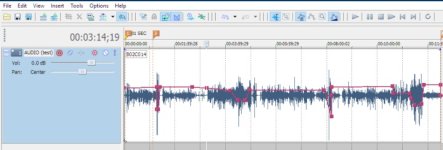
BTW, the default volume envelope color in Vegas is blue, I changed the color to red for illustration. VP also has overall track volume, event' gain, peak normalization and vol. envelopes for the master, sub masters, send/return FX, ect. .
Jim Feeley
Veteran
I have and read the 'Dialogue Editing for Motion Pictures'.
iZotope plugins are too expansive for me, being an amateur, doing non-paid jobs.
Joshua, no one needs an endless number of books (though I seem to be doing my best to get there), but Purcell's and Rose's books are fairly different. Purcell gets deep into a particular audio-post craft. Rose, especially in "Great Sound" takes more of a soup-to-nuts approach, and includes more How To info that may be helpful; check out the table of contents on the link above to see if it'd be redundant, unintersting, or useful.
As for iZotope, I wasn't suggesting you buy their plug ins. They're great (I own and use several) but not free...some REALLY not free. What I wanted to suggest is you look at their tutorials to see how you can solve common post-production audio issues... Many of the features, sliders, and concepts shown in those iZotope tutorials are directly applicable to other audio tools, including the ones in Reaper, Premiere Pro, etc. So you can get good free info from iZotope.
And they do have periodic sales of their plug-ins, including their lower-cost bundles (which basically have fewer plug-ins than their more expensive collections; quality is still the same). I recall seeing their RX Elements bundle, for example, being on sale for $40 US or so. But no need to buy that until you bump up against the limits of Reaper, etc.