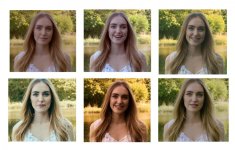
GH5 vs Micro Cinema Camera Skin tone Test

P.S. I was editing my message before but never finished. I wanted to add that grading the Micro's RAW should provide you such a better experience than with anything the GH5 offers now or in the future (unless it starts shooting RAW).

Manipulating the RAW data provides endless flexibility.

The only thing hurting it is HD from a HD sensor. Hopefully V2 of a Pocket or the like will have a nice super-sampled 1080p image, if not 4K.

I was obsessed with grading RAW in 2013 with the BMCC, but started to hate it and pretty much retired from that, ha. On BMCuser, they used to have this grading thread where a lot of people participated and it was astonishing to see how different humans processed images and what people liked and didn't like. You can already see it in this thread.

BMMCC.jpg
 
P.S. I was editing my message before but never finished. I wanted to add that grading the Micro's RAW should provide you such a better experience than with anything the GH5 offers now or in the future (unless it starts shooting RAW).

Manipulating the RAW data provides endless flexibility.

The only thing hurting it is HD from a HD sensor. Hopefully V2 of a Pocket or the like will have a nice super-sampled 1080p image, if not 4K.

I was obsessed with grading RAW in 2013 with the BMCC, but started to hate it and pretty much retired from that, ha. On BMCuser, they used to have this grading thread where a lot of people participated and it was astonishing to see how different humans processed images and what people liked and didn't like. You can already see it in this thread.

View attachment 123669

I'm really interested to see how Panasonic's upcoming camera and the GH5 work as an A/B combination. While only speculating, there's no reason they shouldn't compliment each other nicely.

Blackmagic has its A camera ready in the UMP but no solid "B" camera in my opinion (BMPCC/BMMCC do not cut it for heavy field use).

Blackmagic has relied heavily on its image at the expense of poor design. From what I've seen the GH5's colours are now actually quite good and usability will likely stomp a BMPCC 2.

Are there predictions for its release?
 
If nothing is announced at Cine Gear, new cameras probably won't make an appearance until NAB 2018 unless BM randomly decides to surprise us like with the UMP.

I'm not really sure in which direction they are going anymore...they've chilled out a bit since 2015.
 
I use always Panasonic Natural profile and AWB. I have shooted tens of thousands videos with GH3 and GH4 and I have never seen so odd and dull looking colors like in most grades in this thread. Panasonic AWB is very good. It would be nice to have AWB-lock or semi auto which makes AWB in video start and then stays unchanged. The same would be nice for auto exposure too. Panasonic AWB is quite slow reacting so the sudden color changes during a clip are rare. Olympus AWB is much worse and thus useless.

In my opinion the AWB seems to know usually better than manual WB with gray card or fixed kelvin degree. If the light has some color the gray card kills it. Some times very colored surroundings or clothes still fools the AWB. AWB too wants to neutralize the image but not so much than gray card.

Gray card is good if you grade the mood of light in post or the goal is very neutral image like products. One new AWB idea would be a mixing slider between gray card AWB--camera AWB. We could then decide the ratio between very neutral vs what the camera sees (usually closer what the eye sees). I use this method with Photoshop when correcting the white balance of photos.

In important jobs it is still a risk to use AWB. AWB-lock would help. I wonder why no brand has not figured it. Also it would be nice to save the current AWB value. AWB adjusts more accurate than plain kelvin degree. It changes RGB values too.

If the goal is to make normal looking videos it seems to be difficult and unnecessary to use v-logL.
 
Last edited:
I have never seen so odd and dull looking colors like in most grades in this thread.

AWB won't fix the situation here because the main problem is that you've got most of the background in sunlight at 5500 Kelvin, then the woman in shade is being lit by a combination of blue-sky at 7000 Kelvin and reflected green light from the trees surrounding her that are adding their own green cast. The quick fix would have been to reflect sunlight on to the woman, or use a portable light with a color balance close to the 5500 Kelvin of sunlight. Otherwise in post you're going to have to mask her off and correct both the blue tint and the green tint that is ruining her skin-tone color.
 
As previously mentioned, there is a TON of green spill bouncing on her skin which makes it very hard to get her to have normal skin tones without disturbing the colours in the rest of the image.

I did not use the original file for this, which is why I'm still somewhat impressed with what I was able to get, colour wise. But I'm sure had I used to original file and not a print screen from youtube it would look much better:

kvMkq21.jpg
 
AWB won't fix the situation here because the main problem is that you've got most of the background in sunlight at 5500 Kelvin, then the woman in shade is being lit by a combination of blue-sky at 7000 Kelvin and reflected green light from the trees surrounding her that are adding their own green cast. The quick fix would have been to reflect sunlight on to the woman, or use a portable light with a color balance close to the 5500 Kelvin of sunlight. Otherwise in post you're going to have to mask her off and correct both the blue tint and the green tint that is ruining her skin-tone color.

Or at the very least drop some white sheets on the ground around her, or a few white bounce boards.
 
Let's put them all together:

View attachment 123674

This is exactly why its almost impossible to judge a camera on its color science when dealing with a raw or log format. What we end up judging is more the skill of the grader than what the camera itself is capable of. We see here just how different the color can be pushed from the log format and there are about 1,000,000 more ways to make this shot look. We have to be careful when comparing the color between two totally different cameras because a grader might be more experienced dealing with one over the other. A lot of the Youtube comments thought the BMD did better because of how blue the shirt was. Well all of us eliminated that blue with ease. That test was judged almost entirely by the grading skill of the shooter and not what the camera itself is actually capable of.

BMD will have a color edge right now because there is a large community of users who have had time to practice shooting and grading raw to get decent results. V-log is fairly new and 99% of GH camera shooters likely never even heard of log before it came to the GH4. I used log on the Sony F3 and RED raw but V-log L has been rather new to me as well since it is handled differently. That is going to take some time for people to develop a good workflow and learn how to grade V-log L. Combine that with the fact that a lot of people trashed it on the GH4 and reluctance from some pros after the Cinema5D article we are only really starting to see people take it seriously. There are also a lot of half baked luts out there that a lot of GH camera users will use because of the added challenges of grading log. This will end up being a bad reflection on what log on the GH5 can really do since most viewers will be judging those poorly executed luts rather than what the camera itself can actually do.
 
Not that it really matters, but just FYI, I "graded" the Micro's CinemaDNG...I randomly popped into the thread and saw files were available and just wanted to revisit an old habit, ha.
 
Hello guys. I apologize for replying so late. I purposely shot this the way i did because somebody wanted to see how the cameras would react to intense contrast (scene brightness and colors) I totally loved the idea because its real world test and not someone shooting at some piece of paper in a conrtrolled environment. The whole point of the test was to see how much work it would take to make these footage look decent. Thanks agaij. Sub to my channel i have more tests. Message me there if you need some other tests.
 
If you decide to repeat the test, would it be possible to have a MacBeth color chart in the image? Then you could let Resolve automatically process the grade and see how things really compare from a viewer point of view.

Would macbeth chart work?shes in the shade lol
 
Would macbeth chart work?shes in the shade lol

It's not so much a question of work vs not work. It just gives you many more points of reference for the corrections before even turning toward a grade. Skin has too much variance to be a point of reference. So does foliage. The shirt is perhaps white? The pants?

The chart defines a bunch of known quantities in relation to the light on the scene. That's hugely useful.

BTW, thanks for doing the tests. The important part is that you are making the original files downloadable so people can play.
 
Last edited:
Hey, this is challenging mostly because it was underexposed severely on the GH5 in my opinion, likely because of the background highlights. The camera doesn't like being underexposed internally, you lose quite a bit of saturation/depth where it's important. The BMD camera is also slightly too far under, but even ProRes from that camera is likely one of the best iterations of ProRes implemented by a camera, so you can get away with quite a bit.

GH5 w/Comet Color VLogL LUT
aEK4gEn.jpg


Micro w/Comet Color Ursa Mini LUT (has not been converted to this camera yet, haven't started working on it)
d7dr7yY.jpg


Also not sure if the same glass and NDs were used on both cameras, naturally no matter which way you slice it BMD files have far more color depth hidden in them, but after working on VLogL for a few weeks, out to one external recorder it isn't too bad if you dig the color out.

They're both pretty warm, and either could look better with more work applied (the Micro still is too warm/red due to the LUT not being for this camera, the GH5 still could have less poppy / cold greens. )
 
Last edited:
This is exactly why its almost impossible to judge a camera on its color science when dealing with a raw or log format. What we end up judging is more the skill of the grader than what the camera itself is capable of. We see here just how different the color can be pushed from the log format and there are about 1,000,000 more ways to make this shot look. We have to be careful when comparing the color between two totally different cameras because a grader might be more experienced dealing with one over the other. A lot of the Youtube comments thought the BMD did better because of how blue the shirt was. Well all of us eliminated that blue with ease. That test was judged almost entirely by the grading skill of the shooter and not what the camera itself is actually capable of.

BMD will have a color edge right now because there is a large community of users who have had time to practice shooting and grading raw to get decent results. V-log is fairly new and 99% of GH camera shooters likely never even heard of log before it came to the GH4. I used log on the Sony F3 and RED raw but V-log L has been rather new to me as well since it is handled differently. That is going to take some time for people to develop a good workflow and learn how to grade V-log L. Combine that with the fact that a lot of people trashed it on the GH4 and reluctance from some pros after the Cinema5D article we are only really starting to see people take it seriously. There are also a lot of half baked luts out there that a lot of GH camera users will use because of the added challenges of grading log. This will end up being a bad reflection on what log on the GH5 can really do since most viewers will be judging those poorly executed luts rather than what the camera itself can actually do.

You can ultimately judge a camera's inherent color if you can identify what an end user has done and what the camera wants to do. Spending a solid 30+ hours a week looking at various formats from multiple cameras affords you a bit of an eye for natural characteristics and applied. Personally, for myself, it's insanely easy to separate end-user color and camera color when looking at most images on the web. The tell-tales are always flesh tones, though.

Any time you see over-modulated flesh tones you can almost bet that it's end user's fault. While it's very difficult for manufacturers to get skin dead on, none of them would ship a camera where skin looks muted, over saturated, etc. The other tell's greens and green separation/nuance.

So you really can judge a camera by things online if you know what to look for and you've trained yourself to spot them. It's not easy, but possible.
 
BMD will have a color edge right now because there is a large community of users who have had time to practice shooting and grading raw to get decent results.

Hey, also, let me address these separately as it's a good conversation to have. The BMD camera (all BMD cameras) will have the edge over most, and to be honest that includes RED as much as people refuse to believe it. If you've had access to that HBO Camera test (it's private), a lot of the behind the curtain talk was how Alexa and BMD ProRes files simply play better than R3D, it's not very surprising. So in this case, BMD PRoRes vs GH5 10-bit, the ProRes is going to win. They've done a remarkable job with their ProRes implementation and it gets better as they go along.

Still, if you look through BMD footage on the web, most of it isn't colored very well. So there's not much of an edge here.

There are also a lot of half baked luts out there that a lot of GH camera users will use because of the added challenges of grading log. This will end up being a bad reflection on what log on the GH5 can really do since most viewers will be judging those poorly executed luts rather than what the camera itself can actually do.

One-hundred percent. I've had a number of GH5 owners that have come from BMD cameras, along with others in that GH community approach me asking to convert my color to the GH5 because they can't find a LUT that works well. Doing this was almost impossible, so instead I started ground floor with the GH5 and profiled it for a week before I created the LUTs. This isn't to say that anything I've done is the end all, it is to say be careful on what you're slapping on your footage if you care about color, and always test your LUTs with human beings.

Unless you're a landscape shooter, your priority should be hair and skin, if those look good, everything else is workable.
 
Last edited:
You can ultimately judge a camera's inherent color if you can identify what an end user has done and what the camera wants to do. Spending a solid 30+ hours a week looking at various formats from multiple cameras affords you a bit of an eye for natural characteristics and applied. Personally, for myself, it's insanely easy to separate end-user color and camera color when looking at most images on the web. The tell-tales are always flesh tones, though.

Any time you see over-modulated flesh tones you can almost bet that it's end user's fault. While it's very difficult for manufacturers to get skin dead on, none of them would ship a camera where skin looks muted, over saturated, etc. The other tell's greens and green separation/nuance.

So you really can judge a camera by things online if you know what to look for and you've trained yourself to spot them. It's not easy, but possible.

Maybe you can but that isn't always true of the reviews and hundreds of user comments online. Users tend to gravitate towards a certain look which is why stores crank up the contrast and sharpness on TVs. The GH5 may or may not have the worlds most amazing color but my point is that the results tend to get skewed by the user base and the people commenting on what they see. The GH5 is plagued by a lot of unskilled shooters and less skilled colorists. I'm sure the GH5 is far from perfect. My point is that the online community tends to make a much bigger deal about the minor short comings than what the camera truly deserves.
 
Hey, also, let me address these separately as it's a good conversation to have. The BMD camera (all BMD cameras) will have the edge over most, and to be honest that includes RED as much as people refuse to believe it. If you've had access to that HBO Camera test (it's private), a lot of the behind the curtain talk was how Alexa and BMD ProRes files simply play better than R3D, it's not very surprising. So in this case, BMD PRoRes vs GH5 10-bit, the ProRes is going to win. They've done a remarkable job with their ProRes implementation and it gets better as they go along.

Still, if you look through BMD footage on the web, most of it isn't colored very well. So there's not much of an edge here.


One-hundred percent. I've had a number of GH5 owners that have come from BMD cameras, along with others in that GH community approach me asking to convert my color to the GH5 because they can't find a LUT that works well. Doing this was almost impossible, so instead I started ground floor with the GH5 and profiled it for a week before I created the LUTs. This isn't to say that anything I've done is the end all, it is to say be careful on what you're slapping on your footage if you care about color, and always test your LUTs with human beings.

Unless you're a landscape shooter, your priority should be hair and skin, if those look good, everything else is workable.

Sure there is a lot of bad BMD stuff out there but there are also a lot of seasoned pros who are using it vs a GH4/5. Any camera can have crappy users. My point is the more higher end cameras will attract higher end users and they make those cameras look good. There is bad BMD stuff out there but then there is also amazing BMD stuff out there. The GH5 has some good stuff out there but it tends to be everyday just grab the camera and go outside type of stuff. We rarely get to see high production value tests with the GH cameras. They are out there but the ratio is much lower.
 
I'll go back to always shooting a Macbeth chart so you have some kind of reference to start the process. If you are using a slate, there's no reason you can't hang one of the different charts on the side and shoot it. Having chased the "one profile for every situation" with still cameras, it just doesn't work. Every shot is slightly different, therefore a canned LUT will only get you so close. Use the tools that can help you get a rough automatic/manual correction and then go from there to get the creative look you want. The charts are cheap, and many of the CC options will work with several different charts. Please, I beg you, toss a chart in front of your shots from now on. And when the chart gets old or dirty, replace it with a fresh one. (No I do not work for Xrite, they are actually somewhat slimy since they bought Gretag)
 
Back
Top