
Navigation
Install the app
How to install the app on iOS
Follow along with the video below to see how to install our site as a web app on your home screen.
Note: This feature may not be available in some browsers.
More options
You are using an out of date browser. It may not display this or other websites correctly.
You should upgrade or use an alternative browser.
You should upgrade or use an alternative browser.
GH5 vs Micro Cinema Camera Skin tone Test
- Thread starter JSFILMZ
- Start date
rob norton
Veteran
Thanks for the comparison. Skin looks better on the micro to me.
I think these tests will be more helpful if you go for accuracy rather than such extreme grades. Her white shirt is completely blue.
I think these tests will be more helpful if you go for accuracy rather than such extreme grades. Her white shirt is completely blue.
Thanks for the comparison. Skin looks better on the micro to me.
I think these tests will be more helpful if you go for accuracy rather than such extreme grades. Her white shirt is completely blue.
Well thats the thing i dont want to color grade the images because I believe that defeats the purpose because you will be hiding the true potential of the cameras. I will upload the post process i did so people can see that all i did was a rec 709 lut and tweaked her skintones a little bit. I could have done a million things to both images but thats the thing with vlog and raw you can tweak them to hell but to show non experienced colorist like me what the images look like with minor tweaks, i had to do the test like this. I am trying to upload the raw files but googledrive is being a witch.
I see dead people... zombies...
rob norton
Veteran
Well thats the thing i dont want to color grade the images because I believe that defeats the purpose because you will be hiding the true potential of the cameras. I will upload the post process i did so people can see that all i did was a rec 709 lut and tweaked her skintones a little bit. I could have done a million things to both images but thats the thing with vlog and raw you can tweak them to hell but to show non experienced colorist like me what the images look like with minor tweaks, i had to do the test like this. I am trying to upload the raw files but googledrive is being a witch.
That's fair enough but there are LUTs that just bring the image "back to life" too.
I see dead people... zombies...
Wait till you see what the gh5 sooc looked like lol

Thomas Smet
Veteran
I know one of the intended uses of log is to apply a lut which is the reverse of the log gamma but at the end that isn't much different than shooting with the standard profile. What I mean is it is a baked in manufacturers look.
To me the main advantage of log like any other flat format is to have the room to manually grade so we don't have to settle for a baked in look. That is really part of the whole point of shooting raw or log. It isn't just about getting more dynamic range out of the sensor but also not being forced to let the camera do the image processing.
Personally I find many of the v-log luts, especially the one from Panasonic to be pretty weak. The GH5 is capable of much better color with a better lut without a doubt.
Are you using the same lut on both cameras or a lut designed specifically for each camera?
To me the main advantage of log like any other flat format is to have the room to manually grade so we don't have to settle for a baked in look. That is really part of the whole point of shooting raw or log. It isn't just about getting more dynamic range out of the sensor but also not being forced to let the camera do the image processing.
Personally I find many of the v-log luts, especially the one from Panasonic to be pretty weak. The GH5 is capable of much better color with a better lut without a doubt.
Are you using the same lut on both cameras or a lut designed specifically for each camera?
Thomas Smet
Veteran
Graded this with your GH5 material I downloaded. Spent about 15 seconds in FCPX. 100% manual grade. A bit warm yet but I only spent 15 seconds on it with the FCPX color board. Simple exposure, saturation and color adjustments.
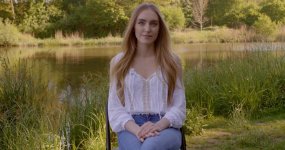
This was graded in FCPX using Logarist with a bit of manual color board in between and after the Logarist set. Not perfect yet either but I spent about 30 seconds on it. The manual adjustments were the required color board average exposure adjustment Logarist uses. The color board at the end of the stack was a tiny color shift and I brought the lows down a bit more.
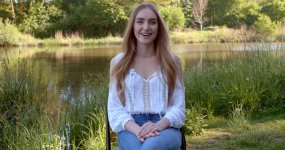
It is important to keep in mind a sensors color science is not defined by a lut. That is the color science of the lut itself. To really see what the sensors color science is capable of you need to determine what can be done with the color on that sensor with and without luts. A lut is basically the same as shooting in camera with standard, natural or Vivid profiles. They just create a canned baked in look. That isn't color science. That is a baked in look that some engineer thought looked groovy. This is why log and raw formats are so vastly important to the holy grail of color science out of each camera.
This was graded in FCPX using Logarist with a bit of manual color board in between and after the Logarist set. Not perfect yet either but I spent about 30 seconds on it. The manual adjustments were the required color board average exposure adjustment Logarist uses. The color board at the end of the stack was a tiny color shift and I brought the lows down a bit more.
It is important to keep in mind a sensors color science is not defined by a lut. That is the color science of the lut itself. To really see what the sensors color science is capable of you need to determine what can be done with the color on that sensor with and without luts. A lut is basically the same as shooting in camera with standard, natural or Vivid profiles. They just create a canned baked in look. That isn't color science. That is a baked in look that some engineer thought looked groovy. This is why log and raw formats are so vastly important to the holy grail of color science out of each camera.
Thomas Smet
Veteran
I think that using Natural profile and auto white balance the result would be much better than any of these grades.
No. You should never ever use auto white balance if you care about color in any way shape or form. Besides I believe he did use auto white balance. Auto white balance is the absolute last thing you should ever use when shooting video. As you move the camera the white balance can shift which can become a nightmare when grading. If a shooter insists on being lazy when it comes to color then at the very least use the daylight or indoor presets. At least those are locked in and you can grade to taste in post. Each shot using that preset will be the same so you can still use the same grading methods across the shots. Auto white balance means each shot can be different and as you move the camera the color can shift in the same shot. That is horrifically the wrong thing to do in any situation.
This was graded in FCPX using Logarist with a bit of manual color board in between and after the Logarist set. Not perfect yet either but I spent about 30 seconds on it. The manual adjustments were the required color board average exposure adjustment Logarist uses. The color board at the end of the stack was a tiny color shift and I brought the lows down a bit more.
View attachment 123658
I like the greens from the Logarist grade, which gets rid of the yellow-green I often see in typical Panasonic footage.
Thomas Smet
Veteran
I like the greens from the Logarist grade, which gets rid of the yellow-green I often see in typical Panasonic footage.
Logarist is really amazing. Insanely slow on my 2012 iMac but it does a really good job with the basic FCPX color board. Logarist still left her shirt a bit blue and if I spent more time I would tweak the color a bit more. My manual grade is definitely a bit too warm for many people. I mainly wanted to show that the shirt does not have to be blue at all and you can get very warm skin tones out of a shaded shot like that.
Didn't do the DNG files because much to my surprise FCPX doesn't support CinemaDNG. Lame. I have worked with RED footage in FCPX but this was my first time using BMD raw material in FCPX. Rather disappointed by that. Guess which cameras I will not be buying now.
Logarist still left her shirt a bit blue and if I spent more time I would tweak the color a bit more.
...Yeah, that bugged me at first, but then I thought about what the actual lighting was like, and pretty much any kind of daylight shade is going to record as blue ( it's often in the 7000 Kelvin range or higher ), unless you color-balance for the white shirt that was lit by the shade. So I think the Logarist system is actually producing very accurate colors, which includes the blue tinted white shirt. ( if this was an actual shoot I would do spot color correction on the woman to take care of the blue tint )

visceralpsyche
Well-known member
Some points about the original V-Log image (thanks for making the unprocessed clip available!):
1. As noted in this thread, Auto WB is THE WORST possible choice for video recording, which means the image is compromised from frame 1.
2. There is massive green spillage from the surroundings on the girl's face and skin (and everything really), so getting an accurate skin tone while keeping the environment accurate is almost impossible without a lot of secondaries correction.
3. Due to the strange originating white balance, any attempt to balance it properly leads to colour channel clipping, especially reds.
4. Was there any ND used, and if so, was it IRND or normal ND? It almost looks as if normal (heavy) ND was used, making some magenta tints on things. But I'm not sure - I could be seeing the effects of 3. on the image and mis-interpreting.
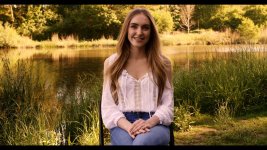
Here's my own Leeming LUT One for GH5 V-Log v405 applied to the clip, plus I've applied the exact same LUT to a recent clip I shot in a similar environment, using an IRND filter and proper white balancing with a neutral grey card, plus positioning the girls so that they were standing away from any hard spill sources. You can see the difference immediately in the colour accuracy and breadth, as well as contrast and neutral tones.


If you re-do the test with my suggested fixes above, I think you'll find the GH5 will give you much nicer results
Thanks for sharing!
Cheers,
Paul
1. As noted in this thread, Auto WB is THE WORST possible choice for video recording, which means the image is compromised from frame 1.
2. There is massive green spillage from the surroundings on the girl's face and skin (and everything really), so getting an accurate skin tone while keeping the environment accurate is almost impossible without a lot of secondaries correction.
3. Due to the strange originating white balance, any attempt to balance it properly leads to colour channel clipping, especially reds.
4. Was there any ND used, and if so, was it IRND or normal ND? It almost looks as if normal (heavy) ND was used, making some magenta tints on things. But I'm not sure - I could be seeing the effects of 3. on the image and mis-interpreting.
Here's my own Leeming LUT One for GH5 V-Log v405 applied to the clip, plus I've applied the exact same LUT to a recent clip I shot in a similar environment, using an IRND filter and proper white balancing with a neutral grey card, plus positioning the girls so that they were standing away from any hard spill sources. You can see the difference immediately in the colour accuracy and breadth, as well as contrast and neutral tones.
If you re-do the test with my suggested fixes above, I think you'll find the GH5 will give you much nicer results
Thanks for sharing!
Cheers,
Paul

Cary Knoop
Veteran

NorBro
Major Contributor
Didn't do the DNG files because much to my surprise FCPX doesn't support CinemaDNG. Lame. I have worked with RED footage in FCPX but this was my first time using BMD raw material in FCPX. Rather disappointed by that. Guess which cameras I will not be buying now.
A highly requested feature for many years...I've begged myself. Apple will never support CinemaDNG.