Voice over effects

Polaroid22

Well-known member
Hello,

I just got a copy of some good quality voice overs, but I want to improve the sound of it as it is a bit dull. So I got Resolve, Premiere and audition. But are there any good quality tutorials or tips you can give me to make it more divine. The words as of now are just a normal voice, but I want it sound divine (probably some EQ and slight reverb, or evel dual layer the words). But I am no expert so any good pointers would help me out greatly!

Thanks!
 
There maybe presets in Audition, which should give you a starting point. Reverb and/or delay are rarely added to VOs, usually just EQ and some comp/limiting if needed... perhaps an exciter. Just remember 'less is more'. If you can post a clip, we can give you an opinion what is warranted. If the 'talent' is not there in the 1st place. You're pretty much SOL with or without processors and effects.
 
I think he literally means he wants it to sound divine, as in delivered by a deity. But maybe he does just mean he wants it to sound really good.
 
So here is a link of what I got so far.
https://vimeo.com/194556140
password: voiceover

I just cut the voice over and placed on each voice-over file in Premiere an multiband compressor(preset: pop master), A parametic EQ (preset: warm presence), and EQ (preset: warm presence). On the part from 0:50 to 0:55 I used 2 multiband compressors on those voiceover parts, as otherwise I could almost not hear the voice over. (I tried to add some Premiere distortion to give it some character, but did not find a sweetspot so I left it out).

Any tips on the voice over?

Thanks!
 
Voice of God?

That is first of all delivery, second proximity effect, third equalization. Orson Welles was maybe the best known at that.
 
Oh wow! That voice does not match that music. Message from heaven music. Depressing dialog. Voice just sounds raspy.

Change the music. Change the voice to sound beaten down. Or, maybe, just change the voice, IF the intent is that things are going to get better real soon. In that case the music overpowering the voice is, maybe, appropreate.

You have to know what you are trying to convey, then you have to use music, dialog, and voice to present that. None of what I see in your video matches, so no idea what you are trying to say.
 
hehe well yeah it wasnt a well thought through plan, just went along with the project as it went(mainly vacation video clips). So I got all these footage togheter and edited into the music, then somebody else wrote the script for the voice over and somebody else did the Voice over. Now Ill have to do with what I have, as I cannot ask the voice over to do it over again(as he already did it for free, and I cannot cut it out, as that would be a dick move aswell).
So at this point I just want to know how I can blend the voice over with the music better. (without replacing the voice over, or the music).
 
The voice itself and the read aren't actually that bad.

Compression is not the one and only solution. You need to start there, follow up with a little EQ, and then use mix levels automation.

The music could come down just a touch in the mix.

Also, scoop out a gentle, wide-ish curve from the music to make room for the voice. Start it centered at 4k and shift it a little to either side until you find the sweet spot. A common "rule" in mixing for recording studios (music recordings) is, where you add a little EQ to one voice or instrument, scoop the same frequency out (very gently) from somewhere else to help everything sit together.
 
Can you go back to the raw voice over?

And the raw music?

Then try cutting the music levels way down, and just a bit of equalization on the VO. That ought to give you a decent starting point. When you have a low key voice over you do not want to overwhelm it with blaring music. Just that should work on something like that video.
 
sorry try again!

Kill the reverb. It sounds like he's in the bathroom, which my brain interprets as the narrator pondering while sitting on the toilet.

There are still places where the music swallows the voice, and mix level automation could fix most of it. You cannot rely on compression to do all of your mixing for you.
 
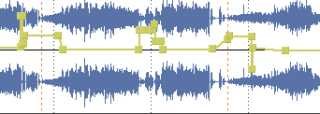
yeah I just ended up doing everything by hand, by adjusting keyframes on the volume of the tracks. But maybe that was you all meant all along :)
 
It sounds sibilant and has a lot mouth tics. I would de-ess it and try some click/ crackle filtering... or draw them out. The music is loud at some points, but that's subjective. A decent 'read' though.
 
Back
Top