Virtual House Tour

DDirector

Veteran
URGENT

My uncle who is a realtor, and he has a client who wants a virtual tour of a house he is selling.
So, he's asking me if I know how to do one.

So, I want to know:
How do I do a virtual tour?
How do I put it on a website? - Is it something I can host?
Is it possible to have this done tomorrow?
I dont know anything....

How do I take pictures, and how do I make it a virtual tour?

thanks
 
Last edited:
You need a tokina 11-16 and a stabilizer. Simply mix still images with steadicam moves between rooms. Shoot all your moves at 11mm to minimize the motion and horizon changes. Put the pieces together with some simple cross fades and upload to Youtube or Vimeo. Go to the Vimeo Music Store to pic some free music to work with the style of house you are filming.

http://vimeo.com/musicstore

Make sure to film in that perfect light at dawn and dusk. Maybe even some HDR images thrown in there with lights on and a setting sun.

Cheers,
Pete
 
Um.. I believe so?

Its not a movie, so it is like the one you linked.
I guess this should be fine. It is a virtual tour. I was thinking more of a walk forward instead of a zoom in. but its fine just like that.

So, how would I do that?
you can pan/tilt all around smoothly... and zoom in and still be all crisp and nice. Plus its HDR.

I have the T2i with Magic Lantern (if needed)
and the widest lens I have is 17mm.
 
Last edited:
Um.. I believe so?

Its not a movie, so it is like the one you linked.
I guess this should be fine. It is a virtual tour. I was thinking more of a walk forward instead of a zoom in. but its fine just like that.

So, how would I do that?


you can pan/tilt all around smoothly... and zoom in and still be all crisp and nice. Plus its HDR.

I have the T2i with Magic Lantern (if needed)
and the widest lens I have is 17mm.

I am on a shoot tomorrow - take a look at this...
Basically you need a pano head and the proper software.
It takes a lot of practice as well....

http://www.studio360.com/virtual-tour.htm
 
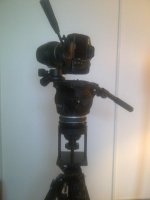
So, I build my own Panoramic Head. I used my Fluid head, and on top of that I mounted my 3-way photo head. So, I can mount my camera vertically. I can also tilt straight up and almost straight down. And I control the pan on my fluid head. It works great, and its centred perfectly.

Oakville-20120809-00360.jpg

So, I have that figured out. But, here are still some of my problems I need help with:

1) Lens: My lens is a 17mm at its widest on a crop (T2i) camera. So, Id need a LOT of pictures. I understand how to go 360' but what if I want to tilt up? how do I align it so it looks good?
- Do I just do a 360' turn of the room, then tilt down as low as possible and do a 360 and then tilt up as much as possible and do a 360'? Will it all stitch together? There will be some overlapping, so I think it will work, but i'm not entirely sure.

2) Free Software: I dont believe I will be doing this again, unless if he finds another annoying client that refuses to work with him unless he does a virtual tour. So, I probably wont need the software again. So, I may want something free to use once.
I cant find what I need that is free.. any suggestions?


3) Publishing on a website: This is what is confusing me the most. After the pictures have all been stitched together, how do I put it on a website to look like what "HVXguy" posted above? Turn to this: http://wwww.izonemedia.com/PANO_DEMO/RR_PANO/rr.html
How to publish it and post it on his website?
 
Last edited:
In addition to your focal length, there's something to be said about perspective for these real estate videos. They're shot to make rooms look larger than life and are almost exclusively on focal lengths between 11-16. Rent or borrow one - I'm sure it'll make the difference between your client being happy or not.

Unfortunately, I don't know much else about the rest - best of luck.

Kegan
 
Here is my workflow:

I use a Nikon d200 and a Nikkor 10.5 MM fisheye,

I use this pano head:
http://www.360precision.com/360/index.cfm?precision=products.Absolute&MainSlideID=1&mainnavID=2

Tyoically you would shoot 6 vertical shots 60 degrees apart.
And then one shot looking up.
To cover the bottom you have to shoot a shot down - not using the pano head.

I have a tripod where I can turn the camera around and look down.

I use HDR for all my panos…..
So I am shooting 7 exposures at each stop - or 56 pics per pano.

I use Photo Matrix Pro
http://www.hdrsoft.com/
or HDR Efex Pro 2
http://www.niksoftware.com/hdrefexpro/usa/index.php?view=intro/main.shtml
to process the HDR….

With my 7 processed photos (we don't use the down shot yet)
I use PT Gui to stitch the photos into a panorama.
http://www.ptgui.com/

Now with my HDR Panorama I use Pano2VR
http://gardengnomesoftware.com/pano2vr.php
to extract the bottom cube and then use Photoshop to
blend that and my bottom photo I shot.
Yes this is hard and very painstaking……

Then with the Panorama complete I use Pano2vr again to make 6 cube faces.

I then turn to Flash Panorama Player to create the web tour.
http://flashpanoramas.com/player/

However - I use XML programming to create custom tours….

krpano Panorama Viewer
http://krpano.com/
is another panorama player you can look at.

However, many clients are now requesting iPad and mobile tours.
I use iosVR to create those.
http://www.iosvr.com/
 
I can't believe that agents still prefer the old quicktime VR 360 panoramas to a well produced walkthrough with music. It is so 1995. The whole point was that it didn't require much bandwidth, but it was always an archaic experience to the viewer and horribly distorted. With ubiquitous YouTube access, even on phones, I would think that a straight up walk through video/slide show would be the preferred method now.
 
It's been mentioned already, but a Tokina and a steadicam is key. I actually own a business revolving around video tours of homes. I was recently flown out to Mexico to shoot a tour of a medical facility. Depending where you live, it can be GREAT business.
 
I can't believe that agents still prefer the old quicktime VR 360 panoramas to a well produced walkthrough with music. It is so 1995. The whole point was that it didn't require much bandwidth, but it was always an archaic experience to the viewer and horribly distorted. With ubiquitous YouTube access, even on phones, I would think that a straight up walk through video/slide show would be the preferred method now.

Yes the old 1995 QT VR did suck.
These are not your fathers panoramas.
Most of the panorama work I do is for larger entities.
http://izonemedia.com/360.html
http://wwww.izonemedia.com/PANO_DEMO/ZEISS_PANO/zeiss.html

Most real estate agents are cheap and most of them
take their own photos.

But one of my biggest clients now prefer these types of shows.
http://www.youtube.com/watch?v=GLLqqc01mw0&feature=plcp
 
Yes the old 1995 QT VR did suck.
These are not your fathers panoramas.
Most of the panorama work I do is for larger entities.
http://izonemedia.com/360.html
http://wwww.izonemedia.com/PANO_DEMO/ZEISS_PANO/zeiss.html

Most real estate agents are cheap and most of them
take their own photos.

But one of my biggest clients now prefer these types of shows.
http://www.youtube.com/watch?v=GLLqqc01mw0&feature=plcp

Real estate agents are definite penny pinchers. The best success is to contact home builders. They build a home and market it. What's the best way besides a video tour? This is where my success lies.
 
Real estate agents are definite penny pinchers. The best success is to contact home builders. They build a home and market it. What's the best way besides a video tour? This is where my success lies.

Yes, I do a lot of work for apartment complex's. The marketing in that industry is fierce.
We usually do photos, videos and 360 tours....
 
Here is my workflow:

I use Photo Matrix Pro
http://www.hdrsoft.com/
or HDR Efex Pro 2
http://www.niksoftware.com/hdrefexpro/usa/index.php?view=intro/main.shtml
to process the HDR….

With my 7 processed photos (we don't use the down shot yet)
I use PT Gui to stitch the photos into a panorama.
http://www.ptgui.com/

Now with my HDR Panorama I use Pano2VR
http://gardengnomesoftware.com/pano2vr.php
to extract the bottom cube and then use Photoshop to
blend that and my bottom photo I shot.
Yes this is hard and very painstaking……

Then with the Panorama complete I use Pano2vr again to make 6 cube faces.

I then turn to Flash Panorama Player to create the web tour.
http://flashpanoramas.com/player/

However - I use XML programming to create custom tours….

krpano Panorama Viewer
http://krpano.com/
is another panorama player you can look at.

Okay, So I am wondering about the software, if this is all correct.

For HDR, I will try to see if I can get HDR Efex Pro 2.
Then to stitch the HDR images, I will should use
PT Gui.

I don't need to extract the bottom of the panorama. I wont shoot vertically down. only up. So there will be a small spot you wont see. Which is fine.

So, after I stitch the photos using PT Gui, I need to create a video?

To create the web tour, I should use one of these?:
-
Pano2VR
-
Flash Panorama Player
-
krpano Panorama Viewer

Looking at the descriptions of them, they all seem to do the same thing. Make a video of the panorama picture.
Which would be the best to use then?

So, after i created the video (probably a flash?), now how do I put it up on the website as a virtual tour?
 
Last edited:
You can create cube faces in PT Gui go to TOOLS/Convert to QTVR /Cubic

You can only create a one pano web page using PT Gui using TOOLS/Publish to Website - but their method is heavy on memory usage
and only having the ability to show one pano - is pretty much useless.

Here is a comparision -
This is one pano using PT Gui - Publish to Website
http://izonemedia.com/ptgui_test/CLUB_ROOM_FINAL.htm

Here I am using Flash Panorama Player and XML programming.
I am working on an iPad/IPhone version of this tour now.
http://izonemedia.com/PANO_DEMO/THE_ELAN_AT_BLUFFVIEW_PANO/ebv.html
 
I can't believe that agents still prefer the old quicktime VR 360 panoramas to a well produced walkthrough with music. It is so 1995. The whole point was that it didn't require much bandwidth, but it was always an archaic experience to the viewer and horribly distorted. With ubiquitous YouTube access, even on phones, I would think that a straight up walk through video/slide show would be the preferred method now.
This is precisely what I am doing for my job. :)

 
This is precisely what I am doing for my job. :)

I must say, that is a LOT simpler than the virtual tour panorama stuff. However, MAYBE its just this video - I havent even seen other videos yet, but for me, I got lost a few times. I was confused about the location, and it didnt really show most of the room at times.
The jump cuts to fast forward movement was okay at times, but sometimes it confused me.

Is that how all walk through videos would be done?

I have not done the virtual tour for the realtor. Because of last minute planning, he nor I wanted to go with this. Especially since it would be super rushed and my first time at it. Id rather practice on my own house, get it right, then start doing them.
But, Id rather do a walk through, IF it can be done very well.
 
Back
Top