AC130: Vignetting - is this inherent?

I took my HPX250 and pointed it towards the sky with OIS on and off, zoomed all the way in and cranked the F-stop slowly from 5 to 11 and no vignetting. Maybe if you talked with Panasonic they will refund the shipping. They should at least pay to send it back to you. Try getting a hold of Jan, she's a great resource.
 
It most definitely looks like an issue with your particular camera. Under no circumstances should the OIS, or any other feature, cause vignetting.
 
It most definitely looks like an issue with your particular camera. Under no circumstances should the OIS, or any other feature, cause vignetting.

But we've seen two different people in this thread how have seen the same problem. I'd love to see others test - point your AC130/AC160 toward the sky, full zoom in, iris at F11 (Error, this should be wide open, not F11) and pan right & left (not necessary, however the vignetting becomes more apparent as it "moves").

...Jerry
 
Last edited:
But we've seen two different people in this thread how have seen the same problem. I'd love to see others test - point your AC130/AC160 toward the sky, full zoom in, iris at F11 (or there abouts) and pan right & left (not necessary, however the vignetting becomes more apparent as it "moves").

...Jerry

What I'm saying is.....it should not be happening; regardless what's causing it, it should not be happening.
 
I took my HPX250 and pointed it towards the sky with OIS on and off, zoomed all the way in and cranked the F-stop slowly from 5 to 11 and no vignetting. Maybe if you talked with Panasonic they will refund the shipping. They should at least pay to send it back to you. Try getting a hold of Jan, she's a great resource.

Did you pan back and forth? That's the only time it's been really noticeable for me. Also, it was hard to spot in the viewfinder, I noticed it when playing back on a 42" LCD screen.
 
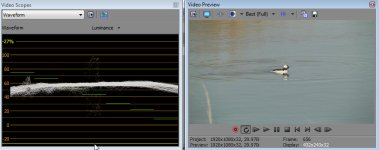
It's most apparent to me when I place the footage on the Sony Vegas Pro 11 timeline.

AC130-Vignetting-Waveform.jpg

...Jerry

Edit: I just tried to recreate using the procedure I detailed above - no vignetting - strange??
 
Last edited:
Interesting. I experienced this same thing with my HMC150. I posted on dvxuser, but didn't get a reply. I called Panasonic, but they never called me back (after several tries).

Here's what I discovered: When you have OIS turned on and you're zoomed 60%-100%, and iris open more than F6 or so, you'll experience this. Most especially when you're shooting a lone object (bird, moon) in front of a solid background, ie. sky.

I love the camera otherwise, but I was very frustrated that Panasonic would not at least fess up that this was an issue.
 
dustinou,

With your post, I figured out why I couldn't reproduce my test above - it should be iris open, not shut!

In any case, now I was able to reproduce this in test conditions. The following should be a something that is reproducable by others (and Panasonic?).


...Jerry
 
From a practical standpoint, I don't envision circumstances where one would really want to use the Iris Wide Open at full zoom. For that would be a worse case scenario for depth of field.
 
From a practical standpoint, I don't envision circumstances where one would really want to use the Iris Wide Open at full zoom.

I'm really not interested in getting in a bickering contest here, however, sometimes the you need full open because there is not enough light to reduce the iris. Furthermore, I can also see this effect at iris as low as F5.6 (maybe lower) - it's just most apparent at wide open.

What I am interested in is (as the thread title suggests), "Is this problem inherent to the camera?" - and I'm seeing others report the same issue, so I'm inclined to think that it is inherent.

...Jerry
 
From a practical standpoint, I don't envision circumstances where one would really want to use the Iris Wide Open at full zoom. For that would be a worse case scenario for depth of field.

Actually, you'd want your iris to be open if you're going for shallow DOF. If you're doing run & gun nature or doc photography, you're going to run into this vignetting - iris only has to be half-open or more. And it's disappointing when you review your footage and find vignetting in these shots. It seems that this phenomenon is a result of how Panasonic has constructed their optics for their recent cameras. I've experienced this on my HMC150 & amendegw documented it on his AC130, so I'd expect this to show up on the HPX170 & AC160 as well.
 
From a practical standpoint, I don't envision circumstances where one would really want to use the Iris Wide Open at full zoom. For that would be a worse case scenario for depth of field.

I saw the problem at f8, so it's not just an issue with the lens wide open. Have you tried this test yourself?
 
Adam Wilt in his review of these cameras, stated that there was a light loss in the edges of the lens when zoomed 80% in.
http://provideocoalition.com/index.php/awilt/story/review_panasonic_ag-ac160_and_ag-hpx250_1_3_3-mos_camcorders/P1/
​"The maximum aperture ramps considerably, from f1.6 fully wide to f3.2 at 85% of the zoom range, roughly halfway between 27mm and 86mm—after which it seems to open up a bit, perhaps 1/4-1/3 stop. At that same point, evenness of illumination starts to fall off: from entirely flat at the wider end, to a gradual and even falloff of perhaps 1/2 a stop at the edges. It’s not visible unless you’re looking for it on a WFM. And of course, these are full-wide-open artifacts; if you’re shooting at f4 to start with, neither ramping nor vignetting will be observable at all."

 
Back
Top