Very poor video quality with new DVX100b - help

jackelope

Member
I just got my new DVX100B yesterday, and I've been filming some test footage over the last 24 hours. I'm trying to keep it simple and just importing the video into iMovie 08 for now. The quality is very poor and I'm not sure why. This is the first time I've used this camera, so I must be missing something. The footage seems pixelated and unclear, like something you would have seen on "America's Funniest Home Videos" in the mid-90s.

Can someone provide any insight or perhaps some simple tests that I can do to figure out if the camera is working correctly?

UPDATE: Here's a link to sample footage: http://gallery.mac.com/mgravitt#100031

Any help is appreciated,
MG
 
Last edited:
This is more likely an Imovie setting than a camera error. Of the many problems that can go wrong with DV cameras recording at a lower resolution is usually not one of them.

I would hook up the AV outputs of the camera to a standard television, put the camera in VTR mode and watch the footage on an external source without capturing the footage. Just play it back and watch it. If it looks good than there is a problem with the mac/software setting.
 
I used a Component VGA cable to hook it up to my LCD TV. It seemed clearer than on the import but still not nearly as clear as some of the footage posted by other forum members.

I checked iMovie settings and there aren't any settings that seem to impact this. Should I try other software? Perhaps something on Windows just to get another data point?

thanks,
MG
 
If you provided more details about your DVX setup it would be a lot easier to troubleshoot.

What's your scene file? Are you using factory settings or have you made changes?

What are the physical settings? Iris, white balance, ND, etc.

Which version of iMovie?
 
I too am going to say that iMovie is likely the culprit.

The only camera setting that could possibly contribute to the footage looking home movie-ish is if you are shooting in 60i. Shooting 60i and viewing it on a LCD monitor will show interlace lines that you might be seeing.

Do what Jason recommended and look at the footage on a TV using the DVX as a playback deck. I am guessing it is going to look fine.

What kind of tape you used and whether it has been recored on before has nothing to do with how the footage looks.
 
What kind of tape you used and whether it has been recored on before has nothing to do with how the footage looks.

Yes, it does.... if you change tape brands or use a tape already recorded on.... The tape's chemical make up could be different, so as it passes over the record head it may run over differently due to residue from another tape brand. Also, any tape loses quality as it has multiple passes, if its a second or even third pass on that tape, you're going to get artifacts, lines, ect. from the footage previously recorded on the tape showing through into the new image.
 
I have been re-using my miniDv tape for years, for all of my wedding tapes,(3-6 tapes per wedding) after i am done editing I make a master edited on a dvd and a miniDV and archive them, then I reuse my tapes, most of my tapes are on there 6-9th generation, though I constantly continue to put new stock in my tape collection, cycling out old tape because I do agree, the older the tape is the more dropouts happen, but I have never noticed degrading in image quality, I do agree not to mix and match different brands because of the oils on the tape can ruin you dvxs heads. Luckily I try to shoot mostly on my FS4, and just have back ups on tape for weddings and events, but when shooting films, I always put new tapes in just for security. back to this post, a lot of footage you see on here is progressive footage, not interlaced which give much better quality, also stick away from "squeeze" mode. I have also found that compressing out of the DV files to a "mp4" h264 renders better looking, smoother images, also some people like my self for there shorts up rez to 1080, then down rez to 720 giving an awesome looking image. If you are going to use a mac and a DVX, get FCP, using Imovie with a dvx is like trying to haul with a bigrig with a civic engine. Its also nice once you have your footage in 720p or 1080p to use the Prorez422 codec to keep quality up to standard
 
Focus issue?

Focus issue?

It looks soft... Did you have it on automatic focus, that takes three or four seconds to kick in at 24p mode and when the camera moves around it can be all over the place, and did you try really zooming in all the way and manually finding the focus... ? It's easier through the viewfinder in black & white too. Hit EVF Detail and outlines will sparkle a little when you reach focus.
 
Make sure you check to see if the progressive mode on your DVX is off, because if it is, the image quality appears to be more "home video" like. If it is off, go to scene settings and switch it to 24p or 24p advance. It looks so much cleaner and more "film-like" in those modes, compared to 60i (off).
 
Last edited:
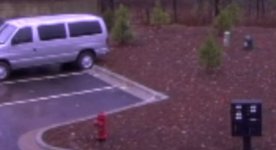
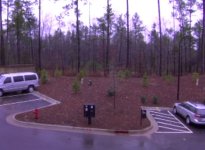
Thanks for all the input. I've attached some images that more clearly isolate the problem. I've checked some settings, done some re-testing, and have some more information. I definitely get this behavior in 24P and 24P Advanced modes as well as the others. I also see the distortion when playing back on the TV.

Other than changing the scene files, all of the other settings are factory defaults. I'm using iMovie 08 (although I also get the distortion on the TV - it is slightly greater after importing to iMovie). Is there a demo version of Final Cut that I can download to try?

I'm using the tape that came with the camera. Perhaps this is a low quality tape?

Please take a look at the attached images. Is this normal? I gave the camera plenty of time to auto-focus.

thanks
MG

Images attached, or view them here: http://gallery.mac.com/mgravitt#100039&bgcolor=black
 

Attachments

  • DVX100B Test Shot - Close Up.jpg
    DVX100B Test Shot - Close Up.jpg
    28.9 KB · Views: 0
  • DVX100B Test Shot.jpg
    DVX100B Test Shot.jpg
    43 KB · Views: 0
Those two grabs look like out of focus interlaced footage. If you are recording them in 24p then possible iMovie isn't removing the pulldown correctly.

And I will say it again, the tape you use has NOTHING to do with how your footage looks quality wise. It is possible that mixing dry and wet lube tapes as well as recording over tapes several times increases drop outs and glitches, but if you footage gets recorded it is going to look the same regardless of tape stock. It is all digital, this isn't the Hi8 days guys...

*Bonus* SP and LP modes look exactly the same as well! LP is just more prone to dropouts especially if captured on a different camera as the tape is moving faster across the head.
 
I completely agree with William, I dont see any loss in quality after recording on the same tap mult. times, If your using Imovie dont shoot 24p, Imovie doesnt recognize the pull down necessary so your footage will look like crap. when I first got my dvx I didnt know how to use FCP with it, but after Berry's book, I learned. If your going to use Imovie, shoot in just 60i, I also think you can be safe with 30p, but not sure. There is no Demo of FCP that i know of, dont get cheap and go with Express because your will just end up buying soon again for the Studio. Find a friend that is in college to order it for you and get the student discount, drop $600 and you will have so much more for your productions, FCP,Motion,Compressor,SoundtrackPro,Cinema tools, Apple loops library, DVD studio Pro, not to mention Color~ a program that is worth the $1200 or studio by its self! so In you saved two grand for a DVX, Save 600 more for Studio2!!!!
 
If you go over a tape several times, eventually it will get more grainy, and worse quality.

No, it won't get grainy. Digital doesn't work like that.

You increase your potential for dropouts, but that doesn't take the form of grain. It takes the form of lost frames or digital sparkles or blocks in your footage.
 
Thanks for all the input. I've attached some images that more clearly isolate the problem. I've checked some settings, done some re-testing, and have some more information. I definitely get this behavior in 24P and 24P Advanced modes as well as the others. I also see the distortion when playing back on the TV.

Other than changing the scene files, all of the other settings are factory defaults. I'm using iMovie 08 (although I also get the distortion on the TV - it is slightly greater after importing to iMovie). Is there a demo version of Final Cut that I can download to try?

I'm using the tape that came with the camera. Perhaps this is a low quality tape?

Please take a look at the attached images. Is this normal? I gave the camera plenty of time to auto-focus.

thanks
MG

Images attached, or view them here: http://gallery.mac.com/mgravitt#100039&bgcolor=black

Try setting your vertical frequency detail to "thick."
 
I used a Component VGA cable to hook it up to my LCD TV. It seemed clearer than on the import but still not nearly as clear as some of the footage posted by other forum members.

I checked iMovie settings and there aren't any settings that seem to impact this. Should I try other software? Perhaps something on Windows just to get another data point?

thanks,
MG


LCD TV's are terrible, especially with Composite inputs. Get a CRT monitor.
 
Something else you might check (after looking at your first image and pan) check to make sure your image stabilizer is off and try another pan. This can affect your image as well and looks similar to a problem i experienced and fixed by removing optical image stabilizer on my hvx 200.
 
I think we can agree it is iMovie's fault.

It also wouldn't hurt reading the instruction manual and getting all the settings down so you can get some good looking footage. The possibilities are endless with this camcorder with all the footage I've seen.
 
Back
Top