GH4 V-LOG L noise reduction and color accuracy

Yup. Very arrogant. Okay then here's a challenge. send me short clips straight off the card and I'll run them through my system and we'll just see. The new WRANGLER LUT fixes that wall. I left the wall there cuz i don;t hide my flaws through editing. I saw the same thing and it is now fixed in the new LUT... science, always learning, adapting. The clouds are an interesting side effect of the saturation increase causing a chroma shift... that sky wasn't blue... it was gray, and completely overcast day. The new VARIABLE LUT leaves the saturation neutral, but by increasing or decreasing saturation at the interpretation level rather than later on cause an interesting chroma shift. Some might like the effect, but with VARIABLE you have the option to take it or leave it.
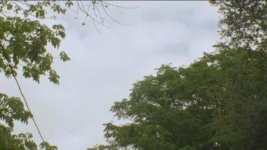
Variable trees.jpg
 
Last edited:
Here you go Shian:

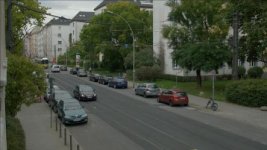
http://downloads.visceralpsyche.com/pix_e5_vlog_test/P1010049.MP4 (112MB)

I posted this on Facebook earlier as a clip everyone can copy and do with what they wish.

Exposed to hold the sky top left of frame. Internal, 8 bit 4:2:0 V-Log L profile, sharpness -3 NR -5. ISO 400, white balanced off 18% grey card held out the window.

It has tonnes of YUV chroma smearing all over the pavement/sidewalk, street, building sides, sky etc.

Would love to see your (and everyone else's) results on that clip.

Cheers from Berlin!

Paul :)
 
AUGH MP4!!!!! That might be your first mistake. I shoot .mov cuz MP4 doesn't deliver as well as .mp4. I'll plug it in once it's downloaded, but yikes. If this was shot out off your balcony, maybe try it again using MOV. Attached still. WRANGLER minimizes the blocking, but damn that's the worst case I've ever seen of it.


Screen Shot 2015-09-19 at 3.10.45 PM.jpg
 
Last edited:
AUGH MP4!!!!! That might be your first mistake. I shoot .mov cuz MP4 doesn't deliver as well as .mp4. I'll plug it in once it's downloaded, but yikes.

There's no functional difference between MP4 and MOV files from the GH4 - both contain H264 encoded at 100Mbit/s maximum. The only difference is that the MP4 container offers the option to record LPCM WAV files whereas MOV doesn't give any audio option.

Cheers,

Paul :)
 
There's no functional difference between MP4 and MOV files from the GH4 - both contain H264 encoded at 100Mbit/s maximum. The only difference is that the MP4 container offers the option to record LPCM WAV files whereas MOV doesn't give any audio option.

Cheers,

Paul :)

Exactly.
 
AUGH MP4!!!!! That might be your first mistake. I shoot .mov cuz MP4 doesn't deliver as well as .mp4. I'll plug it in once it's downloaded, but yikes. If this was shot out off your balcony, maybe try it again using MOV. Attached still. WRANGLER minimizes the blocking, but damn that's the worst case I've ever seen of it.


View attachment 105310

Upload it in MOTION dude.

Look, I'm gonna say it. I've read over at personal view Shians input. He posts a clip of a toy that you can download. So I did and graded it myself. Only way to get that clip to look decent like his view version was to apply NR. Look at his vimeo version. Serious banding in the low values that I've only seen when people use NR in post.

But he keeps claiming his LUTs are the magic sauce and that everybody is stupid, with by saying we are interpreting the footage wrong, or that we are using Mp4 instead of MOV (LOL!!!). All while saying "I have LUTs in the works".

Ya know, if I wanted to make a quick buck I too would post some noise reduced videos and some stills to flicker claiming my LUTs are magic and then when you call me out on it, I'll just say you're an "Idiot over at DVXuser" and say things like you must be using MP4 or interpreting the footage wrong.

So I say this to you Shian, because you haven't been all so cordial either here or on PV.
Upload your best LUT here on DVXuser for free and lets see what you have.
We will run it through:
FCP7 and X
Premiere
After Effects
Resolve

Because I own all of them.

Basically what I'm saying is put up or......
 
AUGH MP4!!!!! That might be your first mistake. I shoot .mov cuz MP4 doesn't deliver as well as .mp4. I'll plug it in once it's downloaded, but yikes. If this was shot out off your balcony, maybe try it again using MOV. Attached still. WRANGLER minimizes the blocking, but damn that's the worst case I've ever seen of it.


View attachment 105310

If you look closely to the left of the Nissan and on to the middle of the road also (tram tracks) you can see that the problem is still there.
 
and you wonder why I call you idiots. I don't use Noise Reduction of any kind... If you can't get my results, it's because you don;t know what you're doing. Video of visceral's clip is rendering.

If you're good as something never do it for free
 
and you wonder why I call you idiots. I don't use Noise Reduction of any kind... If you can't get my results, it's because you don;t know what you're doing. Video of visceral's clip is rendering.
See what I mean people. It's all attack attack attack and NONE of you know what you're doing.

Like I said. Upload ONE LUT, here for free, and WE IDIOTS will put it though the paces.

OR... Go ahead and make a LUT package and charge people say $50, collect some coin and when they ask you what they are doing wrong because their footage still exhibits flaws, just call them idiots and tell them they don't know what they are doing. Either way it might still pay your rent. You do rent right? Because you look like you rent.

Put up, or...Shut up.
 
wow, i said it still, there, and you noticed that it was still there.... obvious guy is obvious.
 
Last edited:
See what I mean people. It's all attack attack attack and NONE of you know what you're doing.

Like I said. Upload ONE LUT, here for free, and WE IDIOTS will put it though the paces.

OR... Go ahead and make a LUT package and charge people say $50, collect some coin and when they ask you what they are doing wrong because their footage still exhibits flaws, just call them idiots and tell them they don't know what they are doing. Either way it might still pay your rent. You do rent right? Because you look like you rent.

Put up, or...Shut up.

Argument from intimidation. very clever. Aw gee, my ego is bruised... I'll show them, I'll give it away fro free... or maybe not care if they ever get good results....

not care.

I tried to help. Good luck with your s*%tty V-log footage. I'm gonna go continue not having s*%tty footage...
 
Shian Storm you failed hard.
You asked people to present a footage to grade to prove that your method works. You got the footage, you graded it and you failed. (Because the original problem is still present in the footage.)
Instead of bringing any solution you just created a stir in the forum. Your name should be S#itstorm:Drogar-BigGrin(DBG)
 
Argument from intimidation. very clever. Aw gee, my ego is bruised... I'll show them, I'll give it away fro free... or maybe not give a poo poo if they ever get good results....

not give a poo poo.

I tried to help. Good luck with your s*%tty V-log footage. I'm gonna go continue not having s*%tty footage...

You haven't tried to help in the least. You came in and told everyone they are stupid and doing things wrong. You tried telling everyone that Mp4 was subpar to .mov. You accused EVERYONE of not knowing what they are doing.

I challenged you to a SINGLE LUT. ONE. That us idiots could work with. Guess what? If it were as you say, you might have made some money or donations from a few here. Instead, you act like a total ASSHOLE! Therefore, I can only conclude of an agenda. That is, promising suckers who might shell out some $'s to you better performance from internal recording by selling LUTs to desperate people that want their Gh4 and Vlog to work.

So go post your magic sauce and charge people for it. And when they ask you "Dude, what am I doing wrong" tell them they are idiots. You're good at that.
 
So my GF told me to stop being an asshole, and solve the problem, cuz this happened, only it wasn't bed, it was football.

duty_calls.jpg

I'm not having blocking and chroma noise as bad as the clip I was sent. Not anywhere. SO that's not something my LUTs can completely fix.

It's not likely that I have the only GH4 capable of shooting V-log without those results cropping up as badly as they seem to be for some of you. And since Panny cams are notorious for displaying hysteresis [so you don;t have to look it up: it's an occurrence where the previous state skews the results of the latter state] I'm wondering if this isn't the case. What were your settings BEFORE you enabled the V-log profile?

For instance, mine was set to [CineD (-5, -2,-5,-5,0) Contrast curve #2 (S+2, H-2)]

I upgraded, loaded the profile and saved to C1

I only shoot mov files. And so far have only shot UHD 24 100mps shots.

internal system clock set to 24
 
Last edited:
So my GF told me to stop being an asshole, and solve the problem, cuz this happened, only it wasn't bed, it was football.

View attachment 105330

I'm not having blocking and chroma noise as bad as the clip I was sent. Not anywhere. SO that's not something my LUTs can completely fix.

That picture is right, there is someone wrong in the internet and its you.
Your images had the problem (if you did not see it, then maybe you are colorblind, because even the spawn figure footage had the issue), if you think that it wasn´t as bad as other people are having it, then go outside like Dustylense said and film busy streets etc.
 
That picture is right, there is someone wrong in the internet and its you.
Your images had the problem (if you did not see it, then maybe you are colorblind, because even the spawn figure footage had the issue), if you think that it wasn´t as bad as other people are having it, then go outside like Dustylense said and film busy streets etc.


I'll shoot some tomorrow.
 
So my GF told me to stop being an asshole, and solve the problem, cuz this happened, only it wasn't bed, it was football.

View attachment 105330

I'm not having blocking and chroma noise as bad as the clip I was sent. Not anywhere. SO that's not something my LUTs can completely fix.

It's not likely that I have the only GH4 capable of shooting V-log without those results cropping up as badly as they seem to be for some of you. And since Panny cams are notorious for displaying hysteresis [so you don;t have to look it up: it's an occurrence where the previous state skews the results of the latter state] I'm wondering if this isn't the case. What were your settings BEFORE you enabled the V-log profile?

For instance, mine was set to [CineD (-5, -2,-5,-5,0) Contrast curve #2 (S+2, H-2)]

I upgraded, loaded the profile and saved to C1

I only shoot mov files. And so far have only shot UHD 24 100mps shots.

internal system clock set to 24

Stay tuned Shian. You made me think of something that I'm trying out. Running through some tests to confirm.

Cool out for a second CutomerGh4. Lets cool our horses. I'm trying something that Shian sparked in my mind.
 
Shian, I posted that clip because it's a good, real world test of the limits of the camera. Most things are in focus, there's a decent amount of movement in the frame, there's full dynamic range from sky to shadow, and there are a good amount of different colours and saturation levels.

It's a torture test of sorts, but it's far better than a shallow depth of field skin tone test that allows the bit rate to be used primarily on the in focus portion.

It's also properly exposed and white balanced, to make sure each of the RGB channels gets the maximum dynamic range available to them.

Never heard of this hysteresis you are talking about, in regard to the camera somehow 'remembering' settings.

Like you, I upgraded to v2.3, used the image app to switch on V-Log L, saved it to C1, and went from there. Didn't touch any master pedestal, shadow or highlight stuff. Adjusted sharpness to -3 (based on earlier testing with other profiles) and NR to -5. White balanced, then set exposure using the histogram (which shows 100% at the top end when sensor exposure is maxed out).

So the clip is fine.

I want to know the limits of my camera before I use it on a paying production, and this is a good test of it, barring external recording at 10 bit 4:2:2 (which seems to work fine aside from the Adobe Premiere workflow).

My conclusion, based on my testing and that of others, is that internal, 8 bit 4:2:0 V-Log is a waste of time and is hurting the potential best image I can get out of the camera.

To prove my point, here's the same scene, shot literally less than a minute earlier, using Portrait profile with -5 -3 -5 -3 -2 (my preferred settings after lots of testing). Again, no Master Pedestal or Shadow/Highlight adjustment. Same white balance. ISO 400 like the V-Log sample.

Feel free to download it and compare the noise, colour, saturation etc. You'll see that it has a much more pleasing image, hardly any weird chroma shifting (aside from a small amount of lens CA at the edges) and flat areas of colour exhibit barely any of the YUV chroma smear we're seeing on the V-Log footage converted back to linear.

http://downloads.visceralpsyche.com/pix_e5_vlog_test/P1010048.MP4 (257MB, right click and save to download)

Let me know your thoughts!

Cheers from Berlin,

Paul :)
 
Back
Top