GH4 V-LOG L noise reduction and color accuracy

joe12south

Veteran
I'm just at the beginning of testing, but it appears like if you set noise reduction to -5, versus 0, you will exaggerate some localized color errors. (The kind that are very hard to remove in post.) These errors are greatly reduced when the NR setting is left at zero. I thought that maybe the V-LOG LUT might correct for this error, but it does not. When I have more definitive proof, I'll post samples. (Testing with a SpyderCHeckr.) For now, I'd encourage people to test this themselves.
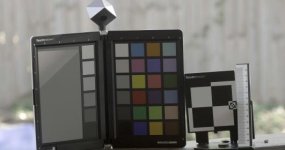
 
vlog_chart_iso1600_s-5_nr-5_manualcc.jpg

V-LOG L, ISO 1600, Sharpness -5, Noise Reduction -5

Notice the the upper-right corner of the color chart and the bottom left corner of the focus chart. The 8-bit banding is to be expected, but the poor color uniformity, is not.

It is possible that this is a compression artifact, which would explain why setting the NR to 0 would mitigate it (less bandwidth is wasted encoding noise.)

[EDIT] The site compressed the image, here's a link to the full resolution uncompressed version: http://blog.josephmoore.name/wp-content/uploads/2015/09/vlog_chart_iso1600_s-5_nr-5_manualcc.png
 
Last edited:
Test out NR at +5. Looked okay to me at ASA 400. Looked worse as I pushed up the ASA.
I'll test it, but I'd be shocked if that aggressive amount of in camera NR didn't make the image look "plastic."

I need to duplicate this in a studio setting where I can control the light for extended periods of time. It was sheer luck that the light happened to catch the chart the way it did and gave me that perfect gradation to highlight the issue.
 
As dustylense said, why would you use -5? Zero is zero.

But that doesn't make sense for noise reduction. You can't have negative noise reduction, so -5 seems like it would be NO noise reduction at all rather than 0. Unless it's actively ADDING noise when under zero, which seems doubtful.
 
But that doesn't make sense for noise reduction. You can't have negative noise reduction, so -5 seems like it would be NO noise reduction at all rather than 0. Unless it's actively ADDING noise when under zero, which seems doubtful.

It's a dumb value for the setting, I agree.
 
Joe, seeing the same weird magenta/cyan colour blocking in my tests:

http://www.dvxuser.com/V6/showthrea...-LOG-L&p=1986577386&viewfull=1#post1986577386

NR settings don't seem to help much and have their own additional problems as you allude to.

Looks like the profile is buggy to me, at least for internal, 8bit recording.

Cheers for the test!

Paul :)
I get those magenta/macro block artifacts in other modes occasionally as well, usually in gray areas like your V-LOG footage shows. I've stuck to the Natural style for a long while now and get that, both in video and stills (see it somewhat frequently while taking long exposure star shots). I've wondered for awhile if it had something to do with the sensor heating up or just an artifact of exposure/lighting conditions, or even contemplated if there was something specifically wrong with my camera as I hadn't ever really seen others bring it up before.
 
As dustylense said, why would you use -5? Zero is zero.

zero is not always zero. Sometimes it is also used to indicate the balance or mid point or where a company thinks the normal level is. Like a value of 50 with a 0 to 100 scale. For example if Panasonic made a camera that didn't allow a user to adjust these settings this is what the factory defaults would be. The -5 and +5 scale is a method to indicate to the user that they are going down from the default value or up from the default value. This is easier to understand than a 0 to 100 scale because what does the company consider to be the default? Sure one could assume a value of 50 but that is harder to remember when playing with the settings. Having zero be the middle is much easier to understand.

Most of these settings are physically impossible to have a -5 value. For example sharpness. There isn't a blur filter on the camera that softens the footage. -5 is actually more like zero or off although I don't really think its 100% off.
 
Every time I pull the NR up to 0 from -5, I hate what it does to the noise - makes it blocky and gross. I actually think this compression handles the noise level pretty well. Though I will say I'm now thinking about saving up for an external recorder. Been thinking about it for a while anyway, but I do think with V-LOG L it's something to seriously consider now. And the reality is, I'd rather invest $2,000 in that at this point than $2,000 in another camera body that's still going to film in 8-bit internally!
 
Zero does not equal "no noise reduction". ON the GH4, zero equals "default noise reduction."

The color uniformity problem I am highlighting exists across all profiles...it's just exacerbated and made obvious when you manipulate a very flat 8-bit image. I had hoped that V-LOG L would correct it, but it clearly does not. Allocating as much of the limited bandwidth as possible to actual image data rather than noise helps a bit, thus it appears less with a higher NR setting.

Where color uniformity problems really looks ugly is in subtle shifts of skin tones. Made the CINE profiles unusable for me.
 
So I've done some more shooting today, and have encountered this ugly phenomenon with the color banding. Haven't seen it in skin tones but the place where I work has a lot of bland brown walls, and holy cow does this codec not appreciate them. I'm going to keep on playing with V-LOG L because I try to avoid those kind of backgrounds, but I'm also looking at saving up for an Atomos Ninja Assassin now.
 
I dont have blocky magenta, but I get lots of color SIZZLES in dark areas, and some funky blues in a blue sky when pushed.
 
What about when you film in HD at 200mbs? Has anyone tried that with V-LOG L yet? Does it handle the compression better? Sure, you lose 4K when you do that...
 
Hi Brandon, I made a few tests myself and came to the conclusion that good internal V-Log footage should be shot 3 stops above zero. It leaves a bit of zebra when set on zebra 1. This is the best option to lessen the noise but keep some nice highlights. Do you think the Assassin would improve the noise of the sensor? Im considering it but i'm afraid it will make a difference in banding and artifacts.
 
Back
Top