
Hello,
I read a couple times that the Canon LCD / Mic bracket will not attach firmly to the Small Rig top plate, so I included a couple pics to show how this can be done.
To attach the bracket tightly to the top plate, you must either put a large washer between the hand screw knob and the front of the bracket so it won't screw in as far or preferably purchase a 3/4" socket cap screw and lock washer to replace the hand screw knob. The socket cap screw can be lightly torqued so the bracket sits firmly against the top plate. (The bracket must be aligned side-to-side so the top plate extends on either side of the center back opening of the bracket.) You must also remove the wire clamp on the bottom of the bracket so the LCD monitor cable can be easily attached to the video in on the front of the body.
I also attached a Nato rail on the back of the top plate so a top handle or a monitor support can be changed instantly.
This arrangement allows the Canon LCD to be folded face down in front of the Canon bracket for storage. If I attached the LCD screen and mic holder directly to the top plate, the monitor could not be folded in front of the bracket without hitting the top handle. Total price for the top plate, Nato handle and rail, Nato rail clamp for monitor mount, and shipping was about $120.
Drew Harty
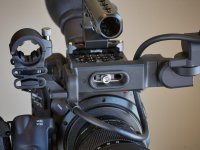
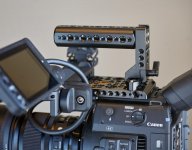
I read a couple times that the Canon LCD / Mic bracket will not attach firmly to the Small Rig top plate, so I included a couple pics to show how this can be done.
To attach the bracket tightly to the top plate, you must either put a large washer between the hand screw knob and the front of the bracket so it won't screw in as far or preferably purchase a 3/4" socket cap screw and lock washer to replace the hand screw knob. The socket cap screw can be lightly torqued so the bracket sits firmly against the top plate. (The bracket must be aligned side-to-side so the top plate extends on either side of the center back opening of the bracket.) You must also remove the wire clamp on the bottom of the bracket so the LCD monitor cable can be easily attached to the video in on the front of the body.
I also attached a Nato rail on the back of the top plate so a top handle or a monitor support can be changed instantly.
This arrangement allows the Canon LCD to be folded face down in front of the Canon bracket for storage. If I attached the LCD screen and mic holder directly to the top plate, the monitor could not be folded in front of the bracket without hitting the top handle. Total price for the top plate, Nato handle and rail, Nato rail clamp for monitor mount, and shipping was about $120.
Drew Harty

