GH5 Using a GH5 for video conferencing (Google Meet)

BobKo

Well-known member
I will be teaching an evening class using Google Meet, and I'd love to use my GH5 for the camera instead of the toy camera built into my laptop. I have a recent (less than a year old) Acer laptop that is reasonably powerful, and it has the usual array of USB2/3 and HDMI ports. I have an AC power supply for the GH5, so the camera won't have to run off a battery. Is there some way to get the GH5's video into the laptop for my presentation? If that is possible, then can I plug a lav mic into the GH5 and get the audio fed in as well? Has anyone tried anything like this? I realize the image resolution for a Google Meet presentation is limited to 720p, but the image quality from the GH5 will be far superior to the tiny thing built into the Acer laptop.

Thanks!
 
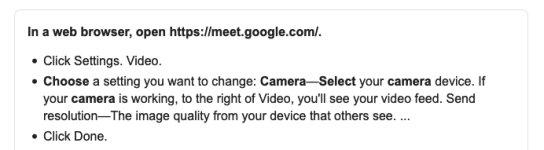
I've just spent three hours looking at videos and informational pages, and can't get this figured out. I downloaded the Panasonic tether app and that seems to work fine as far as getting video/audio into the computer. However, I can't get Google Meet to recognize the video in the tether app.

So I did lots of research and it looked like I needed software called OBS (Open Broadcast Software) to actually control the broadcast of the video/audio from the GH5. So I downloaded OBS, but it does not list Google Meet as one of its clients. There are numerous people online who say it can be done, but their videos/descriptions do not mention anything about the Panasonic tether app and how to get that video into OBS and out into Google Meet. At least none that I've found so far.

My students and I will sure be grateful if someone can get this figured out.
 
Last edited:
You do realize that you need to download and use the new ( still in beta ) Lumix Tether for Streaming software to make this work...

LUMIX Tether for Streaming – Use Panasonic Camera as a Webcam on Windows PC

Yes, I mentioned that in a previous post. With the tether app running on my computer, I can get video/audio from the GH5 into my computer. What I can't do is to get the interface to Google Meet to recognize that the GH5 is connected -- all the computer sees is its own built-in camera and mic.

And that's where I stand at the moment.
 
And you probably tried restarting with the camera connected?

Is there a setting in windows settings about which camera to use? Does it recognize the lumix there? I will look into this...
 
And you probably tried restarting with the camera connected?

Is there a setting in windows settings about which camera to use? Does it recognize the lumix there? I will look into this...

Good suggestions... I will try them and report.
 
I bought a $45 HDMI to USB2 device recently that is working great. No odd beta software to mess with. There are a ton of them out there but they go out of stock very fast.

https://www.amazon.com/MavisLink-Camcorder-Definition-Acquisition-Broadcasting/dp/B087C3NG9W

so far rock solid with my GH4 and everybody at work is blown away how much different it looks than all of our MBP webcams. Total night and day difference.

Since it converts the HDMI to a standards compliant webcam format just about any streaming software should recognize it as a webcam just like any USB webcam. I use it with OBS and Microsoft Teams at work. Also works with FaceTime on all my Macs. I have a Mac mini decked out with eGPU but it was always missing a webcam so decided to give this a try so I can do video calls with my own personal Mac mini as well.

There is a significant delay with the audio and video however so make sure your mic goes through the camera so it is paired with the video. Don't use this for the video feed and the computers mic for the audio feed. They will be out of sync. Use the same device for video/audio. You can either use the built in GH5 mics or I plug a lav mic into my GH4 for even better sound. Would use my NTG-1 but don't want to mess around with extra audio gear for a webcast.

Note OBS will take in just about anything. I use my Blackmagic Intensity Thunberbolt device with my GH4 in OBS but that is a straight HDMI capture device and doesn't convert. Thats why it does not work with Teams/Zoom/Facetime. Those apps require the signal to be encoded in a webcam standard format/signal so they only work with traditional usb webcams.

This Mavislink device linked to above does that conversion for you so it looks like any other usb webcam to the computer.
 
I bought a $45 HDMI to USB2 device recently that is working great. No odd beta software to mess with. There are a ton of them out there but they go out of stock very fast.

https://www.amazon.com/MavisLink-Camcorder-Definition-Acquisition-Broadcasting/dp/B087C3NG9W

Since it converts the HDMI to a standards compliant webcam format just about any streaming software should recognize it as a webcam just like any USB webcam. I use it with OBS and Microsoft Teams at work. Also works with FaceTime on all my Macs. I have a Mac mini decked out with eGPU but it was always missing a webcam so decided to give this a try so I can do video calls with my own personal Mac mini as well.

Excellent information... I figured that I would use a lav mic plugged into the camera, so that would keep the audio/video in sync. Thanks for all that info, though.

One problem for me is that OBS does not recognize Google Meet. OBS has a bazillion chat systems it works with, but Google Meet is apparently not one of them.

Since my class is at 7PM tonight, I practiced today with the crappy camera/mic built into the computer. It works, but it's crappy. Since this is a video-related class I will be teaching (believe it or not, it's called "How to Become a YouTube Star"), I hope to be able to present with far better video/audio than the built-in crap. I'll just have to keep working on it.
 
Excellent information... I figured that I would use a lav mic plugged into the camera, so that would keep the audio/video in sync. Thanks for all that info, though.

One problem for me is that OBS does not recognize Google Meet. OBS has a bazillion chat systems it works with, but Google Meet is apparently not one of them.

Since my class is at 7PM tonight, I practiced today with the crappy camera/mic built into the computer. It works, but it's crappy. Since this is a video-related class I will be teaching (believe it or not, it's called "How to Become a YouTube Star"), I hope to be able to present with far better video/audio than the built-in crap. I'll just have to keep working on it.

Do you have to use OBS? Can't you use a webcam directly with Google Meet? The beauty of the above device is you can use it instead of your laptop webcam.
 
Do you happen to have any other cameras that you could potentially connect through USB as webcams? Canon's webcam utility is compatible with some of their point & shoot cameras. If you're sharing a PowerPoint presentation, it won't really matter how you look, audio is a bigger concern. I've successfully used an $8 USB audio interface to run an XLR preamp and condenser mic into my computer. You won't need the USB audio adapter if your computer has a TRS mic input, but most laptops these days just have one TRRS jack.
 
Do you have to use OBS? Can't you use a webcam directly with Google Meet? The beauty of the above device is you can use it instead of your laptop webcam.

If it *can* be used directly with Google Meet, I haven't figured it out yet. As far as I can tell, when I have the GH5 streaming into my laptop, Google Meet only recognizes the laptop's built-in camera. I have not been able to find the magical incantation to get it to see the GH5.

I have my class tonight, so I set the GH5 project aside for the moment so that I could practice with Google Meet and not be totally clumsy. I'll pick up getting the GH5 to work with Meet tomorrow.
 
If it *can* be used directly with Google Meet, I haven't figured it out yet. As far as I can tell, when I have the GH5 streaming into my laptop, Google Meet only recognizes the laptop's built-in camera. I have not been able to find the magical incantation to get it to see the GH5.

I have my class tonight, so I set the GH5 project aside for the moment so that I could practice with Google Meet and not be totally clumsy. I'll pick up getting the GH5 to work with Meet tomorrow.

I don't know about the Lumix way of doing it. I have a GH4 so it will never work for me. What will likely work with Google Meet however is the $40 device I linked to previously. Instead of using hacky software to fake a webcam just use a real device that takes the a HD clean HDMI signal from the GH5. You can also use it with any other camera in the future or other HDMI like devices. Can even feed HDMI from another computer into it to stream a desktop/PPT directly through Google Meet. Just about anything that pumps out a HDMI signal in HD will work through it. I use it for 24p from my GH4 and its perfect.

These new beta tools are neat and its cool it adds the ability for free but you know what they say about free. I have rarely found any Lumix software or mobile apps to be spectacular with using with my Lumix cameras. Maybe they are better now.
 
Do you happen to have any other cameras that you could potentially connect through USB as webcams? Canon's webcam utility is compatible with some of their point & shoot cameras. If you're sharing a PowerPoint presentation, it won't really matter how you look, audio is a bigger concern. I've successfully used an $8 USB audio interface to run an XLR preamp and condenser mic into my computer. You won't need the USB audio adapter if your computer has a TRS mic input, but most laptops these days just have one TRRS jack.

I just have Panasonic cameras: the GH5, a GX8 and a ZS100. My laptop has a TRRS input that accomodates headsets, but I haven't tested that yet. Definitely on the list to try out.
 
Does this help? (And if you don't see it, maybe try different HDMI resolution settings.)

View attachment 139364

Unfortunately, it did not work for me. I can get the GH5 connected to the laptop using Panasonic's tether app, and I can see/record video on the laptop. However, Google Meet does not show the GH5 as a connected camera. Only the laptop's built-in camera shows up in the choices.
 
What's your HDMI set to in the camera? 4K output, 1080p, auto?

I had the camera set to 1080p/29.97. I did not test the HDMI output to confirm that it was 1080p. It did come into the computer (using the tethering app) and looked good on the computer.
 
Just odd...this is very straightforward plug-and-play.

I would try different settings (cycle through combinations), a different cable, lots of restarts (in different orders regarding what goes on or is launched first), and possibly any software updates.

Having so much experience with recorders, I know that just one wrong setting or a bad HDMI cable completely changes everything. Even though your computer recognizes the connection, something is not communicating properly with Google.
 
Back
Top