C300: Used C300 vs. New C100 vs. New 1DC

Simply that C-Log has a gamma curve that is not as flat as S-Log. S-Log has more range for grading, potentially, because of the 10-bit architecture(assuming one is recording externally with an F3). S-Log curve allows for more highlight protection than C-Log. I don't think it's advisable to shoot S-Log with F3 in-board XDCAM EX codec, since it's 8-bit.

I certainly agree that C-Log need not be used as a default with a C100 or C300, unless in very uncontrolled scenes with high contrast elements.
 
Dino can you explain this?

Simply that Canon's engineers created Canon Log very well aware of its restricting 8 bit home.

In 8 bit you simply can't afford to make the picture all too flat, since tonality will suffer. Technicolor tried and failed, and it amazes me to no end how many users simply stick to CineStyle for DSLRs since it seems the "coolest" thing to do.

Canon Log isn't nearly as flat as Log C for instance, and it couldn't/shouldn't be.

A too flat profile in 8 bit space would simply provide too few code values for pleasing tonality.

Canon Log is actually an excellent effort on Canon's part. I haven't seen any real bad behavior so far, even in AVCHD.
 
Simply that C-Log has a gamma curve that is not as flat as S-Log. S-Log has more range for grading, potentially, because of the 10-bit architecture(assuming one is recording externally with an F3). S-Log curve allows for more highlight protection than C-Log. I don't think it's advisable to shoot S-Log with F3 in-board XDCAM EX codec, since it's 8-bit.

I certainly agree that C-Log need not be used as a default with a C100 or C300, unless in very uncontrolled scenes with high contrast elements.

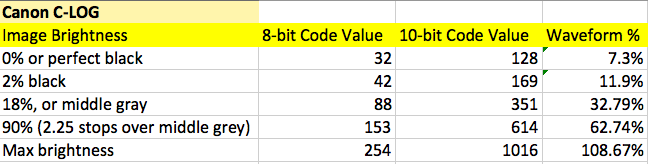
I wouldn't say C-Log is all that different from S-Log. From the charts below you can see there are very subtle differences, mainly that Canon maps the reflectance for middle grey slightly lower than Sony, but both have nearly the same amount of data level steps allocated for 2% black to middle grey, and middle grey to 90% white.

canon_c-log.png


sony_s-log_zps1b1891f9.png


These differences between Canon log and Sony log also have nothing to do with whether or not the recording format is 8-bit or 10-bit, as 10-bit simply gives you 4 times the amount of information but does not impact how in log mode the camera maps reflectance values.

I have shot many projects in SLOG to XDcam EX codec in 8-bit 420 and it holds up better than most would think as long as you nail your exposure so you don't expend your precious data bits in post fixing your exposure before you even start grading. 10-bit will give you more room to play.
 
I wouldn't say C-Log is all that different from S-Log.

I'm not at all familiar with S-log, but seeing that it too has been developed for 8 bit, it comes as no surprise that it is similar.

And for the record (and with only the best intentions in mind): there is nothing called C-log. Canon log is called just that, and Arri's version is called Log C, so there is the slight risk of confusion depending on the context.
 
Great responses. Read them while I consumed a bird.

Dino, your experience with C-Log footage was similar to my own, although the noise I could deal with... one thing that we just couldn't seem to do was get accurate color. It ends up muted, if that makes sense. Generally, I would definitely say no to flat and 8-bit (recently learned over the last two years) but I thought Canon had some special mojo going on. Seems like you would still want to get as close as possible.


Funny how no one seems to have caught the actual context of your question :happy:

If folks want to shoot events that don't require the benefits of the format itself (like log or raw) then I guess they have every right to do so... but shooting log to maximize sensor dynamic range or shooting raw for the maximum flexibility in post for grading on a wedding or corporate video I'd say is overkill. 95% of what people need to shoot can be done on most modern cameras in standard gamma mode.

Agreed. It's kind of working backward to go LOG when a standard profile will get you there! Although, I will say that for internal (if you want to term that corporate) there are some instances where you would want to do that. It just depends on the job -- which is me stating the obvious, or repeating what you said already.

I wouldn't call it "coloring" what you do to restore log footage back to "standard gamma". Log footage can be de-logged very easily with a plugin like LUT Buddy or even homebrew de-logging filters. Once it's restored to normal looking gamma you can color correct, grade, etc... but de-logging is not color correcting in my books.

Also true. This is something I'm trying to figure out right now, there's a guy that has FCP LUTS for Blackmagic, I haven't tried them out yet but I imagine that they'll make that pill easier to swallow.

Need more time to dig into DaVinci to create a few as well. So far it isn't tough to get what you need out of the log, but it also isn't shoot, cut, deliver. In the end, RZE is pretty much right for now, if you can't spend the time coloring you should probably wait until some of the community has already sort of automated the process for specific cases.

I think the C100 actually sounds like a good bet if you need a camera to grab-and-go-shoot-then-hand-footage-off-to-those-guys-that-won't-color-it-or-make-it-look-even-worse-if-they-do.
 
I think the C100 actually sounds like a good bet if you need a camera to grab-and-go-shoot-then-hand-footage-off-to-those-guys-that-won't-color-it-or-make-it-look-even-worse-if-they-do.

Absolutely. That's why I'm spending time with Custom Picture styles, because I need a look that can be developed in-camera because I deal with this a lot.
 
I wouldn't say C-Log is all that different from S-Log. From the charts below you can see there are very subtle differences, mainly that Canon maps the reflectance for middle grey slightly lower than Sony, but both have nearly the same amount of data level steps allocated for 2% black to middle grey, and middle grey to 90% white.

canon_c-log.png


sony_s-log_zps1b1891f9.png

This from Alister Chapman on another forum:

"What has too be considered is that S-Log is designed to be used with 10 bit recording where each stop gets roughly 70 data bits ( this roughly means 70 shades of grey for each stop).

Now lets consider the Canon C300. It has no 10 bit out, it's only 8 bit. Assuming Canon's sensor can handle 13.5 stops then using 8 bit would result in only 17 bits per stop and this really is not sufficient, especially for critical areas of the image like faces and skin tones. A standard gamma, without knee, like Rec-709 will typically have a 7 stop range, this is a deliberate design decision as this yields around 34 bits per stop. As we know already if you try to do a hard grade on 8 bit material you can run in to issues with banding, posterisation and stair stepping, so reducing the bits per stop still further (for example by cramming 13.5 stops into 8 bits) is not really desirable as while it can improve dynamic range, it will introduce a whole host of other issues."

Most camera tests I've seen on the web show S-Log as having more range for overexposure than Canon-Log. Visually, the S-Log usually looks flatter compared to Canon-Log.
 
I have to admit the present discussion is a bit above my head, but on the original topic, I did spend half an hour with that used C300 today. It's near mint!

The camera is so nice to hold... all the switchgear and buttons work nicely, the connectors for the monitor/audio are scary fragile looking with their teeny tiny pins, but other than that it looks and feels like a very solid piece of kit. I like it and I'm quite certain that I can use it on a monopod close to the way I use my Mark IIIs.

The viewfinder is decent, though I have to admit the image isn't terribly big. I'm used to having a huge image with the 2.5x Z-Finder on the back of the Mark III's screen, so I have no idea how the C300's built in EVF would be like on an all day shoot. Seems a bit tiny. I can't even imagine how tiny the C100's evf image would be.

Anyone here use the C300's EVF a lot? I'm talking using it outside, on a monopod, pulling focus, using it as a point of contact, that sort of thing. Is it too strainful on the eyes for extended use? When I'm using a monopod with the Mark III, my face is always up against the Z finder, partly to make it easy to see during the day, partly to make it very easy to pull focus, partly to have that additional point of contact for stability. Can the C300 EVF be used in this manner without my eye tiring out?

We've tentatively agreed to complete the transaction on Tuesday (Monday's a holiday over here). So at least this gives me a couple nights to sleep on it.
 
Last edited:
Thanks for the comment, Gary. However there's one more thing for the C300, and that's 720p/60.

I watched a review of the C100+Ninja2 here, and what I noticed in the video is that the Ninja2 and the C100's LCD actually show very different colors. This could pose a problem.

Skip to 20:48


C300 over the C100 for the following reasons:

1) You need 4:2:2 and don't want to use an external recorder. C100 with a Ninja-2 is still very lightweight, and is better than XF codec, plus you're recording to SSDs and not CF cards.

2) You need SDI out. I have the Atomos Connect with my Ninja-2 so I have it on my C100.

3) You need Genlock. The only way to get this on the C100 is with a Pix 240i, and then you're talking a total of around $10k where the price difference is starting to be negligible.

4) You need PL. Not available on the C100

Outside of those reasons, the C100 is a better deal paired with the Ninja-2 than the $16,000 C300.
 
Last edited:
I watched a review of the C100+Ninja2 here, and what I noticed in the video is that the Ninja2 and the C100's LCD actually show very different colors. This could pose a problem.

It shouldn't pose any problem. First, don't trust the Ninja colors. It's not a calibrated monitor. Second, never eyeball anything. Test and select the white balance you want to achieve the result you need.

I rarely used 720p60 on anything, and if I really need it, I have a 60D for that. On top of that, I want to test FieldsKit from RE:Vision FX to convert 60i to 60p. Early tests look promising, but I'm having a hard time actually finding something worthwhile to shoot in slo-motion. On top of that, a lot of people complain of the low quality of the C300's 720p mode that I've heard, so how useful is it really?
 
Interesting. In Philip Bloom's C300 review he remarked the opposite, that he was disappointed 60p is only 720p, but conceded that it was a really nice and detailed 720p.


It shouldn't pose any problem. First, don't trust the Ninja colors. It's not a calibrated monitor. Second, never eyeball anything. Test and select the white balance you want to achieve the result you need.

I rarely used 720p60 on anything, and if I really need it, I have a 60D for that. On top of that, I want to test FieldsKit from RE:Vision FX to convert 60i to 60p. Early tests look promising, but I'm having a hard time actually finding something worthwhile to shoot in slo-motion. On top of that, a lot of people complain of the low quality of the C300's 720p mode that I've heard, so how useful is it really?
 
Thanks for the comment, Gary. However there's one more thing for the C300, and that's 720p/60.

I watched a review of the C100+Ninja2 here, and what I noticed in the video is that the Ninja2 and the C100's LCD actually show very different colors. This could pose a problem.

Skip to 20:48


If you are worried about monitor calibration on an external recorder then the right answer is probably a 5d mark ii or mark iii. 1dc and c300 are very unlikely appropriate.
 
Why do you say that?

I already have a trio of Mark IIIs. I need more dynamic range want more detail. NDs and XLRs are going to be useful as well. See my first post.

The question Gary brought up is whether C100+Ninja2 would be a better choice than the C300. I guess your point might be that the color calibration on an external monitor doesn't matter to a typical C300 user. This pro user will be checking color and white balance with cards and exposure with light meter and using the waveform and not doing it by eye.

That may be true, but it won't stop me from getting one for better DR and detail and XLR and NDs. I'll teach myself to use the other tools along the way.


If you are worried about monitor calibration on an external recorder then the right answer is probably a 5d mark ii or mark iii. 1dc and c300 are very unlikely appropriate.
 
Last edited:
Originally Posted by John Brawley
Dan it's actually 16 Bit LINEAR sensor data, recorded into 12bit LOG DNG, then unpacked back to 16 Bit.

I thought it was a riddle, wrapped in a mystery, inside an enigma...:happy:
 
The c300 in my opinion would be your best bet. The company I help run, we own 9 of the c300's and we love them. 1st you have time code which neither the c100 nor the 1DC has, 2nd you have an HDSDI out as well as HDMI. The MPEG2 MXF wrapper on the c300 is rock solid and has a proven workflow for both FinalCut, Premiere,and Avid. The c100 shoots AVCHD, which I personally have never been a fan of and consider less robust. The C300 shoots in 4.2.2 color space, the c100 shoots 4.2.0. so less chroma sub-sampling issues during color passes. I also prefer shooting with CF cards which the c300 uses, the C100 uses SD cards. The Cf cards in my experience are a little larger and are less susceptible to getting lost on the go.....Comparing the c300 to the c100 the list goes on and on and in each case the c300 wins hands down.

The 1D-C is a different beast altogether, I like the form factor of shooting with a dslr so I can understand your excitement about it. It does shoot 4k but it is shooting that big 4K frame, wrapped in AVCHD and I have no idea what color space it shoots in...lets hope at least 8 bit 4.2.2 ? I suspect the 1D-C was designed as great B-cam for a C500 shoot. I still believe based on the content you regularly shoot and the extra 2 grand you save, the c300 will do a wonderful job for you....but damn I love the DSLR form factor, I still take out my 7D and shoot guerrilla style on occasion. The form factor of the SLR makes me look like a tourist and can get away with shooting in locations that normally would draw attention. The c300 is more conspicuous than a DSLR, but has more features so it would be a toss up for me.

The on board EVF is good on the c300 but I would actually reccomend you buy the an alpahtron viewfinder, with the money you save from not buying the 1DC. The on-board EVF does articulate and is fine if you spend most of your time on sticks. However if you do a lot of handheld work for long periods of time the on-board EVF it is less than ideal. The reason is two fold the on-board EVF's location is forward of the top handle, the control grip is on the right and that forces you to almost always shoot at the hip. I think this is a big flaw for the c300, we have all our shooters shooting hand held and they just naturally pull the camera on the hip because of its imbalance and a need to stabilize.

All cameras have flaws so I think it becomes which ones are you will to work around? I think the quandry for you is the c300 vs the 1D-C, the c100 I would drop kick from the running ;-)
 
It depends on whether or not you want a better deal or a better camera. In my opinion, the C100/Ninja-2 combination is the better deal. The C300 is the better camera.

Of course, the lines get blurry if you're going to obtain a C300 for $10k.
 
The c300 in my opinion would be your best bet. The company I help run, we own 9 of the c300's and we love them. 1st you have time code which neither the c100 nor the 1DC has, 2nd you have an HDSDI out as well as HDMI. The MPEG2 MXF wrapper on the c300 is rock solid and has a proven workflow for both FinalCut, Premiere,and Avid. The c100 shoots AVCHD, which I personally have never been a fan of and consider less robust. The C300 shoots in 4.2.2 color space, the c100 shoots 4.2.0. so less chroma sub-sampling issues during color passes. I also prefer shooting with CF cards which the c300 uses, the C100 uses SD cards. The Cf cards in my experience are a little larger and are less susceptible to getting lost on the go.....Comparing the c300 to the c100 the list goes on and on and in each case the c300 wins hands down.

The 1D-C is a different beast altogether, I like the form factor of shooting with a dslr so I can understand your excitement about it. It does shoot 4k but it is shooting that big 4K frame, wrapped in AVCHD and I have no idea what color space it shoots in...lets hope at least 8 bit 4.2.2 ? I suspect the 1D-C was designed as great B-cam for a C500 shoot. I still believe based on the content you regularly shoot and the extra 2 grand you save, the c300 will do a wonderful job for you....but damn I love the DSLR form factor, I still take out my 7D and shoot guerrilla style on occasion. The form factor of the SLR makes me look like a tourist and can get away with shooting in locations that normally would draw attention. The c300 is more conspicuous than a DSLR, but has more features so it would be a toss up for me.

The on board EVF is good on the c300 but I would actually reccomend you buy the an alpahtron viewfinder, with the money you save from not buying the 1DC. The on-board EVF does articulate and is fine if you spend most of your time on sticks. However if you do a lot of handheld work for long periods of time the on-board EVF it is less than ideal. The reason is two fold the on-board EVF's location is forward of the top handle, the control grip is on the right and that forces you to almost always shoot at the hip. I think this is a big flaw for the c300, we have all our shooters shooting hand held and they just naturally pull the camera on the hip because of its imbalance and a need to stabilize.

All cameras have flaws so I think it becomes which ones are you will to work around? I think the quandry for you is the c300 vs the 1D-C, the c100 I would drop kick from the running ;-)

The 4k is MJPEG, not AVCHD, and it is 8bit 422 at 500Mbps.
 
Lots of great indepth replies.

The quandary of the C100/C300....I always believe you get what you pay for.....and it is a very big slice to pay.

If you make money from this and can make the money back quickly then why not get the C300.

Will get even more confusing if the rumours of another camera coming at NAB that sits between both cameras.

I bet there will be a bad feature from both C100 and C300 changed on this new camera to confuse us even further.
 
Back
Top