usb 2.0 cable

chasmo

Member
Hmm, I'm stumped. I ordered a mini type-B to standard type-A USB cable but the mini-b side is not a match to the camera. A standard B seems like it would not work either. Sorry for such an elementary question but what is this usb cable supposed to be and where can I get one?

TIA,
chas
 
The camera offers both IEEE1394 and USB 2.0 ports... the FW is a 4-pin for sure so I have no problems there but the USB 2.0 port on the camera is enigmatic to me... AFAIK, it won't accept a standard usb type-B or mini-B, is there another flavor of type-A I don't know about?
 
Can you describe what these things look like? And when you say the port won't accept the cable, does it look like it should, or do they look totally different?
 
Yeah, or check page 14 in your manual to insure you have identified the right port . . . they hide those pesky things everywhere! (Not tying to be rude -- just suggesting you double check . . . new stuff can be a little overwhelming when it first jumps out of the box).
 
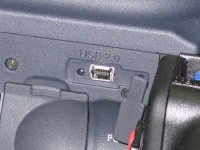
No worries, I don't think you're being rude at all but please understand that I do this for a living so I'm very familiar w/ professional a/v and PC connectors. I can only tell you all that if you look closely at the picture I took of the usb 2.0 port on the side of the camera, and you try to line up a mini type-B usb connector w/ that port, they will simply not dance. Now I'm using a 4-pin mini type-B, as called for on page 14 in the manual, but perhaps there's a 6-pin mini type-B?
 
Mystery solved... sort of...

Mystery solved... sort of...

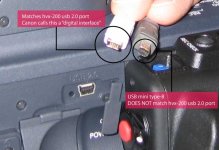
I think I figured this out. On a whim, I raided my Canon S70 (digital still camera) goodie bag and came up w/ a usb cable w/ a standard usb type-A on one end and what Canon calls a "digital interface" on the other end. Turns out, the "digital interface" is a perfect match to the hvx-200. So hopefully this will save others headaches in the future... if you order a usb mini type-B cable, as called for in the Pany manual, you may be sorely disappointed. Take a look at the attached picture to see the difference. Thnx for everyone that replied! If anyone knows the correct name of this 'digital interface' pls post it here for future ref.
 

Attachments

  • usb_mini_difference2.jpg
    usb_mini_difference2.jpg
    34.4 KB · Views: 0
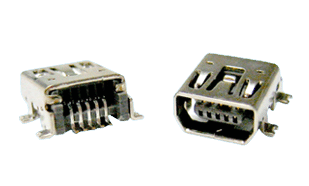
Both Mini-A, Mini-B, Mini-AB and mini 4 Pin B connectors exist:

Mini-B is the connector on the HVX:
mini-usb2-socket.jpg

mini-usb2-5pin.jpg


Mini-4 Pin B is the rounder type:
usb--mini-new-male.jpg

usb--mini-new-female.jpg


Mini AB connector:
ccmusbab-32005-700.gif


Mini-A connector:
180px-Mini_USB_db.jpg
 
Last edited:
Those mini USB cables come in a few different flavors. Like many of the newer digital cameras, the HVX requires the mini USB with 5 pins as opposed to mini USB with 4 pins. I've had similar problems with other devices in the past. Fortunately, I had the perfect USB cable for my HVX sitting in a drawer.

To be absolutely certain you get the right cable, I recommend going into your local electronics store (Frys, Radio Shack, etc.) with your HVX and plug in the cable. Those mini USB cables can be hard to identify just by eyeballing them.
 
Wow, great info. Much appreciated. I ordered the correct cables from David at Specialized (800-359-1858) and they had exactly what I needed (the 5-pin variety). Problem solved. Again, many thnx everyone.
 
old thread same problem. I have a mini-B plug, that comes from a Garmin product. It fits physically, but the HVX doesn´t get recognized in the Laptop. Will have to try to find it tomorrow in a shop in town. Shoot on saturday......damn always stressy these new camera setups....
 
I've got a USB cable that is connected to my Dell LCD's USB ports, and I use it for a PDA, a Garmin 76C GPS, and my HVX -- the Mini B USB cable you have from Garmin should work.

My guess is you didn't install the P2 drivers, or didn't do it correctly. You need to put P2 card(s) into the camera slot(s) of the HVX200 during the installation, and put the camera into MCR mode.
 
What the he!! ever happened to "continuity"???
I've got sooooo many different cables and every time I hook one piece of gear to another, I gotta sort through them all.
Not to mention, since I always like to have spares, the number of cables is astronomical! :kali:

There, I feel better now...almost.
 
Well, should read the manual first. I had to do the 2-seconds-mode-button "trick". Then it worked. Thanks. Gosh I feel like a virgin today.
 
Back
Top