Salvatore Finocchiaro
New member
Hello,
I'm new here.
I noticed a post on this site, where the person was asking if an SSD can be used in a Firestore. The brief answer I believe is Yes. <-- I've edited this post today, as I have found now that an SSD can be used in a Firestore. I will leave the relevent information. My initial test indicated that it would not work.
I spent about 5 hours today trying to install a 64Gb Crucial M4 SSD into my JVC DR-HD100. (I wanted a smaller drive because I have never used the available 805 minutes of record time). I shoot 720p25 or 720p50. The HD100 has the version 3.0.3 firmware, 120Gb Hitachi Sata HDD. It is an NTSC model, purchased direct from BHPhoto and have used it on my JVC GY-HD201E (I'm in Australia).
I believe that upgrading the HD100 with a larger hard drive would not be a problem, although I noted in the previous post that some users did have problems.
The main problem seemed to be formatting the SSD to a FAT32 format. Eventually I found some free HP software called 'HP USB Disk Storage Format Tool', which was easily able to format the larger drive into the FAT32 format. If you are not aware windows will only allow you to format a drive no bigger than 32Gb to FAT32. The catch with the HP tool, is that you will need to put the SSD into a hard drive cradle which can be connected to the PC via a USB cable, or the software does not detect the drive (I used a Newer Technology Voyager Q).
Basically once I had formatted the drive, I checked on both of my computers to confirm it was FAT32, I then installed in the HD100 and fired it up. The splash screen appears, then a 'Please Wait' message appears. I waited and waited and waited, I had a coffee and waited. At this point you can even navigate to the other menus, but the device never finds the drive. (See my own reply below, formatting will make the drive appear).
I called the volume the same name as the original drive FS083004.
None of this worked, the message was always 'Please Wait'.
I re-installed the original drive and all worked perfectly again.
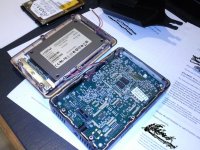
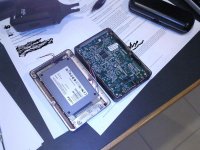
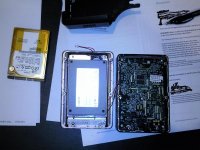
Just a few notes on pulling the Firestore apart.
All screws were phillips head.
6 screws to remove at the back of the device (remove battery first)
Prise the back off very gently, the HDD is on the back panel, but is connected to the mother board via a male connector, the mother board has the female.
As you open slightly there are 2 sets of small wires, the set at the top of the player can be unclipped (these wires provide power to the small fan). I could not see a way of unclipping the others, so essentially you will need to lay both halves side by side.
The HDD sits on a metal tray which is attached with 5 screws. Once undone, you will need to gently pry the metal tray upwards, as there is some sticky material underneath.
The HDD is held onto the tray with 4 screws. There is an angled connector (the male) which needs to be pulled off the terminals of the HDD.
Operation successful, the HDD is removed.
When putting the hard drive back, remember to clip back the wires that provide power to the fan. Incidently, I did not do any testing regarding the fan.
Anyway, I hope that helps. If you have any questions, please be patient I will eventually reply, once I work out how these posts work etc.
Cheers,
Sal
(Sorry about this post, I'm still finding my way around here, I didn't realise, I could edit a post,.... thanks for your patience)
I'm new here.
I noticed a post on this site, where the person was asking if an SSD can be used in a Firestore. The brief answer I believe is Yes. <-- I've edited this post today, as I have found now that an SSD can be used in a Firestore. I will leave the relevent information. My initial test indicated that it would not work.
I spent about 5 hours today trying to install a 64Gb Crucial M4 SSD into my JVC DR-HD100. (I wanted a smaller drive because I have never used the available 805 minutes of record time). I shoot 720p25 or 720p50. The HD100 has the version 3.0.3 firmware, 120Gb Hitachi Sata HDD. It is an NTSC model, purchased direct from BHPhoto and have used it on my JVC GY-HD201E (I'm in Australia).
I believe that upgrading the HD100 with a larger hard drive would not be a problem, although I noted in the previous post that some users did have problems.
The main problem seemed to be formatting the SSD to a FAT32 format. Eventually I found some free HP software called 'HP USB Disk Storage Format Tool', which was easily able to format the larger drive into the FAT32 format. If you are not aware windows will only allow you to format a drive no bigger than 32Gb to FAT32. The catch with the HP tool, is that you will need to put the SSD into a hard drive cradle which can be connected to the PC via a USB cable, or the software does not detect the drive (I used a Newer Technology Voyager Q).
Basically once I had formatted the drive, I checked on both of my computers to confirm it was FAT32, I then installed in the HD100 and fired it up. The splash screen appears, then a 'Please Wait' message appears. I waited and waited and waited, I had a coffee and waited. At this point you can even navigate to the other menus, but the device never finds the drive. (See my own reply below, formatting will make the drive appear).
I called the volume the same name as the original drive FS083004.
None of this worked, the message was always 'Please Wait'.
I re-installed the original drive and all worked perfectly again.
Just a few notes on pulling the Firestore apart.
All screws were phillips head.
6 screws to remove at the back of the device (remove battery first)
Prise the back off very gently, the HDD is on the back panel, but is connected to the mother board via a male connector, the mother board has the female.
As you open slightly there are 2 sets of small wires, the set at the top of the player can be unclipped (these wires provide power to the small fan). I could not see a way of unclipping the others, so essentially you will need to lay both halves side by side.
The HDD sits on a metal tray which is attached with 5 screws. Once undone, you will need to gently pry the metal tray upwards, as there is some sticky material underneath.
The HDD is held onto the tray with 4 screws. There is an angled connector (the male) which needs to be pulled off the terminals of the HDD.
Operation successful, the HDD is removed.
When putting the hard drive back, remember to clip back the wires that provide power to the fan. Incidently, I did not do any testing regarding the fan.
Anyway, I hope that helps. If you have any questions, please be patient I will eventually reply, once I work out how these posts work etc.
Cheers,
Sal
(Sorry about this post, I'm still finding my way around here, I didn't realise, I could edit a post,.... thanks for your patience)
Last edited: