Uggggghhhh....Nikkor Lens Haze????

Logan LeBlanc

Well-known member
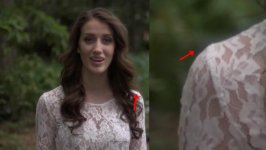
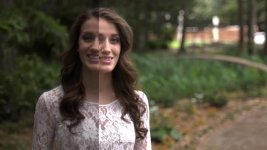
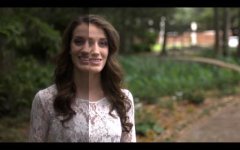
So I've been noticing some hazing on a lot of my footage and chalked it up to some weird highlight clipping-related problem.

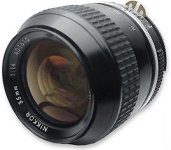
I tracked down the issue: my old 35mm Nikkor.

I just want to A) Make sure this is haze and B) See what measures I can take to fix this.

Check it out: https://vimeo.com/44264605

This is my favorite lens and I really don't wanna part with it, as old as it is.

Thanks,

LL
View attachment 55270
View attachment 55271
View attachment 55272

Screen shot 2012-06-17 at 10.53.39 AM.jpg
Screen shot 2012-06-17 at 10.51.07 AM.jpg
 

Attachments

  • Screen shot 2012-06-17 at 10.53.03 AM.jpg
    Screen shot 2012-06-17 at 10.53.03 AM.jpg
    19.8 KB · Views: 0
Last edited:
I've also got an old Nikkor which I love...
I often use it... to shoot towards a bright light source, when I want that 'flared/haze look'.
I don't often use it to shoot a sequence, because depending on the light(s) hitting the old colour coating... the shots often don't match.

I think the shot in the video clip of the host... is just out of focus... not flared.
 
are you shooting it wide open? I know with my old nikons if I shoot at a 1.4 its considerably softer than other lenses at 1.4
 
I don't remember for the two pics I posted, but I shot some footage on Friday and stopped it down a few clicks and it still had the haze.

@kerrigan, the opening shot in the clip was out of focus, but I'm pretty sure the one at the end was not. I'll try to post a still from Friday's shoot and you'll be able to see what I mean.

Anyway, anyone have any suggestions on how to remedy this? Is it, well, able to be remedied?
 
What is the glass like? Clean and clear or fingerprints, scratches, damaged coatings, small bubbles in the glass, fungus, separation? Hold it up to the light and move it around to different angles to see the internal lenses. Pay particular attention to the rear glass, it will affect the image more than the front.
 
Inspect the lens closely (off the camera) and with light at various angles.

If you can see haze, mars, marks, fungus... take it to a lens technician...or get a replacement. They are cheap and available in excellent condition so fixing an old one may not be worth the time and expense.
 
I have pristine Nikkor 1.4's that are fairly hazy wide open. You can avoid this by not shooting into a light source or by flagging away any hot spots, but I think adding a touch of sharpening in post is the easiest way to deal with it.

Here's a 100% crop before and after sharpening.

smqVC.jpg
 
My 35mm AIS 2.0 has a really dreamlike look when wide open. It goes away when it's not. It's a cool effect when the situation calls for it.
 
That first Host shot, looks so out of focus! Yea, i also seen lens flare/softening happening with that lens. Matt box, or replace with a newer "coated" (Flare resistant) lens.
 
I would highly recommend against shooting wide open on any of those nikkor lenses. F 2 should be stopped down to at least 2.8.
 
Hey guys, so am I understanding that the haze or glow that's coming off of the subjects is normal? Would getting the lens cleaned/serviced alleviate this?

LL
 
As for stopping down, I'm thinking that did more harm than good. What do you think?

Teri 1.jpg

I mean, clearly the left shoulder is glow-ey, right?
 

Attachments

  • Picture 8.jpg
    Picture 8.jpg
    16.4 KB · Views: 0
Last edited:
After inspecting the lens and you don’t see any issues I would test the lens instead. looking at the footage and trying to figure out the issue can be tough unless you remember everything going on with lighting and ambient light on location. To many variables. Set up and try different F-Stops and lighting that will flare the lens. Take notes or talk to the nat mic about settings etc then review.
If you have the issue stop using that lens for paid gigs or us it only when you want a certain look. I like modern lenses because the coatings are so good its just worth it.
 
Last edited:
Back
Top