Two low light grabs. One real noisy. One OK.

I don't think there is a problem with the camera here. I just downloaded and watched the clip. My observations are that there was some noise in the grass towards the bottom of the frame (not really a big issue). I really didn't see much noise elsewhere, although I thought you might have wanted a bit more light on the subjects.

I wonder if you are using a calibrated monitor? Mine is calibrated (the process of calibrating it involved turning the brightness down a lot. Maybe the noise on your screen is in areas that are just too dark to make out on mine?

Try burning it to DVD and watching it on a TV to see if that improves things.

As for the noise in the grass, as a previous person said, Cine-D isn't really great for dark situations, I use it for bright sunlit situations where there is a lot of contrast in the scene, but I use Cine-V for indoors or evening work. Cine-D effectively applies a ton of gain to the shadows so you will get some noise there, especially if you are using 12db gain on top of that.

So in summary, I don't think the footage is as bad as you are seeing, it may well be your monitor. One thing you could do to remove some of the noise, however, would be to do some correction in post to crush the blacks.

BTW, the reason the other scene looks better to you is probable that the subject is better lit and the background is completely black and plain, rather than just very dark with various foliage etc.

Hope that helps.

Are you referring to my clips? If so there is noise in the faces and this scene wasn't even all that low light. Further scenes shot after the camera reset were fine. To me it looks like bad HDV footage. I personally think it was a firmware/codec glitch.

Before doing a reset, I shot well lit footage at home and the noise was prevalent throughout the entire picture. Very blocky, like you could see the compression blocks.

Separate from the above, I have also found that this camera requires an ABB every time you power up or there will be noise in the blacks. I have a thread about that somewhere.

I can not stress this enough. For some reason this is very prevalent with the HMC150. It's like the camera loses it's BB info when power is cut to the camera. I have not experienced this with the HVX200. Not that regularly ABB'ing is a bad workflow. I just wish I did not have to do it everytime I did a battery change or powered off for lunch. :)
 
Last edited:
Are you referring to my clips? If so there is noise in the faces and this scene wasn't even all that low light. Further scenes shot after the camera reset were fine. To me it looks like bad HDV footage. I personally think it was a firmware/codec glitch.

Before doing a reset, I shot well lit footage at home and the noise was prevalent throughout the entire picture. Very blocky, like you could see the compression blocks.

Separate from the above, I have also found that this camera requires an ABB every time you power up or there will be noise in the blacks. I have a thread about that somewhere.

I can not stress this enough. For some reason this is very prevalent with the HMC150. It's like the camera loses it's BB info when power is cut to the camera. I have not experienced this with the HVX200. Not that regularly ABB'ing is a bad workflow. I just wish I did not have to do it everytime I did a battery change or powered off for lunch. :)

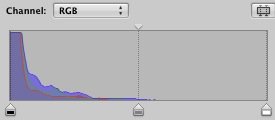
Yes, there is some noise in the faces, but you are using Cine-D which effectively applies gain to the shadows. I've attached a histogram from aperture of a screen-grab from your clip. As you can see nearly all of the image is on the very left side of the histogram. Even the white shirt is only about half way across, so their faces are probably in the bottom 25% (after being boosted in brightness due to Cine-D).

If you had used Cine-V you would have needed more light (or to open the iris more etc.) to get the same brightness in the image, but you would have had less noise. Ideally in my opinion, the image should have been made brighter still (more light, not more gain) so that it was less underexposed on the subjects.

Also, on aspect of applying gain to an underexposed image is that it will tend to give you a soft looking image, I think this is what makes you think you can see the compression blocks.

Not saying that black balancing has no effect on the noise, but it is probably a minor one.

My main point though is that you may be seeing more noise than I am if you are using an uncalibrated computer monitor. This will be much brighter than it should be and accentuate noise which would normally be too dark to notice on a calibrated screen.
 

Attachments

  • Aperture.jpg
    Aperture.jpg
    11.7 KB · Views: 0
what video player and codec are you using to view and transcode your raw avchd clips?
make sure you do everything you can to maximize the quality of the transcode.....some formats and flavors look really bad if you don't get the workflow and codecs just right.

i agree with stuart though, cineD + underexposed shots + gain = noise.
especially underexposing. try not to use auto iris as it'll expose for the entire frame or the brightest object in view and not necessarily the subject of interest.
 
My monitor is calibrated. As far as I know Cine-D does not add gain it is a gamma curve. Any noise already in the picture may become more noticeable due to the gamma curve but it should not actually add gain.

I don't have the clips we shot under the same conditions after the reset nor do I have the clips of my testing under fully lit conditions where there was still noise everywhere. But it was a night and day difference.

In fact we switched to a day for night shooting schedule due to weather issues (-20c at night) and probably had less or similar light levels coming through the lens with very little noise.
 
Last edited:
Also I was not using gain.

Look guys, you can debate this with me to death but the fact is the compression noise went away after the reset. Period. Shooting footage under the same conditions and settings resulted in little to no noise after the reset.

I've been shooting production video for 8 years. I know how to expose an image. The image was supposed to be dark.
 
Last edited:
My monitor is calibrated. As far as I know Cone-D does not add gain it is a gamma curve. Any noise already in the picture may become more noticeable due to the gamma curve but it should not actually add gain.

I don't have the clips we shot under the same conditions after the reset nor do I have the clips of my testing under fully lit conditions where there was still noise everywhere. But it was a night and day difference.

In fact we switched to a day for night shooting schedule due to weather issues (-20c at night) and probably had less or similar light levels coming through the lens with very little noise.

The Cine-D setting does effectively add gain to the shadows (similar to the DRS function), that's part of how it achieves the increased dynamic range compared to Cine-V. I used to use Cine-D all the time until I saw a thread about this problem and now I only use it in situations with a lot of contrast (direct sunlight).

Gain doesn't actually create noise, it just amplifies it, and the Cine-D setting has the same effect as it increases the brightness of the shadow areas. Your footage was very underexposed (obviously this may have been something you did consciously for artistic reasons, that isn't a criticism) so Cine-D will effectively add gain to pretty much the entire image making it look more noisy.

Try filming in a darkish room and then switching between cine-d and cine-v and you will see the shadow areas are much darker and less noisy in cine-v.
 
gtk denwa, but our input is still valid for maximizing image quality.
we're not debating anything, just sharing our experiences that have helped us capture better images.
if you didn't use gain, great. but now you and anyone else reading this know that adding gain does boost the noise (assuming you didn't already know that).

some of us posters aren't just answering your specific question, but also making a point of speaking to all the silent viewers and newbs who might find answers to their questions in this thread. ;)
 
Also I was not using gain.

Look guys, you can debate this with me to death but the fact is the compression noise went away after the reset. Period. Shooting footage under the same conditions and settings resulted in little to no noise after the reset.

I've been shooting production video for 8 years. I know how to expose an image.

You may well be correct that the camera creates some additional noise if not black balanced. I'm just saying that your choice of settings would accentuate any noise that was there. Sorry if it annoys you but I was genuinely trying to help based on my experience filming with this camera in dark situations (pretty much all of my 305 hours of using the camera BTW).
 
I'm not talking about a black balance in regard to these clips, I am talking about an entire camera reset. (Though ABB is an issue with this cam).

I understand what causes noise on this camera. I shoot concerts under stage lighting where it varies from dark as hell to bright as day. I guess what was annoying me was that I had a problem, discovered the solution and you guys started debating whether I even had a problem in the first place. :)

That and a lack of sleep probably has me reponding with a slightly sharp tone. I might need to lower my personal detail settings. lol
 
When I bought HMC captured image was really good. But with time was going on image was gotten worse. More and more blocks. I did sesions with people in forest. I did them at the same place. At the very similar hours (ca. 4PM-summer). Same shots. When I was filming with DVX100 image was OK. Same shots with HMC produced these crazy blocks,stairs around faces and arms. When we went do some shots on the open field blocks apeared on every little shadowed skin. That was horror. I got 30% ruined footage from HMC by blocks. Same shots with DVX100B were OK.
I hope that reset HMC every time prior shooting will help till Panasonic resolve that problem.
 
Last edited:
rak,

You should not need to reset the camera every time! Try it once. You should, on the other hand, Black Balance (ABB) every time you power up.

Do you know how to do that? You hold in you white balance button till the LCD goes black and you see "ABB" on the screen.

If you have to do an entire system reset every time then I would send it into Panasonic.
 
Denwa,
I did BB only couple of times. I didnt reset after switching 1080i - 720p - 1080i. I will do it as you say. Thank you Denwa for your advice.
My scene files for those who claim it could be cine D or DSR issue
DETAIL LEVEL +1
V DETAIL LEVEL +1
CHROMA LEVEL -3
CHROMA PHASE +1
COLOR TEMP Ach +2
COLOR TEMP Bch +2
MASTER PED +2
GAMMA SD NORM
KNEE AUTO
MATRIX NORM 2
SKIN TONE DTL OFF
DSR 0
GAIN 0dB
 
Last edited:
It's ABB you need to do regularly not a reset. :)

You master ped is up and so is your detail, those will both increase noise as will DRS and cine-D. (HD norm is cleaner than SD norm according to Barry's book)


I usually shoot cine-d and cine matrix with:

detail -2 (or-3)
v. detail 0
Coring +2 (or +3)
Master ped -6

Those will reduce noise some.

Also, try this. With DRS off. Close your iris completely. Turn on your WFM. Look at the line. See "noise" on the line? ABB. See noise reduce?

Then turn down detail and master ped till line looks clean. Some experimenting is in order for you to get the look you want.

I have also been playing with Gamma: High, Matrix: Cine, Ped - 1, Detail -7, (coring +3 though It shouldn't do much, if anything with the detail so low) knee: mid.

I'm experimenting at the moment though. I kinda like the look in the LCD. I'm going to do some test footage soon and play back on my monitor later.
 
Last edited:
@denwa - lol!
@rak - that sounds really bad.

i'm sad to hear that some people are having crazy issues like that. it simply shouldn't be that way and you should not have to reset the camera every time you want to use it.

whatever the cause of these issues, it seems like something beyond simple camera operation and scene file settings and more like a bug or glitch that the manufacturer should take care of.
 
Well, AS I keep saying I only reset the camera once. If rac has to reset the camera very shoot then he has a problem withthe cam or at the very least he should reflash the firmware.

Unless it's getting lost in translation and by reset he means ABB.


AVeran, sorry if I sounded like a prick on some of my replies. Too many shoots where I get home at 4am and now my sleep pattern is completely messed, that and battling a virus during a week of shooting. :D
 
Last edited:
@denwa - i'd like to see some framegrabs from shots using your new scene file, sounds interesting. i also prefer the cine matrix, gives the most color throughout the gamma range.
 
Only downside I've found to the cine matrix is that if you are shooting anything with a red LCD, like a scoreboard, the red blooms some what.

We've had crappy weather lately so O haven't been out shooting in the last few days. Also had a bad cold to recover from. I'll try and put something up at some point.
 
Back
Top