I've just received my Odyssey and am going to be traveling on a plane with it. I'm currently using Westside AV's hood and mounting bracket. I'm trying to figure out the best solution, been looking at Pelican cases approved for carry on travel, there is one with dividers and one with foam. Does anyone have any recommendations? I'm nervous I'm going to damage something before I get to my shoot!

Navigation
Install the app
How to install the app on iOS
Follow along with the video below to see how to install our site as a web app on your home screen.
Note: This feature may not be available in some browsers.
More options
You are using an out of date browser. It may not display this or other websites correctly.
You should upgrade or use an alternative browser.
You should upgrade or use an alternative browser.
Traveling with FS700 with Odyssey
- Thread starter zen75
- Start date

Clermond
Veteran
do you use them as cabin case? The case weights already 6kgs / 13 lbs
and most airlines here in Europe limit weight at 8ks / 17,6 lbs
I experienced that in the meanwhile they check it more often.
I travel with a light carbon cabin case and wrap my stuff with
meters of bubble wrap. No problem so far as I take care for myself.
and most airlines here in Europe limit weight at 8ks / 17,6 lbs
I experienced that in the meanwhile they check it more often.
I travel with a light carbon cabin case and wrap my stuff with
meters of bubble wrap. No problem so far as I take care for myself.
Last edited:
Mitch Gross
Veteran
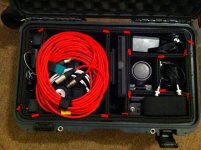
I'm using a a Nanuk 935 case, which is similar to a Pelican 1510, they both conform to the max. carry-on standard size. I use it with a TrekPak adjustable divider system, and I think it's pretty sweet. I have a complete FS700 kit (with 18-200 lens), an Odyssey7Q, a wireless mike kit, small shotgun mike, lots of batteries, charger, power supplies and lots of cables.
There is a myth about case foam. It is easier for most case companies to provide a fairly soft, less dense foam as it is inexpensive (mostly air pockets) and very forgiving. But then you need a great deal of it to cushion your gear. With firmer, more rigid foam you do not need much, but you do have to be more precise in your fit. You want everything to fit is snugly, and then the mass of the gear will help keep everything in its place. The TrekPak system uses hard foam glued to corrugated plastic (aka coroplast) and the dividers are interconnected using a pin system. It's quite clever and is an example of a successful Kickstarter campaign from last year.
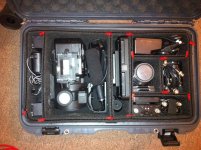
I put all the heaviest gear on the end of the case nearest the wheels, and made sure to nestle the lens in the middle of the case for the best protection from impact. So from left to right (left being where the wheels are) I have the batteries in the space between and above the wheel wells, the camera body with cables lying atop it and the had grip snugged in net to the top handle, the Odyssey7Q with it's mount, then a vertical set of cubbies, with the chargers & power supplies at the top, the lens, SSDs and some audio bits in the middle and the wireless mikes at the bottom. There's room for the shotgun mike to lie across the top and it's boom pole is in the tripod case.
This is how I transport the gear to the various demos and events I conduct with the Odyssey7Q, as well as some of my own personal work. It works out great.
There is a myth about case foam. It is easier for most case companies to provide a fairly soft, less dense foam as it is inexpensive (mostly air pockets) and very forgiving. But then you need a great deal of it to cushion your gear. With firmer, more rigid foam you do not need much, but you do have to be more precise in your fit. You want everything to fit is snugly, and then the mass of the gear will help keep everything in its place. The TrekPak system uses hard foam glued to corrugated plastic (aka coroplast) and the dividers are interconnected using a pin system. It's quite clever and is an example of a successful Kickstarter campaign from last year.
I put all the heaviest gear on the end of the case nearest the wheels, and made sure to nestle the lens in the middle of the case for the best protection from impact. So from left to right (left being where the wheels are) I have the batteries in the space between and above the wheel wells, the camera body with cables lying atop it and the had grip snugged in net to the top handle, the Odyssey7Q with it's mount, then a vertical set of cubbies, with the chargers & power supplies at the top, the lens, SSDs and some audio bits in the middle and the wireless mikes at the bottom. There's room for the shotgun mike to lie across the top and it's boom pole is in the tripod case.
This is how I transport the gear to the various demos and events I conduct with the Odyssey7Q, as well as some of my own personal work. It works out great.
Attachments
Jim Ritscher
Well-known member
Mitch, could you take another picture with the XLR cables removed (so I see how the camera is arranged)? Thanks.
Last edited:
True North
Well-known member
The trekpak stuff is pretty sweet.....over priced but sweet!!
Works well with lighter stuff and not so great for heavier stuff. Reason being is that you only secure the tops which leaves the bottoms of the divider to move around a bit, it is the one flaw of the system
Works well with lighter stuff and not so great for heavier stuff. Reason being is that you only secure the tops which leaves the bottoms of the divider to move around a bit, it is the one flaw of the system
Mitch Gross
Veteran
Here's your picture. Under the camera mike is the handgrip. I have no use for the viewfinder so I don't bother with it. On the left there's normally several more batteries but they're sitting on another charger at the moment. That's a dedicated AC power supply sitting with the batteries. And on the lower right corner I pulled out the belt strap so the wireless mike kit was visible.
True North, once you have the system configured, just lift the entiire thing out of the case, flip it over and add clips to the bottom. Then put it back in the case and you're good to go. Very secure.
True North, once you have the system configured, just lift the entiire thing out of the case, flip it over and add clips to the bottom. Then put it back in the case and you're good to go. Very secure.
Attachments
True North
Well-known member
True North, once you have the system configured, just lift the entiire thing out of the case, flip it over and add clips to the bottom. Then put it back in the case and you're good to go. Very secure.
Brilliant advice, hadn't thought of that, thanks

Ted Herod
Active member
do you use them as cabin case? The case weights already 6kgs / 13 lbs
and most airlines here in Europe limit weight at 8ks / 17,6 lbs
I experienced that in the meanwhile they check it more often.
I travel with a light carbon cabin case and wrap my stuff with
meters of bubble wrap. No problem so far as I take care for myself.
Yes, I've only been forced to gate-check it once. Usually you just don't try to flaunt the fact that it's a Pelican... the more they pay attention to that, the more likely they are to check. Usually it's only the lens case that's actually over the limit. I think the only time we were stopped was flying out of Iceland.
Clermond
Veteran
on my last five flights I have been checked two times. Turkish Arlines in Frankfurt GER, 11kgs instead of 8.
I could deal with them to put the laptop out and put it into my sholder bag. Some weeks later Lufthansa
in Instanbul 10kgs instead of 8kgs, I had to put some stuff into my regular case (and pay 2kgs extra weight)
I also saw people at the boarding gate who where checked again and were forced to hand over the cabin
case to cargo luggage (needless to mention the extra fee)
I always try to avoid any attention or attraction to my equipment.
That's why I sold my alloy Rimowa and travel with a no name carbon cabin case and
two unsightly purple and mint green 90s Samsonites instead. Another advantage:
you see them immeditaley at the carousel ;-))
I could deal with them to put the laptop out and put it into my sholder bag. Some weeks later Lufthansa
in Instanbul 10kgs instead of 8kgs, I had to put some stuff into my regular case (and pay 2kgs extra weight)
I also saw people at the boarding gate who where checked again and were forced to hand over the cabin
case to cargo luggage (needless to mention the extra fee)
Usually you just don't try to flaunt the fact that it's a Pelican.
I always try to avoid any attention or attraction to my equipment.
That's why I sold my alloy Rimowa and travel with a no name carbon cabin case and
two unsightly purple and mint green 90s Samsonites instead. Another advantage:
you see them immeditaley at the carousel ;-))
Last edited:
As an alternative, have you ever thought of using a Backpack?
I used to travel with a pelican case, but I find it much easier to travel with a Think Tank Airport backpack. They are way less cumbersome, easier as a carry on (I won't check in the body or lenses), fit way more stuff, easier to store in tight places and just easier to manage. In fact, I no longer use Pelicans at all for about 4 years now. I just store everything in my backpacks and it works great. Never damaged a thing. Obviously, they're not as strong as a Pelcian, but with a little extra caution, the added convenience is well worth it. Like I said, I've never damaged anything and I'm not overly caution either.
Obviously, if you are checking in the luggage, Pelicans are way better; but as a carrying on, Backpacks are fine.
These work great. I have both sizes. Make traveling much easier.
http://www.thinktankphoto.com/products/airport-accelerator.aspx
http://www.thinktankphoto.com/products/airport-commuter.aspx
I used to travel with a pelican case, but I find it much easier to travel with a Think Tank Airport backpack. They are way less cumbersome, easier as a carry on (I won't check in the body or lenses), fit way more stuff, easier to store in tight places and just easier to manage. In fact, I no longer use Pelicans at all for about 4 years now. I just store everything in my backpacks and it works great. Never damaged a thing. Obviously, they're not as strong as a Pelcian, but with a little extra caution, the added convenience is well worth it. Like I said, I've never damaged anything and I'm not overly caution either.
Obviously, if you are checking in the luggage, Pelicans are way better; but as a carrying on, Backpacks are fine.
These work great. I have both sizes. Make traveling much easier.
http://www.thinktankphoto.com/products/airport-accelerator.aspx
http://www.thinktankphoto.com/products/airport-commuter.aspx

John Foundas
Well-known member
I've just received my Odyssey and am going to be traveling on a plane with it. I'm currently using Westside AV's hood and mounting bracket. I'm trying to figure out the best solution, been looking at Pelican cases approved for carry on travel, there is one with dividers and one with foam. Does anyone have any recommendations? I'm nervous I'm going to damage something before I get to my shoot!
I just finished up a travel gig with the Pelican 1510. I used the cushy insert divider one. It was snug and fine as a carry on. Wrap your Np970 batteries in plastic sandy bags though. Keep them separated.
Mitch Gross
Veteran
Forgot to mention that. Whenever I fly I separate the batteries with Ziplok baggies, and keep a piece of bright tape on each. I tape over the contacts but I also find it handy when I have a lot of batteries in use as a way to mnote charged v. no charged (only charged ones have contacts covered). Useful for me, safer in flight, keeps TSA happy.Wrap your Np970 batteries in plastic sandy bags though. Keep them separated.
Just got back from a trip to Florence with the O7Q. This was before the Westside AV hood, but using the original blue foam packing from the box, the 7Q fit nicely in into the side of Think Tank's Airport International Roller V2.0 bag. Held it nice and snug the entire trip and I used the bag to carry it out into the field along with the FS700. Westside AV hood fits perfectly into the slot as well.
I used to carry my FS700 in a Peli 1510, but a few things I like about the Think Tank vs the Peli:
• More room/dividers
• Lighter (9.5 lbs empty vs 13.6 lbs empty)
• Better Handle + ability to sling on an Urban Disguise camera bag.
• More discreet.
• Possible to keep laptop inside with low-divider set
Being lighter can make a big difference on international travel. When trying to return home at the Florence airport, Lufthansa had a weight limit of 8kg (~17 lbs) per carry-on. With a Peli, you'd only be able to add 3.4 lbs of gear. Very fortunately though, when I told and showed the representative that I had camera gear inside both bags, she gave them a special tag and let both go through.
I used to carry my FS700 in a Peli 1510, but a few things I like about the Think Tank vs the Peli:
• More room/dividers
• Lighter (9.5 lbs empty vs 13.6 lbs empty)
• Better Handle + ability to sling on an Urban Disguise camera bag.
• More discreet.
• Possible to keep laptop inside with low-divider set
Being lighter can make a big difference on international travel. When trying to return home at the Florence airport, Lufthansa had a weight limit of 8kg (~17 lbs) per carry-on. With a Peli, you'd only be able to add 3.4 lbs of gear. Very fortunately though, when I told and showed the representative that I had camera gear inside both bags, she gave them a special tag and let both go through.
morgan_moore
Major Contributor
mint green
Ive got baby pink acquired from a friends daughter (who is now to old to like pink).
Tip to thieves; steal the bad bags

--
Personally I carry on my billingham which can take a FS100+lenses, but a 700+ody would be a squeeze
Rig+clothes are packed around my sticks in the quality Miller bag.
Third case where required is indeed pink no name suitcase.
S


olof
DVXuser Sponsor
[h=1]This is from the TSA:
http://www.tsa.gov/traveler-information/safe-travel-batteries-and-devices
But check with your airline for the latest info. I have not had any problems, just follow the airlines rules.
Safe Travel with Batteries and Devices[/h][h=2]Traveling with Special Items[/h]
Share on emailShare on facebookShare on twitterShare on linkedinShare on diggShare on deliciousShare on redditShare on stumbleuponShare on google_plusone_share
As of January 1, 2008, the Department of Transportation (DOT) through the Pipeline and Hazardous Materials Safety Administration (PHMSA) no longer allows loose lithium batteries in checked baggage.
Learn more at http://safetravel.dot.gov/whats_new_batteries.html.
[h=3]Tips For Safe Travel with Batteries[/h]
[h=3]Lithium Batteries: Safety and Security[/h]

Lithium-ion batteries, often found in laptop computers, differ from primary lithium batteries, which are often used in cameras. Some newer AA-size batteries are also primary lithium.
While there is no explosion hazard associated with either kind of battery, the Federal Aviation Administration has studied fire hazards associated with both primary and lithium-ion cells, and their extensive research is publicly available. As a result of this research, the FAA no longer allows large, palletized shipments of these batteries to be transported as cargo on passenger aircraft.
The research also shows that an explosion will not result from shorting or damaging either lithium-ion or primary lithium batteries. Both are, however, extremely flammable. Primary lithium batteries cannot be extinguished with firefighting agents normally carried on aircraft, whereas lithium-ion batteries are easily extinguished by most common extinguishing agents, including those carried on board commercial aircraft.
TSA has and will continue to work closely with the FAA on potential aviation safety and security issues, and TSA security officers are thoroughly and continually trained to find explosive threats. TSA does not have plans to change security regulations for electronic devices powered by lithium batteries.
http://www.tsa.gov/traveler-information/safe-travel-batteries-and-devices
But check with your airline for the latest info. I have not had any problems, just follow the airlines rules.
Safe Travel with Batteries and Devices[/h][h=2]Traveling with Special Items[/h]
Share on emailShare on facebookShare on twitterShare on linkedinShare on diggShare on deliciousShare on redditShare on stumbleuponShare on google_plusone_share
As of January 1, 2008, the Department of Transportation (DOT) through the Pipeline and Hazardous Materials Safety Administration (PHMSA) no longer allows loose lithium batteries in checked baggage.
Learn more at http://safetravel.dot.gov/whats_new_batteries.html.
[h=3]Tips For Safe Travel with Batteries[/h]
-
Keep batteries and equipment with you, or in carry-on baggage - not in your checked baggage! In the cabin, flight crew can better monitor conditions, and have access to the batteries or device if a fire does occur.

- Buy batteries from reputable sources and only use batteries approved for your device – avoid counterfeits! A counterfeit battery is more likely to cause a fire in your equipment – costing you more in the long run, and compromising safety.
- Look for the mark of an independent testing or standards organization, such as Underwriters Laboratories (UL) or International Electrotechnical Commission (IEC).
- Do not carry recalled or damaged batteries on aircraft. Check battery recall information at the manufacturer's website, or at the Consumer Product Safety Commission.
- Only charge batteries which you are sure are rechargeable! Non-rechargeable batteries are not designed for recharging, and become hazardous if placed in a battery charger. A non-rechargeable battery placed in a charger may overheat or cause damage later.
- Only use a charger compatible with your rechargeable battery – don’t mix and match!
- If original packaging is not available for spare batteries, effectively insulate battery terminals by isolating the batteries from contact with other batteries and metal. Do not permit a loose battery to come in contact with metal objects, such as coins, keys, or jewelry.
- Place each battery in its own protective case, plastic bag, or package, or place tape across the battery's contacts to isolate terminals. Isolating terminals prevents short-circuiting.
- Take steps to prevent crushing, puncturing, or putting a high degree of pressure on the battery, as this can cause an internal short-circuit, resulting in overheating.
- If you must carry a battery-powered device in any baggage, package it to prevent inadvertent activation. For instance, you should pack a cordless power tool in a protective case, with a trigger lock engaged. If there is an on-off switch or a safety switch, tape it in the "off" position.
[h=3]Lithium Batteries: Safety and Security[/h]
Lithium-ion batteries, often found in laptop computers, differ from primary lithium batteries, which are often used in cameras. Some newer AA-size batteries are also primary lithium.
While there is no explosion hazard associated with either kind of battery, the Federal Aviation Administration has studied fire hazards associated with both primary and lithium-ion cells, and their extensive research is publicly available. As a result of this research, the FAA no longer allows large, palletized shipments of these batteries to be transported as cargo on passenger aircraft.
The research also shows that an explosion will not result from shorting or damaging either lithium-ion or primary lithium batteries. Both are, however, extremely flammable. Primary lithium batteries cannot be extinguished with firefighting agents normally carried on aircraft, whereas lithium-ion batteries are easily extinguished by most common extinguishing agents, including those carried on board commercial aircraft.
TSA has and will continue to work closely with the FAA on potential aviation safety and security issues, and TSA security officers are thoroughly and continually trained to find explosive threats. TSA does not have plans to change security regulations for electronic devices powered by lithium batteries.
Latest revision: 24 January 2013
Mitch Gross
Veteran
You cannot check Li-ion batteries, but you can bring them aboard in carry-on luggage. You should put them into individual containers and protect the contacts. I use Ziplok baggies and Gaff-tape the contacts. The limit is 8 grams of lithium per battery, which would be a 100w item. That's why there are batteries such as the Dionic 90, which is just below that threshold. For comparison, a Sony NP-F970 is 47.5w, so no problem.