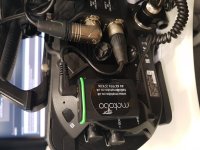
FS7: Timecode output gadget

Vintegreo

Well-known member
I seem to recall stumbling upon a gadget to output timecode from the FS7 when you don't have the XDCA back.

I have a shoot coming up where I'll be working with a sound guy who'll be making a backup recording as well as sending me a good audio signal via a wireless hop. I'd love to have the FS7 provide master timecode, but am not real keen on the rental charge on the XDCA back for the sole purpose of a timecode source.

Thoughts or ideas?
 
Sounds like the camera is recording a backup while the mixer is recording the master audio. Wireless hop may be fine, but it may also add compression and other artifacts -- not to mention RF hits.
But to your question - one way to deal with it is to use a slate at the head of each take.
Of course you can also use the audio tracks to synchronize your footage semi-automatically in some NLE's.
If you want close time code for a reference, you can manually set free run timecode on the camera to more or less match the timecode on the mixer.
We use tentacles on plenty of shoots - but only on ones with cameras that have timecode inputs. Yes, you can send the timecode to an audio track on the FS7, but then you tie up an audio channel and have to worry about compromising your other audio on the camera.
The only way I can imagine trying to use the FS7 as a timecode master would be to try to use a reader that can split out the timecode from and HD-SDI or HDMI signal. Then that timecode would need to be sent to the Mixer. But in this scenario you would have a sync issue since the camera outputs (and viewfinder) tend to be slightly delayed.
 
Tentacle Syncs are the standard go to option when a camera can't do time code at all (as is the case of the FS7, which is incapable of time code in its basic configuration).

Tentacle Syncs are darn cheap too! I own two, using them right now this second on a feature film I'm doing sound for.
 
Sounds like the camera is recording a backup while the mixer is recording the master audio. Wireless hop may be fine, but it may also add compression and other artifacts -- not to mention RF hits.
But to your question - one way to deal with it is to use a slate at the head of each take.
Of course you can also use the audio tracks to synchronize your footage semi-automatically in some NLE's.
If you want close time code for a reference, you can manually set free run timecode on the camera to more or less match the timecode on the mixer.
We use tentacles on plenty of shoots - but only on ones with cameras that have timecode inputs. Yes, you can send the timecode to an audio track on the FS7, but then you tie up an audio channel and have to worry about compromising your other audio on the camera.
The only way I can imagine trying to use the FS7 as a timecode master would be to try to use a reader that can split out the timecode from and HD-SDI or HDMI signal. Then that timecode would need to be sent to the Mixer. But in this scenario you would have a sync issue since the camera outputs (and viewfinder) tend to be slightly delayed.

Would be a very bad idea if not hardwired to the soundie's kit as the FS7 would quickly drift like absolutely crazy.
 
It isn't clear to me at all from their website how this thing works. How does it even connect to the camera - Is it an audio line?
 
It isn't clear to me at all from their website how this thing works. How does it even connect to the camera - Is it an audio line?

It connects via BNC to TC in.. well thats how the sound guys I work with use it.. (there are other cables I believe ).. then it sits on the camera.. very small and light.. also good for coming out of S&Q mode ,audio doesn't have to re set the TC sync each time..

To OP..as others have said .. the camera will be the backup .. often I just have a camera mic as a guide track.. or 1 mixed track wireless .. the audio recorder will be the main.. and TC should always come from the recorder not the camera.. but you would need the TC in back to make it work properly..
 
The only way I can imagine trying to use the FS7 as a timecode master would be to try to use a reader that can split out the timecode from and HD-SDI or HDMI signal. Then that timecode would need to be sent to the Mixer. But in this scenario you would have a sync issue since the camera outputs (and viewfinder) tend to be slightly delayed.

In my perfect world, this is exactly how it would work. That said, I initially thought it cost $150/day to rent the XDCA extension and have since learned that it's $50/day. I'll probably just rent the gadget to get proper timecode ins and outs. We shall see!
 
I use tentacles all the time one on the fs7 one on the a6300 on the gimbal which keeps them in sync.
I also got rid off all my wireless mice and now use two lectrosonics PDR's that are Timecode locked.
At the end of the day I drop all video and all audio into the tentacle software and it syncs the sound to both.
 
There's a handful of small sync boxes on, or about to be, the market now, including the UltraSync One which will also supports Genlock.

What makes the Tentacle the most popular? Because they were first to market? If so, what would you buy once they're all available?
 
In my perfect world, this is exactly how it would work. That said, I initially thought it cost $150/day to rent the XDCA extension and have since learned that it's $50/day. I'll probably just rent the gadget to get proper timecode ins and outs. We shall see!

In my limited experience with the XDCA, it does an OK job maintaining sync. But even then, I'd want to have an accurate timecode box (and preferably a timecode+genlock box) stuck on the XDCA. My preferred workflow is sound guy/gal provides the master clock (and records master audio tracks...especially if audio-to-camera is over an inexpensive wireless system)...and then a TC box on the camera, perhaps also with a scratch audio mix.

If you have the XDCA providing master TC, you'll still need/want to get that TC back to your soundie, right? So you'll still need a TC box.

Ben, I think you're thought about why Tentacle is so common is right: First to market with a cheap, small TC box. But as you say, now there are a bunch of lower-cost options. Here's an audio dealer's page that lists most of them:
https://www.trewaudio.com/product-category/slates-timecode/slates-timecode-syncgen-boxes/

Tentacles seem fine, though I'm not a big fan of their connectors and built-in batteries. Not saying they're bad, because they're not. But if you only use these things occasionally, one of the boxes with replaceable AAA batteries might be a reasonable way to go to make sure you don't get stuck with dead batteries...BTW- this isn't a FUD thing... Tentacles seem well made...

Me, I have a couple Ambient Lockits (expensivish tc/sync boxes)...But camera folks are spoiled by the tiny and decent Tentacles. So I'll probably be buying...um... I"m not sure. The cool thing to me is that all the new tc boxes appear to be decent at doing their job. And it comes down to the implementation and features that appeals most to you. For example, the UltraSync One is really appealing. But those mini COAX connectors means I'd need to build a new set of cables to work with the various cameras I come across... Not a deal killer, but an extra expense that makes me think a bit (less of an issue if you don't already have tc cables and/or will mostly be working with one or two models of camera). Also, I'm kinda getting along better than I expected without genlock these days. I mean, it's nice, but we've been dealing without it for quite a while now... Sigh, I guess. Also: I do a fair amount of work as a location sound guy, so it's easier for me to justify a bit more money spent on TC gak...

Ben, what appeals most to you?

IronFilm, I recall you considering your options before going with Tentacles. What made you choose those over other choices?

Vintegreo, let us know what you end up doing and how it goes during the shoot and post.
 
I'm one of those PIA DP/OPs who occasionally balks at having a larger Lock-It box attached to the camera if it seems I'll be cradling the camera, but a tiny version wouldn't be such as issue.

Probably won't be buying any of these systems just yet, but will request them when appropriate.
 
To go back to the OP original question -- is there a way to get an accurate time code out from an FS7 to the Tentacle system if the camera doesn't have the XDCA (and therefore has NO timecode out BNC connector)?????
 
Seems there surely must be... and I say that simply because I have and use the PIX e5 recorder with my FS7 quite a lot - and it can feed TC to it via hdmi & sdi (need to double check the sdi option)...
In the camera menu - there's a way to set up recorder or monitor output and trigger recording of the recorder and have TC on or off... perhaps this could work with TC system (sorry - not familiar with Tentacle... I'm a FCPX user and syncing audio in post has become such a breeze without using TC)
 
The way it works is the following:
You set Time of day timecode on the tentacle via iPhone app. You feed TC via Audio from the tentacle to channel 1 or 2 on the camera
you rund the shot files through tentacles own software and it reads the audio timecode and stamps it on your footage it takes the same amount of time like copying the card to a drive essentially thats what you are doing it just goes through the software. You can also load all the Remote recorded audio with TC and sync in in the app.


To go back to the OP original question -- is there a way to get an accurate time code out from an FS7 to the Tentacle system if the camera doesn't have the XDCA (and therefore has NO timecode out BNC connector)?????
 
I take a whiff of TC from our Zoom F4 recorder (BNC output to 3.5mm jack input on Tentacle - LTC is just an audio signal), Tentacle locks onto that in a couple of seconds.

20170613_210318.jpg

The Tentacle then sticks on side of FS7 (or A7Rii) and feeds the LTC line level audio signal into ch2 - I just made an unbalanced 3.5mm to XLR cable (pictured).

After shooting, you run your rushes through the Tentacle Sync Studio software - you get one transferable license free with each TS box.

The TS software outputs new files, video essence untouched, ditches the LTC synching signal and replaces audio channels of MXF with the separately recorded audio stems. It can preserve any audio channels recorded on the FS7 too - all set up in preferences. You then end up with a set of new MXFs with multi-channel audio embedded. And you stop asking why they included 8 channels in the audio spec :-)

Nicely thought through and made by ze Germans.

Ben.
 
Thanks Ben , good explanation at last - sounds pretty nifty. Could you use this on an Osmo also? The website says it also has a built in mic. Is that for reference sound on a second track?
 
Last edited:
Thanks Ben , good explanation at last - sounds pretty nifty. Could you use this on an Osmo also? The website says it also has a built in mic. Is that for reference sound on a second track?

Lenny, the inbuilt mic on the TS means you can plug it into a DSLR/Osmo etc and you'll get some scratch audio on channel 1 of the stereo pair, which would otherwise be cancelled out by inserting the mic jack. So, yes, you'd end up with timecoded Osmo rushes and you can then embed the externally recorded audio stems on the Osmo mp4s/movs.
 
It turns out that the XDCA back rents for only $25/day here locally, so I'll be just going the "traditional route" on timecode ins and outs. That said, this is all GREAT info to have on how the tentacle thing works. I'm glad to have all of that info!
 
Back
Top