Time Lapse with Canon EOS 7D

Hi,

I just bought myself a Canon 7D and I was wondering how I could make some timelapse videos with it.

I have watched a few tutorial videos but none of them feature the 7D, an the most informative one was done with a Nikon that had an option in its menu to take pictures in determined time gaps. Does the 7D have that kind of option or do I have to buy a shooting timer or some other external apparel?

I know that you have to leave the camera still on a tripod and let it take thousands of pictures by itself and, at the end, these pictures will work as one frame in the video, like a stopmotion, but after I have taken the pictures, how do I compress them into a video? Is there an application or a plug-in that does the job?

One last question: After compressing the pictures into a video, will it be the same size as the HD video that is recorded with de 7D, wich is 1920x1080??

Thank you
 
You get a timer, set it to the interval you want. Set your picture size to fairly small and have at it. Quicktime Pro allows you to create a video from timelapse really easily, and I assume other specialized programs are available as well. You can also import the images in an NLE, but they tend to have a harder time dealing with it. And if you need thousands of pictures depends on how long it's going to go.

As for the last question, this is one you should just think through a bit. Your video will be the resolution that you tell it to be, since you're using still pictures, which are always larger than video frames. You'll need to use standard sizes for proper encoding and uploading.
 
You need an intervalometer like this.

But check around these boards as there are cheaper versions. You can also use the EOS software included with the camera, but you'll be tethered to a computer.

You can conform your images into a movie sequence through many different pieces of software. Quicktime, After Effects, etc. I'm sure there are some free options out there as well.

The sequence size will be determined by your still settings on the camera. This can also be conformed to a more video friendly aspect in software.
 
The 7D does not have a built-in timelapse feature. You'll need an intervalometer to take photos at specified time intervals. The Canon one works great and I've heard that the cheaper eBay versions work just as well too.

Yes, you should use a tripod or some other way to ensure that the camera doesn't move while taking the photos (although advanced techniques allow you to pan or tilt...but don't go there until you get the basics right first).

If you use a Mac, QuickTime Pro 7 includes an image sequencer that you can use to output the photos as a single video clip. Alternately, you can drag all of your photos onto a timeline (works in FCP; I assume it would work similarly for any other editing software too) in the order needed.

The size of your video will depend on the size of your photos. The video will be the same size as your photos.

Beyond your questions, there's a lot of other basic information you'll need to know/learn to get decent timelapses. You should checkout timescapes.org for more about timelapses. Be sure to look at the forums and the FAQs, etc. There's a lot there if you do a little digging.
 
Hmmm...looks like Cassius and pete beat me to it. You can ignore most of my post as it's repetitive.
 
I have FCP 7.0, but is when I import photographs, it makes clips that are to long, so I have to manually cut them in to shorter clips with the blade and delete the rest. If I where to do that with 1000 pictures, there is a big chance I will go crazy! Am I doing something wrong, is there a setting that let's you import pictures as a single frame?

About Quicktime Pro 7, is it the same application as the Quicktime Player or is it something else? Because a I just bought a new Macbook Pro that already comes with the latest version of Quicktime, but I had read somewhere that it imports still pictures as footage, but when I looked for it I didnt find it....

Thank you so much for the help!
 
In FCE you can right click and set the duration of a whole selection of photos... I'd have to imagine you can do that in FCP as well.

edit:
Re: quicktime: quicktime and quicktime pro are different.
 
Depends on the look you are going for.

I recommend going to timescapes website (as recommended earlier) and looking around for a while. A lot of these things is going to be your preference.
 
Clouds can move very fast even at normal speed. You definitely have to experiment but I would say that 25-30 seconds is the upper limit to get really fast rolling clouds. 10-15 seconds would often be better.
 
In FCP there is a way to set your pictures to one frame per second, fairly easy.
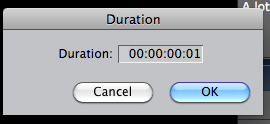
Place all of your pictures into the timeline. Select all of your pictures and right click>set duration. In the window that pops up type in "1" and final cut will do the rest. It will take a little bit of time, but it is worth it. Here is a picture to help you out.
moz-screenshot.png
 

Attachments

  • Screen shot 2010-07-22 at 12.30.44 PM.png
    Screen shot 2010-07-22 at 12.30.44 PM.png
    15.1 KB · Views: 0
+1 to what Andrew said. You can also set your preferences for still images before you import them into FCP so they automatically come in at 1 frame (or whatever other duration you want).
 
Back
Top