Time Lapse Shot with GH2 Flow Motion v2.02

Benjobe

Well-known member
The first three segments in the video were recorded at 1920x1080 24p in 24L mode (which I believe is 50mbps with the Flow Motion v2.02 patch). After importing the video into Final Cut Pro 7 I increased the frame rate 3200% and I increased the contrast with a three-way color correction filter. I also did a little pan&scan movement within the frame. That's all I did with the video segments.

The rest of the video is composed of 4976x2800 RAW photos which I processed in Photoshop, exported as PNG files, imported into FCP 7, and dropped into a timeline as single frames. I then did some color correction / contrast adjustment, frame rate manipulation, and keyframe movements within the timeline.

Here's the link to Timelapse.org which has posted it as the Video of the Day today:

http://timelapse.org/2012/08/the-heavens-of-humboldt/

I think this video shows that the GH2, while making exceptional video, can also produce great photos as well.

Special thanks to Vitaliy Kiselev for hacking the GH2 and to LPowell for the Flow Motion v2.02 patch.
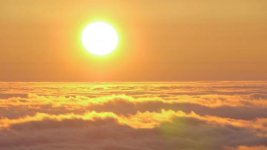
 
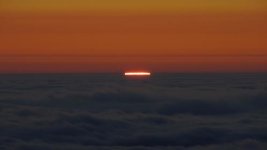
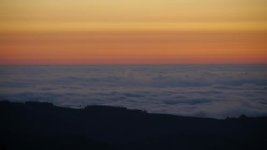
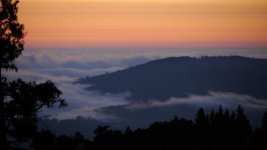
Here are a few frame grabs from the video segments, totally unprocessed, exported from FCP 7 as high quality PNG files.

1920x1080 24L 1/50th f5.6 ISO 160 with the Lumix 45-200mm at 200mm and OIS enabled.

Horse Mt Sunset 1.jpg

Same as above (1920x1080 24L 1/50th f5.6 ISO 160 with the Lumix 45-200mm at 200mm and OIS enabled.)

Horse Mt Sunset 2.jpg

1920x1080 24L 1/50th f4.0 ISO 200 with the Lumix 45-200mm at 45mm and OIS enabled.

Horse Mt Sunset 3.jpg

1920x1080 24L 1/50th f4.5 ISO 400 with the Lumix 45-200mm at ~90mm and OIS enabled.

Horse Mt Sunset 4.jpg

(These videos were all taken at 50mbps using the Flow Motion v2.02 patch)
 
Really enjoyed your work. Could you explain how you control exposure on the day to night transition shots? I have tried using iAuto for some day to night shots in a well lit city and of floodlit building, but they didn't work as well as I was hoping. Are you shooting fully manual or letting the camera control some settings such as iso or aperture?

Thanks
 
Day to night transition is tricky. I typically have the dslr in Aperture Priority mode during the sunset and keep it there until it gets dark. If there's a lot of movement in the frame (like clouds) I manipulate the aperture and ISO to keep the shutter speed ~1/50th so there's nice motion blur. However, in full sun this is nearly impossible without a ND filter, and filters of any kind are prone to producing terrible lens flare when shooting the sun or a bright moon. For this reason I typically shoot with a naked lens. So no ND. Which means that with full sun my shutter speed is very high. Not ideal but not a deal breaker either. However, once the sun gets low on the horizon or passes behind clouds then I can keep my shutter speed ~1/50th pretty easily by adjusting the ISO and aperture.

I typically keep the aperture above f8 until twilight. The aperture might be f16 with full sun but as the light fades I gradually open it up to f8 while keeping my eye on the shutter speed and trying to keep it at 1/50th. The f8 is to ensure that all my foreground, mid-ground, and background is in focus. At this point I start adjusting the ISO, gradually raising it from 160 to 800, again while trying to keep the shutter speed constant. But as it gets darker the foreground and mid-ground become less important. All eyes are on the sky at this point looking for stars. It's at this point that I leave the ISO at 800 and start manipulating the aperture again. I gradually open the iris from f8 to f2.0 while keeping the shutter speed constant. When I've reached f2.0, ISO 800, and shutter 1/50th it's getting pretty dark and the light is fading fast. Now I let the Aperture Priority start to lengthen the shutter speed below 1/50th. My camera's AP mode will take the shutter speed all the way to 2 seconds and then leave it there. If I want a longer shutter speed (moonless night sky stars need ~15 second shutter at least) then I have to start manipulating the camera manually.

At this point I quickly (between frames) switch the camera into Manual mode, keep the aperture and ISO constant, and begin lengthening the shutter speed. I increase the shutter speed one increment every 24 photos (which will be 1 second of time lapse video if using 24 frames/sec). This means I'm out in the elements (winter is the hardest) in near-total darkness holding the intervalometer in one hand and a timer in the other hand. I usually have a headlamp on to help.

I haven't even mentioned the shooting interval yet. This is tricky too. When the sun is up and the clouds are moving fast my interval may be anywhere between 1 sec and 10 sec. But at some point I have to start manually lengthening the interval between shots. I usually begin doing this at the time I'm at f2.0, ISO 800, and 1/50th shutter when I let the AP mode automatically, gradually lengthen the shutter speed to 2 seconds. I usually lengthen the interval by one second every 24 photos. If done correctly, then by the time my DSLR in AP mode has reached a 2 second shutter speed then my interval has become ~10 seconds.

Now at this point I'm in full manual mode with the DSLR and also with my intervalometer. I'm juggling the lengthening of my shutter speed (one increment every 24 frames) with the lengthening of my interval (1 second every 24 frames). I juggle these settings until I reach my final destination for the night sky. If it's a starry moonless sky then I usually stop at a 15 second shutter and 30 second interval. If it's a full or partial moon then I usually keep my shutter lower, maybe at 6 seconds, and my interval ~20 seconds.

It's also important to know that a long shutter speed can create oblong star images. Basically the stars are moving too much during the exposure. This effect depends on the focal length of your lens. A wide lens, like my 24mm, has no probably producing point-like stars with 15 second shutters. There's a formula I found somewhere that says your shutter speed needs to be equal-to or less-than 500/focal length (in 35mm equivalence). So the longest shutter speed I could use with my 24mm without producing star streaking would be 500/24 = 20.8 seconds. (It's actually a 12mm but my GH2 has a 2x crop factor which makes it a 24mm equivalent)

I know this is a lot of information. I didn't intend to write this much. I hope some of it was helpful. Good luck with your time lapses!
 
WOW, looks like I have a lot to learn! Thanks for your very comprehensive answer. It's going to take me a while to figure out how to follow your methods. At least I have some guidelines as a starting point for intervals and exposure. Thanks again.
 
Back
Top