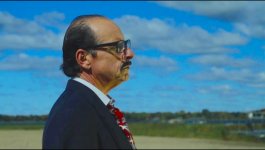
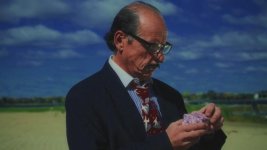
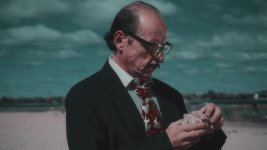
Three Strip Technicolor

This is the typical original Technicolor I love
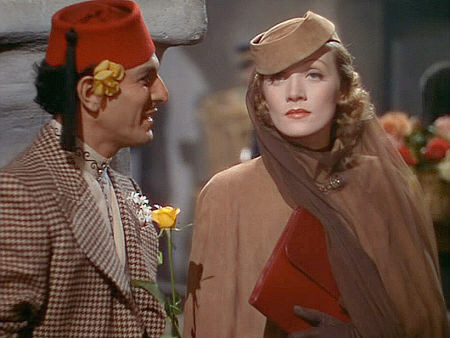
technicolor-gardenofallah-2.jpg


With a HVX200, some ND and Pol filters you can almost create that in camera.

Is there a 'clearer' recipe for After Effects. The example I think is using a still in Photoshop... but Photoshop these days can deal with movies in a limited way, so I suppose I could create the color separations in PS.
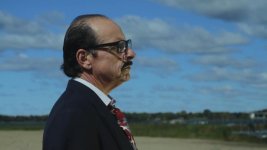
 
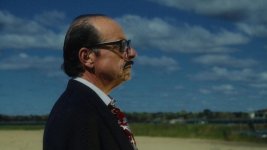
Ok, here is the un color corrected:
police1UN.jpg

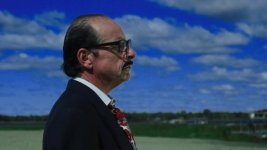
Here is my attempt:
police1.jpg

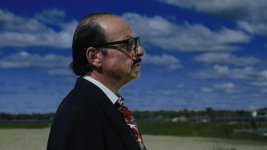
and here is the raw Aviator technicolor method:
police1technicolor.jpg

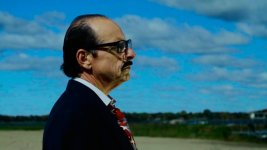
And here is the technicolor adjusted a bit:
police1technicolorAdjust.jpg
 
Last edited:
Yeah that's closer to what I got too...Frank's seems closer to what it I think it should do, not that it looks better.
 
I think we forget too that when they shot with Technicolor they used a lot of makeup to compensate, and they usually had a consultant on hand to make sure colors came out looking like the colors they were supposed to represent.
 
I think we forget too that when they shot with Technicolor they used a lot of makeup to compensate, and they usually had a consultant on hand to make sure colors came out looking like the colors they were supposed to represent.


Right, a solid amount of grease make-up and powder sure helps, and they had tons of light, since they where shooting in the neighborhood of ASA 5.

Frank
 
I think we forget too that when they shot with Technicolor they used a lot of makeup to compensate, and they usually had a consultant on hand to make sure colors came out looking like the colors they were supposed to represent.

That 'color consultant' would be....Natalie Kalmus... the wife of Herbert T. Kalmus the founder of Technicolor... Here's the wiki article on her activities as consultant...

------------
Originally a catalog model, then an art student, Kalmus made sure sure that costumes, sets and lighting were adjusted for the camera's sensitivities. She was generally regarded as a nuisance, but her services were contractually part of Technicolor's services. In her attempts to keep colors from being rendered improperly onscreen, she was accused of going to the other extreme of mildness. She wrote: "A super-abundance of color is unnatural, and has a most unpleasant effect not only upon the eye itself, but upon the mind as well." She recommended "the judicious use of neutrals" as a "foil for color" in order to lend "power and interest to the touches of color in a scene."[3] Producer David O. Selznick complained in a memo during the making of Gone with the Wind:

“ [The] technicolor experts have been up to their old tricks of putting all sorts of obstacles in the way of real beauty. . . . We should have learned by now to take with a pound of salt much of what is said to us by the technicolor experts. . . . I have tried for three years now to hammer into this organization that the technicolor experts are for the purpose of guiding us technically on the [film] stock and not for the purpose of dominating the creative side of our pictures as to sets, costumes, or anything else. . . . If we are not going to go in for lovely combinations of set and costume and really take advantage of the full variety of colors available to us, we might just as well have made the picture in black and white. It would be a sad thing indeed if a great artist had all violent colors taken off his palette for fear that he would use them so clashingly as to make a beautiful painting impossible.[4] ”

Director Vincente Minnelli recalled of making Meet Me in St. Louis, "My juxtaposition of color had been highly praised on the stage, but I couldn't do anything right in Mrs. Kalmus's eyes."[5] Director Allan Dwan was more blunt: "Natalie Kalmus was a *****."[6]
 
Thanks. That produces differant result than the AE file you sent. That is in line with Franks result.
 
Patrick,
Do you have an AE file or settings that you could show me on how you got the Aviator algorithm going? The file I have produces the more magenta infused sky (which I like better BTW), but I would like to have on hand a closer proximation of the Aviator method for other scenes.
 
3 Strip.look.jpg2Strip_2.look.jpg

If you have money to spend......the way to go is Cineform first light used in conjunction with Iridas Speedgrade onset.

Did these in Speedgrade Onset with the shader option and added a 2 strip and 3 strip.These can then be loaded in Cineform firstlight and then superimposed on your footage without rendereing and play back in realtime. A bit pricey but nothing else comes close when it comes to grading on a budget - not even magic bullet. You can load expensive grades to your footage with this combo.
 
Last edited:
View attachment 24947View attachment 24948

If you have money to spend......the way to go is Cineform first light used in conjunction with Iridas Speedgrade onset.

Did these in Speedgrade Onset with the shader option and added a 2 strip and 3 strip.These can then be loaded in Cineform firstlight and then superimposed on your footage without rebdereing and play back in realtime. A bit pricey but nothing else comes close when it comes to grading on a budget - not even magic bullet. You can load expensive grades to your footage with this combo.


Well, after this discussion, I watched "Aviator"(2004), and the 2 stripe vs. 3 stripe was pretty obvious... but your examples, don't really match the color what I display had... the 'cyan' cast was brighter, and the 'greens' in the 3 stripe rendition were, well, emerald city green... MGM Las Vegas green... ok, even that may be a bit 'darker'...

I've not watched my $50 (at Costco) "Wizard of Oz"(1939)...

Anyway, one question I have is, exactly were are people getting their 'references' as to what either the 2 or 3 stripe process 'was'... I have a number of these $5 "Alpha Home Entertainment" dvd's where they've repackaged PD or cheap/old films.

But where did they get the masters... some of them look like VHS transfers... tearing scanlines and all...

Watched "Gigi"(1958) and supposedly a 'restored' DVD, and occasionally one would see color shifts in a scene... like they cut in a couple of segments of negatives or prints, as they could to get something that was not so abysmal...
 
good examples of the differances between transfers can be seen here:
http://www.dvdbeaver.com/film/DVDReview/tocatchathief.htm
http://www.dvdbeaver.com/film/DVDCompare5/northbynorthwest.htm
http://www.dvdbeaver.com/film/dvdcompare/vertigo.htm

as you can see the differances can be pretty dramatic

EDIT: Aviator had super saturated colors, like Wizard of OZ. Most three strip films muted the colors much more than that, but still the colors pop through. In my opinion there is no one three strip look as there are vast differances in looks between films. So I guess it's a combination of the process, the set design and the lighting.
 
Last edited:
Well, after this discussion, I watched "Aviator"(2004), and the 2 stripe vs. 3 stripe was pretty obvious... but your examples, don't really match the color what I display had... the 'cyan' cast was brighter, and the 'greens' in the 3 stripe rendition were, well, emerald city green... MGM Las Vegas green... ok, even that may be a bit 'darker'...


Sure they don't match but that was with the default untweaked look. If you have heard of Speedgrade onset you will know that it is the little brother to Iridas Speedgrade - used on Hollywood movies costing about £ 10 000 for the HD version alone and with Onset you get it's basic power for about 300 bucks.It can be a VERY powerful colour grading tool that you could grade a full movie with if you didn't need the full power of Speedgrade. In conjunction with Cineform first light you can colour time your footage to look just as you want it.
 
Trying to emulate three-strip Technicolor. I have tried the Magic Bullet Epic setting and dislike it. Below is my attempt by hand to emulate but would like to know if others have done so successfully and how they did it perhaps with some screen shots. I am editing in Vegas and using After Effects FYI.


Any tips or suggestions welcome


This looks good. Two things I would suggest. A little less color saturation, and ease up on the blacks just a little.
 
Back
Top