Three Strip Technicolor

boulder

Well-known member
Trying to emulate three-strip Technicolor. I have tried the Magic Bullet Epic setting and dislike it. Below is my attempt by hand to emulate but would like to know if others have done so successfully and how they did it perhaps with some screen shots. I am editing in Vegas and using After Effects FYI.


Any tips or suggestions welcome
 
Shot it with the Canon 7D w/Agfa custom camera setting, Nikkor 50mm 1.4, reflectors, NDs, and simply used the AAV colorlab plugin in Vegas with color curves in after effects
 
Last edited:
what is really cool, to me anyhow, is that three strip technicolor is very close to bayer pattern cmos as far as capture. Cmos bayer pattern is photosites that record 25% red, 25% blue and 50% green. Technicolor uses prisms and three strips of film to divert 25% of the light to the red emulsion, 25% of the light to the blue emulsion and 50% of the light to the green emulsion. Cool huh? I love it when old film tech.mirrors new digital. LOVE it
 
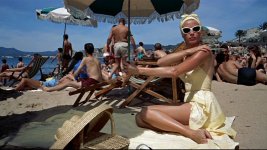
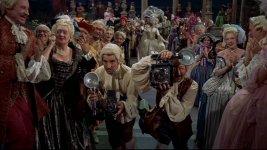
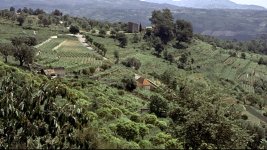
I have tried the Aviator settings etc too and even though I understand it may be closer technically to the original three strip, to my eyes it still misses. The colors are all pumped up but when I look at screen grabs etc of say Hitchcock films around the 50's/60's, the colors ain't as blatant. Look at the blues

catch1.jpg

catch2.jpg

catch3.jpg

If we applied the Aviator method these shots would look like candy.
 
I think if you take the "Aviator" algorithm, desaturate it to about 0.6, then maybe compress with blacks at .1 and whites at .91, you'll get something that's a bit more accurate. Still nice solid colors, but not candy apple...

Patrick
 
Last edited:
Trying to emulate three-strip Technicolor. I have tried the Magic Bullet Epic setting and dislike it. Below is my attempt by hand to emulate but would like to know if others have done so successfully and how they did it perhaps with some screen shots. I am editing in Vegas and using After Effects FYI.


Any tips or suggestions welcome


I thought it looked good. Does have that technicolor feel, for the most part. You've gotten much closer than most. I think texture is the only thing left to accomplish.

The only thing, off topic, that caught my eye... is the over-shallow DoF when he pulls the box from the sand. Day exteriors usually have deeper dof. It's not right or wrong, just less typical and stood out to me. Other than that, the wind seems to be blowing your shiny board bounce-fill around and the detective's mustache is about to take flight in the wind! You might want to submerge the Police boat hull a little more, give it some atmospheric haze and a slight buoyant bounce in the water. It sits there and guides my eye in the wide. :P

I really really liked the scene. I thought it was an older film at first.
 
I thought it looked good. Does have that technicolor feel, for the most part. You've gotten much closer than most. I think texture is the only thing left to accomplish.

The only thing, off topic, that caught my eye... is the over-shallow DoF when he pulls the box from the sand. Day exteriors usually have deeper dof. It's not right or wrong, just less typical and stood out to me. Other than that, the wind seems to be blowing your shiny board bounce-fill around and the detective's mustache is about to take flight in the wind! You might want to submerge the Police boat hull a little more, give it some atmospheric haze and a slight buoyant bounce in the water. It sits there and guides my eye in the wide. :P

I really really liked the scene. I thought it was an older film at first.

Thanks. On the closeup box scene I was trying to make it look overlit and a bit staged as some of those movies tended to not go for a natural look but more concerned with lighting it properly. Bounce reflectors were a problem...needed stronger hands from the crew. Yes, his $2 mustache is my little joke, someimes in other scenes it's a bit crooked or higher up on his lip etc. Still needing to loop portions of the audio though. Will do your suggestions on the boat stuff, thanks!
 
Not bad at all! The two things I noticed is the blues were a little over saturated to my eyes from looking at examples of what you were trying to achieve.

The other thing, off topic, is man, suit fabrics are HELL on moire. I saw it immediately as we have problems with suits ALL the time showing moire.

And funny, I just composted a helicopter into a scene for a short we did. I think your helicopter is moving too fast give then angle of it. I have watched a million helicopter videos over the last two months. That said, the coloring and everything looks nice.

I am getting ready to do another one. On the first film I used Blender but on the next one I am using Maya.

Anyways nice!

And as a funny side note, we used fake mustaches in our video as well. How strange. I guess helicopters and mustaches go together.
 
actually I just used a photo as the helicopter, that's why I had it move so fast (looked crappy)., You got a decent helicoper you want to donate? (pretty please?)

BTW I could rotoscope his suit on the first close up of him (where it is the most noticable)...how you you suggest I lessen the moire in After Effects once I rotoscope it? Blur?
 
Last edited:
There are TONs of free helicopters out there.

Take a look at Turbosquid.com and search for free models. Download Blender which is also free. You can import a lot of different model types into Blender. Then you can go from there.

I added my motion blur of my helicopter with after effects.

I created my blades in photoshop, flickered and animated them as a flat image in AE, the used them as a texture on a square translucent plane in Blender.

Check out the helicopter in this sequence:
(around 3:14)

As for the Moire, I think I'd try that first and see how it works. I haven't fixed any yet, just reshot it.
http://www.youtube.com/watch?v=pMrwNz24j_g
 
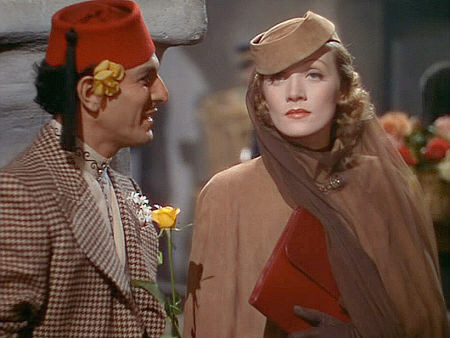
This is the typical original Technicolor I love

technicolor-gardenofallah-2.jpg


With a HVX200, some ND and Pol filters you can almost create that in camera.
I did that for Indiana Jones and the Spear of Destiny.

attachment.php


attachment.php


For Aviator it was done in After Effects

The 3 Strip Technicolor look in Aviator, created by imitating the quality the red, green and blue layers have when originally photographed in black and white with the very discerning Technicolor deep red, green and blue filters in the camera.

By digitally re-filtering the layers using a version of a primary color matte it helped remove this inherent crosstalk. If you picture a density matte of the blue areas of the film only (grey in the blue area and white in the non blue) then multiplied it with the red and green layers the blue areas of those layers would get darker. The darker that area is, the less red and green colors are allowed to be printed through. For example, a blue sky becomes bluer if there is more density in the sky area of the red and green layers allowing less of those colors to print through.

This multilayered matte strategy was constructed in After Effects and produced a generic "Technicolor Filter" that could be applied to any image including a multicolored chip chart. This chip chart produced the basis of a 3D LUT by comparing each color before the "Technicolor filter" and after. This LUT was produced by Josh Pines of Technique (Technicolor's Digital Intermediate Division) and was used after the Da Vinci color corrector and before the Christie 2K projector to view the results in real time. This LUT was later converted and baked into the resulting Cineon files and filmed out. The hardware and software versions of the LUT were identical and every frame of the film was treated based on chronology with either the 2 or 3 Strip look.

2.jpg


5.jpg


Here is some further reading.
http://www.widescreenmuseum.com/oldcolor/technicolor6.htm

Frank
 
Last edited:
Thanks Frank. Yes I did try the Aviator method in After Effects and wasn't terribly happy with the results but maybe I'll give it another shot.
 
Back
Top