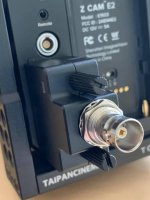
These Zcam guys are killing it!!

I think most of the issues with modern cameras (especially ones that use off the shelf sensors like the Z-Cams) can be fixed with firmware upgrades. If the maker is willing to keep cranking out iterative improvements to the software, and it appears Z-Cam is, they’ll be fine.

I’m seriously considering one... I have some shoots coming up where I need decent HFR and preferably in 4K.
 
If an SSD is connected to the USB C port to record, can a hub be used so that the SSD and an Iphone can be connected at the same time so that you can also use the app to control the camera?

How is the picture lag on the phone? It seems stupid to need a phone and a monitor to use the E2. Can one of them be eliminated?
 
Last edited:
Why would you "need" a phone to control the camera? It has a menu system on the screen on the camera as well as buttons for common stuff (and user-assignable buttons).
 
Why would you "need" a phone to control the camera? It has a menu system on the screen on the camera as well as buttons for common stuff (and user-assignable buttons).

Because light weight tripods.

Because gimbals/steadicam.

Because jib/russian arm/drone.

Because AC’s sometimes don’t shower.

Because tired.

Because no-one-will-know-if-you-are-texting-anymore.

Because sound department has the feature.
 
Needs a functional android app too.

It seems that the Portkeys LH5 monitor with Long Arm adapter can control the E2 camera. More stuff to buy and add, but might be worth it to some people.
 
Why would you "need" a phone to control the camera? It has a menu system on the screen on the camera as well as buttons for common stuff (and user-assignable buttons).

Just like a monitor or EVF, I want it facing me, not facing up. That little screen on top of the camera is useless in most cases as it is above eye level for most shots. I want the full menu quickly available and not have to dink with buttons on the front or top of the camera that are hard to get at and I can't see.
 
Portkeys LH5 w/ Long Arm... or wait for the excellent BM5.

I'm guessing a hub will not work with storage in the mix.

Phone will also work via WiFi.
 
Portkeys BM5 - that looks very nice. I'm hoping it will add to the short list of what it can control in future releases.
 
i read that you can also use the ethernet port with an adapter to connect to your phone. as an option.

You can use the USB-C input to connect direct to an iPhone and control the camera with the Z Camera App. The latency is much less when connected with the cable than it is with WiFi.
 
You can use the USB-C input to connect direct to an iPhone and control the camera with the Z Camera App. The latency is much less when connected with the cable than it is with WiFi.

Right, but he was originally asking about having both an iPhone and an SSD for storage connected at the same time.
 
You can use the USB-C input to connect direct to an iPhone and control the camera with the Z Camera App. The latency is much less when connected with the cable than it is with WiFi.

Yes, I was hoping USB-C port had low enough latency to use as a monitor and control interface, but then, how is it used as a storage port for SSD?
 
Just learned about a Timecode synch/jam option with an adapter that plugs into the COm Port. I'll be getting one to test out for the review. Not clear how it works yet.

54462699_10157151007253390_4759473012699299840_n.jpg
 
Erik, please observe the lag on the USB-C port and comment on how well would it work as a monitor port. Also, if you can ask them about a way to connect SSD and Iphone to the USB-C and use it for both a recording function and use the app on the iPhone. Thanks.

Do they have an SDI adapter up their sleeve for the com port?
 
Erik, please observe the lag on the USB-C port and comment on how well would it work as a monitor port. Also, if you can ask them about a way to connect SSD and Iphone to the USB-C and use it for both a recording function and use the app on the iPhone. Thanks.

Do they have an SDI adapter up their sleeve for the com port?

I haven't tested the updated app yet. I found when the iPhone was plugged into the camera the lag was much less but the image isn't as good as a monitor. Accessing the menu settings is slick.

The idea of having an SSD drive and iPhone inputted at the same time in one input probably isn't doable and just sounds like a bad idea to me. CFast is getting cheaper and worth the stability.

They are working on an SDI adapter that will probably be plugging into the HDMI port. It's a work in progress still.
 
Back
Top