There is nothing mathematically correct about LUTs they are interpolators. TRUE/FALSE

morgan_moore

Major Contributor
Cary wrote;There is nothing mathematically correct about LUTs they are interpolators.

In another thread I wrote..

As a thread jack I thought another thread might be better..

A look up table

1=banana
2=orange
3=grape

Input value
213
With lut applied
oragne, banana, grape
Out put value
213
Mathematically Lossles.
Input = Output exactly

A second LUT
1=banana
2=orange
3= or >3 = grape

Input
432

Output
332

This second LUT is lossy as the 3 and the 4 are compressed to being 3 and data is lost.

LUTs dont have to be destructive ?
 
To fully define a 10bit rgb pixel

you have 1024 (levels of brightness) and three channels

1024 * 3 =3077

You can fully define a 10bit pixel with that 3077 value even though there are millions of colours available in a 10bit pixel

or at least with a bit of code like this..

R0040G0827B0500->R0042G0837B0515

which clearly could be loslessly compressed
 
Last edited:
I am not sure I understand what you are trying to demonstrate here, you cannot define a 10bit pixel with any value greater than 1023 (1024 is the number of integer values 10 bit can have, the largest value possible is 1023 btw). Sure with 3077 that could only be a color of R1023, G1023, B1023 but what about a value of 3000? What are the RGB values for that? There are thousands if not hundreds of thousands of possiblities.

A lut takes a color with 3 values and maps it to another color also of 3 values. If you don't want any interpolation you have to have a value in the lut for every single possible input color. For example imagine you wanted a 3d lut with a size of 32 to map every possible 8bit value without interpolation. So an input value of 0,0,0 would map to 0,0,0 - input 1,0,0 to 1,0,0 - input 2,0,0, to 2,0,0 ... input value of 31,31,31 to 31,31,31. Now what value would 32,32,32 map to? (Keep in mind a value of 31 represents the 32nd input)

It can't because there are no more values available in the lut and we are not even 25% of the way to a white color. In order to have this lut work and be able to use values up to 255 you need to skip some values in each channel and interpolate if your input value is not represented fully in the file, so input 0,0,0 to 0,0,0 - input 7,0,0 to 7,0,0 - input 15,0,0 to 15,0,0 ... 255,255,255 to 255,255,255.

All luts will require some interpolation since no luts out there actualy have enough values to do so without, you would need a 3d lut of size 256 for 8 bit and the largest lut I have ever seen are the Impulz luts at size 64. This is why Resolve allows you to choose the quality of interpolation in the project settings for luts.
 
I'll regret this, but while luts can generally be thought of as lossless within their input/output range, I side with Cary. Why would you want transformations to be constrained within a limited 8 or 10 bit range; clipping when going outside of that range? Using RCM works in a 32 bit space, allowing you to freely transform between bananas, oranges and grapes *and* have different EI and white points.

In other words, you have a SLog3/709 lut. As long as your input is the expected SLog3 and you expose with middle gray at 41% the output should be reasonably within range. But if you pushed EI there could be a problem. If you use a lut designed for SLog3 with SLog2, there could be a problem.

Here is what Alister says about it:

http://www.xdcam-user.com/2017/12/using-luts-for-exposure-choosing-the-right-lut/
 
What dhessel comments on is a loss of precision within the range, what Alister comments on is where the output goes out of range, i.e. clipping. Either way, interpolated or out of bounds, hard to say a lut is really lossless.
 
A 1D LUT could do a one to one mapping, a full 3D LUT, where the RGB channels are dependent, can obviously not.

But perhaps you are missing the point of a colorspace transform, it's a mathematical formula that is not limited to a given source bit-depth and target bit resolution.
Colorspace transforms do a matrix transform by converting both the gamma and the gamut from a source to a destination colorspace (typically by converting to a linear light gamma and an XYZ gamut as an intermediate).

If you use professional color grading software there is no need to use LUTs for colorspace transformations.
 
A 1D LUT could do a one to one mapping, a full 3D LUT, where the RGB channels are dependent, can obviously not.

But perhaps you are missing the point of a colorspace transform, it's a mathematical formula that is not limited to a given source bit-depth and target bit resolution.
Colorspace transforms do a matrix transform by converting both the gamma and the gamut from a source to a destination colorspace (typically by converting to a linear light gamma and an XYZ gamut as an intermediate).

If you use professional color grading software there is no need to use LUTs for colorspace transformations.

This is exactly the process I was doing with the lut I was making when this whole conversation started. I quit once I realized that the solution was sitting there in front of my face and I hadn't noticed. I have used the colorspace transform node many times to go from slog to rec709 but never considered the possiblity of going to another colorspace like arri wide gamut and logC instead. Anyway when I wrote that I was trying to make a mathematically accurate lut to go from slog to logC I meant that it was a straight conversion with no look applied, not that there wouldn't be any interpolation.
 
I am not sure I understand what you are trying to demonstrate here, you cannot define a 10bit pixel with any value greater than 1023 (1024 is the number of integer values 10 bit can have, the largest value possible is 1023 btw). Sure with 3077 that could only be a color of R1023, G1023, B1023 but what about a value of 3000?

A 10 bit camera will never output 3000 (aka input into the LUT) so you dont need a number for that in the capabilities of the LUT.

1023 - 1024 - Im sure you are correct that 1023 is the max :)
 
A lut takes a color with 3 values and maps it to another color also of 3 values. If you don't want any interpolation you have to have a value in the lut for every single possible input color. For example imagine you wanted a 3d lut with a size of 32 to map every possible 8bit value without interpolation. So an input value of 0,0,0 would map to 0,0,0 - input 1,0,0 to 1,0,0 - input 2,0,0, to 2,0,0 ... input value of 31,31,31 to 31,31,31. Now what value would 32,32,32 map to? (Keep in mind a value of 31 represents the 32nd input)

It can't because there are no more values available in the lut and we are not even 25% of the way to a white color. In order to have this lut work and be able to use values up to 255 you need to skip some values in each channel and interpolate if your input value is not represented fully in the file, so input 0,0,0 to 0,0,0 - input 7,0,0 to 7,0,0 - input 15,0,0 to 15,0,0 ... 255,255,255 to 255,255,255.

WHen you said 32X32X32 I thought you meant an ability to output 32^3 input to output values - my comment was that that would be enough values to cover the 1023*3 or 4096*3
 
Overall clearly Im describing a 1d lut where each input is mapped to a distinct output. I look forward to considering the interpolation and lossiness of 3d LUTs :)
 
OK. Anyone got any examples of a degredation caused by the interpolation?

Also would it not be possible to have a large 'render lut' (that slowed the mahine but did not interpolate) and a small 'grade lut' (that interpolated but played back well in the NLE or in camera monitor)
 
This is exactly the process I was doing with the lut I was making when this whole conversation started. I quit once I realized that the solution was sitting there in front of my face and I hadn't noticed. I have used the colorspace transform node many times to go from slog to rec709 but never considered the possiblity of going to another colorspace like arri wide gamut and logC instead. Anyway when I wrote that I was trying to make a mathematically accurate lut to go from slog to logC I meant that it was a straight conversion with no look applied, not that there wouldn't be any interpolation.

CTL (Color Transformation Language) vs LUTs It's all here in all it's beauty:

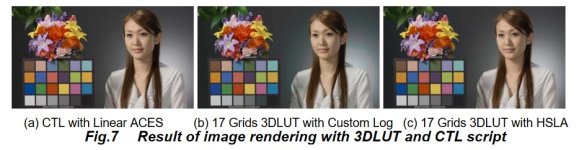
"We showed the Log scale ACES color space is useful for the system which only supports 3DLUT, but does not supports shaper LUT. But there are systems that only support very small number grids of 3DLUT such as cube of 17 grids. In this case, the accuracy is not enough and the difference from ideal CTL rendering is not acceptable. Fig7 (a) and (b) shows the result of CTL rendered image and cube of 17 grids 3DLUT. The Gray balance of the 3DLUT rendered image is different from CTL render.

(a) CTL with Linear ACES (b) 17 Grids 3DLUT with Custom Log (c) 17 Grids 3DLUT with HSLA Fig.7 Result of image rendering with 3DLUT and CTL script In this case, the input space of 3DLUT is a cubic expression of Custom Log ACES. The cubic space is defined as (R,G,B)=(-2.1,-2.1,-2.1) to (2.3,2.3,2.3) in Custom Log ACES and (-0.1,-0.1,-0.1) to (200,200,200) in linear ACES. The cause of the difference between CTL rendering and the 3DLUT rendering means the Custom Log space is too wide to approximate CTL in cube of 17 grids 3DLUT. The dymamic range of Custom Log can’t reduce any more. But for color direction, the domain might be reduced. For example, (-2.1,2.3,-2.1) is the edge of the cube. This means the color is something like red = -0.1, green is 200 and blue is -0.1 cd/m2. Since the color balance is extremely uneven, this color unlikely exists in the natural world. We have tried to define the reasonable color space to enhance the accuracy of 3DLUT processing. The necessary domain of the 3DLUT input is the domain that needs to express all output device value. We have investigated the domain by inversion of DCI gamut to Custom Log ACES."

For the scholars of color the rest is here:

https://www.smpte.org/sites/default/files/24-1415-TS2-2-C&P03-Iwaki.pdf

LOG vs LUTs.jpg

And some useful well designed LUTs, EE and LL for download here:

"The reason for these LUT’s is to enable low budget and very fast paced productions to have the advantages of an ACES workflow whilst shooting with their "normal" kit.
The LUT’s are designed to take the log output of many commonly used cameras and enable you to use a standard rec 709 monitor and reproduce the "look"of having gone through a complete ACES workflow. IE they contain the effect of the relevant IDT, RRT & ODT. If you use these LUT’s when shooting you should be able to use "standard" IDT’s & ODT’s in post with no LUT and get exactly what you saw when you were shooting."


https://acescentral.com/t/luts-that-emulate-the-aces-workflow/1334

Chris Young
 
Last edited:
And some useful well designed LUTs, EE and LL for download here:

"The reason for these LUT’s is to enable low budget and very fast paced productions to have the advantages of an ACES workflow whilst shooting with their "normal" kit.
The LUT’s are designed to take the log output of many commonly used cameras and enable you to use a standard rec 709 monitor and reproduce the "look"of having gone through a complete ACES workflow. IE they contain the effect of the relevant IDT, RRT & ODT. If you use these LUT’s when shooting you should be able to use "standard" IDT’s & ODT’s in post with no LUT and get exactly what you saw when you were shooting."


https://acescentral.com/t/luts-that-emulate-the-aces-workflow/1334

Chris Young

Wow, these are fantastic! I just did a test with these in Resolve (EE versions), replicating the process of matching shots from an ACES project that I did with an FS7 and EVA1, and the it looked and felt the same! (Although, I'm not a pixel peeper). I know they are not designed for post work, but...

My big issue is with a corporate client who is losing confidence with mixing my EVA1 with FS7's on projects that I don't edit/color (I am probably the only editor among their regular freelancers who uses Resolve/ACES to match cams and grade). If I can manage to apply these as MLUTs in the FS7's and burn them in (I'll have to use an external recorder that allows this for the EVA1), I may have found the answer to my prayers!

Seriously, if can give these other editors little more than having to do a slight WB and exposure tweak to match these cameras, I'm golden! Until today, I was dreading the thought of having to possibly buy an FS7 and/or the new FX9 just to keep this client... ugh. Thanks for the hope, Chris!!!
 
That's why we are all hear... hopefully! To learn and pass on solutions, help and info we all find useful. That's why I posted the link because you sounded like a candidate for this sort of solution. They work well as MLUTs plus as you say they were not designed as post LUTs but all the necessary information is embedded in them and I can tell you now I've used them in post and only had good results and feedback. You can't argue with their heritage. These LUTs are working for me and hopefully will do the same for you. Happy grades :)

Chris Young
 
Back
Top