FX6: The Sony ILME-FX6V Owners Club

Interesting comments, Grug. It is always good to hear from people who have actually been hands-on with what they are talking about. I'm not surprised that there was more leeway in the RAW during grading, but like you say, is it worth it? And I still wonder if it really makes a noticable difference in the final graded output of footage that was shot pretty well in the first place. Nothing but some well-shot side-by-side, split-screen testing, that shows a significant difference is going to win me over. I already went through all this with the FS5 and I'm not going to assume anything about the "advantages" of RAW ever again. Just to be clear, I'm not against RAW in general. 99% of everything I shoot with my F55 is 16-bit RAW or XOCN-ST and there is defiintely a difference with those files.

I think you pretty much nail it on the head there Doug. If you've shot (whatever it is) well, and there's no significant grading needed (no secondary correction required at least), then I really don't think it's worth the pain of the Prores Raw workflow.

If the camera offered XAVC Class 480, I don't think I'd even consider the pain of the raw workflow, it would be "good enough" for everything. But the Class 300 is painfully thin. It's okay, but it really is riding the line of being JUST good enough for most things, 300Mbps just isn't enough data to get a thick 4k frame unfortunately. So it breaks down sooner than I can really trust for a high-quality master.

We've been recording XAVC as a backup to the raw files the whole shoot, and have had a couple of shots where the 10-bit files have broken up into some plainly visible banding in smooth gradients like sky, or plainly-painted walls. At the same time, we've had a couple of shots were we have some unusable moire in clothing fabrics in the raw footage, but the XAVC versions of those same clips don't show up the moire... so you almost want to have both running at all times, just in case - it's pretty irrating.

If you're on FCP, why is the workflow horrendous and awful?

Because FCPX is just to transcode the raw footage into Prores4444 to then send on to our post house. One of the great horrors of the Prores Raw workflow at present, is that some (possibly most) of the trancoding options for the footage, can't actually do accurate transforms to SLOG3/Sgamut3.cine - Compressor being the most obvious culprit. Also the metadata on E.I. values only partially travels through with the footage. So the risks of an assistant editor possibly processing a clip incorrectly, and assigning the wrong ISO value to the exported Prores4444 master is too high to risk.

It's one of the real head scratchers with Prores Raw. It works fine in some NLEs, but it's godawful for any traditional post workflow unless your post house is using Assimilate Scratch (and there's not a single post house I know of in my city that does). So you've got this raw codec that works well for people shooting and editing their own material, but not for conventional workflows - and projects that are shot and edited by the same person, are (generally) the kinds of projects that have the least-demanding final deliverables - and therefore have the least need for the higher overall image quality that the raw recordings can offer.

I really don't get it.

Every other raw codec I've worked with, we're able to open in Davinci, export proxies, and call it a day (the raw files coming back into play just for the colour grade) - no need to strike new masters, and then transcode the new masters into proxies just to get a smooth workflow for post.
 
Sometimes things take time to develop.

It took RED 15 years to perfect their own universe.

I've been waiting 9 years for CinemaDNG support in FCP. (Still nothing.)

ProRes RAW has been around for barely 3 years.

From a business standpoint (and although it's at the bottom of the list as far as priorities), Apple wants you to use FCP, not anything else. And some may think that they'll have to be more flexible if they want people to use it more, and that's true, but they don't need to do that (like as far as money and truly caring about competition).

When you use ProRes RAW in FCP, it's a natural process, workflow.
 
And latitude-wise, be aware of the methodology that CineD use in their tests. They're adding no noise reduction to the raw clips (which is why the slightly noise-processed XAVC footage, yields slightly better latitude results in their tests). But you can 100% pull out more shadow detail from the transcoded raw footage, than you can from XAVC footage. It's not a huge difference by any measure, but if you're zooming in 400% to compare the two, there's clearly more you can salvage from the thicker footage (if you apply a bit of noise reduction in post judiciously).

The workflow is still awful though. So I find it hard to recommend.

That is good info (no pun intended)


i put the A7s3 and R5 up against the Red Gemini.

the R5 was onviously behind in terms of DR. Although, the raw from that camera is still amazing. The A7s3 was very close in terms of DR to the Red Gemini, but the compression destroyed the latitude, and the denoising took away some of the texture/tonality. At a first glance, they were almost identical in terms of ability to hold a scene. but in post there was something a atiny bit more rolled off in the highlights transition to clipping, and the lower compression took the macro blocking out of the shadows. So, it was my guess, that perhaps with shooting raw, that the Sony would be at the same level as the Red in terms of DR. however, it appears without Noise Reduction, the latitude will take a step back before taking a step forward, but based on your report, there is still the possibility they are even closer. i certainly don’t see the need to go Komodo and lose the frame rates and other things. (Komodo is behind the Gemini ans Monstro in terms of DR, and would not consider it more than a B cam. Seems many gravitating to the Komodo’s lighter weight, but the iq is behind dsmc2 by half to a ehole stop in DR and sensitivity. Komodo has the weirdest look of the Red’s to me, and i suppose it is the easiest way to get internal raw and a step above BM pockets, but the Fx6/A7s3 just seems to take the win, as the iq in Raw is likely on par with Komodo, while also having allnof the other benefits of FF35, 120fps, 12,800 iso clean, light weight codecs, internal ND or ibis, and on and on. )


However, where the A7s3/Fx6 definitively pull ahead is in the 12,800 iso, or second gain stage. Even though i might still prefer the gemini in better light, there is no camera that holds a candle to the Fx6/A7s in terms of getting a high quality image in true low light. it really is stunning, and so fun to play with vibrant colours that our eyes can barely detect. it is a different thing. And the A7s3 has enough latitude to handle those pesky bright light sources even in low light. genuine game changer.

in terms of colour science, there are plenty of people that prefer the Fx6 colour science over Red’s. Sony “venice” attributes, of the even earthy tan, seem to help out shooters. Red’s skintones are fine in daylight, but can quickly derail in nuanced and mixed lighting situations, and there might be some advantages going with camp Sony for many.
 
Last edited:
Grug, isn't there some post process available for de-moireing the clothing shots? Seeing as the internal XAVC is just a processed version of the RAW?
 
When you use ProRes RAW in FCP, it's a natural process, workflow.

I haven't kept up with FCP since version 7, so let me ask you about grading in FCP. Can it even hold a candle to the power and speed of Resolve? I'm not talking about dropping a LUT on all the footage and calling that grading, I'm talking about taking the time to finesse each shot into something special. It seems to be that if a shoot is important enought that it warrants being shot in RAW, why wouldn't it also warrant being graded in Resolve, Baselight, Scratch, or some other full-featured color grading software? Does FCP really have those kinds of tools? Are there professional colorists who use FCP as their weapon of choice? I honestly do not know. But I do know first-hand that Premeire certainly does not have the necessary tools for serious grading.
 
Last edited:
I haven't kept up with FCP since version 7, so let me ask you about grading in FCP. Can it even hold a candle to the power and speed of Resolve? I'm not talking about dropping a LUT on all the footage and calling that grading, I'm talking about taking the time to finesse each shot into something special. It seems to be that if a shoot is important enought that it warrants being shot in RAW, why wouldn't it also warrant being graded in Resolve, Baselight, Scratch, or some other full-featured color grading software? Does FCP really have those kinds of tools? Are there professional colorists who use FCP as their weapon of choice? I honestly do not know.

Yeah, that's a good question - and the answer is complicated.

The short version is; no, FCP cannot hold a candle to the power and speed of Resolve FOR COLOR GRADING.

Here's the longer answer if you choose to read it. [Which covers different parts which may or may not be relevant.]

___

I'm assuming you're only asking about color grading but if not I'll get this out of the way first:

As far as power and speed is considered - and someone using software in different ways - that's going to depend on the person just as much as the software and hardware.

My power and speed comes from the knowledge in my brain. It is my understanding and familiarity of the application that is critical in everything that I do. I simply could not be as efficient (or mentally content) in anything else unless maybe I dedicated another 10 years to learning it.

From a technical standpoint, I use FCP on Apple Silicon so the power and speed there is self-explanatory.

___

As far as editing - and not grading - FCP is light years ahead of Resolve. Even people who hate Apple would agree if they were forced to learn it.

I mostly used Resolve when it started to be included with Blackmagic cameras in 2012. Although it has vastly improved in the last decade, it still doesn't compare to FCP and Premiere as a power editing NLE, IMO.

However, ignorance is bliss because if that's what one learns from Day 1 - and nothing else - who cares about FCP and Premiere; they don't exist.

___

So, color grading...

Questions that need to be asked: Why are you shooting RAW, what do you shoot, and how much grading is really necessary?

Why?
If I'm using a C200, I'm shooting RAW for the better quality, not the color grading flexibility.
If I'm using a RED, I'm shooting REDCODE because that's pretty much the only option. (There's ProRes but you don't use a RED to shoot ProRes.)
If I'm using a FX6 with some sort of RAW, I probably have a reason (as you pointed out).

What?
A blockbuster film usually requires color grading.
But 20-25 smaller pieces of content, produced weekly - maybe for internal viewing during a major corporate transition for only educational purposes - may not. I believe you actually mentioned in this thread how capturing great images in the camera and doing minimal grading can be beneficial, and that is what I do. So how much color grading power could I possibly need?

How much?
Personally, my interest is in corporate work in which the information and the creativity in supplying that information is so much more important than spending time on color grading footage that was captured with a camera that simply is not capable of easily producing higher-end looking, commercial images in the first place.

If I use an ARRI or RED for any content creation - and if my production went well - I actually would drop a LUT on all of the footage and call it grading because it's 99% done.

Seriously.

But you see...if you would have told me that years ago, I would have said, what do you mean? You need to do more, right?

No, you don't. And anyone out there can download ARRI and RED footage, and see how only basic corrections such as contrast and saturation after proper conversions will pop and thicken your footage more than any FX6s or C300 Mark IIIs can without spending much more time finessing each shot into something special.

___

In a philosophical sense, what is color grading? IMO, it's simply a process that changes the visual perception of pixels that may or may not be represented differently across the globe.

To conclude...I don't know if there are any professional colorists who use FCP - and I would say not many if any - but FCP has all of the tools that I could personally ever need for my own work and life, which make me very happy.
 
I haven't kept up with FCP since version 7, so let me ask you about grading in FCP. Can it even hold a candle to the power and speed of Resolve?

I'm not a professional colorist (nor am I NorBro) but as someone who edits/colors in FCPX about 90% of the time (the other 10% being Resolve) I can comfortably say "no." The color tools have come a long way (from what I hear—I've only been using FCP since it was FCPX) but the level of nuanced control and speed is nowhere near that of Resolve. You can get the results you want in most situations, but Resolve is very clearly the "better" tool for color grading. I will say that if your footage is properly shot and doesn't need excessive grading FCPX is more than adequate—e.g., I find it perfect for doing light touch ups to S-Cinetone footage.

That said, editing in FCPX is absolutely faster in about 99% of situations. I really wish the two programs played better together, since in an ideal world I'd edit in FCPX and color in Resolve.
 
Thanks for the in-depth reply, NorBor. It all makes sense and I agree with most of what you have written. I will say that one big difference between Sony cameras and the rest of the bunch is that it is possible to get a nice finished look onboard the camera that can match or exceed what LOG footage would look like if just a LUT dropped on it in post. I guess that's where I'm coming from. If I'm going to shoot LOG/RAW then I'm going to be serious about grading and I'll want the power of Resolve. But if I don't want the hassle of that workflow, then I'll dial-in a WYSIWYG look right onboard the camera and I won't really have to do any grading at all in post. However, the FX6 changes all that for me and that is what bugs me about that camera. I either have to shoot LOG and then grade in post or accept S-Cinetone. And the range of shooting situations where S-Cinetone actaully looks good is very narrow.

I totally agree that I won't be using Resolve anytime soon for editing. I went from FCP7 to Premiere -- chose the FCP7 emulation mode -- and never looked back. It was a very smooth transition to Premiere that didn't take a lot of time to figure out. FCPX and Resolve might be fine for someone just getting started, but there's zero chance I'll be using either one for editing because I'm too fast and efficient with Premiere, Grading is a different story, though, and everything that I shoot for myself goes through it. Especially for stock footage creation, there are things that Resolve can do to speed up the workflow that none of the others can touch.
 
So you've got this raw codec that works well for people shooting and editing their own material, but not for conventional workflows - and projects that are shot and edited by the same person, are (generally) the kinds of projects that have the least-demanding final deliverables - and therefore have the least need for the higher overall image quality that the raw recordings can offer.

You'll just have to start editing your own material like the rest of us!
 
You'll just have to start editing your own material like the rest of us!

haha - Speak for yourself Rob. Don't know how many people on this forum shoot and edit their own material, but I've been a DP for over 30 years and have a large circle of friends in the business. None of us primarily shoot and edit their own material. We all have our own projects of course, some more than others, but as a DP for hire - most of shoot and hand off the files.
 
Appreciate everyone has their preferred workflow, but for me, until ProRes Raw is compatible with the industry standard finishing tool it is not ready for the big time and is just another proprietary thing locking you into someone else's toolsets.
 
All talk about raw video and getting the most out of it is fine but this camera has spoiled me in just about every aspect. Now that I even solved the poor monitor clamp I have nothing more to complain about. It's just fantastic be it Slog3 or S-Cinetone, images is the best I've seen from any camera I've operated and so easy to massage in post.

To add the complexity and bulk of raw to maybe, just maybe, squeeze something more out of the FX6 is madness. It destroys the design totally and makes life more complicated. Keep it simple, keep it clean.
 
Resolve added a new method of editing when they put in the 'Cut' page. With the older edit page for example, you would drop your clips on a timeline, trim, transition, move, etc. With the Cut page you're working from the clips in your bin, opening each in a preview window, setting in/out points, inserting, appending, overwriting to the timeline. Rather than using a mouse to edit, Speed Editor works in conjunction with the cut page. It includes push buttons that control the edit modes, timeline navigation, and effects. The push button shortcuts are for features exclusive to the Speed Editor. The Search Dial is similar to the jog wheel on edit decks. It's available in a bundle with a Resolve Studio license for $295.

Whether it matters or not compared to FCPX or PP I cannot say, for as Norbro said they do not exist for me, but the Speed Editor is new and probably does not 'exist' for a lot of others used to other tools.
 
It wouldn't surprise at all me if Resolve was the superior editing platform at this point. But the learning curve required keeps me from diving in. If only there was more time in the day . . .
 
Not wanting to re-open a can of worms but second shoot in same environment as before (esports Gaming club with RGB Lighting) yesterday.

FX6 again handled the saturated red and blue lighting with ease and the FS7s stumbled. A7s III on a gimbal looked perfect too.
 
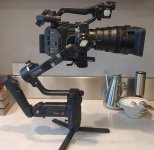
FYI - the Crane 3S Pro just arrived, and first impressions are (with the extension arm in place):
- Can fly the FX6 + Monitor + Top Handle + 28-135 Lens (but you need to take of the lens hood for clearance in you ever wanted to do a 360 - not sure why you want to take a shot of the inside of the gimbal however). You do need to take off the side handle
- This combo is very heavy hand held, but better if pivoting off your stomach/pelvis, and fine if you are in underslung mode
- I can find no way of controlling the FX6 functions from the 3S's . The FX6 does not work with the included USB cables, and the "mysterious" USB to LANC cable that Zhiyun mentions is no where to be found (either in the box or online). I could try using my LANC controller or even the Sony App on a phone but.... it is all more stuff
- The motors are pretty quiet (a light whirring noise that I'll need to see if the Mics pick up).

CS3 FX6.jpg

This is my first use of a Gimbal (and it is a neat bit of kit) but... I'm not sure what my expectations of it are. I really need to try out the myriad of functions that it has. It seems a bit "agricultural" in places with tolerances that can be a bit tight on some arms when balancing the FX6, and others seem a bit loose as I get a bit of a "clunk" when it passes a certain angle (maybe something is not tightened down or my balance is not perfect). One area I thought it was pretty good at was turning the FX6 into a stationary PTZ. The kit also came with a Lens support, and a Servo Zoom & Focus motors that I've not even unboxed yet (edit: and a HDMI Transmitter + a whole lot of other bits and bobs. You get a lot of "stuff" for very little coin).

Edit - I wonder if this USB-C to LANC cable would work.... https://www.smallrig.com/smallrig-p...-type-c-for-smallrig-control-handle-2970.html

Edit - Added my wired LANC controller to the 3S (on one of it's 1/4 20) and works fine giving focus, zoom, and rec on/off. Cable does not seem to get in the way.
 
Last edited:
Not wanting to re-open a can of worms but second shoot in same environment as before (esports Gaming club with RGB Lighting) yesterday.

FX6 again handled the saturated red and blue lighting with ease and the FS7s stumbled. A7s III on a gimbal looked perfect too.

ah, well, the timing of this comment and me seeing this video pop up in my feed:

https://www.youtube.com/watch?v=3o7vGNIY1o4

^has some bright saturated red light
 
Phoar... I've used some janky anamorphics in my time, but that's some next-level optical muck! :p

What are the Aviascopes? (haven't heard of them before)

chances are Ben’s spelling is correct. Aivascope?

i think it is a more modern budget adapter made recently. they used an old Olympus Zuiko mating lens that is likely giving the more vintage vibes. “Aviascope” sounds nicer though.


interesting to see it covering the full sensor, though, they may be lensing itself to the jankiness, or extra personality. i quite like that about the Fx6, used to have to give up pro video fuleatures for dslr mirrorless to get that look, and not it is still in a fun lightweight package, but all the video features too. and the larger sensor draws more personality out of janky lenses.
 
Back
Top