THE SEXY, RELIABLE "NATIVE 25p" THREAD

what a fantastic 1st post! you forgot to say please and thanks :smile:

why don't you use the 24p Blackout/Lpowell patch (b.ini) and modify the 1080 GOP from 12 to 15, thats all i did and having great results!

Sorry, I do not like thinking about it :) I tried, but the result is not stable ... I would 720p from Blackout-Powell Native 24p Patch and 1080p from Fast Action Native 25p Patch TOGETHER! THANK YOU, PLEASE :)
 
...I would 720p from Blackout-Powell Native 24p Patch and 1080p from Fast Action Native 25p Patch TOGETHER! THANK YOU, PLEASE
Sorry, but that's just not possible, as I explained in my earlier post:

Updated Fast Action Native 25p Patch - Download Beta version here:

LPowell - Fast Action Native 24p Patch Beta.zip

For the last two weeks I've been testing a new stabilization technique that promises to significantly improve Native 25p (and Native 24p) reliability. However, I could not to find a way to improve FHD 25p stability without breaking SH 50p mode at the same time. I was almost ready to give up on the technique when I thought of combining it with my Fast Action 3-Frame GOP Patch, which sets SH mode to 25p. I found I could then improve the stability of both FHD and SH modes at 25p using my new technique.

Before updating my 50Mbps Fast Action 3-Frame GOP thread with this Native 25p patch, I'd like to ask PAL users here to put it through some additional testing. Among other adjustments, this patch sets FHD mode GOP-size to 15 and SH mode GOP-size to 3. I'd be most interested to hear how the results of these settings compare to the Blackout-Powell Native 24p Patch, which records SH mode video at 50p. Any time you can put into this project will be greatly appreciated.
 
I tried the patch and perfect. No faults in the FHD mode, in very detailed scenes and in the other. The average speed of 38-45 Mbps

Thank you very much
 
Is it safe to up average and max bitrate for class10 card,something like fusion of 75mbitPeakPerfPatch and Fast Action Native 25p Patch ?
 
Is it safe to up average and max bitrate for class10 card...
I've attempted to fine tune the average and maximum bitrates of both the 75Mbps GH1 Peak Performance Patch and the Fast Action Native 25p Patch to produce the highest bitrates that can be recorded with the highest degree of reliability in each case. The Peak Performance Patch was explicitly designed for use with Class 10 SD cards, but can be safely used with many of the fastest Class 6 cards as well. I've tested the Native 25p Patch on both Class 6 and Class 10 SD cards, and have found no additional reliability margin with Class 10 cards that could be used to further increase bitrates.
 
no additional reliability margin with Class 10 cards that could be used to further increase bitrates.

2nd post for me. I can tell my experience as a PAL user. I writte in my previous post some settings that (may be magic?) works for me. Incredible or not I mixed some settings from lpowell (thanks for all your effort) and from other users (sorry I don't remember the names) finishing with 25p native checked, FHD gop 15, FHD/SH bitrate 51000000 and overall bitrate 61000000. I test it with a similar scene like one of lpowell showed us where in dark places was the famous "mud"... My result was 100% ok in sunny detailed parts as in shadow no detailed parts!!!... No frame skipping (Stream Parser) and only a cople of failures in a lot of shots... Just experimenting, but I will use this (lucky?) setting in the future...

Thanks
 
Could you share setup?

Yes of course. I'm sorry because I don't remember the names of the people where I copied the settings to make the mix (long time ago).

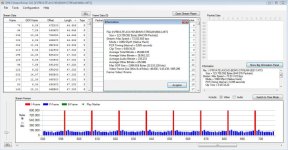
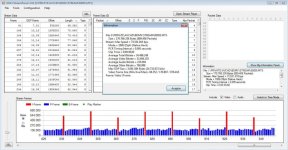
Here is the settings, a example and a Stream Parser image:

[Settings]
Version increment=3
Prevent version compare=Checked
Third-party battery=Checked
All Interface Languages=Checked
30min limit removal=Checked
PAL<->NTSC Menu=Checked
720p30->720pXfps=2
720p30 width=1920
720p30 height=816
720p30 420->422 color sampling=Checked
E1 Quality=400
E1 Table=4
E2 Quality=300
E2 Table=4
E3 Quality=250
E3 Table=4
E4 Quality=179
E4 Table=4
Native 24p/25p=Checked
Video Bitrate FHD/SH=51000000
Video Bitrate H=29000000
Video Bitrate L=17000000
Overall Bitrate=61000000
720p50 GOP Size=15
720p60 GOP Size=12
1080p25 GOP Size=15
1080p24 GOP Size=12
Preset bitrate=545
Overall Bitrate 2=61000000
Constant for 1080p=5184000
Constant for 720p=518400
Framerate related comparison=12


In Mpeg I have hi quality settings because I have a 2fps version to do timelapses in a anamorphic way. It works fantastic too...
 

Attachments

  • SP_01.jpg
    SP_01.jpg
    90.6 KB · Views: 0
  • vlcsnap-2011-04-27-09h19m49s26.jpg
    vlcsnap-2011-04-27-09h19m49s26.jpg
    125.8 KB · Views: 0
More details...

Card: Transcend class 10

Hand held shoot.

Manual focus.

OIS on.

Panasonic 14-140mm @ 140, f/16 1/125s.

Another example:

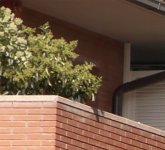
Same card, now tripod. First atempt, failure (card speed error). Second atempt I started out of focus and 7 seconds after go in focus. 45 seconds footage before I stoped. Look the cropped image. In shadow and in the very very corner of the image, you can see some detail, maybe a little mud, but I think this is from the soft corner of the lens and jpeg compression. 140mm manual focus, OIS off, f/16...
Look Stream Parser: BIG keyframes!!!!
 

Attachments

  • SP_02.jpg
    SP_02.jpg
    88.5 KB · Views: 0
  • vlcsnap-2011-04-27-09h57m37s13.jpg
    vlcsnap-2011-04-27-09h57m37s13.jpg
    175.9 KB · Views: 0
  • vlcsnap-2011-04-27_crop.jpg
    vlcsnap-2011-04-27_crop.jpg
    62.2 KB · Views: 0
Thanks for the info, interesting.
This is getting off topic with the MPEG-time-lapse, but I would love to read more about it... could you post a separate thread? I do remember someone using this but they were getting low bitrates/lots of empty frames...
 
My SanDisk Extreme Pro 16GB 45MB / s has arrived
and I tried again the THE SEXY, RELIABLE "NATIVE 25p".
Subjects: Trees and Leaves
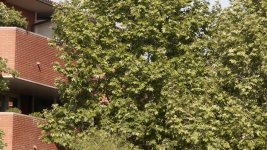
With Tripod maximum recording time 20 seconds, then crash.
Usually after a few seconds.
Without a tripod, it looks better.
I took two shots over 30 seconds but has gotten even crashes.
For these shots I used Lumix 14-45. Aperture F3.5-F8. and ND8 filters.
The results are actually no better than with Transcend 16GB Cl 10 card.:crybaby:
 
My SanDisk Extreme Pro 16GB 45MB / s has arrived
and I tried again the THE SEXY, RELIABLE "NATIVE 25p".
Subjects: Trees and Leaves
With Tripod maximum recording time 20 seconds, then crash.
Usually after a few seconds.
Without a tripod, it looks better.
I took two shots over 30 seconds but has gotten even crashes.
For these shots I used Lumix 14-45. Aperture F3.5-F8. and ND8 filters.
The results are actually no better than with Transcend 16GB Cl 10 card.:crybaby:

You used the "Fast Action Native 25p Patch" or "Blackout-Powell Native 24p Patch" with GOP 15?
 
Sorry guys. I'm getting a bit confused reading through all the posts here.

So what's the most reliable, and highest bit rate 25p settings for high contrast settings when shooting on a tripod (20mm/50mm lens at f1.7 - 2.0 with ND filter).

I'm using the Sandisk Extreme.
 
Well, PAL users, what do you think about changing the 25p GOP-size to 15 frames? I've tested this setting several times in the past week, and while it's not immune to failure, it does seem more reliable than the previous 12-frame GOP I used in the Blackout-Powell 24p Patch. If we conclude it's a worthwhile improvement, I'll release an updated INI patch file in that thread.

Feedback: I used a GOP-size of 15 frames for both the FHD and SH modes and noticed a significant improvement. It's not totally robust though as the following clip stopped after about 30 seconds (whereas the straight Blackout-Powell Native 24p Patch stopped almost immediately - using a Class 10 16gb Transcend card BTW). The fail was in FHD mode and interestingly I could not get a fail in SH mode. To be sure I was using a shutter speed of 1/50 for FHD and 1/100 for SH.

http://www.vimeo.com/22954324

Also, can anyone tell me why this vid has so much mud?! It was shot using the same patch and lens (being the stock 14-140 lens) in SH mode at 1/100. I could swear that it was neither over or under-exposed when I shot it. Also it's my experience that I frequently get great results from this camera when up close to my subject but often horrible results on bright sunny days like in the vid. Noting this vid and the one above were also shot using a Kenko circular polarizer.

http://www.vimeo.com/22972673

I've uploaded the original MTS files for both.

Cheers.
 
...can anyone tell me why this vid has so much mud?! ...it's my experience that I frequently get great results from this camera when up close to my subject but often horrible results on bright sunny days like in the vid.
In this video, two factors combine to overtax the bitrate available to the AVCHD encoder, resulting in muddy details. While the exposure is correct, the overall brightness and deep focus of the scene produces a large quantity of fine details that must be encoded. In addition, the complex movement of the water surface produces innumerable tiny motion vectors, requiring high bitrates to encode the frame-to-frame differences. In these circumstances, you may get more finely detailed results by underexposing the image. This will reduce the bitrate needed to encode midrange and highlight details, with the minor drawback of obscuring dimly-lit details.
 
Feedback: I used a GOP-size of 15 frames for both the FHD and SH modes and noticed a significant improvement. It's not totally robust though as the following clip stopped after about 30 seconds (whereas the straight Blackout-Powell Native 24p Patch stopped almost immediately - using a Class 10 16gb Transcend card BTW). The fail was in FHD mode and interestingly I could not get a fail in SH mode. To be sure I was using a shutter speed of 1/50 for FHD and 1/100 for SH.

http://www.vimeo.com/22954324

Also, can anyone tell me why this vid has so much mud?! It was shot using the same patch and lens (being the stock 14-140 lens) in SH mode at 1/100. I could swear that it was neither over or under-exposed when I shot it. Also it's my experience that I frequently get great results from this camera when up close to my subject but often horrible results on bright sunny days like in the vid. Noting this vid and the one above were also shot using a Kenko circular polarizer.

http://www.vimeo.com/22972673

I've uploaded the original MTS files for both.

Cheers.

i ran the Blackout-Powell Native 24p Patch and SH mode had the same issues with mud.

i amended the GOP to...

FHD 1080p 25fps @ GOP 15

SH 720p 50fps @ GOP 12

made a huge difference instantly, still running the same patch now & loving it :smile:

check out page 16 of this link... i asked the question about muddy SH too, Lpowell replyed at the bottom.
http://www.dvxuser.com/V6/showthread.php?243813-Blackout-Powell-Native-24p-Patch-GH1-FTW!!!
 
Last edited:
What I know about motion vectors I could write on a pin head ;-)....but for sake of sanity I reloaded the Blackout-Powell Native 24p Patch and took the advice of Terra1 - using a GOP of 15 for FHD and a GOP of 12 for SH. I managed to get significantly improved results in FHD mode, albeit the lighting, while still horrible for filming, had less contrast that in the previous video I posted. Maybe this explains the lack of mud, or possibly there was a 'user error' in my last vid.

FHD1080p 25fps @ GOP15: http://www.vimeo.com/23149882

I'll continue testing this and advise of any problems. Thank you both for your help.
 
Last edited:
Updated Fast Action Native 25p Patch - Download Beta version here:

LPowell - Fast Action Native 24p Patch Beta.zip

For the last two weeks I've been testing a new stabilization technique that promises to significantly improve Native 25p (and Native 24p) reliability. However, I could not to find a way to improve FHD 25p stability without breaking SH 50p mode at the same time. I was almost ready to give up on the technique when I thought of combining it with my Fast Action 3-Frame GOP Patch, which sets SH mode to 25p. I found I could then improve the stability of both FHD and SH modes at 25p using my new technique.

Before updating my 50Mbps Fast Action 3-Frame GOP thread with this Native 25p patch, I'd like to ask PAL users here to put it through some additional testing. Among other adjustments, this patch sets FHD mode GOP-size to 15 and SH mode GOP-size to 3. I'd be most interested to hear how the results of these settings compare to the Blackout-Powell Native 24p Patch, which records SH mode video at 50p. Any time you can put into this project will be greatly appreciated.

LP, thanks for posting this patch. I've been testing this out a little over the weekend and it is super stable, compared with the various native 25p settings I tried last year. I shot with a few cards, starting with a class 4 ( which I know you shouldn't use ). Even on this I only had failures on FHD, small aperture shots, when filling the frame with high detail. I've been shooting for 2 days now on class 6 cards, with zero failures so far.
I have seen some mud on 720 shots as well as a slight increase in macro blocking at 1080 in blue skies , compared to my older settings ( which were the c settings, non native ).
I want to try a class 10 card, peak performance patch and will try and give a more detailed account next week, if it's of any use. Cheers
 
Back
Top