F3: The NEW PMW-F3 s-log footage collection

I get what you're saying. I might have said the same at one point. I place no faith in math. I place faith in my eyes. What I was trying to say is that their math has a lot more going on than just a gamma curve and a saturation boost. It's modeling a camera's image processing chain. Go look at the Ritz piece I posted, and tell me if it looks anything you've seen from a Sony camera, especially the exteriors.

Suffice to say, I have found a 3D LUT (the ACES derivative I made) and ACES to give me the image I want as a starting point. It's the closest I've gotten to an Alexa without an Alexa. For a colorist to walk in and say "Oh yeah, I can replicate what's going on there in 30 seconds" based on 1 or even 5 images in a timeline probably isn't seeing the same subtleties I'm seeing, and being a bit brash.

Regardless of all this, I consider the LUT to be director of photography's prerogative in the same way a DP might have chosen a film stock in the past. It's the look that was in my mind when I previsualized the images, and that's an important creative step. I can't pre-vis in log space if the final look isn't anything like untreated log.

If the colorist insists on tossing my previs tool to the side because he's too macho and doesn't understand the subtleties I see of the LUT I'm using, then he does so at his risk.

As far as your argument with exposure...ACES is effectively re-exposing log images like a raw decoder stack does, so I find that I get the best results in a true ACES situation. The 3D LUT, if you gain up or down before the LUT, gets somewhat close to the same results. If you have too much contrast, I think you should check your input clip levels scaling (video vs. data).

Not boasting, just saying what my experience has shown me.
However, I am willing to be open and give your LUT a shot if you feel like sharing. I have no problem finding a solution that would prove me wrong. In fact it would be most helpful.
I know that I tried someone's ACES derivative recently and it definitely gave me percentages I was accustomed to, about 40% on the money, another 20% where only a small adjustment was needed, and the rest way off.

However, while you addressed the first part of my post, you didn't address the second and more important part.
It is a subjective process and the vast majority of color correction is the time consuming part of taking an automatized process and favoring the values one chooses.
The LUT, like any process is only a starting point, and that is never the most time consuming part of the process.
 
Last edited:
I know that I tried someone's ACES derivative recently and it definitely gave me percentages I was accustomed to, about 40% on the money, another 20% where only a small adjustment was needed, and the rest way off.

Exposure accuracy with any of the Sonys is a crap shoot, because hardly any shooters (myself included) have a proper LUT to be shooting (and judging exposure) with in the first place. If I had a way to monitor with LUT while shooting, this would never ever be an issue. It never is with Alexa, because there's an in camera 709 LUT that perfectly matches the post LUTs.

When I had an F3, I had in camera LUT, but never a post lut and that was worth a crap. Now I have an F55 with really nice post LUTs, but no in camera LUT to nail exposure. Sony can never pull it together all at once.

So my point is, don't make determinations of a S-Log2's LUT accuracy or validity based on what is currently a broken system :-) We're all flying blind, really.
 
Slog may be good to help record the wide DR scene you describe, but simply if you don't ramp the contrast up to 7stops from black to white it will be wooden. Such a curve would obviously crush/clip a wide DR scene but then it has to be pulled back in secondaries. If the curve is not steep enough you get wooden, end of.

Sam could you please post some examples of what you consider plastic, wooden and correct looking skin tones, some reference pics etc? I know these things can be kind of subjective. Can I request some of the other contributors to these threads to also post some examples of what you think are good, bad or ugly skin tones? They don't necessarily have to be shot on the F3. We could may be start this up in another new thread if you guys like?

We are looking at doing some tests of slog on the f3 in our studio facility in Birmingham very soon in the new year. I'd like to see what we should be trying to look out for during the tests. I personally have a lot to learn about proper exposure with F3's Slog.

Sam I don't know if you would have time and like to pop over to Birmingham on the day to look over and advise us on things to try?

We will be using models make up artists in a controlled studio setup. We are also going to look at tungsten vs daylight setups and see which yields better results using Slog.

Guys if you'd also be kind enough please take a look at the link below. We shot this in a few hours using cine 4 out 422 to a BM shuttle. A sad thing was my main lens 24-70L was scratched somehow at a previous shoot. Our AC realised on the shoot just as we were about to roll. I didn't want to take the risk of using the damaged lens as the advert was going out on Central TV So we shot only on the 16-35L and a Tokina 11-16.

I'd like your opinion on whether the skin tones look wooden or plastic. My client do insist on having skin exposed quite brightly. I know we could do better skin with shooting slog. Pls excuse the final shot in the spot that had to be shot in a vastly mixed lighting situation as we had neither the time or budget to re light the whole large area as we would have liked.

http://youtu.be/Tn_2Exu73X0
 
Last edited:
Sam could you please post some examples of what you consider plastic, wooden and correct looking skin tones, some reference pics etc? I know these things can be kind of subjective. Can I request some of the other contributors to these threads to also post some examples of what you think are good, bad or ugly skin tones? They don't necessarily have to be shot on the F3. We could may be start this up in another new thread if you guys like?

We are looking at doing some tests of slog on the f3 in our studio facility in Birmingham very soon in the new year. I'd like to see what we should be trying to look out for during the tests. I personally have a lot to learn about proper exposure with F3's Slog.

Sam I don't know if you would have time and like to pop over to Birmingham on the day to look over and advise us on things to try?

We will be using models make up artists in a controlled studio setup. We are also going to look at tungsten vs daylight setups and see which yields better results using Slog.

Guys if you'd also be kind enough please take a look at the link below. We shot this in a few hours using cine 4 out 422 to a BM shuttle. A sad thing was my main lens 24-70L was scratched somehow at a previous shoot. Our AC realised on the shoot just as we were about to roll. I didn't want to take the risk of using the damaged lens as the advert was going out on Central TV So we shot only on the 16-35L and a Tokina 11-16.

I'd like your opinion on whether the skin tones look wooden or plastic. My client do insist on having skin exposed quite brightly. I know we could do better skin with shooting slog. Pls excuse the final shot in the spot that had to be shot in a vastly mixed lighting situation as we had neither the time or budget to re light the whole large area as we would have liked.

http://youtu.be/Tn_2Exu73X0

Sorry guys posted the wrong link to a previous advert shot on a c300. Corrected it now :)
 
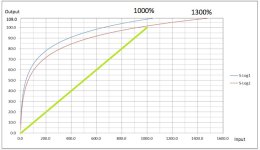
I created a 'notional' 709 curve.

68 maps to 100, which actally hits published data well.

This means that a LUT should be so harsh that any value above 68 should be clipped, if it is not, the image does not have proper contrast and will look wooden.

Of course that does not mean data above 68 is useless, because you can bring it back with secondaries, I think it just demo how harsh a correction needs to be to get back a realistic look.

Of course doing an ETTR stunt in an attempt to escape the noise floor will need even more odd corrections and to carry them out in a naturalistic manner is doubtless somewhat of a challenge..

View attachment 80254

This is a better representation of the relationship between S-log and log REC709:
REC709 maps a linear scale of intensity value change vs log gamma corrected input voltage that corresponds to human visual response. But anything beyond 100 is in Adams zone terms pure white with no detail. In fact the scope value scale in increments of 10 corresponds visually with Adams' descriptions of zones 0 thru 9. There have been all kinds of LUTS for log compression curves applied to camera video over the years, The latest generation are supposed to emulate the response curves of digital negative film stocks. When value corrected for more linear mid tones and nice highlight rolloff, the result is sacrificing range and detail in the deep shadows, as your own tests showed. We are on the same page. The theoretical maximum dynamic range of gamma corrected NTSC/REC709 values is 57dB, or about 9-1/2 stops. You see this reflected in the SN specs of REC709 video output from Sony's cameras even though the sensor can capture 13 stops or so. Hence the need to compress the broader DR via some scheme or another to fit the video "print" space.

Slog1_Slog2.jpg
 
Last edited:
This is an S-log sample from an FS-700 internal recording. I pushed this right to the edge for color saturation. There is color bleed in the stop sign. 1% more and I started to get macro blocking obscuring the letters in "stop".
To me this looks like roughly normal color saturation and values. The sign could have been a little more saturated red, but can't get there from recorded data.
attachment.php
 
This is a better representation of the relationship between S-log and log REC709:

My red curve was not mine it was the 709 curve - I just extended where it might go beyond 110. But your curve makes some sense too - I will revisit it when it is not midnight!

You made the green curve right?

Actually thinking about it I think mine is right and yours is wrong - the 709 space is 7stops (or there abouts) any image with proper contrast and more than 7 stops should clip.

S
 
Sam could you please post some examples of what you consider plastic,

The top three of the OP did not have proper contrast IMO - but still nice work

For 'what skin should look like' I guess maybe check out http://www.neilsnape.com (nb not all his models are fully clothed).

Id say this is fully saturated some of his images are toned but this is 'real'
http://www.neilsnape.com/images/details/details_23.jpg

And your advert - looked good - I guess it was graded for broadcast, and I cant really comment as Im on a LCDiMac - but I imagine it looked great on the device that was the target final delivery device - Dorris' Telly.

Hook up for a test. Great plan.
 
I thought I'd share the links I found which were all shot on the Sony F3 in s-log mode. (I did not shoot any of them!)

Of note is the Pouring Rain video. It was shot internally in XD-cam.


Hi Shoot56,

I can only see the one video mbody. I'm viewing on an ipad and android phone.

Would you be kind enough to just pop some links in that will work on mobile devices?

This thread is getting quite a addictive :)
 
My red curve was not mine it was the 709 curve - I just extended where it might go beyond 110. But your curve makes some sense too - I will revisit it when it is not midnight!

You made the green curve right?

Actually thinking about it I think mine is right and yours is wrong - the 709 space is 7stops (or there abouts) any image with proper contrast and more than 7 stops should clip.

S

You are right about the working DR of REC709 being about 7 stops for any values that you want to hold visible detail or tone in. The REC709 standard is referenced to the analog NTSC voltage range of 0-700mv = 0-100 IRE. Digital code values are 16=0mv, 235=700mv in 8-bit and 64=0mv, 960=700mv in 10-bit. 700mv voltage range is gamma corrected to a 20log(v1/v2) power density giving a 6dB per photometric stop linear light intensity scale (not linear voltage or linear encoding). 20log(700/1)=56.9dB or 9.48 photometric stops between black clip and white clip. If you look at the SN specs for the Sony F-series, you will see them listed as 57dB, the theoretical maximum for NTSC/PAL/REC709.
How do I know this besides being an old video engineer? My physics professor in college was Dr. Tom Goldsmith, the inventor of NTSC.

What people seem to have a hard time understanding is that REC709 is a display reference (WYSIWIG) standard that has little to do with how your camera captures images or what those images look like. Referring to any LUT as "REC709" is misleading since what you see on the monitor is always REC709 regardless of what the image looks like or the lut or grade that was used to create it. It just means that if you want to see 50% middle gray in your image for instance, you are going to send the TV an 8-bit code value of 110. If you want to shift your scene exposure value by 10 IRE one way or the other, you will have to adjust exposure by one F/stop at the camera.
 
Last edited:
The top three of the OP did not have proper contrast IMO - but still nice work

For 'what skin should look like' I guess maybe check out http://www.neilsnape.com (nb not all his models are fully clothed).

Id say this is fully saturated some of his images are toned but this is 'real'
http://www.neilsnape.com/images/details/details_23.jpg

And your advert - looked good - I guess it was graded for broadcast, and I cant really comment as Im on a LCDiMac - but I imagine it looked great on the device that was the target final delivery device - Dorris' Telly.

Hook up for a test. Great plan.

Sam,

Yes the advert was 100% graded for broadcast.

I have a Sony 17 inch Trimaster EL OLED PVM-1740 and a Sony LMD-2110w for CC work and editing. However on my MacBook Pro screen my advert looks quite washed out. I use the OLED and my waveforms to place my blacks and whites where I want them and get the kind of contrast I'm after. I use the LMD-2110w more to get the kind of view that most consumers will have out there. Not very many OLEDs out in there with the general viewing public. So not many will see a nice contrasty picture like I am seeing on the Sony OLED. Its a kind of balancing act if you see what I mean. If I'm grading for the web I'd rely more on my Macbook LCD and check on various devices like iPads, mobile phone screens and PC monitors too. I find I can push the black levels a little further when the content is graded for web only delivery. When My advert was broadcast on ITV/ Central TV and the B4U network it looked exactly as I indented on consumer tv's. I think my two monitors using different screen technologies is working quite well. On music video I also tend to crush the blacks a bit more than i did for this advert.

Thanks for posting the links again I can see all the videos now :)

I'll be in touch in the new year once the test shoot date is a little clearer. I'll try to give you as much advanced notice as I can regarding date and time. It would be great to have you at the test shoot.
If there is any other stuff you guys would like me to look at during the test shoot please do let me know. I've scheduled a whole day so we should have enough time to try a few things out.

Cheers,

Surinder.
 
I'd like your opinion on whether the skin tones look wooden or plastic. My client do insist on having skin exposed quite brightly. I know we could do better skin with shooting slog. Pls excuse the final shot in the spot that had to be shot in a vastly mixed lighting situation as we had neither the time or budget to re light the whole large area as we would have liked.

http://youtu.be/Tn_2Exu73X0

Your skin tones themselves look okay to me, but your final output is washed out because likely in order to increase your skin tones on behalf of your client, you boosted the entire image shifting your mid-tones and low-tones higher.

This is where more careful grading to even out your levels can help:

Original : Levels Restored : Re-exposure
surinder_before.jpgsurinder_after.jpgsurinder_after2.jpg
 
Razz
my point I think is that 99% of final viewing is on 7 stop devices. The other 1% being cinema screens which I don't know too much about - I guess they are good for 8 or 9 stops and use a different space.

so we have to grade our 10+ stops into 7 (or crush or blow) or present a flat wooden image - because 10 stops over 7 looks wooden - not enough contrast.

i guess there are two ways of grading - the raw stills way where you start with good contrast (a 709 curve) and recover highs and lows - or the bonkers way where you build up the contrast from a flat image.

clearly I prefer the first methodology :)
 
Your skin tones themselves look okay to me, but your final output is washed out because likely in order to increase your skin tones on behalf of your client, you boosted the entire image shifting your mid-tones and low-tones higher.

This is where more careful grading to even out your levels can help:

Original : Levels Restored : Re-exposure
View attachment 80289View attachment 80288View attachment 80290

Thanks for taking a look Dennis. I really value you input and advise. If you get a chance please take a look at the advert on a calibrated monitor too. As I mentioned to Sam in my previous post the advert looks washed out on my MacBook LCD too. It has really nice contrast on my Sony OLED and looks like what most people will see on my Sony LMD 2110w LCD monitor. When it aired it looked exactly as I intended it to look. I've even seen it air on my SD CRT tv in my bedroom and it looked okay.

On this particular spot I intentionally went for a lower contrast look. I just about got the blacks to kiss the bottom of the scopes So that there was at least a reference black in the picture. In normal circumstances I would have ended up with a look pretty close to what you posted. There is a current trend with adverts to go for a lower contrast look and I quite like it. I think I still have a long way to go before I can pull off a nice low con look though :)

If you skim through some of my older video on my YouTube channel you'll see I usually grade my music videos a little harder, crushing the blacks and getting the picture nice and bright using the rec709 space as much as possible. My clients really like that kind of TV contrast look. Personally I find it looks a bit videoish but it keeps the work rolling in :) I really prefer a lower contrast look myself with crushed and slightly elevated black levels while also limiting the white output a little.

I'm loving my F3 and looking forward to learning more and shooting Slog. For me getting the exposure close in camera and working with 10bit prores files is a must due to the rapid turn arounds my clients require. That's why all the F3, FS700, F5, F55 slog stuff is so interesting for me.
 
Razz
my point I think is that 99% of final viewing is on 7 stop devices. The other 1% being cinema screens which I don't know too much about - I guess they are good for 8 or 9 stops and use a different space.

so we have to grade our 10+ stops into 7 (or crush or blow) or present a flat wooden image - because 10 stops over 7 looks wooden - not enough contrast.

i guess there are two ways of grading - the raw stills way where you start with good contrast (a 709 curve) and recover highs and lows - or the bonkers way where you build up the contrast from a flat image.

clearly I prefer the first methodology :)

Ha ha, me too!

Personally I've never measured a display that exceeded 5 stops of linear photometric DR. But the value range reference on the camera exposure end is still 10 more or less. Conceptually no different than Ansel Adams dodging and burning his prints to pull negative values within the range he wanted to see. Just a lot easier for the most part.

I am not a fan of the current log curves for the most part. If you start out too flat you are wasting valuable bits of available data range. Definitely not good for low bit rate long GOP codecs.

Read your F3 blogs and love your approach to matching it with your Nikon.

There is so much confusion and struggle with exposure with all of these different luts. I am slowly working through some ways of illustrating the fundamentals that apply to any photographic medium that hopefully will make good exposure decisions easier. But every LUT is like a different film stock. So many different possibilities generate complex choices.
 
I'm no Ansel but I did start my career in a b+w dark room and quickly learned the joy of a contrasty paper stock and bringing the dr of the negative into the range of the paper by dodging and burning. The process is no different in digital apart from you get free infinite goes and can see the result before dipping the paper - easy.

Btw I've never measured anything.
 
Thanks for taking a look Dennis. I really value you input and advise. If you get a chance please take a look at the advert on a calibrated monitor too. As I mentioned to Sam in my previous post the advert looks washed out on my MacBook LCD too. It has really nice contrast on my Sony OLED and looks like what most people will see on my Sony LMD 2110w LCD monitor. When it aired it looked exactly as I intended it to look. I've even seen it air on my SD CRT tv in my bedroom and it looked okay.

On this particular spot I intentionally went for a lower contrast look. I just about got the blacks to kiss the bottom of the scopes So that there was at least a reference black in the picture. In normal circumstances I would have ended up with a look pretty close to what you posted. There is a current trend with adverts to go for a lower contrast look and I quite like it. I think I still have a long way to go before I can pull off a nice low con look though :)

If you skim through some of my older video on my YouTube channel you'll see I usually grade my music videos a little harder, crushing the blacks and getting the picture nice and bright using the rec709 space as much as possible. My clients really like that kind of TV contrast look. Personally I find it looks a bit videoish but it keeps the work rolling in :) I really prefer a lower contrast look myself with crushed and slightly elevated black levels while also limiting the white output a little.

I'm loving my F3 and looking forward to learning more and shooting Slog. For me getting the exposure close in camera and working with 10bit prores files is a must due to the rapid turn arounds my clients require. That's why all the F3, FS700, F5, F55 slog stuff is so interesting for me.

I am using calibrated Apple cinema display, which is what I viewed it on. I also looked at it on calibrated macbook pro 15" screen. I still feel it is just a little too washed out for my liking, it is objective opinion of course. I can't tell you it is right or wrong, just that its too much for my liking. Even if your client wants 70-75% IRE skin tones there is no reason to wash out the entire scene, you might want to do selective grade using a simple tracking mask or other alternative methods.

I have seen YouTube and Vimeo lighten footage, darken it, etc.. all you can do is trust your scopes in the end. When I looked at your image on scopes nothing was kissing the blacks and your RGB black levels were not even at all. To judge footage online can be difficult, perhaps you want to provide a file download version so others can give you better advises.
 
Last edited:
I am using calibrated Apple cinema display, which is what I viewed it on. I also looked at it on calibrated macbook pro 15" screen. I still feel it is just a little too washed out for my liking, it is objective opinion of course. I can't tell you it is right or wrong, just that its too much for my liking. Even if your client wants 70-75% IRE skin tones there is no reason to wash out the entire scene, you might want to do selective grade using a simple tracking mask or other alternative methods.

I have seen YouTube and Vimeo lighten footage, darken it, etc.. all you can do is trust your scopes in the end. When I looked at your image on scopes nothing was kissing the blacks and your RGB black levels were not even at all. To judge footage online can be difficult, perhaps you want to provide a file download version so others can give you better advises.

Thanks Dennis,

I'll upload a prores export or something like that when I get back into work. Something may have changed along the way to YouTube but it was pretty good on my scopes in Premier and the waveforms on my Sony OLED. I have to keep an eye on the scopes as its a QC fail to have highlights too high and superblacks Adstream can sometimes be super strict on illegal video, chroma and audio levels so all the scopes are watched from acquisition right down to final delivery. The advert passed QC first time. It looked good when it aired on all 4 channels thank God as the deadline and budget was crazy on this job.

Learning so much here from yourself, Nate and Sam. Again I'm glued to this thread and looking forward to seeing more Slog videos and also learning more about the workflows you guys are using to get Slog to a viewable rec709 image.

Surinder.
 
Back
Top