The GH6

Thanks! I filled out the rebate right away so my card may be in the mail by now, who knows. Though I suspect for me this camera is a CF express camera now. Definitely need a v90 SD card if you want to use the high MBPS ALL I modes.

i believe the Record button in front can be disabled….
I think might even be able to be rebound to a different function but haven’t checked yet.
 
As I slowly work my way around the camera, very much impressed with the build quality, by far the best of any previous m43 cameras with S1H like construction. Getting used to the weight issue and with a lens attached seems well balance with the excellent grip. Great interface as usual. Looking forward to getting some test recordings done soon. And yes, looks like CFexpress will be required. :( And while a free 128GB is welcome, hardly enough for anything other than testing. Still, very happy so far.

 
I put in a V60 card and it recorded a lot of modes. 4k 422 about long gop and All-I. C4k 400 Mbps and even 5.7k 420 10 bit All-I. The manual says 400Mbps or less V60 works.
I plan on mostly using 4k 422 10bit 24p. All-I or GOP.
ProRes at 4K will need a CFexpress card.
 
does anyone know that 2000 ISO High dynamic range setting, can it be assigned to a button? would be great to be able to switch quickly between the 250 base ISO for Vlog to the 2000 ISO.
 
My free CFexpress card came today from Lumix.
 

Attachments

  • photo129953.jpg
    photo129953.jpg
    65.8 KB · Views: 0
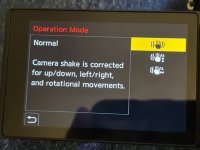
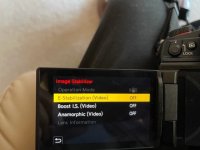
I've trying to figure something out with the image stabilizer setting on the GH6. When I'm in the video camera M mode the setting in image stabilizer that says operation mode is grayed out. In other modes, the operation mode you can put the image stabilizer in normal mode or pan left/right or pan up/down.

My question is what is the image stabilizer in the Video camera mode set on? Is it on Normal? You can change it to E-Stabization, Boost I.S. or Anamorphic. You can turn those on or off, but not the operation mode.
 
I'm not sure but I've seen in videos a place to turn off in the operation settings
 

Attachments

  • thumbnail_IMG_6401.jpg
    thumbnail_IMG_6401.jpg
    53.9 KB · Views: 0
I think it has to switched off at the lens. I agree cannot see any other way.

I was told by someone that the IS lens has something to do with this. So I turned the IS off at the lens. Camera still acts the same. Then I took the lens off and the camera shows all of the settings.
I do interviews and they say to always turn off the IS if using a tripod. Will turning off the lens turn off the camera too?
 
okay the way to turn off the camera's IS when using a IS lens, is to just turn the lens off. One more question. In video camera mode the Operation mode is grayed out and can't be changed. So is it on? In normal mode or what? It works in M, S, S or P modes. Just not in video camera M. The monitor shows Duel 2 so I guess it is on.
 

Attachments

  • thumbnail_IMG_6405.jpg
    thumbnail_IMG_6405.jpg
    52 KB · Views: 0
Last edited:
I don’t see a reason for you to turn off the IS for interviews. Unless you are panning around wildly on a telephoto lens.


QUOTE=Zim;n5689097]

I was told by someone that the IS lens has something to do with this. So I turned the IS off at the lens. Camera still acts the same. Then I took the lens off and the camera shows all of the settings.
I do interviews and they say to always turn off the IS if using a tripod. Will turning off the lens turn off the camera too? [/QUOTE]
 
I don’t see a reason for you to turn off the IS for interviews. Unless you are panning around wildly on a telephoto lens.


QUOTE=Zim;n5689097]

I was told by someone that the IS lens has something to do with this. So I turned the IS off at the lens. Camera still acts the same. Then I took the lens off and the camera shows all of the settings.
I do interviews and they say to always turn off the IS if using a tripod. Will turning off the lens turn off the camera too?

[/QUOTE]

The manual says, "We recommend turning off the image stabilizer function when using a tripod."
I've left my IS on with the GH3 on a tripod with a problem.
 
only when panning and tilting. And only with IS not IBIS.
it’s not going to effect s stationary shot.
obviously it’s not wrong to turn it off but if you re just going for a lockdown shot it makes no difference.


The manual says, "We recommend turning off the image stabilizer function when using a tripod."
I've left my IS on with the GH3 on a tripod with a problem. [/QUOTE]
 
If you are not panning or tilting on the tripod, it is just fixed then it doesn't matter. If you are going to pan etc on the tripod then turn it off as it will try and correct your movements. Not good, as there will still be that little movement when you stop moving the tripod.
 
Back
Top