

MattDavis
Well-known member
I happened to be checking out the new software for my Pix220 external 4:2:2 recorder - no joy, still doesn't see C100 timecode.
What I did find by accident is a 'worst case scenario' of the C100's... ahem... 'textured' (not noisy?) image giving the compressor a really hard time. Darkish areas of flat tone make for boiling noise, and whilst we're all great fans of the internal AVCHD codec, the ProRes 422 'should' be better. It wasn't - it was horrible:
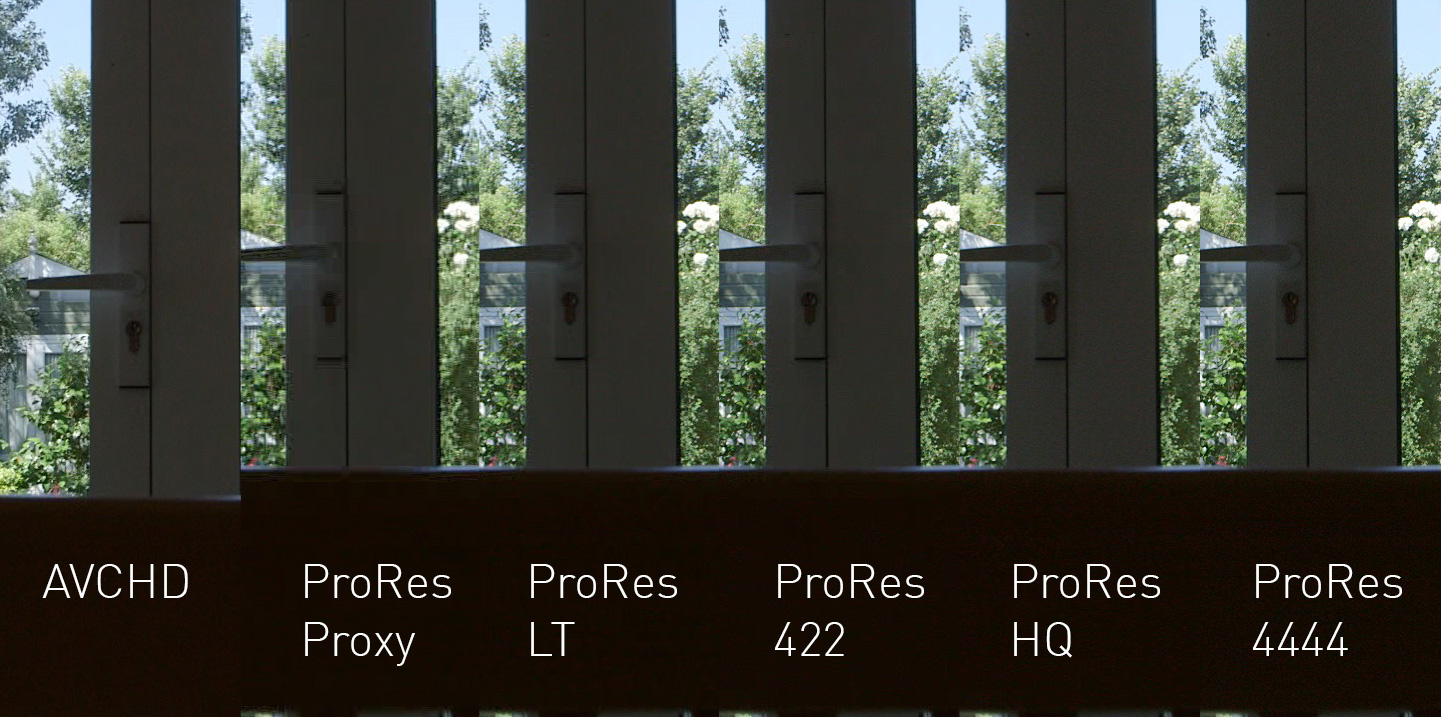
This still doesn't really tell the full story, so I put it on Vimeo:
And even Vimeo doesn't seem to do it justice - hopefully the downloadable master file (I uploaded ProRes) will unlock the true horrors within. That's with 0dB gain, f11, 1/50th. Maybe there's a bit more in the 4444 version. I'm not sure if I'd go that extra step unless doing packshots, special chromakey etc. I've also uploaded the master ProRes version here.
Sorry about the composition and style. This wasn't a posed shot. I was testing timecode, so I didn't even bother to focus the camera, just getting an image...
The Skinny: Use ProRes HQ! It's not just for chromakey! In this (not representative) case, I'd prefer the AVCHD files over the standard ProRes 422 record, 145 Mbits per second just isn't man enough to deal with the noise in shadows.
What I did find by accident is a 'worst case scenario' of the C100's... ahem... 'textured' (not noisy?) image giving the compressor a really hard time. Darkish areas of flat tone make for boiling noise, and whilst we're all great fans of the internal AVCHD codec, the ProRes 422 'should' be better. It wasn't - it was horrible:
This still doesn't really tell the full story, so I put it on Vimeo:
And even Vimeo doesn't seem to do it justice - hopefully the downloadable master file (I uploaded ProRes) will unlock the true horrors within. That's with 0dB gain, f11, 1/50th. Maybe there's a bit more in the 4444 version. I'm not sure if I'd go that extra step unless doing packshots, special chromakey etc. I've also uploaded the master ProRes version here.
Sorry about the composition and style. This wasn't a posed shot. I was testing timecode, so I didn't even bother to focus the camera, just getting an image...
The Skinny: Use ProRes HQ! It's not just for chromakey! In this (not representative) case, I'd prefer the AVCHD files over the standard ProRes 422 record, 145 Mbits per second just isn't man enough to deal with the noise in shadows.
Last edited:
