The Canon DSLR Audio thread

maybe somebody could please help me out, im a newb, i plugged my new rode video mic into my 60d, hit record, played it back to have a listen and all i hear is a hum/hiss noise and my voice is so muffled you can barely hear it at all, its not working, i feel kind of stupid bc ive searched everywhere and cant find any other people with this issue, seems everybody just plugged there mic in and started shooting? is it a faulty mic? is there something in the camera menus i not seeing that i have to enable or something, ive searched all over them cant find anything except auto and manual recording but that does nothing. i know magic lantern is available to help with audio put i know i dont need it to even be able to hear my voice at all when speaking in the mic from 1 foot away. im so confused
 
maybe somebody could please help me out, im a newb, i plugged my new rode video mic into my 60d, hit record, played it back to have a listen and all i hear is a hum/hiss noise and my voice is so muffled you can barely hear it at all, its not working, i feel kind of stupid bc ive searched everywhere and cant find any other people with this issue, seems everybody just plugged there mic in and started shooting? is it a faulty mic? is there something in the camera menus i not seeing that i have to enable or something, ive searched all over them cant find anything except auto and manual recording but that does nothing. i know magic lantern is available to help with audio put i know i dont need it to even be able to hear my voice at all when speaking in the mic from 1 foot away. im so confused

Was the microphone on?
And if so, at what dB setting?
 
Did you have the camera in manual audio mode? If AGC is on it might muffle out your voice. But also make sure the mic is on. Try it at 0db gain at first. Also check to make sure you had the plug all the way in.
 
Is it safe to say, that even with the ML and v2 updates, that the 7D can still only display a signal meter and gain control can be set but only via a menu and cannot be adjusted while recording?

My first post here lol....trying to get caught up on this stuff >:)

Thanks!!
 
The 7D does not really have Magic Lantern yet. The alpha version was just released this week, and about a month ago we all thought ML on the 7D was mostly impossible! If you want to try this on just about any other camera, that would be another story. (I really need to update the FAQ about the 7D's progress)

EDIT: I just realized what you are asking. Yes, gain control is adjusted via the audio menu within ML. However, you can actually bring up the ML menu and adjust the gain while recording as well. I just tested this on my T2i just to make sure, and it does indeed work (although you may have to exit the menu for the settings to stick, I'm not sure).
 
Last edited:
Hey all,

first of all, thank you for all the info!

Just want to share my experience and disappointment with the t3i: I just bought a t3i and the audio hiss (with rode videomic) is terrible, much worse than the t2i I used before (with just Rode Videomic plugged directly into the cam). I'm seriously considering returning the t3i and getting a t2i instead.

I have never used Magic Lantern. And without it, my t2i footage (with RVM) sounds great and I did not get AGC issues. (I would use Magic Lantern if I buy my own t2i to make it even better.)

As far as I know the Magic Lantern for t3i still does not fix audio monitoring or AGC disabling. If I have to choose between flip out screen (t3i) and better sound (t2i with and without Magic Lantern) my decision is easy. Get rid of the noisy t3i. The interesting thing is that on the t3i the hiss is louder with the Rode Videomic plugged in than with the built in camera mic!

Not the case with t2i...And I know my RVM works fine...

Finally I think the external mic plug on the t3i is a bit too low and in the way of your left hand easily. The t2i plug is a bit higher up the camera and out of the way.

Just wanted to share my experience...

What do you all think?

I have had no problems with my T3i recording audio, assuming I have everything set up right ahead of time. The biggest issue I run into is getting a hot enough signal into the camera. If the volume of the input isn't high enough it won't mater that you turned down the AGC because you will just have to boost it back up later, resulting in hiss. I've used line level outputs on multiple mixing boards to great success both shooting in a controlled environment and in the field. Also using the RVM-Pro with it set to +20db works very well.

I heard of someone using a 100 ohm resistor between the hot and ground connectors on an xlr-to-3.5mm adapter to boost a regular xlr signal to line level. Still doing some investigation on this one. I'll let you know if I figure it out.
 
if you need to go into camera to record then an XLR mic going into a Juiced Link would be littile costly but will be a good choice.
 
if you need to go into camera to record then an XLR mic going into a Juiced Link would be littile costly but will be a good choice.

Juiced Link would be nice, if money isn't an object. I'm looking for a cheap alternative. It's kind of an exercise in creative problem solving. I don't own any XLR mic's currently so a Juiced Link would be an expense with no purpose, but I would like to be able to plug in an XLR if I ever work a gig where its an option.
 
Juiced Link would be nice, if money isn't an object. I'm looking for a cheap alternative. It's kind of an exercise in creative problem solving. I don't own any XLR mic's currently so a Juiced Link would be an expense with no purpose, but I would like to be able to plug in an XLR if I ever work a gig where its an option.

Case in point today. I was doing a gig for a university student and he checked out a bunch of gear from his school including a Tascam recorder. But the recorder was recording distorted audio and I couldn't figure out why. Would have been nice to be able to use the very nice shotgun mic that he had but there was no way to hook it up to my camera directly. So instead we ended up putting my VMP on the end of the boom and using that.
 
My headphones went out and I'm considering an option mentioned in the Magic Lantern user manual. I have a t2i and I monitor by using the usb cable that came with the camera. I was using a pair of Sony MDR-V6. ML says the Audio Technica ATH-M50 works great because it is lower impedance. Anyone using these to monitor with? My MDR-V6 headphones were fine but the audio level just was weak. I considered springing for a Fiio headphone amp but never did. So my options are: 1) new MDR-V6 with a Fiio amp, or 2) the ATH-M50 with no headphone amp. Will the latter option produce adequate sound levels for monitoring?
 
I got myself one of those Fiio adapters, have been using it to amp my headphones to listen to monitors during filming. Haven't tried using it as a mic amp yet, will get to that one of these days and post my results.

Meanwhile, I updated the first post to include the recommended ways of doing things in my opinion.

Hi, I would like to ask - have you actually tried this setup?
I am considering buying the Audio Technica Pro 24CM and connect it through the Fiio E6 to my Canon 600D. My plan is to record ambient sounds (like birds in a forest) but also use it for some family vacation videos (this is also the reason I don't want my gear to get too bulky so I can still carry it in one bag) and I would like to reduce the noise which is still present in the recordings even if I am using the internal or an older external microphone. Do you think that the Fiio preamp would be "strong" enough to accomplish this?
Thank you!
 
The mic on the t3i stinks! It's only good for gathering 'reference' audio if you're going to link up with PluralEyes. The audio on the 5d is pretty good though. I don't understand why the t3i got gipped. I think it's because of the lower price.

With the t3i, you're going to have to move to some sort of external audio solution—the zoom H4n, one of the external recorders. I deeply wish the DSLRs would have XLR inputs. But that's just me.
 
There is no built in mic on any camera that is usable, so you may as well figure on using an external mic every time, and in the cases where the camera's preamps crappy (which us usually with DSLRs) you must use 2nd system sound.
 
The mic on the t3i stinks! It's only good for gathering 'reference' audio if you're going to link up with PluralEyes. The audio on the 5d is pretty good though. I don't understand why the t3i got gipped. I think it's because of the lower price.

With the t3i, you're going to have to move to some sort of external audio solution—the zoom H4n, one of the external recorders. I deeply wish the DSLRs would have XLR inputs. But that's just me.

The T3i started with a different chipset than the 60D, 5D and T2i before it. I believe they continued with that chipset going forward into the 70D and T4i, but everything before that had more-or-less the same audio quality.
 
Okay, so my wife's company just bought a Canon 70D for shooting promotional web videos and stills. They asked me to set it for them, and I cannot figure out how to switch the audio in the camera from mixed stereo to dual mono. They're running a wireless mic and a Rode shotgun into a Beachtek mixer. The mixer is showing separation between L and R channel (and in the headphones). But the audio on the final recorded files is all mixed.

I can't find it anywhere in the menu settings on the 70D to switch from mixed audio to dual mono. DSLR video is still pretty new to me. Am I missing something completely obvious?

 
Last edited:
I doubt there is "dual mono" on any DSLR.s That term refers to 2 separate mono tracks. But you say the camera audio monitor shows that the 2 channels are registering left and right during recording? Sometimes when you import footage into an NLE, it plays both sides of the stereo file panned center. How are you listening to it when you hear it all mixed mono? Are you just double clipping the video file to play it in the default player, or are you opening it in some editing software? If so what NLE are you using? There's usually a way to click on the audio of a clip and separate the two tracks.
 
Just...Chad is right. there is no 'dual mono' setting on these little consumer cameras (I see you have been using a professional level camcorder). Chad is correct. Both Adobe and Vegas for example can split the audio signal into separate mono channels.
 
I doubt there is "dual mono" on any DSLR.s That term refers to 2 separate mono tracks. But you say the camera audio monitor shows that the 2 channels are registering left and right during recording? Sometimes when you import footage into an NLE, it plays both sides of the stereo file panned center. How are you listening to it when you hear it all mixed mono? Are you just double clipping the video file to play it in the default player, or are you opening it in some editing software? If so what NLE are you using? There's usually a way to click on the audio of a clip and separate the two tracks.

The audio meter on the Beachtek mixer has separate left channel/right channel meter. The audio shows clear distinction between the channel, and I can hear it in the headphones so I know it's dual mono going into the camera which (according to the specs) has a stereo audio (and that requires two tracks). The audio is currently set up to run a wireless lav mic on the left channel and shotgun mic (mounted to the camera) on the right channel.

The video is all in .mp4 on the SD card in the camera. I'm importing the video into FCP 7 where I get two channels of audio in a stereo pair. But even when I turn off the stereo pair to make them independent channels, the audio is still the same (meaning channels 1 and 2 still have both the lav and shotgun audio mixed). Basically, I end up with two identical channels of mixed audio.

So then I thought, maybe it's an .mp4 encoding issue (since .mp4 sometimes embeds the audio data into the video data) so I ran the raw video through Mpeg Streamclip to convert it an .mov. I tried it with h.264 and Sony XD Cam EX, but it made no difference.

SO... the only conclusion I've come to is that the Canon 70D is mixing the channels instead of recording them separately. I mean, why market your camera as having stereo audio when it's really only mono that's cloned into two channels? Why not clone the audio five times and call it surround sound? Sorry, this camera is making me cranky.

I could probably live with it if I was the guy using the camera everyday and just turn off and on the shotgun mic as needed. But this camera is going to be shared amongst everyone in a marketing department who will be expected to shoot videos for their website so the more variables I can sort out for them, the happier they will be (and the happier my wife will be - that part is important).


Last edited:
Do you have any other stereo source you can try to make sure? Do you have a stereo mic you can plug straight into the camera? Or plug in an ipod with a song that has obvious stereo stuff happening. Also, mp4 doesn't look as good as .mov FYI.
 
Solution for Canon 70D audio (stereo vs dual mono)...

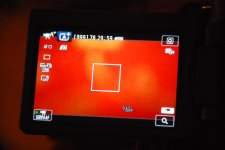
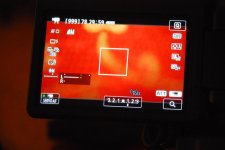
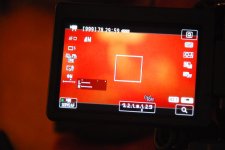
This little detail is not mentioned in the user manual, but here is what I discovered: If you shoot video in Green Zone (full auto everything), the audio will be mixed by the camera. If you shoot in Program (or TV, AV or M) then the camera will keep the left channel separate from the right channel. If you do not see the in-camera audio meter on the view screen, you are in full auto. When I switched to Program mode, the viewfinder provides more info and a audio meter showing L and R, and you have more options in the main menu (including the ability to set levels, though the level setting applies to both L and R - individual level changes need to be made in an external mixer).

Sigh. Wish Canon had been a little more clear about this in their technical material.

DSC_8546.jpg
1. Viewfinder in Green Zone

DSC_8544.jpg
2. Viewfinder in Program Mode with left channel only active (wireless lav mic)

DSC_8545.jpg
3. Program Mode with wireless lav and Rode shotgun active

DSC_8547.jpg
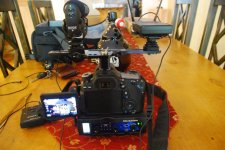
4. The set up: mixer is the Beachtek DXA-SLR Mini, Sony UXB wireless and Rode Shotgun
 
Back
Top