Talent versus 'mud, jello and banding'

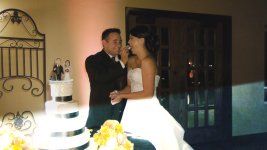
Here's what happens every time a photographer fires their flash in the same room as the GH1 while in 1080/24p.....


BEFORE the flash...


i would actually consider that a bug. and it should be fixed. reason? it's not normal for any video function to break up like that when someone pops a flash. even for a dslr. this isn't swinging a camera around in the forest, this is an important moment being recorded to have it messed up by something too common as a flash.
 
Last edited:
i would actually consider that a bug. and it should be fixed. reason? it's not normal for any video function to break up like that when someone pops a flash. even for a dslr. this isn't swinging a camera around in the forest, this is an important moment being recorded to have it messed up by something too common as a flash.

Incorrect. This is called flash-banding and happens with all CMOS chip camcorders. Some, like the HPX-300, have an onboard correction mechanism, but it still can happen. This is a result of the rolling shutter being slower than the camera flash.

EDIT:
Wow my bad I should have looked at the pics, I just went by description cause I wasn't logged in...that's not flash banding that's something else...but I think it is probably a similar problem....

Actually it's likely the codec reacting to the changes made to the entire frame all at once by the flash...hmmmm...I haven't seen this happen with mine, I will do some tests at some point.
 
Last edited:
can you show me an example of the codec breaking up like that when a flash pops?
you can see videos of the mk2 when a flash pops and nothing like that even comes close to what you see in that grab.
and as we all know the cmos readout on the mk2 is slower than the gh1.
 
i'd hope panasonic saw the above as a bug and not something that's just part of the codec. especially if a flash can do that. and i'm looking at it purely as a consumer. not a want to be filmmaker.

this however, if a flash is fired, and cmos chips can't work around it, then there's nothing you can do. then that's fine.

 
it's not normal for any video function to break up like that when someone pops a flash. even for a dslr.
Tell that to the entire HDV camcorder industry then. Flashes have always caused long-GoP codecs problems. The latest generation is better, but watch any broadcast of "Access Hollywood" or anywhere where there's a red-carpet event on HD broadcast, it's pretty much unwatchable. Sports and press conferences can be pretty bad too.

With that said, this looks worse than most HDV flash breakups, but in a different way; HDV gets blocky, this gets "smooth", and I think this is worse because of the dramatic loss in detail.

I would strongly recommend to anyone who's encountering problems like this, to shoot in the MJPG mode instead. It would be immune to any long-GoP issues.

And the sooner long-GoP dies, the better off we'll all be. Of course, with more and more long-GoP development happening, it's probably never going to come about that we're freed from it, but I sure wish we could be.
 
Actually it's likely the codec reacting to the changes made to the entire frame all at once by the flash...hmmmm...I haven't seen this happen with mine, I will do some tests at some point.
That's exactly what it is.

I would expect that there's flash-banding on one or two frames, and the rest of the GoP is degraded by the massive changes the flash introduced.
 
i'd hope panasonic saw the above as a bug and not something that's just part of the codec. especially if a flash can do that.
It's unquestionably part of the codec. Fortunately the GH1 offers a second codec, MJPG, which is totally immune to this effect, and, again, I would recommend any wedding shooters to consider using MJPG instead of AVCHD for that type of work where flashes have the potential to ruin shots.

MJPG will still be subject to potential flash-banding, but not to affecting an entire group of frames.
 
Now allow me to simulate what a un-synchronized flash can do on a frame shot with a top-of-the-line Arri 535B movie camera, ie; arguably one of the best movie cameras money can buy (Panavisions can only be rented)

http://www.arri.de/camera/35_mm_film/arriflex_535_b.html

thanks to the mechanics of the rotating shutter it by necessity must use.

http://en.wikipedia.org/wiki/Rotary_disc_shutter


I've never been one to complain about "flash banding". Honestly, I don't think CMOS is any worse than CCD...it's a camera flash at a WEDDING...who cares how it bands across the video...it's only for like one frame...and when you watch the video it looks like a FLASH going off...just like it did in real life. My customers aren't dropping their DVD's into an NLE and sending me frame grabs to complain about.

But when the codec completely failes for half a second, and the photog is blasting you point blank 2000+ times in one evening, I think it gets pretty ugly...even for to a customer's point of view...who is really only typically concerned about content.

I've never had issues with "jello". It's actually kinda fun to watch on the NLE...but it only happens when I'm setting up shots...and not in the stuff I actually put in the video. I'm don't shoot handheld video or trains or anything.

I really like my GH1, but when it comes to weddings (which it wasn't designed for), I'm still pretty much giving it two thumbs down. It's not good at all for the ceremony with the kit lens, and with the 20mm f1.7 it should be useful for about 50% of the non-important stuff at the reception.

Add to that the huge sync issues that come with the GH1...which is apparently caused by the non-native 24p in a 60i stream...made even worse for the need for pulldown, and it makes this camera a real PITA to use for event work. It works well alone...it just doesn't play well with others. (Other cameras, audio recorders, etc.)

Since the HMC40 is now in stock, I'm considering getting one just for the ceremony and some of the reception stuff, and just using the GH1 for "fun" shots with the 20mm and 7-14mm lenses. The 14-140 can stay home. :happy:
 
Ugh...that's really, really bad. How many frames does it affect and how noticeable is it when watching the footage? Was thinking maybe the flash going off would be enough to distract the eye away from this if it didn't happen in too many frames.

From the time the flash pops until the codec recovers, it's about 10 frames...very noticable on the DVD. When a photog is firing in burst mode you can actually lose an entire recessional, a kiss, the departure under sparklers/rose petals (which poses enough problems for the codec already), etc.
 
What sync issues?


Syncing 1080/24p from the GH1

It doesn't match up to native 24p from my palmcorder, and doesn't match up to 48k/16bit audio recorders (it isn't a crystal issue with the recorders...I've used them for a while)
Using NeoScene drastically changes the lenth of the video as well, causing more sync problems.

I'm sure this isn't a problem shooting 5-second scenes for a commercial or "movie", but in a 30-75 minute long-form wedding ceremony with other media being captured, it's a LOT of extra post work...which is money out of my pocket.

Every other 24p or 60i video camera I've used (I've used a lot of them) have had no sync issues no matter how long the ceremony went on. Even my tiny Panny NATIVE 24p SD9 cheapo palmcorder will hold sync forever along with 2 different Zoom H2 recorders...and it doesn't require pulldown.
 
Probably something to do with 23.976 and 24p, and therefore a setting you need to be aware of in the transcoding options of Neoscene. Check it out.
 
It's unquestionably part of the codec. Fortunately the GH1 offers a second codec, MJPG, which is totally immune to this effect, and, again, I would recommend any wedding shooters to consider using MJPG instead of AVCHD for that type of work where flashes have the potential to ruin shots.

MJPG will still be subject to potential flash-banding, but not to affecting an entire group of frames.

that's great that people have the option of a codec to chose from....but you're not thinking about a consumer who doesn't know that changing the codec from avchd to mjpeg is going to fix the problem...and to think of it, the consumer should be told that this problem may arise when using avchd...which is not noted. or is it? it's not weddings it's a couple, if not more of things, that can be problematic. graduations, birthdays. completely consumer related. mom and dad aren't going to pick up the camera and one of them is going to be like, "oh honey, make sure you switch it to mjpeg because dvxuser.com recommends we use it during flash photography when recording video" it's a bug. plain and simple. i personally don't really see it a problem for myself, but i'd hate to hear about little billy's graduation speech or jane's once in a lifetime wedding to be partially ruined with a codec breaking up because of a dozen flashes going off here and there.
 
Last edited:
Probably something to do with 23.976 and 24p, and therefore a setting you need to be aware of in the transcoding options of Neoscene. Check it out.


That's gotta be the majority of it. As far as I know, NeoScene only converts to 24p...not 23.976...but I'm still trying to figure this whole GH1 workflow out.

I just wish I could drop it on the timeline and edit it like I do the footage from my native 24p 17mbps AVCHD cheapo palcorder. Surely this woulnd't ne a huge leap for a firmware upgrade, or put Panny's prosumer camcorder people out of business? :Drogar-Thinking(DBG
 
That's gotta be the majority of it. As far as I know, NeoScene only converts to 24p...not 23.976...but I'm still trying to figure this whole GH1 workflow out.

I just wish I could drop it on the timeline and edit it like I do the footage from my native 24p 17mbps AVCHD cheapo palcorder. Surely this woulnd't ne a huge leap for a firmware upgrade, or put Panny's prosumer camcorder people out of business? :Drogar-Thinking(DBG
It's got to be something you're doing to the footage during the conversion, because the native recording is 23.976 and we've shot tons of footage and ... as far as I know, there's no sync issue whatsoever.

You can just drop it on the timeline, if you're dropping it onto a 60i timeline...
 
That's gotta be the majority of it. As far as I know, NeoScene only converts to 24p...not 23.976...but I'm still trying to figure this whole GH1 workflow out.

I just wish I could drop it on the timeline and edit it like I do the footage from my native 24p 17mbps AVCHD cheapo palcorder. Surely this woulnd't ne a huge leap for a firmware upgrade, or put Panny's prosumer camcorder people out of business? :Drogar-Thinking(DBG
24p is almost always actually 23.976. Very few video workflows (excepting film-based ones, I suppose) do exactly 24.0 fps. This is because in the video world, there were only three original delivery standards (for color video): NTSC, PAL, and SECAM. PAL and SECAM have identical fps (25 frames or 50 fields). NTSC is, of course, 29.97 frames or 59.94 fields per second. The new ATSC standard (for DTV) uses NTSC frame/field rates. 23.976 fps is known as the "NTSC film" frame rate because after telecine the content is slightly slowed in order to match delivery standards (23.976 after pulldown becomes 29.97). So when working with 24p video, always assume that it's 23.976 fps, not 24.0 fps. Actually, "24p" is entirely a video concept, since film always has discrete frames without any relation to the "interlaced versus progressive" issue.

NeoScene's pulldown removal to extract the 24p should still result in 23.976 fps.
 
Last edited:
I have seen the flash problem in other wedding videos where the GH1 was used, but in those cases it looked more like just a flash and it was easily recognized as such. Therefore easily overlooked. But it seems to me the 2 examples posted so far in this thread are particularly nasty compared to others.

Here's an example of what I consider to be a more "normal" looking flash. Be interested to see if others agree.

http://www.imaginginsider.com/?p=101583

http://www.dvxuser.com/V6/showthread.php?t=181205

EDIT: Sorry, it's a long clip - should have listed some times:
0:50
1:44
2:01 - there may be more
 
Last edited:
It's got to be something you're doing to the footage during the conversion, because the native recording is 23.976 and we've shot tons of footage and ... as far as I know, there's no sync issue whatsoever.

You can just drop it on the timeline, if you're dropping it onto a 60i timeline...

I'll have to try putting the native 60i from the GH1 on a 60i Vegas timeline, and seeing if it will remove the pulldown when rendering to 23.976. I know that Vegas won't remove pulldown properly when putting the native 60i on a 23.976 timeline...but it does alter the length of the video.

Right now I'm editing on a 23.976 timeline, and the native 60i files look terrible...i.e. the frames are blurred without pulldown reversal. But when I use NeoScene to convert the 60i to 24p, the resulting video is stretched much longer...but looks good.

Either way, so far it's just not an efficient workflow when profit is your #1 driving factor in a full time biz.

I've shot+edited 4-5 weddings with the camera so far, and have 5 more to shoot+edit in the next 2 weeks, so I'll have lots of opportunities to try and figure it out! :happy:
 
I have seen the flash problem in other wedding videos where the GH1 was used, but in those cases it looked more like just a flash and it was easily recognized as such. Therefore easily overlooked. But it seems to me the 2 examples posted so far in this thread are particularly nasty compared to others.

Here's an example of what I consider to be a more "normal" looking flash. Be interested to see if others agree.

http://www.imaginginsider.com/?p=101583

http://www.dvxuser.com/V6/showthread.php?t=181205


Yeah, that 720p encoding looks really good! I shot one of my weddings in 720p, and didn't have any problems.
 
Back
Top