T2i letterboxing.

hello all.

i have had the canon for a while now, and have filmed some good stuff on it, mostly skating, but i cant figure out how to get rid of the letterbox...i originally filmed in 1080 at 24p, then dropped to 720 at 60p, for the ability to slow the action down. ive played with the file size(L, M, S, Raw, etc) and have searched everywhere on the menu, also searching where i could figure out on adobe premier elements 8.....no luck. please help...its so so anoying, and im trying to get some clips for a friend but they wont come out proper....

any help is so so so appreciated.

wil.
 
Not sure what to do on Premiere Elements 8 but my first impulse is that you put your HD footage in an SD sequence and then exported in HD. You need to make sure your settings while you're editing are HD. The closest analog I have is Premiere CS3 for mac...in your project settings you need to select HD settings.

screenshot20100903at353.png
 
In premiere cs5 you right click on the clip in the timeline and select "scale to frame size" or something like that. easy as pie. Hopefully it is simillar for elements 8. If not, then you can manually scale the clip to fit the frame...
 
Won't work if he has the wrong frame size. I am guessing he put his 1080/720p footage in a 480p sequence and then exported at 720p.
 
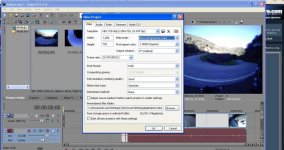
Im gonna to suggest looking over your project settings. When you first open elements, it may prompt you with the overall project settings for video, audio, ruler (which is your timeline's measurement for the project), etc. Itll look different for each program, this is what Vegas' looks like.


The project settings should conform to the video files themselves, so if shooting at 720p at 60fps then input those into the project settings, or choose a template that matches it (or choose a template, then adjust any settings if they need it).

If you have already ensured the project settings, be certain of what render settings your video should be coming out as. Are you selecting a template form a drop down list? Any possible "advanced" or custom tabs your missing? I am not familiar with elements, but Vegas and Premiere cs5 are flexible in this way.
 

Attachments

  • vegasset.jpg
    vegasset.jpg
    86.2 KB · Views: 0
Ben, if you export a "480P" timeline as 720p, I'm sure it would scale the image, not add weird letterboxes. And, also, if he was using a 480p timeline, his footage would be magnified, not smaller. and he would be asking us how to shrink it to the frame size.

I am pretty sure he is working in a 1080p timeline and needs to scale the 720 up.
 
Yeah probably, I didn't watch the whole thing so I didn't see any footage that DID fill the frame and he said he shot using both frame sizes so I assumed he did something weirder than that.
 
me thinks ive got it...just uploading a tester to youtube now. i think it was my settings when opening a new project...thankls **** loads guys n gals, ive been going mad trying to figure it out by myself...
 
Back
Top