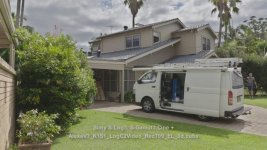
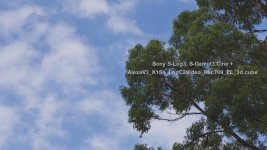
F55: Split Screen comparison of Venice-like LUT vs. LC709TypeA LUT

I don't own these cameras but have to agree with morgan_moore, both of these LUTs did not get you to proper color so that has to be some sort of fail, right? If the point of LOG shooting is to grab more DR and improve the color possibilities, shouldn't the applied LUT table get you to skin tones that are not magenta or green biased from the start? Seems kind of wrong to have to re-grade the LUT to get the skin correct.
 
... shouldn't the applied LUT table get you to skin tones that are not magenta or green biased from the start? Seems kind of wrong to have to re-grade the LUT to get the skin correct.

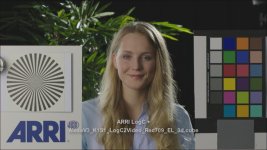
Agreed, totally. Because of some of the color bias I'm seeing in some LUTs and to keep things pretty well down the middle of the road especially when I hand off S-Log3, S-Gamut3.Cine to other post people I just give them one of ARRI's LUTs. The LUT that seems to work well with little or no color cast with S-LOG3 and gives pretty decent skin tones is the AlexaV3_K1S1_LogC2Video_Rec709_EL 3d.cube. It's one of ARRI's lower contrast LUTs. If more contrast is required well then that is easily dialed in in post.

Skin tones are a very subjective observation. I find opinions vary greatly as to what is a nice "skin tone" but generally I find if no one comments on the skin tones then generally the observers on the set/shoot are usually pretty happy. People very rarely comment on the hue/color of cars, foliage, buildings and most other objects in a scene but will nearly always comment on off color skin tones. As humans we are constantly looking at one another and are tuned to skin condition and colors and if someones skin color looks a bit off we suspect they may be ill. I also find this LUT which is designed as as a full swing E to L LUT, 'Extended' range to 'Legal' 709 levels handles the dynamic range of S-LOG3 quite nicely. Highlight roll-off is well handled in the LUT and when adjustments are required in post it responds to fine adjustments predictably with pleasing results. Even blue sky saturation when pushed doesn't hold any nasty surprises. Well that has been my two cents to date. Below are a couple of S-LOG3 shots with this ARRI LUT and ARRI's reference Isabella shot with the same LUT. Obviously to observe these correctly they need to be viewed on a 709 monitor / TV which expecting 16-235 levels. Not a PC screen that is expecting 0-255 levels.

Chris Young

AlexaV3_00.jpgAlexaV3_01.jpgAlexaV3_02.jpgAlexaV3_03.jpgAlexaV3_04.jpg
 
Last edited:
"Skin tones are a very subjective observation"

Surely this is the point of a gretag card which has various 'skin' values and published RGB values to correspond.

IMO A camera delogging LUT should move a gretag card to the right values, the colourist can then warm or cool to meet the artistic intent from a known base with a further LUT or manual adjustment.
 
Doug started an interesting discussion here.
I'll have to reconsider my favorite LUT. My starting Lut often is the Arri Alexa lut that comes with Davinci. I like it for my FS7 Slog3 footage.
But the Venice Lut seems also very nice to me, slightly less magenta?

I just solved problems with my computer. One of the SSD's had 'traces' of an old windows 10 version and that made it crash all the time.

But now there is time for some more testing.
 
I would like to try the Venice LUT in Resolve but have been unable to find a download link. Can anyone help with this. Thanks Peter

Edit
I have found the modified ones from Alister so will give them a try.
 
Last edited:
I did a similar thing with this venice 3d lut and the arri alexa lut:
I think I stick to the Alexa Lut. (on the right).


Last edited:
Try this link
http://shootdatapost.com/blog/2012/8/1/arri-alexa-legal-vs-extended.html

Then half way down page you will see info and a link to Arri lut generator.

I wouldn't use the LUT that the orignal link in the article takes you to for work in post. As it says on the tab at the top of the form, it is intended for On-set usage and it does not allow extended levels. You'll want to click on the Postproduction tab and change the Source and Destination Ranges to extended, and most likely the File Format to Resolve instead of Lustre.

Chris, does the LUT you posted have those changes?
 
I wouldn't use the LUT that the orignal link in the article takes you to for work in post. As it says on the tab at the top of the form, it is intended for On-set usage and it does not allow extended levels. You'll want to click on the Postproduction tab and change the Source and Destination Ranges to extended, and most likely the File Format to Resolve instead of Lustre.

Chris, does the LUT you posted have those changes?

I assumed that people would read the article and then when they use the link to Arri Lut Generator would select the postproduction tab and make changes to match the image shown just below the arri link on the shootatpost.com web page
 
You assume too much, my friend. Based on my experience, most people just want to download the LUT, or the scene file, or the picture profile or whatever the file is without actually reading stuff or finding out what the underlying settings are. Plug 'n play is the name of the game today.

BTW, look foward to trying the new LUT myself. Thanks for bringing that generator to my attention.
 
Last edited:
Chris, does the LUT you posted have those changes?

Yes Doug. The LUT I am using is the post production one with Extended range input and Legal 709 range output. The LUT I uploaded wasn't generated using ARRI's online generator. It came directly from an ARRI contact here in Oz. For me it is working well and I and more importantly clients are happy with the results. The bulk of my LOG shooting, when shooting LOG is at EI 800. That 800 workflow plus this AlexaV3_K1S1 Lut seem to co-exist quite happily.

Chris Young
 
Last edited:
Cool. I will give it a try when I have time. I've been looking for an excuse to shoot some test footage with my FS7 & R5 RAW recorder so maybe I can combine the two tests into one.
 
Back
Top