F55: Split Screen comparison of Venice-like LUT vs. LC709TypeA LUT

Not every log format is the same so using the Offset control in Log mode is not always accurate.
A more exact approach is to convert to linear light and adjust the Gain in the LGG controls.
If you use Resolve 15 this is easy since it has a new node base gamma/gamut override, however Resolve 15 is still in beta. For Resolve 14 it is more complicated.

Under ACES adjusting the exposure, except for minor ones, after the IDT does not work very well. In my opinion for ACES to run well it is critical to get well-exposed footage as input.
 
Just to clarify a couple of things.

The Sony s709-V200 LUT is not designed to make an FS5, FS7 etc look like a Venice. It is the LUT designed to be used with a Venice camera so that the graded S-log3 or raw from a Venice looks the same as the images that come out of the Venice SDI's when you have selected it's built in s709 monitoring LUT. It's designed for a larger dynamic range and gamut than that of the FS cameras. This is why I created a set of adapted versions for use with the 14 stop range and more limited gamuts (and also different color filters) of the FS series cameras and PMW-F5/F55. Of course you can use the Venice LUT on any camera you wish, but it's only really meant to be used with Venice footage.

If you want to adjust the exposure of a clip in Resolve using ACES you need to use the Log Offset control. This will give the equivalent of a direct exposure shift. Lift, gamma or gain will not give a true exposure shift.

Tying this back to Cary's points, why would the Venice need a lut like this? Would not Resolve's YRGB Color Managed transformations [S-Log3/S-Gamut3.cine to 709] already match what comes out of the Venice SDI with its built-in 709 monitoring lut?

Follow-on questions; people notice the new, warmer more yellow tones, especially in the skin tones coming from the Venice and the new FS5. The Sony lut seems to have a similar, subtle effect with Doug's F55 footage. If the Venice output is already natively like that, wouldn't the lut "double down" and add even more, making it too strong to use on the Venice S-Log3?

Is the lut even having the effect of warming or it this imagined?
 
Did you try 'Alister_V-Look.cube' to see if it was any "better"?
I see a LUT called Alister_V-Look_0-Native it appears to have the same limited upper range as the Venice V200 LUT (at least for 0-100IRE values) but has lower black levels.
 
I'm struggling a bit with the explanation that the V200 lut is intended to self-match the Venice S-Log3/SG3cine output with its own 709 output from the SDI. I thought the original understanding was for helping the Sony B-cams match up better with Venice. If this was not the intent, seems odd that Sony release the lut into the wild.
 
Is the lut even having the effect of warming or it this imagined?
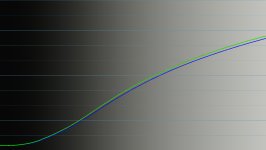
It is not imagined, if you look at the RGB waveform you see that the blue channel is trailing.

Of course the color effects are 3D but overall the blue is undeniably lower:
 

Attachments

  • blue channel.jpg
    blue channel.jpg
    67.7 KB · Views: 0
It is not imagined, if you look at the RGB waveform you see that the blue channel is trailing.

Of course the color effects are 3D but overall the blue is undeniably lower:

Excellent Cary! Bravo! I feel like a Pandora's box has been opened because it would not seem logical that the Venice S-Log3/SG3cine output should be any different than its SDI, nor that the V200 lut could be applied to Venice without lowering the blue more than it already is natively compared to the other Sony siblings.

Are you able to test if Alister's luts have this lowered blue?
 
I see a LUT called Alister_V-Look_0-Native it appears to have the same limited upper range as the Venice V200 LUT (at least for 0-100IRE values) but has lower black levels.

I did see that file in the other folders.

When I downloaded the LUT's* there was a master folder labeled 'Venice Looks'. Inside of that was six folders. One of them was labeled 'Sony Cine EI Camera'. And inside of that was the single file 'Alister_V-Look.cube'.


*This was Saturday afternoon. Maybe he changed or removed it after that.
 
I found that LUT, it seems similar to the Alister_V-Look_0-Native.cube.

By the way that LUT does seem to crush the blacks rather aggressively, I would not feel comfortable using this LUT in post because the deep blacks might be irrecoverable during grading after applying this LUT.
But, I am generally not comfortable with LUTs that perform solely or partly technical transforms. Perhaps a mild film look LUT in the end but that's about it for me when it comes to LUTs.
 
From his Blog

Alister Chapman said:
Venice is a 15 stop camera with a new sensor and as a result the official s709 LUT’s are not quite right for the current 14 stop cameras like the FS5, PMW-F55, FS7 and even the A7 series. So the LUT that I have created is slightly different to allow for this.
The end result is a LUT that gets you really close to the way Venice looks. It won’t magically turn your FS5 into a Venice, there is something very, very nice about the way Venice handles the extremes of it’s dynamic range, plus Venice has Sony’s best colour filters (similar to the F55 and F65). So Venice will always be that one very nice step up. But these LUT’s should get you close to the default Venice 709 look.

http://www.xdcam-user.com/alisters-blog/
 
Can anyone point to Sony's explanation of this LUT somewhere online - or even where - on any of their sites, they released it?
 
I think the split screen test I'd like to see would have the Venice on one side and the FS7 with the LUT applied on the other.

Made me think back to my film days and the time I brought a low budget feature producer to look at a series of Super 16 blowup tests (vs. 35mm film) that were shown to illustrate how good Super 16 could look. After seeing the comparison, the next day he went out and raised an extra 60K so we could shoot on 35mm film.
 
The irony is 99% of the population wouldn't notice a difference...and probably wouldn't care if you pointed it out as they would already be onto the next thing.
 
If you want to mimic what you currently do with a LUT you could:

Just trying this CK. I like, I like. Can get extreme highlight roll-off looking better and an easier way to do it. Will practice some more. Old dog can still learn new tricks, love it :)

Chris Young
 
I do love that you post these comparisons because they usually affirm my belief that the FS7 can produce an image to match with the higher end cameras. And I'm with the FS7 for the long haul at this point.

My two cents:
Side A seems to have a subtle magenta cast in some of the shots and also appears to have more saturation, for instance, with the green spray cans. Interestingly, in some shots, like the matches and some of the motorcycle shots, I didn't see any difference at all. Side B did not have the subtle magenta cast and looked a little more diffuse to me.

My guess as to which was which was wrong.

P.S. This is turning into one of the threads that I will have to go back and read a few times over. Lots of good comments on color grading.
 
I do love that you post these comparisons because they usually affirm my belief that the FS7 can produce an image to match with the higher end cameras.
The video is a comparison between two LUTs not between two cameras.

There are no LUT's that can make a Venice out of a FS7.
If someone claims that it is snakeoil, and that applies to any LUT that has the words RED, Alexa, Arri or Venice in it for application in some other camera.
 
I never thought of it that way. I always thought some of these LUTS were giving an appearance in the style of that camera, not that an FS7 was another camera.

It isn't exactly the same thing as a LUT, but doesn't the FS7 give you the matrix option of shooting with an F55 Like 709 color space?

It is not that the FS7 is in any way an F55, but that it is trying to approximate that look.

That's how I'm meaning it.
 
Back
Top