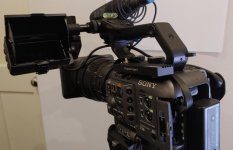
FS5: Sony PXW-FX6

Thanks Doug, that's all really useful info.

I still think it might be too heavy for me. I generally put the LCD at the front of the top handle and shoot with the camera braced against my chest or shoulder. Top left is possibly the worst place to have extra weight. I'll find a way to try it out - I'll know within 5 minutes whether or not it's going to work. I hope so.

Question for anyone out there with Gratical eye / other external EVF experience: Is it far superior to a loupe on an LCD? It seems like a lot of expense and hassle (powering, rigging, loss of camera monitoring controls) so I suppose it must be but I've never actually used one.
 
Andy, obviously you're adding some weight to the camera but not too much. I just weighed the whole Z-finder/LCD assembly and it comes to 1.8 pounds -- including the Sony LCD.

As to balance, I think it's going to matter where you place it on the camera and how you configure it. I mostly shoot from a tripod so I have mine mounted at the rear of the handle on the left side. And it's down low, almost side by side with the handle. I could also mount it more over the top of, or behind, the handle if I wanted to. Everyone is going to have their own preference for placement. It is great to have so many mounting options on the FX6.

Folding? No, it's not going to fold up and the camera is definitely taller and wider than it was before. I'm not a fan of breaking down cameras to pack them up, and I never break down any of my other cameras, but I think I'll have break this one down. Fortunately that is fast and easy. I just unplug the monitor cable, loosen one lever, and the whole Z-Finder/LCD slides right off the rail. It takes literally less than ten seconds to remove the whole thing and it's easy to get it back into the exact same position when you put it back on.

Doug, the Z-Finder bracket provides a 15mm mounting point to which the original Sony EVF part attaches, correct? Is it not very easy to have the whole thing slanted hence potentially throw the sense of level of the camera? Probably not an issue when shooting from a tripod but hand held it could promote crooked shots. Or is there any kind of detent which locks it in 90 degrees increments?
 
Does anyone have recommendations for some of the better thought out accessories / rigging for the FX6? I know its very scenario specific usually but mine just arrived (first owner camera) and the choices are overwhelming. Ignite Digi / Wooden Camera / Chrosziel etc etc.

I've used Ursa G2 and C300 cameras mostly, am 6"4 so try to avoid shoulder rigs and work mostly handheld or on sticks. I'll need at least some light 15mm rods for a follow focus and a 503 monitor mounted but the rest is kind of in the air. I like a good top handle and don't use XLR's often. Are there any manufacturers just hitting it out of the park usability wise in 2020/21?

I like the look of the Zacuto Loupe mentioned above, I usually use a gratical but I think its too big for this camera.
 
Doug, the Z-Finder bracket provides a 15mm mounting point to which the original Sony EVF part attaches, correct? Is it not very easy to have the whole thing slanted hence potentially throw the sense of level of the camera? Probably not an issue when shooting from a tripod but hand held it could promote crooked shots. Or is there any kind of detent which locks it in 90 degrees increments?

You can relax. The FX6 monitor mount does not have the same problem as the original FS7 and I think you'd have to go out of your way to have it slant and become crooked. But with that said, the Z-finder is even more rigid and there's no way the viewfinder will slant and cause you to miscalculate the horizon. In fact, I just took another look at it and I couldn't even make it crooked if I wanted to. It's a innovate way that they have done the mounting hardware and you'd have to see it to appreciate. I still have my FS7 (using it as a webcam for an event today) so I know exactly what issue you are worried about. Worry no more.
 
Does anyone have recommendations for some of the better thought out accessories / rigging for the FX6? I know its very scenario specific usually but mine just arrived (first owner camera) and the choices are overwhelming. Ignite Digi / Wooden Camera / Chrosziel etc etc.

I've used Ursa G2 and C300 cameras mostly, am 6"4 so try to avoid shoulder rigs and work mostly handheld or on sticks. I'll need at least some light 15mm rods for a follow focus and a 503 monitor mounted but the rest is kind of in the air. I like a good top handle and don't use XLR's often. Are there any manufacturers just hitting it out of the park usability wise in 2020/21?

I like the look of the Zacuto Loupe mentioned above, I usually use a gratical but I think its too big for this camera.

There's a lot of options, and the camera is so tiny, that you really have to plan everything out very precisely if you want to have an efficient rig that lets you work faster (rather than bogs you down trying to make adjustments to fiddly bits of rigging).

I'd stick to Wooden Camera or Vocas for the top plate - because they're the only two offering lens mount adapters that can be seamless braced to their top plates (ideal for adapting the camera to PL-mount or EF if you need rigidity).

Personally, I'm very enamoured with Bright Tangerine's Left Field quick-release baseplates, because they're basically my dream baseplates - with cheap adapter plates that can be swapped between different cameras, native quick-releasing for Arri dovetails, and rod mounts front and back (so you can leave rear rods permanently attached to hold things like a battery plate in place, but switch out the front rods as needed).

I've tried swapping out the top handle for my usual cinema ones, but losing the two additional assignable buttons is a pain, and knowing you'll always have to carry the top handle with you for any work that requires sound into the camera, is a pain too. So for now, I'm trying to work around it.

And I think the Zacuto loupe makes the most sense overall. I've been using my Gratical Eye while I wait, and it's great. But one of the most exciting things about the FX6 is it's sheer speed (particularly for turning on) so using the LCD with a loupe is the best way to take full advantage of that speed. Also, having an evf + the LCD attached to the camera, really chews up space. It's hard to over express just how little space you have to rig things on this camera.
 
Does anyone have recommendations for some of the better thought out accessories / rigging for the FX6? I know its very scenario specific usually but mine just arrived (first owner camera) and the choices are overwhelming. Ignite Digi / Wooden Camera / Chrosziel etc etc.

I've used Ursa G2 and C300 cameras mostly, am 6"4 so try to avoid shoulder rigs and work mostly handheld or on sticks. I'll need at least some light 15mm rods for a follow focus and a 503 monitor mounted but the rest is kind of in the air. I like a good top handle and don't use XLR's often. Are there any manufacturers just hitting it out of the park usability wise in 2020/21?

I like the look of the Zacuto Loupe mentioned above, I usually use a gratical but I think its too big for this camera.

I second Grugs sumup. Wooden Camera / Vocas top plate PL combo is hard to beat for the "not so pro" E-mount. Bright Tangerine is also on top of my list, if anybody ask me about baseplates, matteboxes, followfocus. Im still waiting for the Zacuto Z-Finder, but after reading some comments Im really exited.
 
You can relax. The FX6 monitor mount does not have the same problem as the original FS7 and I think you'd have to go out of your way to have it slant and become crooked. But with that said, the Z-finder is even more rigid and there's no way the viewfinder will slant and cause you to miscalculate the horizon. In fact, I just took another look at it and I couldn't even make it crooked if I wanted to. It's a innovate way that they have done the mounting hardware and you'd have to see it to appreciate. I still have my FS7 (using it as a webcam for an event today) so I know exactly what issue you are worried about. Worry no more.

Thank you Doug. I looked closer and see that the loupe frame is rigidly attached to the bracket and the 15mm part that the monitor clamps just an additional support. Indeed should not get crooked. That is great to hear!
 
I've had my FX6 & the PZ 28-135mm since late Dec and I thought you may be interested in a couple of things:

Memory Cards: I'm not keen on the expensive and small capacity CFExpress Type A cards, with the max you can get being 160GB so it will only hold about 44Mins of UHD/50fps footage (or only 22min of 100fps S&Q). The good thing with the FX6, is that it will attempt to record to any card you put in (you just get a warning about it being "Not Guaranteed Media")..... So I've done some testing on "cheaper" SD Cards by simply recording to the cards for 30min and see if they throw any errors for the 500mbps UHD 50fps, and the 1,000mbps S&Q 100fps (I'm in PAL land):
- Kingston Canvas React Plus V90 UHS-II (256GB) Micro SD: Works fine, which is pretty amazing for a Micro SD Card (I had to use a UHS-II Micro to full size SD adapter)
- Anglebird V60 UHS-II (256GB) Micro SD: Works fine on 50fps, but I got recording errors after a few minutes on 100fps and recording stopped
- Samsung EVO Plus UHS-I (512GB) Micro SD: Works fine on 50fps, but I got recording errors after a few seconds on 100fps and recording stopped. It is interesting this high capacity, relatively inexpensive UHS-I card had no issues at 50fps. Nice! Looks like you don't need a UHS-II card but any card that is fast enough to saturate the UHS-I bus.
- Zitay CFexpress A to SSD Adapter (with a Samsung 1TB 970 Eve): Works fine. It is an interesting idea, and if you don't mind the door being open (no complaints from the FX6) you can really open up big storage for low $'s. The adapter mounts to the FX6 body with a 1/4" and the cable routing is OK (it could be better but it does work). The only think I'm conscious of, is if you snag the cable, you will pull the adapter out of the FX6 and recoding will stop.

Mic Holder: I found the included Mic Holder to be pretty bad. It droops, I had to use an insert to hold (and it was still loose) a 19mm mic, and wrose.... you get plenty of handling noise. I've replaced this by simply unscrewing the OEM Holder, and (with a bit of a mod to cut a channel in the base) replaced it with a pair of Rycote Cyclone. I've also swapped to CT-LPXR-18B low profile / adjustable angle XLR cable which helps prevent you hitting the mic with you hand when using the handle.

ZITAY.jpg
 
Last edited:
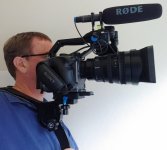
Stable Handheld Shooting: Philip Bloom in his FX6 review talked about about how to shoot stable handheld given the small size. The reference to "El Cheapo" was not a joke (and he is looking a producing a modified one). I can confirm that the "El Cheapo" + a quick release plate on my FX6 + 28-135 works really really well. Keeps the Camera at Eye Line, is Comfortable, Stable and seems Robust enough. You don't even need the "extensions" that come in the kit to get a good viewing distance to the Monitor if you mount the monitor as forward as you can. Best A$30 "add on" yet (though feels strange holding up a A$10K cam setup with A$30 of plastic).

ElCheapo.jpg
 
^ Is the FX6 E mount such that you don't need a lens support for that heavy lens?

I checked with a few different sources, and all said it would be fine on the FX6 Mount.... and so far not a wiggle. The only advice was to break it down for transport.

I also updated my post on SD Cards, and surprisingly the Samsung 512 EVO (micro sd) worked fine for UHD 50fps... and it's only a UHS-I card.

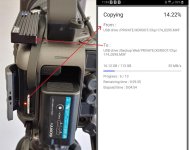
One thing I can't find in the menu is how to copy the content of one card to another, as I was thinking about shooting to the V90 then copying the contents to the ZITAY adapter as the V90 filled up. I did find however you can plug your Phone (Android) into the USB port on the FX6, and the FX6 then acts like a USB Hub allowing a File Explorer App on the Phone, to create folders (say Backup Wed) then copy the contents from the other card into that folder. It's not terribly quick at the transfer, but it is an easy way to copy footage with out a Laptop.

CopyCard.jpg
 
I checked with a few different sources, and all said it would be fine on the FX6 Mount.... and so far not a wiggle. The only advice was to break it down for transport.

I also updated my post on SD Cards, and surprisingly the Samsung 512 EVO (micro sd) worked fine for UHD 50fps... and it's only a UHS-I card.

One thing I can't find in the menu is how to copy the content of one card to another, as I was thinking about shooting to the V90 then copying the contents to the ZITAY adapter as the V90 filled up. I did find however you can plug your Phone (Android) into the USB port on the FX6, and the FX6 then acts like a USB Hub allowing a File Explorer App on the Phone, to create folders (say Backup Wed) then copy the contents from the other card into that folder. It's not terribly quick at the transfer, but it is an easy way to copy footage with out a Laptop.

View attachment 142172

Just get a couple of cards. Reconcile withe the laptop. You've been warned.
 
Cards are so cheap these days, I can't imagine jumping through all these hoops, using cards that just barely might work, and creating convoluted workarounds for issues that don't even exist. Life ain't supposed be that hard. Buy a couple of decent v90 cards and one CFexpress for slow-mo and get down to business.

35 minutes to transfer 16GB? My god, that would take less than a minute to transfer from a card reader - and I'd have multiple secure backups. Is this all just a hobby or is it your business?
 
Last edited:
I actually agree with Doug & I have been just shooting on V90 cards so far (and yes it is a Hobby not a Business).

It is the FX6's inability to copy/backup from one card to another that got me thinking of a workaround for the occasions where we travel without a PC to empty the cards to (I did the Inca Trail and we were limited to 7kg each).... and who doesn't have a stack of older spec cards or SSD drives?

Anyway, the point is you can backup from one card slot to another on the FX6 if you use your phone via the USB port to act as the controller.


FYI:
35 minutes to transfer 16GB? My god...
This pic suggests it would take 35min to transfer 113GB (not 16gb which was the progress to date) and that screen shot was from when I was testing the old 512GB UHS-I card to just see if it work at all.... it does run faster with better cards of course, and on all occasions it copied the files reliably. I had also tried a mini USB3 hub with card reader to SSD drive for such occasions but while it was fast, it always failed to complete the transfer.
 
Cards are so cheap these days, I can't imagine jumping through all these hoops, using cards that just barely might work, and creating convoluted workarounds for issues that don't even exist. Life ain't supposed be that hard. Buy a couple of decent v90 cards and one CFexpress for slow-mo and get down to business.

35 minutes to transfer 16GB? My god, that would take less than a minute to transfer from a card reader - and I'd have multiple secure backups. Is this all just a hobby or is it your business?

Looks like the estimated time is for the remainder of the 120 GB card, 16GB is what's copied so far. But still, this makes very little sense. Can't shoot while copying and I assume the idea is to recycle the card without even checking the footage??? Media managed from a phone??
 
Yeah - you guys are correct. For the next trip I'd just buy more cards. I can also, drop a large NVME into that ZITAY enclosure and inexpensively backup the cards without a laptop.
 
On the speed front, for backing up:
- 85MB/s: In Camera (with phone as the controller) V90 --> Zitay CFExpress Adapter
- 270MB/s: V90 (in USB 3 Adapter) --> PC (NVME Drive)
- 400MB/s: Zitay CFExpress Adapter (plugged into their USB3 CFExpress Card Reader) --> PC (NVME Drive)

Yeah, the speed of using the Camera to do the backups between slots is not great (It will take about 45min for every 60min of 50fps recordings to backup) Vs using a PC. Should still be OK to to do a daily backup while at dinner. One upside, is it will be faster to offload all the footage back to the PC from the Zitay CFExpress than any other method (the same 60min of 50fps recording will only take a bit less than 10min).
 
This pic suggests it would take 35min to transfer 113GB (not 16gb which was the progress to date) and that screen shot was from when I was testing the old 512GB UHS-I card to just see if it work at all.... it does run faster with better cards of course, and on all occasions it copied the files reliably. I had also tried a mini USB3 hub with card reader to SSD drive for such occasions but while it was fast, it always failed to complete the transfer.

Oops. Sorry for misreading that screen shot.

BTW, I am able to download a completely full 80GB CFexpress card in less than 100 seconds with a Sony MRW-G2 reader.
 
Back
Top