F5: Sony official LUTs over saturated?

surinder

Well-known member
I've got to be doing something wrong here.

Shot some slog 3 tests today and monitored using the 709/800% lut in the viewfinder.

I imported the test clips into PPCC2014 and used the Lumetri effect to apply the LC709 type A LUT.
I thought that it would be that simple to get an Alexa look. But to my results looked shockingly bad. So bad that I'd be embarrassed to post them. All of the Sony LUTs made my test footage look super saturated and high contrast. With an overall blue cast. Surley something is wrong with my workflow.

I recall an old thread by Nate on the F55 Sony Community Site saying something to the effect that the LUTs were created with the F55 in mind and looked saturated when applied to F5 footage. This may hold true for the FS7 footage too.

So far I'm getting better results by applying the Fast colour corrector, using levels and adding saturation.

Any pointers on what to try next would be very much appreciated.


Surinder.
 
Surinder,

Today I shot a job in SLog 3 that is due tomorrow, if you have the time, could you post a screenshot of the settings you are using in fast color corrector? I'd rather deal with LUT's when I have more time, especially since they don't appear to always work well.
 
Do you use Resolve - the luts are perfect there - and in CatBrowse

Maybe try one of those to view then you know if you have camera or software issue..

S
 
Are you shooting exteriors or interiors?

On exteriors I'm find the LC-709TypeA LUT looks great and needs minimal adjustment. On some interiors I'm doing a black stretch using levels on the the 3-way before applying the LUT. Again works a treat.
 
Are you shooting exteriors or interiors?

On exteriors I'm find the LC-709TypeA LUT looks great and needs minimal adjustment. On some interiors I'm doing a black stretch using levels on the the 3-way before applying the LUT. Again works a treat.

Thanks Liam,

Are you working in Pemiere Pro or Resolve?
 
Surinder,

Today I shot a job in SLog 3 that is due tomorrow, if you have the time, could you post a screenshot of the settings you are using in fast color corrector? I'd rather deal with LUT's when I have more time, especially since they don't appear to always work well.

It's incredibly simple in Premiere. Go to Effects, select all the Slog3 shots in your timeline, drop the Lumetri effect onto the those shots. If your exposures are correct you'll be in good shape. If they are off load the 3-way colour corrector above Lumetri in the Effects pane and adjust the mid slider in video input. Adjust WB if necessary too. Don't add a curve, don't do any colour grading before the LUT is applied or the colours will be mapped incorrectly.
 
Surinder,

Today I shot a job in SLog 3 that is due tomorrow, if you have the time, could you post a screenshot of the settings you are using in fast color corrector? I'd rather deal with LUT's when I have more time, especially since they don't appear to always work well.

Will post a screen grab for you tomorrow when I get in to the studio.

But it's quite simple if you want to try this in the meantime:

Bring up your reference monitor and set it to display RGB parade ( I find this most helpful as you can check individual channels for clipping etc and good to verify white balance at the same time ) Adjust your input levels top and bottom sliders in a manner to get the blacks to just touch the bottom of the scale and use the top slider to bring the highlights up to taste without clipping. White balance can be adjusted easily at this point too. Use the eye dropper to click on something white in the scene and use the gain value to fine tune the white balance if needed. Finally bump up the saturation to around 150 and that's pretty much it.
 
Thanks Liam,

Are you working in Pemiere Pro or Resolve?

Everything has been in Premiere so far. Haven't washed anything through SpeedGrade yet, hopefully will soon. Certainly, I'm finding I have a lot of room to push things around with properly exposed footage - i.e. mids around 41%, whites around 61%.
 
It's incredibly simple in Premiere. Go to Effects, select all the Slog3 shots in your timeline, drop the Lumetri effect onto the those shots. If your exposures are correct you'll be in good shape. If they are off load the 3-way colour corrector above Lumetri in the Effects pane and adjust the mid slider in video input. Adjust WB if necessary too. Don't add a curve, don't do any colour grading before the LUT is applied or the colours will be mapped incorrectly.

That's pretty much what I'm doing. Is there an empty Lumetri effect?. In my effects list I only see looks or stylised Lumetri effects. I apply one of these and it adds a look to my clip. I then go in and load in one of the Sony LUTs. May be this is what I'm doing wrong?

I'll post some screen grabs tomorrow. As today's test clips look like an abortion gone wrong :(
 
Everything has been in Premiere so far. Haven't washed anything through SpeedGrade yet, hopefully will soon. Certainly, I'm finding I have a lot of room to push things around with properly exposed footage - i.e. mids around 41%, whites around 61%.

For tomorrow's test I will disable MLUTs and make sure I hit 41 and 61% bang on.
 
I've never touched Premiere but in Resolve you must make sure your working in Data levels, not Video for the timeline and also select Data in the Clip Attributes. If your software thinks the footage is Rec709 then any of the Sony LUTs you apply will drastically over saturate and contrast. Not sure if this is whats happening to you but it's the first thing I thought of.

Regarding what Nate said way back about the LUTs being for the 55, in my experience dropping the LC709A LUT on to F5 footage looks perfectly "normal", a slight saturation adjustment may be desired but nothing drastic.
 
It would be useful to toggle the WFM between the MLUT and the underlying SLOG for now I'll go without MLUTs to make sure the SLOG is correctly exposed.

Thanks all.

I'll be doing your heads in a little more tomorrow :)
 
Tried again today to test out the Sony LUTs in Premiere Pro.

First of all I started with turning MLUTs off and used the zebras with a low aperture to make sure reflected white was at 61% or as near as possible. It was extremely windy today and it just started to rain again. So did a couple of hand held short test clips in the back yard shooting SLOG 3 EI 2000 to keep things simple. The results I got today were much better than yesterday.

I was doing several things wrong yesterday a) Not enough light outside It was getting dark and totally grey, b) I was under exposing, c) I was applying the Lumetri Looks to the clips and then loading in a LUT. But I discovered today that there is a Lumetri blank effect in Premiere too and used that instead. Well today things worked a lot better.

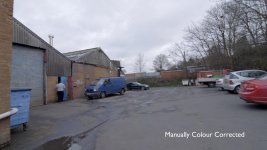
Here are two screen grabs. One with the Sony LC709 Type C LUT applied and the other corrected using the fast colour corrector effect in PP2014. No secondary corrections were done for this simple test.

Personally I find the manually corrected version looks better. It may work better for me if I do a black stretch before the applying the LUT as per Liam's suggestion earlier in this thread.

Take a look and let me know what you guys think?

LC709 TYPE A .jpgManual CC PP2014.jpg
 
They both look 90% the same.

If you care about this difference I guess maybe you can modify the sony lut so you have your look as a one click solution?

S
 
The LUTs are a great thing to have for a one click solution for sure. Nothing a little pre-black stretch and desaturation shouldn't be able to fix.

Also experimenting with SLOG 2 and its looks less noisy to me.
 
I agree, I think the manual one looks pretty good. The LC709TypeA LUT doesn't help a great deal if the scene is flat to start with. Did you try any of the other Sony LUTs? Might be worth a look.

Glad you got your workflow sorted - it took me a while to discover the blank Lumetri filter as well!
 
I agree, I think the manual one looks pretty good. The LC709TypeA LUT doesn't help a great deal if the scene is flat to start with. Did you try any of the other Sony LUTs? Might be worth a look.

Glad you got your workflow sorted - it took me a while to discover the blank Lumetri filter as well!

Some good solid info in this thread.

I'm sure other SLOG/FS7 newbies like me will make these same basic errors.
It's a great point of reference for Premiere Pro users like myself wanting to try out LUTs directly in Premiere Pro
 
Back
Top