Sony HLG to Rec 709 LUTs

cyvideo

Veteran
Last week I was asked to shoot eight quick interviews back to back in UHD with minimum fuss and kit as we had to travel a bit. I was also asked to shoot them in HLG? Why? The producer wants to future proof to a degree and wanted minimal post color work. Hmm I thought. The final destination was to be 709. Today I had to do another two interviews for him. How am I going to process these I thought. I decided to create a Sony HLG 3 to Rec 709 LUT. To travel light with minimum kit I went with the Z90 with its bog stock standard HLG 3 BT2020 Picture Profile and a soft top light on the camera. All other light was office ambient floros. First time I've used HLG on an actual job. Experimented a bit with it but now I was confronted with a request for it. So far I'm pretty happy with the outcome. Surprisingly easy to drag HLG into 709 and loved the added flexibility of low ISOs and white balancing. What I learnt during my experimentation was to overexpose by exactly one stop as this dropped the whole vision waveform pretty neatly between 0 and 100 IRE. Here it is with a homemade HLG to 709 LUT. Anyone have any suggestions for an HLG to 709 workflow? Any comments good folk?

Chris Young

Edit: Geez! Once you upload stills to the forum they really look quite :angry: On a true 10-bit 709 monitor they look way better than on the old PC screen.

CYV HLG-709 LUT.jpg
 
Last edited:
For HLG to 709 Id certainly be fiding or more likely makng a lut.

This doenst look like it though. On my imac screen it has very few blacks.. like it is the ungraded version. Make it look good on the PC screen - not your fancy one.
 
To my eye a quick go in photoshop.. Levels and desaturate red channel
CYV HLG-709 LUT.jpg

Web page looks flatter.. like its lifted the bottom 10%
 
Thanks for feedback MM. Will have a go at it tomorrow. On a 50" Viera it looks okay with the levels running 64-940 (16-235) but on the PC screens which are generally 16-255 it looks a little flat. Think I'll add contrast. You reckon desat the reds? The Reds are spot on on the scopes and look okay on the telly. Might leave them for now just try the contrast path first. Suck it and see I guess.

Chris Young
 
I was also asked to shoot them in HLG? Why?

Why? Because the client doesn't know what they are asking for. :)
HLG is not intended for post-production grading. It is intended for "live" output and/or monitoring. It is a terrible choice for post. If the client wants maximum dynamic range and future-proofing they should be recording in S-LOG2 or S-LOG3. But to be honest, S-LOG isn't the best choice either. A nice REC709 Picture Profile can run circles around S-LOG on that camera.
 
DJ. Agree 100% on all your comments. I like a decent 709 for a lot of work. So maybe not going down this path again! Have to work with what I have on this job. It's coming out okay but just too much time wasting getting there. Oh well we live and learn!

Chris Young
 
I'm actually impressed that your client has the foresight to want to "future proof" the footage (even if they don't exactly know how to do that). Fortunately, there is a very, very easy workflow that will produce much better results. Here is a quick summary:

- Shoot in Log with wide color gamut (e.g. S-Log3.S-Gamut3.cine, V-Log/V-Gamut, etc.)

Use Resolve to Grade/Transform using ACES:
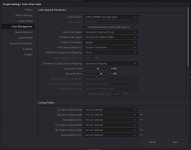
- To set up the transforms, go to Project Settings/Color Management/
- Color science: ACEScc (or ACEScct)
- ACES version: 1.1 (or highest available)
- ACES Input Device Transform: Sony SLog3 SGamut3Cine (or whatever Log you shot it in)
- ACES Output Device Transform: Rec.709 (or whatever you want to use to monitor with and/or export to)
- Grade as much or as little as you like

Then, simply:

- Export Rec.709 deliverable
- Export ACES master (change Output Device Transform setting: ACEScc or ACEScct)

Basically what this does is it transforms your Log footage to the ACES colorspace (which is massive). This is where the grading actually takes place. It also outputs in real-time to the colorspace of your choosing for monitoring. So, even though you are working on Log footage that is transformed to ACES, you can monitor (and export) in Rec709... no LUTs required!

For future-proofing, just export to ACES for an ACES master. When needed, just open the ACES master and export to your desired colorspace: Rec2020, P3, etc.


If you can't get your head around ACES, here's a good primer:
http://shootdatapost.com/blog/2014/5/16/aces-in-10-minutes


...and there's a wealth of info and resources here, too:
https://acescentral.com/


Just don't let this become too exotic of a notion in your head. It's ridiculously simple. And, if your client is already asking about future-proofing, it's worth learning about.
 
*** Oh, and by the way, you can also use ACES to help you with your current HLG to Rec709 issue (sorry I didn't think of this earlier). Same as above with this minor change in Input Device Transform:

Use Resolve to Grade/Transform using ACES:
- To set up the transforms, go to Project Settings/Color Management/
- Color science: ACEScc (or ACEScct)
- ACES version: 1.1 (or highest available)
- ACES Input Device Transform: Rec.2020 HLG (1000 nits)
- ACES Output Device Transform: Rec.709 (or whatever you want to use to monitor with and/or export to)
- Grade as much or as little as you like

Then, simply:

- Export Rec.709 deliverable
- Export ACES master (change Output Device Transform setting: ACEScc or ACEScct)
 
Last edited:
I'm actually impressed that your client has the foresight to want to "future proof" the footage (even if they don't exactly know how to do that). Fortunately, there is a very, very easy workflow that will produce much better results. Here is a quick summary:

- Shoot in Log with wide color gamut (e.g. S-Log3.S-Gamut3.cine, V-Log/V-Gamut, etc.)

Use Resolve to Grade/Transform using ACES:
- To set up the transforms, go to Project Settings/Color Management/
- Color science: ACEScc (or ACEScct)
- ACES version: 1.1 (or highest available)
- ACES Input Device Transform: Sony SLog3 SGamut3Cine (or whatever Log you shot it in)
- ACES Output Device Transform: Rec.709 (or whatever you want to use to monitor with and/or export to)
- Grade as much or as little as you like

What you have described is my normal workflow when shooting LOG which accounts for about 20-30% of my work. Anything I do directly for my retail clients is also LOG. For outside producers, especially the broadcast ones a lot of my jobs are fast turnaround Rec 709. It's shoot and edit the files and it's on air that or the next day. No time for faffing around with grades other than a bit of LGG and WB.

Since I first posted on this HLG stuff, the producer in question had all this put into his head by someone, I've discovered the HLG capable Sony cameras have an HLG setting with a selectable 709 color space. I tried that out. It's just like working with 709 but it seems to have much more capability for highlight handling. For 709 hand off delivery I will examine and experiment with this some more as it looks like a better option than a stock 709 scene file. Again within that HLG 2020 to Rec 709 mode you have all the other parameters that you can adjust for various picture tuning as you would do if you were creating a normal 709 scene file.

It was all so simple back in the Beta days he says wistfully :)

Chris Young
 
Oh ok, apologies if that read as patronizing in even the slightest bit... I just know of far too many photogs, and even editors (who I respect and admire), who either know nothing about or fear the idea of ACES. I totally get that exporting .xml to Resolve for another step of processing and export is a bit exotic for broadcasters (they are about 30% of my work, too!).

I still don't know why anyone would:

- Want to "future-proof" by recording in HLG when they could record in LOG (did everyone agree that HLG is going to be the HDR standard yet?). From LOG you can transform to any number of HDR and cinema standards (and really, HLG is kind of a half-measure as I understand it).
- Use a LUT to get from HLG to Rec709 on a quick turn package when using a LUT to get from LOG to Rec709 is just as easy (within an editing program like Premiere, FCP, etc.).
- Record HLG into Rec709 colorspace (which is not HDR... and kind of defeats the purpose, no?).

It seems that you are making ways toward a solution you are comfortable with (and that's all that really matters), so please just regard the above as musings about method. More about curiosity than anything else :)
 
No no worries. Glad to hear others comments. His, the producer's idea was that the original camera files being HLG can be viewed straight out of the camera on an HDR capable UHD set, one of which he has, which makes his clients happy as they can view their "glorious" UHD rushes straight away. It's a 4k selling point for him. Tweaking the HLG files for quick HLG delivery only require a little bit of LG & Gain. If required for standard HD delivery I'm just hitting them with a 709 LUT and a little LGG now that he is happy with with the final 709 LUT we have come up with. In fact the producer in question rang me a couple of hours back and said the particular client we originally shot the HLG for loved the HLG rushes on his, the producers office UHD set that he, the client booked another seven short one minute promo videos. I can't argue with that because hopefully I'll get to shoot and post them. Fingers crossed. Not a big job but little fish are sweet. I'm now looking into recording S-LOG internally on the FS7 and possibly burning in an S-LOG2/3 to HLG LUT on an Inferno for his HLG viewing rushes. That gives me the best of both worlds. The only issue being possibly being the three Cine EI fixed white balances on the FS7 would also translate to the external HLG recording meaning they would probably need a white balance dependent on the shoot circumstances. The way of the world today, so much more stuffing around to keep clients happy these days!

Chris Young
 
Resolve includes native REC709 HLG color space conversions, one of the features of the HLG standard. HLG TV sets automatically adapt a proper HLG color space input to match the specs of their panels. HLG is one of three HDR standards and the only one backwards compatible with REC709. Most HDR TV sets support HLG and HDR10. Higher end sets also support Dolby HDR standard too.
Shooting in a camera log format and doing a mathematically correct color managed HLG conversion in Resolve greatly simplifies the grading process, especially if your reference monitor supports HLG standard. A mid range relatively inexpensive HLG HDR consumer TV can make a useful reference monitor for most practical purposes. I tend to prefer LG's because they have Expert mode calibration menus that are consumer accessible rather than requiring a service code. The newest generation models have two different user calibration setups for light room and dark room conditions.

If you shoot raw or log formats, in Resolve color management settings you set your camera native color space as the input and display referenced color space as your timeline conversion to match your reference monitor for accurate grading. Output color space conversion can be set to a different display space for output encoding if needed, HDR or non HDR.
That can become a can of worms as you have to specify the maximum white lumen level of your intended HDR display . For most consumer TV's 300 nit standard is appropriate. If you use third party luts for grading, your timeline color space should be the same as the one the LUT was written for. Output color space should do the HLG conversion.

Vlog to REC709 HLG conversion example:

V-log to HLG color conversion.jpg
 
Last edited:
Grading log footage is not as straightforward as changing contrast and color saturation. Why mathematically correct color space conversions simplify your life.

]
 
Back
Top