
Navigation
Install the app
How to install the app on iOS
Follow along with the video below to see how to install our site as a web app on your home screen.
Note: This feature may not be available in some browsers.
More options
You are using an out of date browser. It may not display this or other websites correctly.
You should upgrade or use an alternative browser.
You should upgrade or use an alternative browser.
FS7: Sony FX9 v Canon C500 mkII
- Thread starter Liam Hall
- Start date
G
Guest
Guest
He's reading the results of the myriad of charts in the test. He's provided a link to the raw camera files, and everyone is invited to download and form their own conclusions. (if thats too much, the pR output is available on Vimeo). Generally RED cameras don't hold up all that well in these types of tests, although I believe he really liked the Helium.
My question wasn’t about the data, but more about Geoff Boyle’s opinion and commentary. He’s a trooper, but after seeing that, i’ll be more skeptical about his views in the future.
G
Guest
Guest
Speaking of LUT's, I was just testing out the V2.0 vs V1.1 LUT's from Canon and the V2.0 do a much better job at protecting color channels from being crushed or clipping after the LUT is applied. The high saturation roll off is much better. I wonder which LUT's CVP was using.
Very cool! I’ll be sure to make sure i am trying the V2’s out along side the V1’s
Are we comparing Canon C500 Mk2 2 Gbit RAW-Lite against Sony FX9 XAVC-I 4:2:2 10-Bit footage ?
With footage tweaked in post ? ( I don't care what comes out of the camera as long as I can get what I want in post )
SOOC is best, followed with any required recovery, then 709 and/or 2020 (HDR supported by YT) LUTs would be fair. Files available for download (Vimeo etc.) also helpful so each person can test themselves (SOOC).
I think the FX9 XAVC could do well against Canon raw, though XF-AVC is the matching use case (approx file sizes).

Liam Hall
Veteran
Speaking of LUT's, I was just testing out the V2.0 vs V1.1 LUT's from Canon and the V2.0 do a much better job at protecting color channels from being crushed or clipping after the LUT is applied. The high saturation roll off is much better. I wonder which LUT's CVP was using.
The video was made in October, I don't think the new LUTs were released by then (could be wrong). That said, we don't know if they used a LUT as they never mention their method in the video.
My question wasn’t about the data, but more about Geoff Boyle’s opinion and commentary. He’s a trooper, but after seeing that, i’ll be more skeptical about his views in the future.
Geoff would tell you that the only way to evaluate the tests is to download the RAWs for yourself. His commentary is extremely measured, but literally everybody on his mail list has an opinion. You have an opinion. Take a look at the films and see if yours is more correct than his.
In fact, not only would he...he did..right at the top of his post:
"I want to stress that these are purely personal impressions and that you should check out the raw files at https:/cinematography.net
and also get your hands on a camera to see how it feels for you before making any decisions."
Last edited:
The video was made in October, I don't think the new LUTs were released by then (could be wrong). That said, we don't know if they used a LUT as they never mention their method in the video.
The new LUT set from canon came out in mid November. However, I've just run some charts, and I think I can clear up what the problem was. As you and I have been saying, the CVP test was flawed, but not quite how we saw it. I ran charts at 0 to +6. Processed with contrast and saturation and no LUTS. White clipped at 4 stops. Yellow and lightest skin tones clipped at 5 (as they should). A mess at +6. The colors look generally very good thru +5 and are still very present at +6, although the lightest ones have clipped purely by their value. I took the +6 clip and applied the LUT, and actually the colors didn't go away like the CVP test, but they did get a little worse. Then I flipped the process order (exposure adjustment after the LUT) Colors disappeared just like the CVP test, which turns out to have been a little more flawed than we thought. This workflow is backwards, but also explains why the canon colors got progressively less saturated with each added stop of exposure (that's just not how digital sensors work). Given what I'm seeing in my charts, the camera pretty much mirrors Geoff Boyles reading of the C700 FF -- the C 500 II has 3.5 stops of latitude in the highlights. Peace out.
Have been repeating the same thing over and over regarding color blowing to white and you brought up shadow noise. I explained how’d I’d deal with noise, then back on topic of highlights and color. I also pointed out this Canon issue in one of Geoff’s tests you shared against the Alexa (which did much better in color (WB easily fixed in post): both Canons blew to white in the neck and the footage looked correctly exposed!).
I'm not going to post these tests today, as they were done quickly, under some changing light, and thus weren't properly white balanced in camera. While it's painfully obvious from the results, that what Liam and I have been saying for two months is absolutely true, I really don't want to give you another rabbit hole to squirm into. I'm headed on vacation early next week and don't know whether I'll have time to re-do in the studio before then. I wish I was dealing with a more reasonable adversary.
Last edited:
Repeating the same question and staying focused is how we find the truth. I’ve tried to help everyone doing ad hominem realize it’s not productive in the search for truth. Furthermore, one’s insults tend to be projection, which reveal aspects of the speaker’s belief in their self.
If one has evidence that shows the C500 II matching or exceeding the FX9 in useable DR and color recovery, show it so everyone can determine the truth for themselves.
I pointed out one example where the C500 II was looking better than the FX9 in terms of look; fair evaluation based on test results. I saw many examples + Canon and Sony personal experience in making the conclusion the FX9 is the winner for IQ this round. Last round the C300 II bested the FS7 in IQ.
If one has evidence that shows the C500 II matching or exceeding the FX9 in useable DR and color recovery, show it so everyone can determine the truth for themselves.
I pointed out one example where the C500 II was looking better than the FX9 in terms of look; fair evaluation based on test results. I saw many examples + Canon and Sony personal experience in making the conclusion the FX9 is the winner for IQ this round. Last round the C300 II bested the FS7 in IQ.
G
Guest
Guest
Haha, thanks for the permission.Geoff would tell you that the only way to evaluate the tests is to download the RAWs for yourself. His commentary is extremely measured, but literally everybody on his mail list has an opinion. You have an opinion. Take a look at the films and see if yours is more correct than his.
In fact, not only would he...he did..right at the top of his post:
"I want to stress that these are purely personal impressions and that you should check out the raw files at https:/cinematography.net
and also get your hands on a camera to see how it feels for you before making any decisions."

NorBro
Major Contributor
Repeating the same question and staying focused is how we find the truth. I’ve tried to help everyone doing ad hominem realize it’s not productive in the search for truth. Furthermore, one’s insults tend to be projection, which reveal aspects of the speaker’s belief in their self.
If one has evidence that shows the C500 II matching or exceeding the FX9 in useable DR and color recovery, show it so everyone can determine the truth for themselves.
I pointed out one example where the C500 II was looking better than the FX9 in terms of look; fair evaluation based on test results. I saw many examples + Canon and Sony personal experience in making the conclusion the FX9 is the winner for IQ this round. Last round the C300 II bested the FS7 in IQ.
I think the best truth is an evaluation of one's happiness with the camera he or she is using. Because I don't know if anything else really matters if you do indeed apply critical thinking.
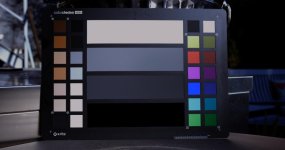
Actually, I will post this. Shot is a little blue as the sun was peaking in and out of clouds when I shot this. This is my c500 II+5 chart compared to the CVP C500II +5 chart. Both are XF-AVC. (we should also talk about how their fx9 chart starts really oversaturated, compared to the C500 chart which starts a little dull, but I digress). We can see at +5 that while things are starting to go haywire, the color Is holding pretty well throughout the chart.
edit: I just realized this was shot in Clog3. Another reason to redo. Shooting in Log2 should add another stop of highlight.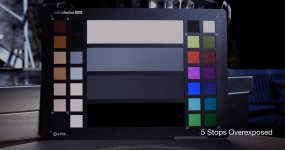
edit: I just realized this was shot in Clog3. Another reason to redo. Shooting in Log2 should add another stop of highlight.
Attachments
Last edited:
On the C300 II I didn't see any major stop advantage for skintones on CLog2 vs. CLog3. CLog2 was most useful in that it closely matches ARRI's LogC, and thus when using cinema color and production matrix it worked OK with Alexa LUTs (I ultimately stopped using this setup as I got better results with custom settings and CLog3).
The issue I have with Canon's color science is blowing to white early. When tuning the EOS R with custom picture styles using builtin CLog as a reference, I was able to match total DR to white clip, however I couldn't quite match CLog's color retention in the last bit for e.g. blue sky with the face backlit (and no front light source / bounce). The C300 II has more DR before ghosting (skin going white), and the 1DX II shooting video has a bit less than the EOS R shooting CLog (similar when using custom picture styles). The online examples of the C500 II look similar to the C300 II, which was also rated by Canon at 15 stops (and shown not to be true (in my own experience DR was good but not great)). For my use/preference I care about what happens to skintones as they approach white. When I examine footage of the C500 II, I see similar ghosting skin behavior I observed with the C300 II (again, both rated by Canon at 15 stops):
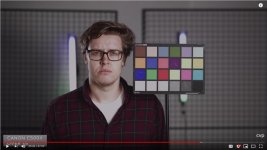
Randomly searched, found this example. No idea what settings, however it's a repeating pattern I see with Canon Cx00 cameras.

When we compare the example frame with Canon at +5 to various Sony sensors, we see the FX9 and Venice are still usable. Even the old FS7 could be salvaged with a bit of post work in the highlights on the face (depending on custom/delivery reqs. (wouldn't be great)). The C500 II has lost almost all color in the face. I cranked saturation up on that C500 II example in PS and got something similar to the FS7 (for the face), however the shirt now was too hot in saturation (would require masking, etc.).
cpreston mentioned newer LUTs which sounded like they reduced the skintone ghosting: that's a good result now that we're exploring why the C500 II is doing this. If there's a way to fix the issue with LUTs or settings: something useful learned from this discussion. IMO the C500 II has similar IQ with slightly better skintones vs. the FS7, and in one example the FX9. Ranked for IQ & usable DR: Venice > FX9 > C500 II / FS7 (very close). Sony sensors lead Canon in DR (and Sony's also apparently using a smaller fab process vs. Canon), so these results aren't that surprising. What is surprising is how much the FX9 improved over the FS7. For color IQ & DR, I haven't seen any significant improvement with the C500 II over the C300 II (usable detail is improved: 5.9K sensor).
The CVP test made clear what I've been seeing in C500 II examples regarding skintone ghosting. If different settings or LUTs can be used to deal with this issue, let's see those results and how to avoid skintone ghosting. This would be helpful to the folks I know that will be testing these two cameras soon.
The issue I have with Canon's color science is blowing to white early. When tuning the EOS R with custom picture styles using builtin CLog as a reference, I was able to match total DR to white clip, however I couldn't quite match CLog's color retention in the last bit for e.g. blue sky with the face backlit (and no front light source / bounce). The C300 II has more DR before ghosting (skin going white), and the 1DX II shooting video has a bit less than the EOS R shooting CLog (similar when using custom picture styles). The online examples of the C500 II look similar to the C300 II, which was also rated by Canon at 15 stops (and shown not to be true (in my own experience DR was good but not great)). For my use/preference I care about what happens to skintones as they approach white. When I examine footage of the C500 II, I see similar ghosting skin behavior I observed with the C300 II (again, both rated by Canon at 15 stops):
Randomly searched, found this example. No idea what settings, however it's a repeating pattern I see with Canon Cx00 cameras.
When we compare the example frame with Canon at +5 to various Sony sensors, we see the FX9 and Venice are still usable. Even the old FS7 could be salvaged with a bit of post work in the highlights on the face (depending on custom/delivery reqs. (wouldn't be great)). The C500 II has lost almost all color in the face. I cranked saturation up on that C500 II example in PS and got something similar to the FS7 (for the face), however the shirt now was too hot in saturation (would require masking, etc.).
cpreston mentioned newer LUTs which sounded like they reduced the skintone ghosting: that's a good result now that we're exploring why the C500 II is doing this. If there's a way to fix the issue with LUTs or settings: something useful learned from this discussion. IMO the C500 II has similar IQ with slightly better skintones vs. the FS7, and in one example the FX9. Ranked for IQ & usable DR: Venice > FX9 > C500 II / FS7 (very close). Sony sensors lead Canon in DR (and Sony's also apparently using a smaller fab process vs. Canon), so these results aren't that surprising. What is surprising is how much the FX9 improved over the FS7. For color IQ & DR, I haven't seen any significant improvement with the C500 II over the C300 II (usable detail is improved: 5.9K sensor).
The CVP test made clear what I've been seeing in C500 II examples regarding skintone ghosting. If different settings or LUTs can be used to deal with this issue, let's see those results and how to avoid skintone ghosting. This would be helpful to the folks I know that will be testing these two cameras soon.
On the C300 II I didn't see any major stop advantage for skintones on CLog2 vs. CLog3. CLog2 was most useful in that it closely matches ARRI's LogC, and thus when using cinema color and production matrix it worked OK with Alexa LUTs (I ultimately stopped using this setup as I got better results with custom settings and CLog3).
The issue I have with Canon's color science is blowing to white early. When tuning the EOS R with custom picture styles using builtin CLog as a reference, I was able to match total DR to white clip, however I couldn't quite match CLog's color retention in the last bit for e.g. blue sky with the face backlit (and no front light source / bounce). The C300 II has more DR before ghosting (skin going white), and the 1DX II shooting video has a bit less than the EOS R shooting CLog (similar when using custom picture styles). The online examples of the C500 II look similar to the C300 II, which was also rated by Canon at 15 stops (and shown not to be true (in my own experience DR was good but not great)). For my use/preference I care about what happens to skintones as they approach white. When I examine footage of the C500 II, I see similar ghosting skin behavior I observed with the C300 II (again, both rated by Canon at 15 stops):
View attachment 138149
Randomly searched, found this example. No idea what settings, however it's a repeating pattern I see with Canon Cx00 cameras.
View attachment 138150
When we compare the example frame with Canon at +5 to various Sony sensors, we see the FX9 and Venice are still usable. Even the old FS7 could be salvaged with a bit of post work in the highlights on the face (depending on custom/delivery reqs. (wouldn't be great)). The C500 II has lost almost all color in the face. I cranked saturation up on that C500 II example in PS and got something similar to the FS7 (for the face), however the shirt now was too hot in saturation (would require masking, etc.).
cpreston mentioned newer LUTs which sounded like they reduced the skintone ghosting: that's a good result now that we're exploring why the C500 II is doing this. If there's a way to fix the issue with LUTs or settings: something useful learned from this discussion. IMO the C500 II has similar IQ with slightly better skintones vs. the FS7, and in one example the FX9. Ranked for IQ & usable DR: Venice > FX9 > C500 II / FS7 (very close). Sony sensors lead Canon in DR (and Sony's also apparently using a smaller fab process vs. Canon), so these results aren't that surprising. What is surprising is how much the FX9 improved over the FS7. For color IQ & DR, I haven't seen any significant improvement with the C500 II over the C300 II (usable detail is improved: 5.9K sensor).
The CVP test made clear what I've been seeing in C500 II examples regarding skintone ghosting. If different settings or LUTs can be used to deal with this issue, let's see those results and how to avoid skintone ghosting. This would be helpful to the folks I know that will be testing these two cameras soon.
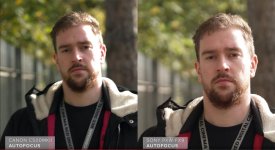
The top pic,s are from the same CVP test.. showing rather amazingly better the AF of the fx9 is than the 500II.. even they seemed shocked at how better it was than the Canon.. for far to near test anyway..
morgan_moore
Major Contributor
Arri - top end is desaturated; 'so cliever' 'so filmic'
Canon - top end is desaturated; 'major fail'
I think that once you want to compare camera's you should test them in a laboratory with controlled light, with calibrated instruments and standard conditions and standard test methods.
All other tests are useless, except for amusement or raging discussions about personal taste and opinions.
Old photo magazines used to have this. Reliable and objective.
Or is there still a place were camera's are tested this way?
All other tests are useless, except for amusement or raging discussions about personal taste and opinions.
Old photo magazines used to have this. Reliable and objective.
Or is there still a place were camera's are tested this way?

cpreston
Veteran
The top pic,s are from the same CVP test.. showing rather amazingly better the AF of the fx9 is than the 500II.. even they seemed shocked at how better it was than the Canon.. for far to near test anyway..
From that test, I'm a bit surprised that either camera can recognize a face with one side of the face entirely blown out. Face tracking has come a long way.
The CVP test made clear what I've been seeing in C500 II examples regarding skintone ghosting.
As I suggested earlier. When presented with evidence, you find a way to ignore it, and then head off and find some irrelevant “proof” of what you already know from years of experience with “canon color science”. Let me clear things up for you. The image I posted, while hastily prepared, imperfect, and not final, clearly illustrates there’s something very wrong going on in the CVP test that you seem to think is the holy grail. If you fail to see that, I can’t really help you. (I’ve also come to the insane conclusion that I really don’t need to change your mind on this, and that letting you continue to spout convoluted misinformation about cameras, unchallenged, is gonna be ok.). Nice chatting with you.
Last edited:
From that test, I'm a bit surprised that either camera can recognize a face with one side of the face entirely blown out. Face tracking has come a long way.
The Sony in particular is impressive in this test. Canon’s face tracking algorithm isn’t nearly as advanced. (Although I’ve read user experiences from the Sony side that say the fx9 struggles more than the canon when the head turns. There are a lot of aspects to AF systems..and this very perfunctory test (by cvp’s admission) only shows you 1 aspect. That said, it’s obvious Sony has done some great work here.
Liam Hall
Veteran
The new LUT set from canon came out in mid November. However, I've just run some charts, and I think I can clear up what the problem was. As you and I have been saying, the CVP test was flawed, but not quite how we saw it. I ran charts at 0 to +6. Processed with contrast and saturation and no LUTS. White clipped at 4 stops. Yellow and lightest skin tones clipped at 5 (as they should). A mess at +6. The colors look generally very good thru +5 and are still very present at +6, although the lightest ones have clipped purely by their value. I took the +6 clip and applied the LUT, and actually the colors didn't go away like the CVP test, but they did get a little worse. Then I flipped the process order (exposure adjustment after the LUT) Colors disappeared just like the CVP test, which turns out to have been a little more flawed than we thought. This workflow is backwards, but also explains why the canon colors got progressively less saturated with each added stop of exposure (that's just not how digital sensors work). Given what I'm seeing in my charts, the camera pretty much mirrors Geoff Boyles reading of the C700 FF -- the C 500 II has 3.5 stops of latitude in the highlights. Peace out.
Great post Barry. I completely agree. Applying the LUT before adjusting exposure is something I've seen editors get wrong with log footage countless times over the years.
cpreston
Veteran
Great post Barry. I completely agree. Applying the LUT before adjusting exposure is something I've seen editors get wrong with log footage countless times over the years.
At least in FCPX, applying a LUT will hard clip the color values and the information can't be recovered by secondary color corrections. Canon's V1 REC709 LUT's all had the problem of transforming the image in a way that would cause color channels to either clip or be crushed. The V2 LUT's appear to roll off the saturation so that you maintain some color definition, but you still have the problem if desaturating the superwhites and blacks.