FS7: Sony FX9 v Canon C500 mkII

One reason there are few C500 MKII test videos on Youtube/Vimeo is we're all busy shooting actual jobs. I've just returned from 18 days on the road in Nicaragua, Peru, Barbados and Panama. The films won't be available for public consumption for a couple of months, which is a shame, but I can report the camera coped flawlessly with a range of lighting conditions and continuous AF for interviews made my life so much easier than shooting on my FS7. Canon just need to reinstate 1FPS and ship my damn accessories.
 
..... the camera coped flawlessly with a range of lighting conditions.... Canon just need to ... ship my damn accessories.

very much my experience, and ditto on the accessories.

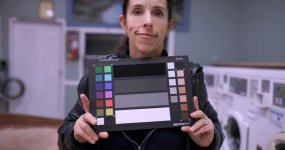
This is a classic "bad lighting" situation. Location scout last night for the next segment of Nellie's dance reel. Location is a run-down laundromat lit by 5 T12 fluorescents of varying ages and colors. (two warm white, a modern cool white, and a very vintage cool white with a very visible green shift. I positioned my assistant and chart under the older green fixture (the cool white is behind her and the warm whites some distance behind me, not influencing this shot much), white balanced to the old green cool white above her. Of course it's not perfect as there are several "whites" going on In the shot, but I was pretty happy with how the skin tone looked given the sketchiness of the light directly above her.
laundromatSrgb.jpg
 
Mixed fluorescents are a beauty. I remember being at Dunkin Donuts once with a friend and asking him, "Hey, what's that green stuff under your eye?".

And I was without a camera. I guess my eyesight wasn't properly white-balanced that day.
 
very much my experience, and ditto on the accessories.

This is a classic "bad lighting" situation. Location scout last night for the next segment of Nellie's dance reel. Location is a run-down laundromat lit by 5 T12 fluorescents of varying ages and colors. (two warm white, a modern cool white, and a very vintage cool white with a very visible green shift. I positioned my assistant and chart under the older green fixture (the cool white is behind her and the warm whites some distance behind me, not influencing this shot much), white balanced to the old green cool white above her. Of course it's not perfect as there are several "whites" going on In the shot, but I was pretty happy with how the skin tone looked given the sketchiness of the light directly above her.
View attachment 138102

The challenge with cameras and skintones is typically with magenta and green (and with Canon sometimes red (way too much) and yellow (R+G)). In this example the skin highlights go magenta and shadows go green, with the main white strip on the chart going warm+magenta: when viewed on an iPhone X OLED. When viewed on a MBP there's more green overall and the bottom white strip looks white, while highlights in background still look magenta. I'm not on one of my calibrated desktops displays currently, however I'd expect slightly different results there as well. With the FS700 and A7S I, magenta/green issues were a constant problem to deal with in post for skintones: ultimately I preferred slight magenta vs. green for skin tones (unless I was shooting a Matrix sequel haha). the A7S II was better, and recent A7's are even better, as is the FX9, Venice etc.

Many folks said A7S I had terrible color and skintones were always bad. With the right camera settings and a bit of post work, I thought it was OK, at least for SciFi (shot on the A7S I, GH4, GoPro (underwater)):
Cover shot is still frame from A7S I: slight green bias when compared to other images on this page. Opening shot has magenta bias to deal with too much green: still works IMO for SciFi, but not accurate. Compare the skintones to all the images on this page: if staring first at a magenta bias, then looking at something with another bias (e.g. green), the green perception will be increased. Stare at the green bias image, then the magenta bias image will be increased. Note the Panasonic examples below don't have any green/magenta bias issues (which is a good thing IMO); though they look a bit on the orange side.

Panasonic's color in my experience has problems with too little blue, and skintones look a bit 2 dimensional/flat, perhaps magenta/yellow, but rarely red/green issues in my experience. While they've improved, the current cameras still need work on color science and skintones for the same reasons: skintones just don't look quite right. GH4 with a lot of post work (very first shot I did on a steadicam- first take/practice and that's what we ended up using):

More GH4 on steadicam: lots of post work to get skintones looking like that:

Again, my motivation for bringing up color and skintones frequently is at this point I'm looking for cameras to simply be accurate to what the eye sees when shooting. I shoot, edit, color, do vfx+green screen and am looking for accurate color from the camera, especially any new camera in 2020 or later, vs. spending hours in post fixing things. Another reason why ARRI dominates the high end: easier to get looking good/right vs. other cameras.

If in your example the subject was hit with a bit of on-camera high quality light, skintones would look more natural (less magenta high + green low bias). See the EOS R mixed light example:
Overhead lights are low quality ~3000K sources (CFL/LED, not tungsten) with a 95+CRI/Ra on-camera point source COB LED. Most people like the way that shot looks. IMO it's just OK, but happy with the results given the conditions. Note there are no magenta/green issues going on, only IMO orange/yellow not being quite right. Makeup looks right, however part of the yellow/orange skintone issue is due to spray tan products. While the results are OK, the reason ARRI asks for and gets the higher rates is because it does a better job in these cases. A way to test of course is to shoot side by side with the same lenses then do exposure ramps and see what happens to color.

The FX9 & C500 II are good tools; this thread is about comparing them and to help folks decide which is a best fit for their needs. ARRI/Red/Venice/Panasonic are not even an option for those relying on AF. Both cameras have different biases in their color science and have different looks- once one understands the differences, they can confidently make decisions as to which camera will work better for them.
 
My takeaway from your C700 test is that the C700 doesn't do particularly well at compensating for lighting sources with different spectrums. Most of the time I am not sure what I am looking at in people's skin tone tests, but I agree that the skin tones are bad in that C700 test. The right side looks like it was lit by an old green spiked LED, the left by an old HMI bulb, and the backlight might be a partially gelled tungsten. Still I have no idea how to compare those results to a different camera. Maybe an Arri would compensate for the lighting and even out the skin tones without color correction, but I have no reference for comparison.

I didn't set up the lights, just the camera settings and chose the lens (Canon CNE- don't recall focal length). Didn't do much work in post, just wanted to see how the camera handled skintones. The goal is accurate color (as provided by ARRI), where skintones look correct/pleasing. There's a lot of room for improvement in Canon's C series for color and skintones- just get it to match their DLSR raw color would be nice. In 2020 it's not bad, however ARRI, Red, Venice etc. IMO look a lot more pleasing, emotionally compelling (recent ARRI & Red footage is also looking really accurate- which isn't something to argue about re: preference. Accurate is what the eye sees when shooting, without weird stuff going on in the shadows, mids, and highlights). If folks can't see the difference between the C500 II, FX9 etc., then it's down to cost, ergo, etc.
 
Mixed fluorescents are a beauty. I remember being at Dunkin Donuts once with a friend and asking him, "Hey, what's that green stuff under your eye?".

And I was without a camera. I guess my eyesight wasn't properly white-balanced that day.

Haha!
 

See the example shots around 5:45 for color/skintones. The issues discussed are functional (worth reviewing for those interested in the FX9), vs. IQ.


FX9 doing a good job with super saturated skintones and AF.

C500 II seems to have trouble with, IMO, pleasing super saturated color (or at least folks can't easily make it work in post):

That said, that's the Cx00 Canon look, and for folks who dig that, all good. For those that don't, there's the FX9, Red Scarlet (good deals used) if AF not needed etc. Red Komodo could shake things up in the AF Cinema cam space.
 
Last edited:
I think you have to wait until you can see footage shot of the same subject with both cameras at the same time. Trying to draw conclusions from different subjects shot under different lighting with different cameras becomes very subjective...
 
That’s the best way; I’m aware of such a test coming soon.
That said, I’m very familiar with Canon Cx00 color, and if we sample all available footage, we can see patterns. If there’s a common issue, it’s possible it’s the camera vs. everyone making the same mistakes resulting in the same issues.

I haven’t used the FX9, and have seen some weak examples, however the better FX9 examples are looking better than the best C500 II examples. Better quantified as good/accurate skintones when saturation is pushed.
 
In this example the skin highlights go magenta and shadows go green, with the main white strip on the chart going warm+magenta: when viewed on an iPhone X OLED. When viewed on a MBP there's more green overall and the bottom white strip looks white, while highlights in background still look magenta.

Probably best to not judge color on your iPhone. In fact that entire chart is shifted magenta blue, (there are no green shadows). (this was done on purpose as thats the direction we're going with the color, and we want a "pink" skin tone in this piece, and I just wanted to see if it was there, given that some older flourescents can just strip the red out of skin tones) The background color is shifted even more blue because there is a cooler lamp back there (per my OP). If we look at the neutral image, we'll see that it is extremely linear on the grey scale, and that the skin color is warmer (Jodi is Portuguese and has light olive skin (green skin she will tell you), pink isn't in her palette. :-) Nellie will look more pink without the shift. here is the image as originally white balanced.
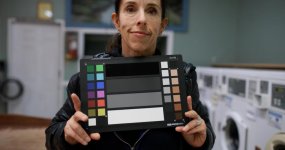
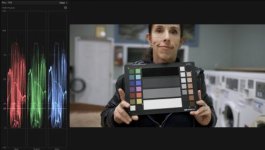
Nellie laundromat N.jpgScreen Shot 2020-01-28 at 1.47.21 PM.jpg
 
Last edited:
Regarding the C700 and compensating for different spectrums. Geoff Boyle, last year, posted a very specific comparison of different camera responses to a tungsten light and a tungsten LED (unnamed). These were made at the cameras 3200 preset, and as Geoff would always tell you, the only thing being looked at here is how they render the different lights at that preset (so...not overall picture quality, or what the camera is capable of etc). What it shows is, while Alexa and Venice look the best under tungsten, when you bring an LED into the situation, the canon cameras, in particular the C700FF, are probably the most consistent, along with Venice. (what I do know is that the canon tungsten preset has always been "off" (something that, by the way, they've corrected in the C500II), but it's remarkable how well the C700FF corrects for the additional green (in skin tone, green looks yellow) output by the LED compared to many of the cameras tested, especially RED. I guess this only matters if you're using LED instead of hot lights, but I'm sure nobody's doing that. :-)

https://vimeo.com/363241953

Very interesting, thank you for posting it! Arri looks so good, but Venice too
 
Probably best to not judge color on your iPhone. In fact that entire chart is shifted magenta blue, (there are no green shadows). (this was done on purpose as thats the direction we're going with the color, and we want a "pink" skin tone in this piece, and I just wanted to see if it was there, given that some older flourescents can just strip the red out of skin tones) The background color is shifted even more blue because there is a cooler lamp back there (per my OP). If we look at the neutral image, we'll see that it is extremely linear on the grey scale, and that the skin color is warmer (Jodi is Portuguese and has light olive skin (green skin she will tell you), pink isn't in her palette. :-) Nellie will look more pink without the shift. here is the image as originally white balanced.

View attachment 138103View attachment 138105

My day gigs are in software, mostly multimedia/video/graphics/games/sims (currently security- no visuals at all though might do some fun real-time graphs soon). In software we have to test on multiple devices, phone, tablets, desktop, TV (to view videos produced in apps). That's where I learned that each device can produce different looks. Even more tricky is different browsers can produce different looks. For photos/video, the goal is to get color super accurate, especially for skintones since humans are very finely tuned to skin color issues. Then as each device deviates one way or another, the result still looks pretty good. Even when we use the vectorscope & skintone line, which is something most colorists will agree is a useful tool in getting good/accurate skintones (e.g. crop out a patch of skin and check on the vectorscope), sometimes when viewing on some devices it doesn't look good. So for critical skintone evaluation, I view stills & videos on as many devices as I have available, and also listen to others comments on devices I don't have access too (e.g. Android mobile (can check Android video via FireTV's YouTube app)). Also helpful to use calibrated displays and to periodically look away / take breaks as the eye-brain system will adapt to off-color grades 'normalizing' the look. Meaning images will start to look good after staring at them (still frame with a lot of time adjusting/grading). Then when watching later it can look terrible.

I still see green in the shadows of your subject- if that's what the eye sees, all good, that's accurate. While I do strive to make white white, if I don't want to spend the time with masking, secondaries, or power windows (Resolve), I'll let white shift a bit if that's what it takes to make skintones look better. For narrative the grade can be anything for mood/emotion, and a lot more time is spend in color (tons of masking, secondaries, PW's, etc.). Lately don't have as much time to do post work, another reason I'm motivated to use cameras with accurate/pleasing/fun color/looks in camera.

On that note, looks like the FX9 supports 3D LUTs in camera- cool! Does the C500 II support 3D LUTs in camera?
 
It's a little hard to glean much information from these tests as they are, as you said, lit with unknown sources that don't seem matched, and at least the ones I looked at aren't "side by sides", and they seem to be an attempt to hit an amorphous target (the Arri homage).

Regarding the C700 and compensating for different spectrums. Geoff Boyle, last year, posted a very specific comparison of different camera responses to a tungsten light and a tungsten LED (unnamed). These were made at the cameras 3200 preset, and as Geoff would always tell you, the only thing being looked at here is how they render the different lights at that preset (so...not overall picture quality, or what the camera is capable of etc). What it shows is, while Alexa and Venice look the best under tungsten, when you bring an LED into the situation, the canon cameras, in particular the C700FF, are probably the most consistent, along with Venice. (what I do know is that the canon tungsten preset has always been "off" (something that, by the way, they've corrected in the C500II), but it's remarkable how well the C700FF corrects for the additional green (in skin tone, green looks yellow) output by the LED compared to many of the cameras tested, especially RED. I guess this only matters if you're using LED instead of hot lights, but I'm sure nobody's doing that. :-)

https://vimeo.com/363241953

It's interesting the Shane Hurlbut chose the original C500 for the Need for Speed night exteriors because of it's tendency to 'see" the yellow (green) of the sodium vapor around the Valley where the Alexa sort of ignored it. (the original C300 was similar in this aspect). From what I've seen under tungsten, sodium vapor, Metal Halide, and some very mixed and old fluorescents, the C500 Mark II definitely sees less of this yellow(green), mostly with the LUT's applied. The LUTs also seem to downplay yellow in skin tones under daylight, although grading without their LUTs generally restores that in a generally pleasing way.

I spent the day yesterday shooting interviews and B-roll under a white variety of lighting conditions and sources. I don't find grading the C500 mark II for pleasing skin tones difficult at all. With a properly white balanced capture, I generally arrive at a very nice look with nothing but contrast and saturation controls. The canon LUTS lean towards a red/pink skin with a compressed "Arri" highlight. Grade without these LUTs and the skin tones have a fuller range of highlights and a more "honey" colored bias (I'd say it's a bit more natural looking and is easier to adjust than the coloring from Canon's LUTS.)

Geoff's example: on first watch, the Alexa didn't look that great, and the Canon's looked better. On repeated viewing, noticed the C700 FF for example blew skintones toward white, and overall looked a bit magenta to me. There was also less skin color detail vs. the Alexa (which looked a bit green/dark in comparison). The Canon's looked like "White Priority" and the Alexa looked like "Ambient Priority" in terms of final WB. I use Canon DSLRs in Ambient Priority.

This is the best skintone demo I've seen for any camera in terms of accurate color, as the eye would see it (vs. a look or style):
Moving the light like that is a nice way to do skintone ramps to see what happens to color as light levels change across the face.

If you're happy with the C500 II and it works for you, that's all that matters. It's a tool and if it makes your work better/easier vs. other tools, it's the right tool for the job.
 
Last edited:
Geoff's example: on first watch, the Alexa didn't look that great, and the Canon's looked better. On repeated viewing, noticed the C700 FF for example blew skintones toward white, and overall looked a bit magenta to me. There was also less skin color detail vs. the Alexa (which looked a bit green/dark in comparison). The Canon's looked like "White Priority" and the Alexa looked like "Ambient Priority" in terms of final WB. I use Canon DSLRs in Ambient Priority.

Again, Geoff would tell you his test tells you ONE thing, how the camera at the manufacturers tungsten preset sees these two specific lights. Indeed the Alexa and Venice look terrific with their presets shooting an actual tungsten bulb, but they see this specific tungsten balanced LED very differently, and arguably are way out of balance. The C700 sees these two lights in very much the same way, the closest of any of the cameras. This is what the test is designed to illustrate. (Can the C700FF and the C500 II look better than this with say a custom white balance for an actual tungsten light, I believe they very well could, but this test isn't designed to illustrate that, so based on this test....one cannot make a conclusion about that. The question posed by the previous poster, was whether or not the C700 handled various sources better or worse than some other cameras. In this specific case, it handles them better.
 
Last edited:
That's where I learned that each device can produce different looks......

On that note, looks like the FX9 supports 3D LUTs in camera- cool! Does the C500 II support 3D LUTs in camera?

As you stated, every device displays color differently, that's why we use waveforms and histograms and vectorscopes to judge the accuracy and linearity of color in the image, because looking at a display, any display, to judge color, doesn't work.

The C500 does accept custom 3D LUTs.
 
G
This is the best skintone demo I've seen for any camera in terms of accurate color, as the eye would see it (vs. a look or style):
Moving the light like that is a nice way to do skintone ramps to see what happens to color as light levels change across the face.

It's really interesting that you think this looks accurate to you. To me, virtually every person seems to have exactly the same skin color. Even the ethnic africans have this "neutral pink" hue that I find totally un-natural. When I look at skin I see yellows and red and peaches and browns, and oranges, and greys and greens and ivories, all mixed up on the same face. Alexa has typically downplayed yellows in skin tones, a trait that canon mimics with its LUTs. I wouldn't call either accurate. I would call them homogenous. Was watching curb your enthusiasm last night thinking that everyone in that show has the exact same skin color. Wonder what camera they use.
 
Geoff test: shows Canon being similar in different lights. To my eye it looks too magenta and flat/low color detail/blown to white (neck). Would need to see an e.g Canon DSLR raw still that folks agreed matched reality to decide which camera, if any was accurate for the conditions.

Device testing: as noted e.g. skintone line is the common tool for skin tones, however that’s not enough! Must test on many devices to see what happens and make corrections as needed: that’s part of QA. Give it a try, you might be surprised by what you see.
 
Accuracy: watching a live model with our eyes, then compare to quality monitor, then compare in post on calibrated system. I’ve done tons of skintone tests and cameras in general have a ways to go to be accurate in the general case; sometimes monitoring live it looks good then in post... what happened?

Yes, I and many commenters on the ARRI example think it looks accurate. Sure, you’d need to test yourself to be convinced. Perhaps someday you’ll have the opportunity.

Venice example: outside shot skin looks a bit brown, otherwise the indoor shoots look really good/accurate:

.

Perhaps using good quality lights try a test on the C500 II where you push saturation to the limit and see how skintones hold up. Then try in mixed, bad light etc.
 
Perhaps using good quality lights try a test on the C500 II where you push saturation to the limit and see how skintones hold up. Then try in mixed, bad light etc.

Any skintones that hold up when you push the saturation to the limit are skintones without color in them. Generally, the easiest way to get pleasing skin tones is to pull a key on the skintones, remove most of the saturation, and then shift the hue to match whatever looks best to your eye. It is relatively easy to make everything look like that Arri footage.

I've read that some people have an extra normal ability to perceive various shades of color. I'm not sure how that interacts with limited range of a monitors reproduction, but I am quite sure that I don't have that ability since I often have no idea what anybody is talking about when they start comparing skin tones from online footage.
 
Perhaps using good quality lights try a test on the C500 II where you push saturation to the limit and see how skintones hold up. Then try in mixed, bad light etc.

I guess I just don't understand. If the flat, neutral desaturated skin tones of the Arri video you posted are "the best skintone demo (you've) seen for any camera in terms of accurate color, as the eye would see it (vs. a look or style)" what benefit would I gain from "pushing saturation to the limit" to see how skin tones hold up. I get the point of pushing a codec to the breaking point, but that doesn't tell you much about getting what you think is accurate color.

Most of the links you've posted (as examples of awesome) display a very homogenous approach to skin rendering either through makeup, or post processing or model choice. The look, to me is very much like a processed fashion shot. To each his own on that, but it's certainly not the be all end all of where skin tones should lie, or as a goal to be attained. (as a fashion photographer for 30 years, I know this look very well, and when I became serious about cinematography, I was more than a little curious about how filmmakers are often not attempting to produce skin tones that look like airbrushing, about how the color on the highlight and shadow sides of a face were often different colors, to create depth, and to recreate how colors exist outside of the white boxes most studio fashion is shot in.

I'm going to hop off this conversation. The rabbit hole is getting too deep, and too weird for me. I will suggest that if you want to make comments about any camera, about it's skin tones, color science, about it's tactile casing...you should probably spend some time with it. But thats just a suggestion. Over and out.
 
Back
Top