
Navigation
Install the app
How to install the app on iOS
Follow along with the video below to see how to install our site as a web app on your home screen.
Note: This feature may not be available in some browsers.
More options
You are using an out of date browser. It may not display this or other websites correctly.
You should upgrade or use an alternative browser.
You should upgrade or use an alternative browser.
FS7: Sony FS7 purple fringing - any fix?
- Thread starter Martin.G
- Start date
Lenilenapi
Carbonite Member
(Post revised)
Well if your satisfied that's fine for you , but I don't know what the heck I'm looking at . You could have virtually no color in your subject but CA would still be very saturated , so if your settings were too saturated the Ca could be horrendous .
As I said before - If there's a problem with this camera I would like to know, so I'm open minded & don't question the "cred" of anyone posting . But to my mind its a serious charge and nothing On this 11 page thread so far tells me anything reliable or anything that implies its any different from any other video camera I've ever used. That's my 2 cents
lenny
Well if your satisfied that's fine for you , but I don't know what the heck I'm looking at . You could have virtually no color in your subject but CA would still be very saturated , so if your settings were too saturated the Ca could be horrendous .
As I said before - If there's a problem with this camera I would like to know, so I'm open minded & don't question the "cred" of anyone posting . But to my mind its a serious charge and nothing On this 11 page thread so far tells me anything reliable or anything that implies its any different from any other video camera I've ever used. That's my 2 cents
lenny
Last edited:
broughtonfilm
Well-known member
It's not CA. The image is in the center of the lens image circle, too. But like I said, it's a non-issue for me, as I don't use Custom mode.
What does the location of the fringe in the frame have to do with determining whether the base of the issue is a CA or not? CA can happen anywhere within image circle, especially the longitudinal type.

basspig
Veteran
What does the location of the fringe in the frame have to do with determining whether the base of the issue is a CA or not? CA can happen anywhere within image circle, especially the longitudinal type.
Because it's atypical to be visible in the center of the frame. I'm certain this is not CA that we are seeing. And also the fact that the lens in use is a prime, not a ENG zoom, which would be producing gross amounts of CA. All of my lenses that are not ENG lenses are free of visible CA. This issue is either a sensor issue or a processing issue. The image is probably 10 stops overexposed at the center of the moon disc, and some sort of chroma processing error is taking place at the spillover on the edges. I'd favor the processing theory, since it's gone with the Cine EI mode and both images have similar amounts of saturation.
Viddovation
Veteran
Because it's atypical to be visible in the center of the frame. I'm certain this is not CA that we are seeing. And also the fact that the lens in use is a prime, not a ENG zoom, which would be producing gross amounts of CA. All of my lenses that are not ENG lenses are free of visible CA. This issue is either a sensor issue or a processing issue. The image is probably 10 stops overexposed at the center of the moon disc, and some sort of chroma processing error is taking place at the spillover on the edges. I'd favor the processing theory, since it's gone with the Cine EI mode and both images have similar amounts of saturation.
What lens, and if applicable, adapter are you using?
broughtonfilm
Well-known member
Because it's atypical to be visible in the center of the frame.
Longitudinal CA (spherochromatism) happens in any part of the frame. This kind of CA is typical for fast lenses.
All of my lenses that are not ENG lenses are free of visible CA.
This I simply don't believe.
Again, the debate is not whether the CA is there as an initial cause of the fringe but whether the camera does something that makes it look much worse.
basspig
Veteran
This moon shot was with the Mitakon f/.95 35mm Prime lens.
I have a particular sensitivity to CA. I see it in a lot of footage and I have returned lenses because of it. This lens, however, does not have objectionable CA. For it to be this bad, the lens would be unusable in normal lighting, and the custom profile would have to be tweaked to the extremes to crank up saturation, use the highest saturation matrix, perhaps a bunch of other settings way out of kilter, but that is not the case. Custom just responds differently to extreme contrast than Cine EI.
I have a particular sensitivity to CA. I see it in a lot of footage and I have returned lenses because of it. This lens, however, does not have objectionable CA. For it to be this bad, the lens would be unusable in normal lighting, and the custom profile would have to be tweaked to the extremes to crank up saturation, use the highest saturation matrix, perhaps a bunch of other settings way out of kilter, but that is not the case. Custom just responds differently to extreme contrast than Cine EI.
Lenilenapi
Carbonite Member
With all respect , I'd bet my home that this was longitudinal CA regardless of whether or not the camera magnifies it .
ive never seen a still lens that was free of longitudinal Ca .
Whst lenses do you own? L
ive never seen a still lens that was free of longitudinal Ca .
Whst lenses do you own? L
basspig
Veteran
So far, I have this Mitakon, a couple of Rokinon Cine Primes, and the Sony 28-135 G lens, which is the cleanest of the lenses I own.
The lenses I use with my EX3 are awful. Even moderate contrast brings out red and blue fringes. I was reviewing some orchestra footage I'd shot in 2010 and it struck me how bad the tuxedos looked with the color fringes at the borders. My new lenses don't do that at all.
CA is usually acceptable in the central areas but not near the corners of the frame. It goes from nearly invisible at the center to horrendous at the edges (referring to the Fujinon broadcast lenses I own in 1/2" format).
The lenses I use with my EX3 are awful. Even moderate contrast brings out red and blue fringes. I was reviewing some orchestra footage I'd shot in 2010 and it struck me how bad the tuxedos looked with the color fringes at the borders. My new lenses don't do that at all.
CA is usually acceptable in the central areas but not near the corners of the frame. It goes from nearly invisible at the center to horrendous at the edges (referring to the Fujinon broadcast lenses I own in 1/2" format).
Lenilenapi
Carbonite Member
That's lateral or transverse CA and seems easier to correct . Your rockinons are chock full of longitudinal or axial CA . Just look in your house at night and turn on a light bulb with a bright shade or just the bare bulb with a darker background . Basically you make it like the moon in your shot with a bright source Against a dark background . Open your iris all the way and now focus in front of , at , and behind the source . It will be ringed by color when out of focus . Usually green and magenta . I've never seen a DSLR lens without it though some are better than others. 35mm f1.4 lenses are often especially bad . Zeiss ZF 1.4 is terrible . Expensive cine lenses are much better . Stopping down helps .
Last edited:
basspig
Veteran
I set up a test with a single high intensity desklamp simulating a high contrast light source, but could not recreate the effect.
However, I did some other testing with video monitors and LCD backlights in the studio and noticed that when Matrix was turned on, some narrow ranges of color went to absurd saturation levels. The burgundy red background of my Windows desktop became a bright magenta primary, for instance. Light blue backlighting of an LCD display looked like oversaturated CMYK color--it had that appearance of an RGB image converted to CMYK in Photoshop. If I turned on Adaptive Matrix, those colored light sources' saturation was tamed to a great extent.
I think this is a matrix issue.
Frankly, I'm surprised at how clean the Mitakon lens is. I didn't expect quite this level of performance at the price I paid.
One thing I did find out during testing in Custom mode: the camera has a LOT more gain. At one point, I was working from indirect light from the monitors bounding off the ceiling and illuminating objects at the far end of the room some 20' away. Shogun's scope was showing me 55 IRE levels in an area that looked to my eyes like a nearly black void where I could not make out any objects by eye. The camera had a nicely exposed color picture though.
However, I did some other testing with video monitors and LCD backlights in the studio and noticed that when Matrix was turned on, some narrow ranges of color went to absurd saturation levels. The burgundy red background of my Windows desktop became a bright magenta primary, for instance. Light blue backlighting of an LCD display looked like oversaturated CMYK color--it had that appearance of an RGB image converted to CMYK in Photoshop. If I turned on Adaptive Matrix, those colored light sources' saturation was tamed to a great extent.
I think this is a matrix issue.
Frankly, I'm surprised at how clean the Mitakon lens is. I didn't expect quite this level of performance at the price I paid.
One thing I did find out during testing in Custom mode: the camera has a LOT more gain. At one point, I was working from indirect light from the monitors bounding off the ceiling and illuminating objects at the far end of the room some 20' away. Shogun's scope was showing me 55 IRE levels in an area that looked to my eyes like a nearly black void where I could not make out any objects by eye. The camera had a nicely exposed color picture though.
Lenilenapi
Carbonite Member
perhaps you're using to much of a point source. Usually I use an overexposed lampshade or a ceiling lamp in diffused housing. Sometimes the white inside reflector of a desk lamp. The point source bulb might be hard to get definite edges from. Truth is I will always see Longitudinal CA even on focus chart just on either side of the focus point. There is absolutely no question your Rockinon's have longitudinal CA so you're not looking in the right place yet.
Re Matrix, - again you're just not providing much information. What matrix settings with what gamma? . Matrix On is the standard way to shoot virtually every non-log video camera, so if you're getting weird colors you are doing something very wrong or by looking at monitors you've chosen an extremely saturated image to begin with. Adaptive matrix seems to be designed for this very issue. Its not something I've ever played with but might be very useful in love music shows with LED lighting.
"Adaptive Matrix works well with intense lights that are over-saturating a surface. When turned on, it brings back detail and provides a more natural image. It was suggested that this function would be useful when shooting bands or shows that feature bright colored lighting."
Re Matrix, - again you're just not providing much information. What matrix settings with what gamma? . Matrix On is the standard way to shoot virtually every non-log video camera, so if you're getting weird colors you are doing something very wrong or by looking at monitors you've chosen an extremely saturated image to begin with. Adaptive matrix seems to be designed for this very issue. Its not something I've ever played with but might be very useful in love music shows with LED lighting.
"Adaptive Matrix works well with intense lights that are over-saturating a surface. When turned on, it brings back detail and provides a more natural image. It was suggested that this function would be useful when shooting bands or shows that feature bright colored lighting."
Last edited:
morgan_moore
Major Contributor
I don't see what the argument is here really.
I would observe - it is simple to find a lens without too many aberrations at the centre - this can be tested on a DSLR in stills mode. Most of my lenses take good 6k stills so wont struggle with '4k' video.
Having ruled the lens out clearly somewhere in the image chain some nasty edge effects can join the party
Either by using over harsh LUTs/Post or by using the wrong settings in Custom
If they do apprear it is reasonably trivial to hide them in post.
Test Test Test.
S
I would observe - it is simple to find a lens without too many aberrations at the centre - this can be tested on a DSLR in stills mode. Most of my lenses take good 6k stills so wont struggle with '4k' video.
Having ruled the lens out clearly somewhere in the image chain some nasty edge effects can join the party
Either by using over harsh LUTs/Post or by using the wrong settings in Custom
If they do apprear it is reasonably trivial to hide them in post.
Test Test Test.
S
Lenilenapi
Carbonite Member
Sam, I've never seen a DSLR lens without very noticeable longitudinal CA in the center of the image including quite expensive ones. Its the dirty secret of using these far less expensive lenses for video. To be honest , I'm stunned that some of you seem to think your lenses don't have it. Even the Zeiss reps at NAB admitted to me it was a huge problem and they simply could not fix it without spending the money they do on their true Cine lenses - which are much better. That's one of the things you pay for with real cine glass.
I don't know if that's the cause of the aberrations you folks are talking about here, but its premature to blame the camera or any settings until you clarify the role of CA. I agree "Test test Test" . My point is I haven't seen any tests that confirm this is a camera issue.
So what's the argument:
Is this garden variety CA or something else?
Is it CA that is magnified by the camera in some settings or at some exposures or will it come back when you add LUT's and saturation regardless of shooting Log?
Is this unique to Sony or the FS7 or is it typical of all video cameras. ?
I do appreciate your info about how easy it is to hide them in post BTW, that was relief. a
I don't know if that's the cause of the aberrations you folks are talking about here, but its premature to blame the camera or any settings until you clarify the role of CA. I agree "Test test Test" . My point is I haven't seen any tests that confirm this is a camera issue.
So what's the argument:
Is this garden variety CA or something else?
Is it CA that is magnified by the camera in some settings or at some exposures or will it come back when you add LUT's and saturation regardless of shooting Log?
Is this unique to Sony or the FS7 or is it typical of all video cameras. ?
I do appreciate your info about how easy it is to hide them in post BTW, that was relief. a
morgan_moore
Major Contributor
I just dont see (optical) problems with DSLR lenses - and I do a lot of 6k raw stills photography that gets pretty seriously pixel peeped. Yep my 20-35 is dodgy at the edges as is my 14/2.8 (on fullframe) and my really old 28/2 is soft open as are a couple of my other lenses - all stuff I would expect.
I think there are two issues at play.
1) purple edges as in my moustache - this is a function of using a 4k chip to shoot 4k, it is a function of 422 not having enough information. This is a 'problem' with the sensor/camera setup and not soluble in camera.
(The in camera solution would be a stronger OPLF - as sold for the 5/55 - or a higher res sensor .. F65 -)
Using 'soft' glass may also help - I saw it most when shooting not with my dusty nikkors but with the canon 'cine' primes - logical as the old glass may resolve just under 4k - perfect!
The post solution is a selective magenta desat - something Ive been doing for ages on my 20-35 for stills!
2) Red edges (as in my candles) this seems to be some sort of image processing problem - a hang over from Sony 1990 - that we all dislike. Using Slog cures it, using the wrong LUT can bring it back, shooting custom or burning the wrong lut can put it permanently in to the file.
These are just my personal observations from looking at too many files over too many years, It is not a qualified or scientific answer!
S
I think there are two issues at play.
1) purple edges as in my moustache - this is a function of using a 4k chip to shoot 4k, it is a function of 422 not having enough information. This is a 'problem' with the sensor/camera setup and not soluble in camera.
(The in camera solution would be a stronger OPLF - as sold for the 5/55 - or a higher res sensor .. F65 -)
Using 'soft' glass may also help - I saw it most when shooting not with my dusty nikkors but with the canon 'cine' primes - logical as the old glass may resolve just under 4k - perfect!
The post solution is a selective magenta desat - something Ive been doing for ages on my 20-35 for stills!
2) Red edges (as in my candles) this seems to be some sort of image processing problem - a hang over from Sony 1990 - that we all dislike. Using Slog cures it, using the wrong LUT can bring it back, shooting custom or burning the wrong lut can put it permanently in to the file.
These are just my personal observations from looking at too many files over too many years, It is not a qualified or scientific answer!
S
Last edited:
Lenilenapi
Carbonite Member
Well I'm gonna do some testing . I've seen terrible CA on lenses for years, but must confess I've probably always been testing on Sony cameras in standard modes.
Lenilenapi
Carbonite Member
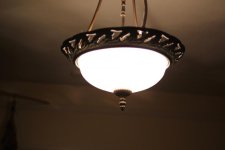 Zeiss ZF 35mm f1.4
morgan_moore
Major Contributor
Interesting one that. Checking an old shoot of mine (stills) you can see the same effect in one of the frames on a lamp in frame 8.
But it is not something that has bothered me - or the client (s) - or I had even noticed!
http://www.sammorganmoore.com/bed-and-breakfast/
Another shoot of mine on lowly stills lenses with some edges..
http://www.sammorganmoore.com/jills-house-2/
Do you actually shoot for a lighting company where that could be the actual composition?
S
But it is not something that has bothered me - or the client (s) - or I had even noticed!
http://www.sammorganmoore.com/bed-and-breakfast/
Another shoot of mine on lowly stills lenses with some edges..
http://www.sammorganmoore.com/jills-house-2/
Do you actually shoot for a lighting company where that could be the actual composition?
S
Last edited:
Lenilenapi
Carbonite Member
Oops I made a mistake - that lens is an f2 . The 1.4 would be much worse .
I often test lenses at home at night. I always see fringes around the lamps in the background . It's often worse than this . I just did this test fast . I see it on every focus chart as well . Slightly out of focus the other way and its green . But a few lenses are cool warm. I've never seen red . I've developed an eye for it I guess . It's on every still lens trust me . Though sharper fast lenses are worse .
I first picked up on it after buying the zeiss ZF 35mm 1.4 . The packaging had some bubblewrap that was left on the table and for some reason caught the light in such a way that the entire piece of bubble wrap was a field of electric green magenta fringing
I often test lenses at home at night. I always see fringes around the lamps in the background . It's often worse than this . I just did this test fast . I see it on every focus chart as well . Slightly out of focus the other way and its green . But a few lenses are cool warm. I've never seen red . I've developed an eye for it I guess . It's on every still lens trust me . Though sharper fast lenses are worse .
I first picked up on it after buying the zeiss ZF 35mm 1.4 . The packaging had some bubblewrap that was left on the table and for some reason caught the light in such a way that the entire piece of bubble wrap was a field of electric green magenta fringing