SONY f3 WILL NOT TURN ON

Jbo639

New member
Using a sony f3 for a shoot tomorrow, Tried to apply v1.4 update, walked away while update was installing, came back and the screens were all black. Tried to power down camera, and the screen remained black, and the camera on indication light remained on. Unplugged the battery, and tried to restart camera, and it was unresponsive, and the screen remained black. WHen I turn it on now the screen flickers. If anyone knows how to fix this please let me know asap.:Drogar-Smoke(DBG):

best,
-j
 
During the update process, the screen goes black for the second phase of the update and then comes back for the third. So you have interrupted the update process no doubt. This is contained in the update instructions.

Trying reapplying the update. Otherwise, it needs to go back to Sony.

Ned Soltz
 
Per Ned. You interupted the update. The instructions tell you it will go black a couple of times. Other people have started over and successfully completed the update. The entire process takes awhile. Something like 24 minutes if I recall. Make sure your power doesn't shut off.
 
RTFM (read the instructions) before doing software updates at home. That's why Sony orginally wanted you to bring them to service.
 
this is just painful to read... yeah you might have just bricked your camera, call Sony and hope they have a solution that doesnt involve you shipping it to them.
 
Hi!
I did this too, I turned the camera on again and after a while It worked again. The camera will hopefully complete the update.

Roger
 
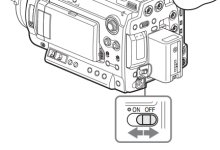
While we're talking about turning the F3 on and off, can everyone tell me if their on/off switch works by means of a two-position switch? ie. to the left is ON and to the right is OFF?

Trying to confirm my sanity. Thanks,
 
Morton are you kidding? My ON is on the left, and OFF on the right?

Anyway regardless of which side ON is on, what I swear about my on/off switch was that it was one of those spring loaded switches where if you push it pushes back to normal position. Then if you want to turn it off, you push it again but it always returns to the normal position.

I guess its been a while since I used my F3. Boy that's embarassing.
 
Most of them do it like the manual - On to the left, towards the little light.

Which way up are you holding your camera Morton?

onoff.jpg
 
Made the same mistake as the OP when updating to v1.4.
Left the room and came back, saw the black screen. Freaked.
Nothing was happening for many minutes.
Saw the frozen power on. Finally, took the battery out.
Yes, I did. :shocked:
Well, put the battery back in. Waited a while.
Camera suddenly turned on and completed the updating process.
Amazing. Imagine being so stable as to not brick with a power loss in the middle of an update.
Everything worked fine after. But I re-installed a second time just case.

That will teach me to read the installation notes the next time.
 
I did the update last week and thanks to reading about the screen going blank it was cool. Had I not known I also would have thought it had gone bad.
 
Back
Top