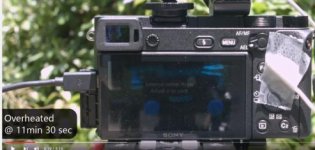
SONY A6300 4K overheating issue and my solution

Well, an interesting solution to the problem, if a little kludgy. I hope showing this clip will embarrass Sony into fixing the problem internally.
 
Last edited:
Well, an interesting solution to the problem, if a little kludgy. I hope showing this clip will embarrass Sony into fixing the problem internally.

I think it will be hard for SONY to fully solve this problem. All working sensors generate lots of heat, especially A6300's 6k->4k down-sampling, it just like a little heater. The compact design of the A6300 camera body just doesn't have a good physical venting system. A firmware update may IMPROVE the overheating issue, but not fix the issue. This is my opinion though.

That also explained why the professional video cine cameras like Red and Blackmagic have cooling fan built inside the camera.

BTW, I love A6300. It is just perfect at this price range. When I need to record a really long time, I normally don't move the camera. An extra fan doesn't cause much trouble for me. :cheesy:
 
don't get me wrong...I'm liking my a6300 as well... and will always use with external recorder - most likely shooting HD when using with video to hopefully minimize it's big gotcha's....rs, overheating & skinny codec
 
don't get me wrong...I'm liking my a6300 as well... and will always use with external recorder - most likely shooting HD when using with video to hopefully minimize it's big gotcha's....rs, overheating & skinny codec

Are you using a 4K recorder? it is a lot of extra money.
 
Well, an interesting solution to the problem, if a little kludgy. I hope showing this clip will embarrass Sony into fixing the problem internally.

Plus,

in the camera, it has an error message, "Internal Temp High. Allow it to cool." That means, SONY tested the camera, and encountered the same overheating issue. SONY engineers spent time working on it, but they figured out they couldn't fix it. In the end, they decided to add this error message to let users know it is a known issue, don't panic, the solution is to let it cool. It is just a limitation of this camera.


2016-05-31_0935.jpg
 
Man this is so great! Not sure is if you intended it to be but it is. Even funnier is that it actually works!!! Please Sony get this fixed! haha!
 
Are you using a 4K recorder? it is a lot of extra money.
It is extra money... but I didn't purchase specific for the a6300. I use it also with my FS7 - and will pretty much use it - at least for a monitor, if not also a recorder, on all shoots in the future.
 
It is extra money... but I didn't purchase specific for the a6300. I use it also with my FS7 - and will pretty much use it - at least for a monitor, if not also a recorder, on all shoots in the future.

Markfpv, when you record externally how big an improvement is the record times before you overheat? Also, do you also use the original batteries, or a dummy battery connected to an external power source?
 
Ted - Probably don't have an answer for you. The first a6300 I got had to be sent back because it had problems. Just got the replacement last week and have not shot longer than 30 minutes or so at a time. In those situations, I've been recording both internally as well as externally - and only once got the overheat message (but it was not continuous recording - rather testing outdoors on humid 85% day.
(I would likely never use the 6300 but rather other camera's for long event recording).

So far I'm using original batts and hdmi out to Pix E5. Plan to do some testing this week - keeping the LCD off (using vF only) on the 6300 and not recording internally to see how long she'll go.
 
I think it's great. This is what film making was long about. And, not just with the cameras. Anyone seen that bit on "making of Citizen Kane" where Greg Tolland and Welles called up the auxiliary crew and told them to pick-ax a hole in the middle of the building's floor because both wanted to get as low an angle on the title character as possible?

BTW, a hair dryer might have worked just as well.
 
Back
Top