
Navigation
Install the app
How to install the app on iOS
Follow along with the video below to see how to install our site as a web app on your home screen.
Note: This feature may not be available in some browsers.
More options
You are using an out of date browser. It may not display this or other websites correctly.
You should upgrade or use an alternative browser.
You should upgrade or use an alternative browser.
Some of my work in LightWave
- Thread starter TowerFan
- Start date


Aroon_Narayanan
Well-known member
Wow...can't wait to see it with textures!


That looks fantastic, wanna see the finished render.

Anhar_Miah
Veteran
Very good, your mesh flow is very clean.

TowerFan
Senior Member
Thanks for the replies all! I appreciate the interest. Spent the past few days working on details, but nothing new to post yet. Will start on creating UV's today which I don't like doing. Lightwave needs a bit of help with their UV tools. The newest version, 9.5, has some new UV tools that I haven't tried yet, maybe it'll be an improvement.
That overall shape was a tough one to get. I used spline patching and I like using that techniqe to get about 80-85% of the large shapes. Lots of tweaking though, as always.
Stay tuned. Bump mapping this weekend... hopefully...
That overall shape was a tough one to get. I used spline patching and I like using that techniqe to get about 80-85% of the large shapes. Lots of tweaking though, as always.
Stay tuned. Bump mapping this weekend... hopefully...
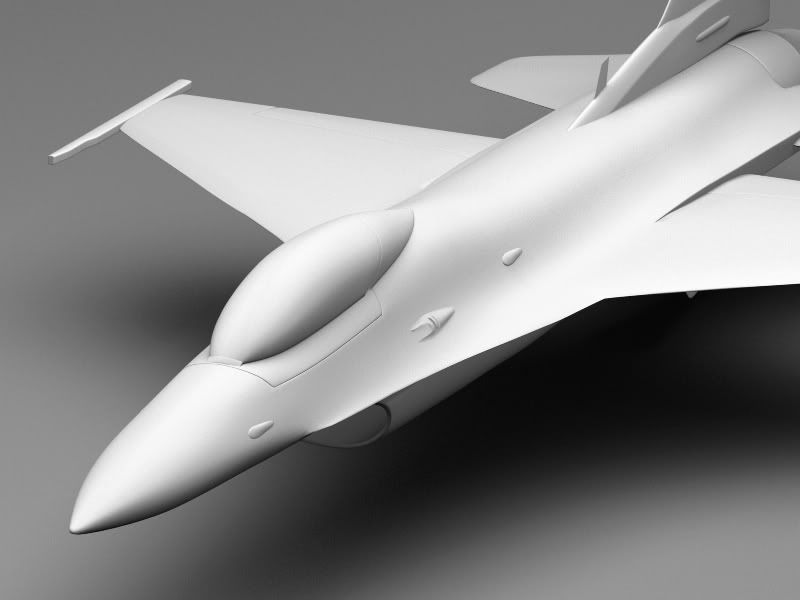
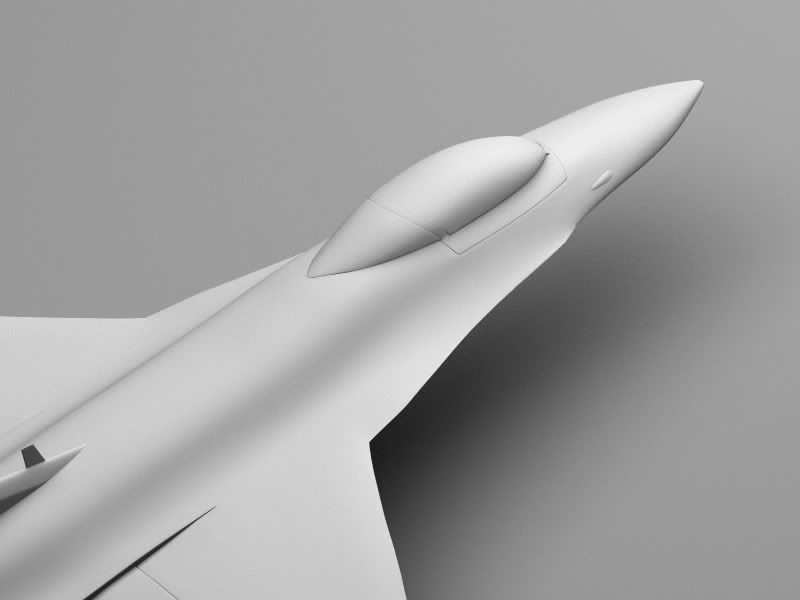
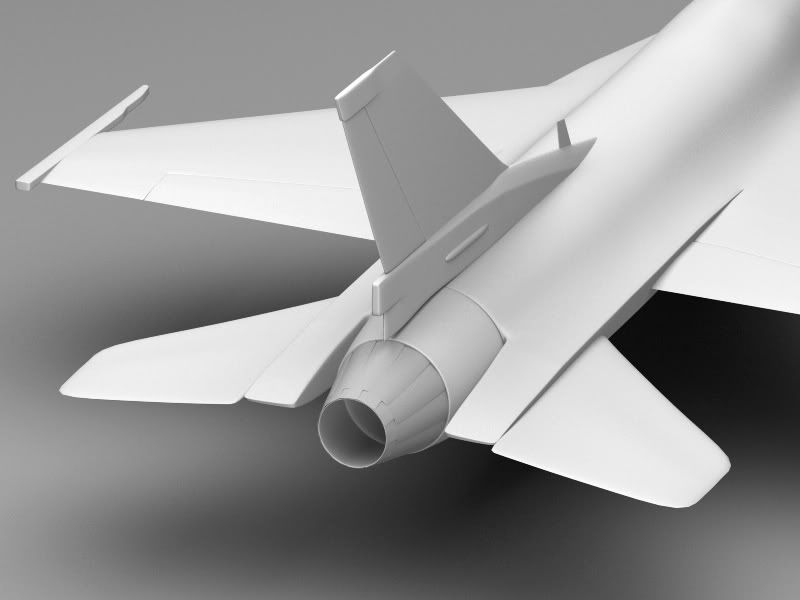
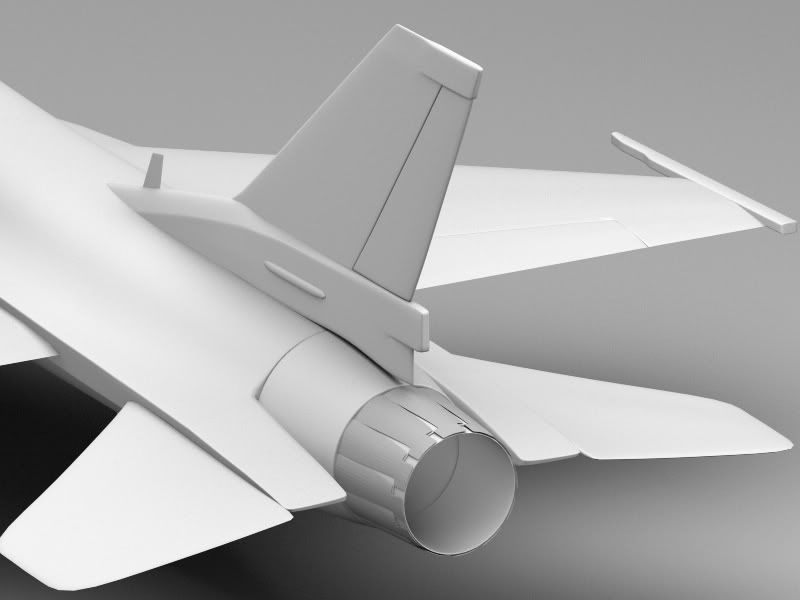
With a couple excepted areas, you don't need to UV-map most of that model.
The wings, tailplanes, stabilizer, strakes and most of the fuselage could be mapped perfectly accurately and well, with regular planar maps.
Unless you are doing the UV work, for the sake of sharpening your UV-mapping skills.
The wings, tailplanes, stabilizer, strakes and most of the fuselage could be mapped perfectly accurately and well, with regular planar maps.
Unless you are doing the UV work, for the sake of sharpening your UV-mapping skills.
TowerFan
Senior Member
I hear ya Max. I'm going to do all of the texturing and bump-mapping in Zbrush and I've found it's best to create your own UV's for it. The automatic UV's in Zbrush usually work OK but sometimes don't work too well either. I'll probably try the auto UV first and see what kind of results I get.
Just out of curiosity, have you used the good-old-fashioned planar projection mapping tools?
I'm a little bit baffled as to why you would want to bother with UVs for, say, the fuselage dorsal and upper wing and tailplane surfaces, when making accurate axial-projected maps is simpler than falling down the stairs...
I'm a little bit baffled as to why you would want to bother with UVs for, say, the fuselage dorsal and upper wing and tailplane surfaces, when making accurate axial-projected maps is simpler than falling down the stairs...
TowerFan
Senior Member
Are you talking about just using image projection and not using UVs at all? I'm really shooting for the moon with this project to try and improve my work, and I want it to look as good as possible with my feeble skills.
In order to go back-and-forth using Lightwave and Zbrush the model must have UVs. I'm not very experienced with UVs but of course I'm going to use planar UV projection for the obvious bits. The problem is that the UVs can't have any overlapping polys or Zbrush tends to crash. The part I'm not looking forward to is cleaning up the parts where I used bandsaw and knife to sharpen up edges. It's gonna be a pain moving around all the points to eliminate overlap.
In order to go back-and-forth using Lightwave and Zbrush the model must have UVs. I'm not very experienced with UVs but of course I'm going to use planar UV projection for the obvious bits. The problem is that the UVs can't have any overlapping polys or Zbrush tends to crash. The part I'm not looking forward to is cleaning up the parts where I used bandsaw and knife to sharpen up edges. It's gonna be a pain moving around all the points to eliminate overlap.
For my part I regard UV mapping as the tool to use for forms that don't lend themselves to planar/cylindrical/spherical/etc mapping. If I want to be *really* accurate with a more complex irregular form, I might even create a simple morphed shape to map to, deformed into the target shape (one of the interview questions at Digital Domain used to be, how would you map a banana, without recourse to UV mapping...)
I don't use ZBrush myself; I use mainly Photoshop to create maps.
It might be worth your while, to experiment with using Photoshop (or similar) tools with simple axial mapping. For much if not most of that model, you'll probably find it a lot faster and simpler.
I don't use ZBrush myself; I use mainly Photoshop to create maps.
It might be worth your while, to experiment with using Photoshop (or similar) tools with simple axial mapping. For much if not most of that model, you'll probably find it a lot faster and simpler.

Gord.T
Still "Senior Member"
Not sure what to say here. Uwrapping a plane only takes a few hours, give or take, in C4D anyways.
Not sure what axial mapping is. I take it that's a Maya term for one of the standard projection methods like cubic, cylinder, ect? But you would still need to edit the UV to get rid of the distortions. Your workflow sounds interesting but I'd have to sit down and chat for awhile to understand better what your (Max) saying because, well, I dont understand.
I'm not in any way countering what Max is saying, he's probably right. Still, unwrapping an aircraft is pretty common. And it's just nice to see where the paint layers in PS are going.
I unwrapped my spit months ago, not really a big deal. Not a corporate gig or anything so no worries timewise.
Not sure what axial mapping is. I take it that's a Maya term for one of the standard projection methods like cubic, cylinder, ect? But you would still need to edit the UV to get rid of the distortions. Your workflow sounds interesting but I'd have to sit down and chat for awhile to understand better what your (Max) saying because, well, I dont understand.
I'm not in any way countering what Max is saying, he's probably right. Still, unwrapping an aircraft is pretty common. And it's just nice to see where the paint layers in PS are going.
I unwrapped my spit months ago, not really a big deal. Not a corporate gig or anything so no worries timewise.
TowerFan
Senior Member
I appreciate your comments and time Max, but I’m not following you. You’re using the term “maps” differently than it’s used in Lightwave I think. In LW the term “maps” refers to Vertex Maps, meaning points or vertices, and there are five types: Weight, Morph, Texture (UV), Color, and Selection Set. I don’t understand your use of the term “axial mapping” and not meaning UV’s.
Can I texture a banana without using UV’s? Sure, easy as pie. Can I texture an aircraft to appear like a USAF Thunderbird without UV’s? I don’t know. Of course I don’t use UV’s for procedural texturing, like a banana, but I always have for text, labels, and stuff like that.
Just a rookie here, and admittedly texturing is my worst area, but I’m all for making things easier. If you can expand on your comments and define your terminology so I can get it through my mellon, please do. Thanks!
Can I texture a banana without using UV’s? Sure, easy as pie. Can I texture an aircraft to appear like a USAF Thunderbird without UV’s? I don’t know. Of course I don’t use UV’s for procedural texturing, like a banana, but I always have for text, labels, and stuff like that.
Just a rookie here, and admittedly texturing is my worst area, but I’m all for making things easier. If you can expand on your comments and define your terminology so I can get it through my mellon, please do. Thanks!
When you open up the texture panel for any given surface channel in Lightwave, you are offered controls for applying planar, cylindrical, cubic, etc image maps (that is, bitmap images) with or without automatic sizing. Most of these mapping options require you to select an axis on which the map is applied - X, Y, or Z; hence, the term axial mapping as opposed to UV mapping which is not calculated along one axis, to the exclusion of others.
If you were to render (for example) an alpha-channel image of your F-16, shot from directly above (IE down the Y axis) at a high telephoto setting, you will have a black-and-white silhouette of your model.
You can import that image into Photoshop, etc and paint over it, using it as a guide since it is the exact proportions as your model's geometry.
If you were to then assign a common surface name to all of the polys that make up the dorsal surface of your model, you could then apply your texture image made in Photoshop to the model, automatically sized on the Y axis as a planar projection map.
The same applies to the tailplanes, and to the vertical stabilizer, if you were to map it on the X axis, rather than Y as you might, for the wings and dorsal. Some portions of the model will not be as amenable to planar mapping as others, but where it's appropriate it's usually the most efficient and accurate way to map.
If you were to render (for example) an alpha-channel image of your F-16, shot from directly above (IE down the Y axis) at a high telephoto setting, you will have a black-and-white silhouette of your model.
You can import that image into Photoshop, etc and paint over it, using it as a guide since it is the exact proportions as your model's geometry.
If you were to then assign a common surface name to all of the polys that make up the dorsal surface of your model, you could then apply your texture image made in Photoshop to the model, automatically sized on the Y axis as a planar projection map.
The same applies to the tailplanes, and to the vertical stabilizer, if you were to map it on the X axis, rather than Y as you might, for the wings and dorsal. Some portions of the model will not be as amenable to planar mapping as others, but where it's appropriate it's usually the most efficient and accurate way to map.