Navigation
Install the app
How to install the app on iOS
Follow along with the video below to see how to install our site as a web app on your home screen.
Note: This feature may not be available in some browsers.
More options
You are using an out of date browser. It may not display this or other websites correctly.
You should upgrade or use an alternative browser.
You should upgrade or use an alternative browser.
Some of my work in LightWave
- Thread starter TowerFan
- Start date

Gord.T
Still "Senior Member"
Sooo, axial is just another way of saying things. Gotcha. It still sounds to me like your unwrapping because your using fixed planes for different parts of the aircraft. You're still unwrapping it, you're just not using interactive (variable projection) to do it.
The end result is the same no? You import a UVW map into photshop with the UVW outlines and paint over that? I think were getting lost in the terminolgy here.
//Late post. As long as Tower has it, cool.
The end result is the same no? You import a UVW map into photshop with the UVW outlines and paint over that? I think were getting lost in the terminolgy here.
//Late post. As long as Tower has it, cool.
There's no 'unwrapping' involved, in that the outline of the map-guide you start with, is derived from a single-axis view with no geometric distortion.
Sorry if you find the terminology confusing. I'm talking about an image map which is projected onto a given surface along a selected axis.
Sorry if you find the terminology confusing. I'm talking about an image map which is projected onto a given surface along a selected axis.

TowerFan
Senior Member
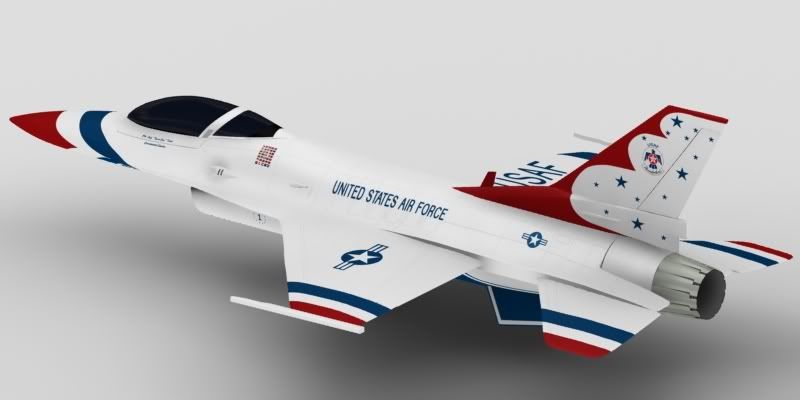
So here's an update. Messed around with ZBrush and UV's for some time. Couldn't get a good result out of ZB, the textures were all smeary and pixelated. I'm still a real noob with it so will work it out later for future projects. Decided to go with planar mapped UV's, and Photoshop, for a few reasons. Image projection worked OK but the images were really piling up. Too many to deal with. I'm using UV's so I can get a lot more parts with one image. Where there's distortion, it's easier to move the UV points to try to fix it than tweaking the image. Also, using UV's makes it easier to give the model to users of other 3D packages.
Still have lots of details and tweaking to do. Saving the most difficult painting for last. The bottom and nose will be tough. Still needs bump mapping as well.
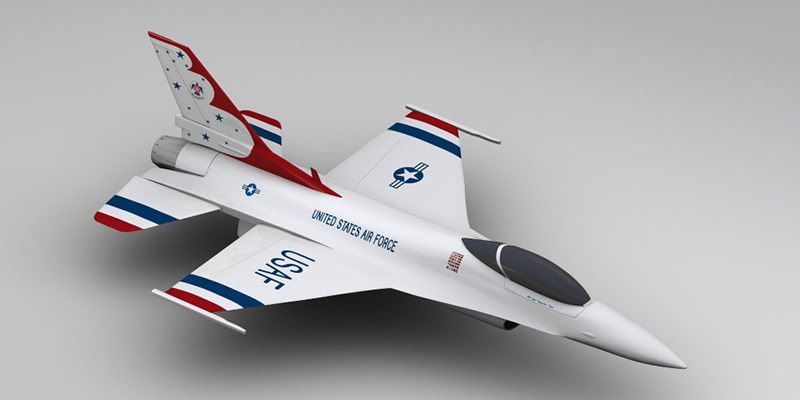
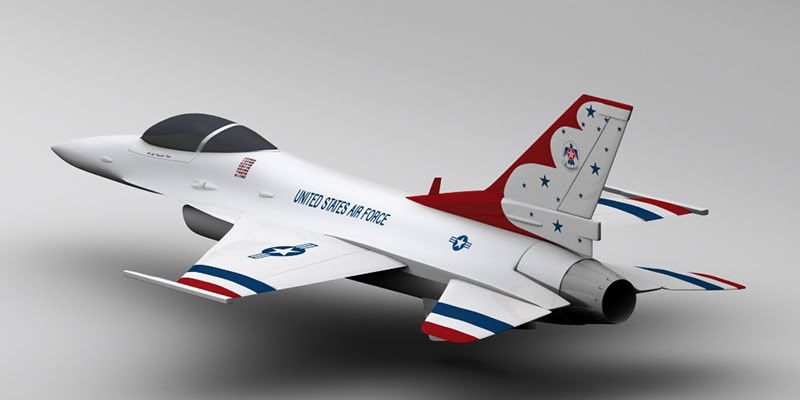
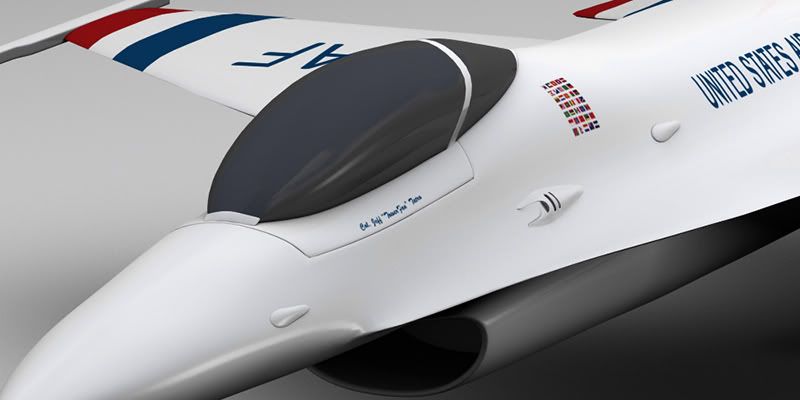
Still have lots of details and tweaking to do. Saving the most difficult painting for last. The bottom and nose will be tough. Still needs bump mapping as well.
Last edited:

Anhar_Miah
Veteran
Nice! looking very good, just perhaps a glass material for the cockpit
TowerFan
Senior Member
Thanks Anhar! I haven't decided how far to take this project yet. If I make a glass cockpit there has to be something inside to see. Like a pilot and the interior! That would be as much work as the whole exterior. Any suggestions would be welcome!! (I am leaning toward doing the interior though...)
Gord.T
Still "Senior Member"
Looking good Tower.
I'm a noob at ZB too. Haven't tried texturing with it but making normal and displacement maps seems to work pretty good. Just have to keep the resolution of the saved texture up around 2Kx2K or 4Kx4K.
Not sure how much interior you would need. The main stuff from the seat up I suppose. Whatever is missing you would just have to watch your camera angle.
I'm a noob at ZB too. Haven't tried texturing with it but making normal and displacement maps seems to work pretty good. Just have to keep the resolution of the saved texture up around 2Kx2K or 4Kx4K.
Not sure how much interior you would need. The main stuff from the seat up I suppose. Whatever is missing you would just have to watch your camera angle.
TowerFan
Senior Member
Thanks Raptor. I imported just the fuselage into ZB and it had about 3400 polys. I cranked it up to about 3.5 million. I painted a bit for testing, exported the texture at 4096, and it was all smeary and pixelated. Not sure why yet. I have a really great tutorial on how to go back and forth from ZB to Lightwave and I have had great results with other, lower poly objects. I used a head model that had about 400 polys, cranked it up, did some sculpting and coloring, exported text, disp, and norm and all worked well in LW. I don't know why I had such trouble with the plane.
Oh well, I'll work it out in the future. I really like ZBrush and how it works. It can add that next level, or three, of detail to a model that's just impossible with the LW modeler.
Oh well, I'll work it out in the future. I really like ZBrush and how it works. It can add that next level, or three, of detail to a model that's just impossible with the LW modeler.


Matt Grunau
Adobe Demigod
Kick ass! I can't believe I missed this thread for so long. F-16s are great and fun planes, and your texturing is working very well indeed.
I can't wait to see that puppy in action.
For the texturing of the thrust cone, may I suggest a simple high con animation on a cone with the bottom poly removed and an in-program gradient for transparancy falloff. It works wonders, looks good, and has almost no render time at all. Plus, you can endomorph it for length and diameter at the base to match your engine endomorph.
I can't wait to see that puppy in action.
For the texturing of the thrust cone, may I suggest a simple high con animation on a cone with the bottom poly removed and an in-program gradient for transparancy falloff. It works wonders, looks good, and has almost no render time at all. Plus, you can endomorph it for length and diameter at the base to match your engine endomorph.
TowerFan
Senior Member
Kick ass! I can't believe I missed this thread for so long. F-16s are great and fun planes, and your texturing is working very well indeed.
I can't wait to see that puppy in action.
For the texturing of the thrust cone, may I suggest a simple high con animation on a cone with the bottom poly removed and an in-program gradient for transparancy falloff. It works wonders, looks good, and has almost no render time at all. Plus, you can endomorph it for length and diameter at the base to match your engine endomorph.
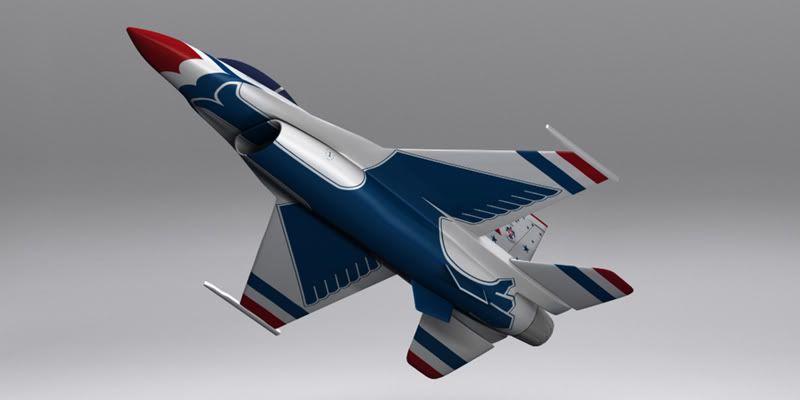
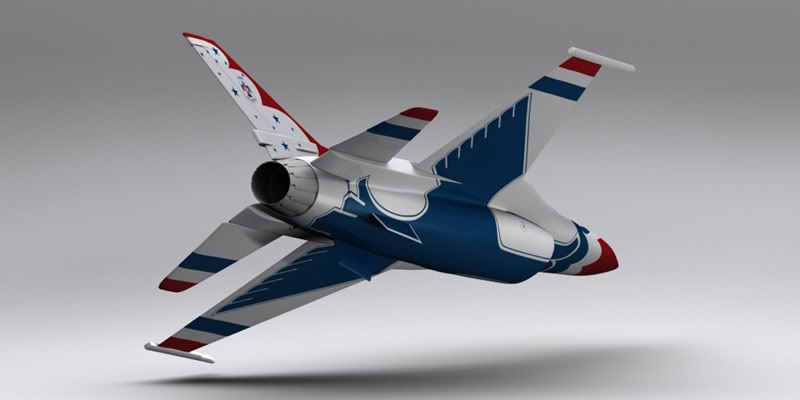
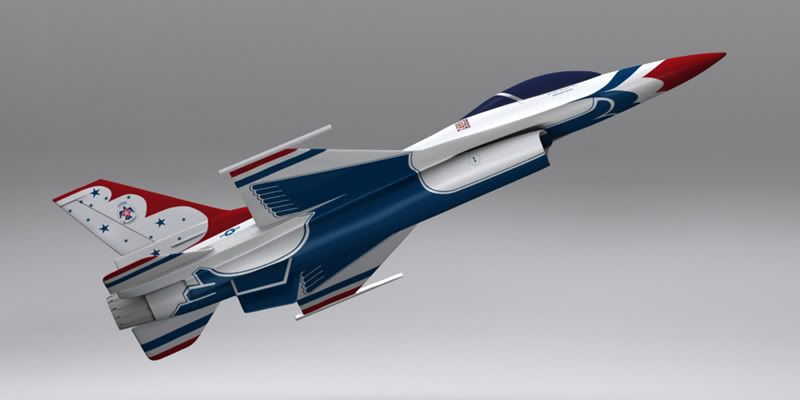
Thanks Matt! The F-16 has always been one of my favorites. Thanks for the tip for the thrust. Was wondering how to do that. I'll give it a try (when I get that far!).

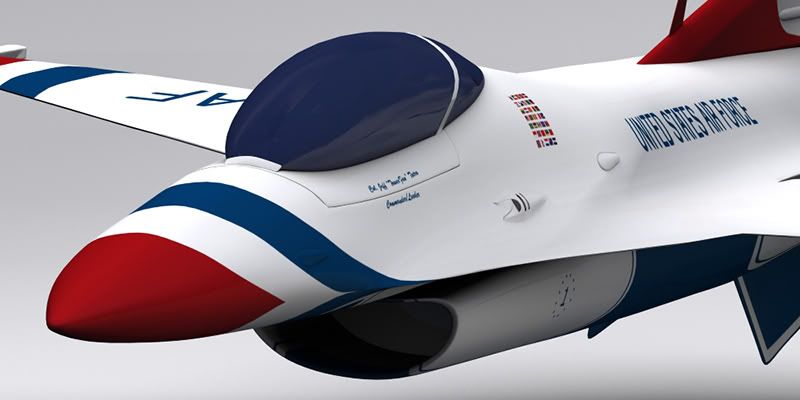
Matt Grunau
Adobe Demigod
Wow!
Super tight man!
Clear up the glass, add a tad more spec and reflection to the body and yer done. That has come out very well. For god's sake man, show a mesh!
It would seem the issues with the texture turned out to be non-issues.
Check your PM.
Well done Tower.
Super tight man!
Clear up the glass, add a tad more spec and reflection to the body and yer done. That has come out very well. For god's sake man, show a mesh!
It would seem the issues with the texture turned out to be non-issues.
Check your PM.
Well done Tower.
TowerFan
Senior Member
Thanks Matt! I responded to PM. As I mentioned earlier I'm not sure how far I'll go with this. I just might do the interior... That would definately take it over the top. Every render I do I tweak the spec and reflect a bit. Dialin' it in slowly but it's getting close.
Do you have any advice or can you point me to a good tute on how to composite a multi-pass render? I thought you'd mentioned this technique in this or another thread in the past. I want this to look as good as it can, and I think that's a pro approach, but I'm not sure how to do it.
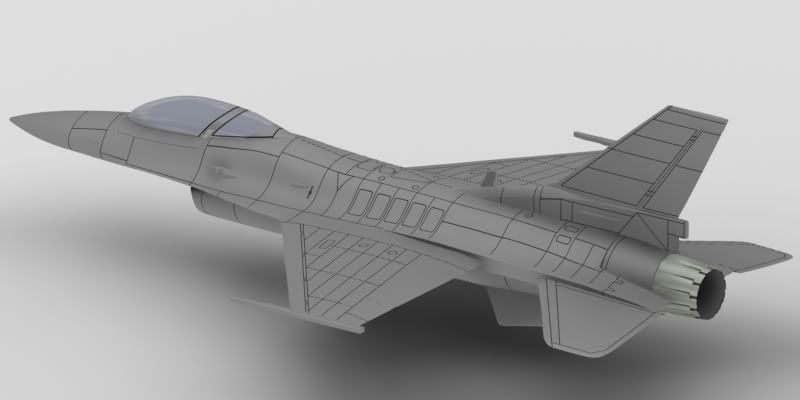
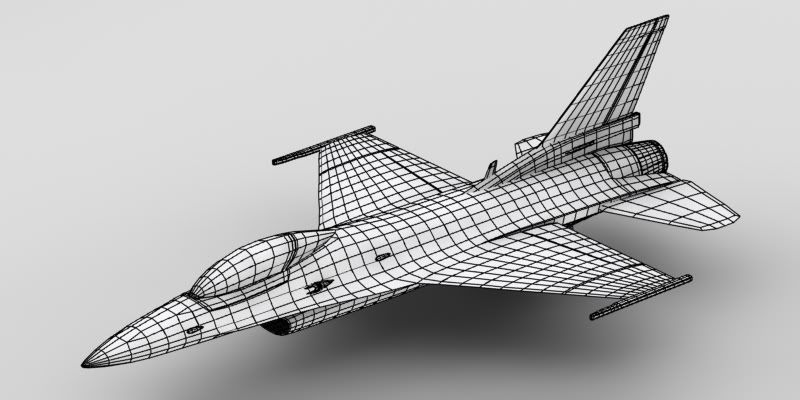
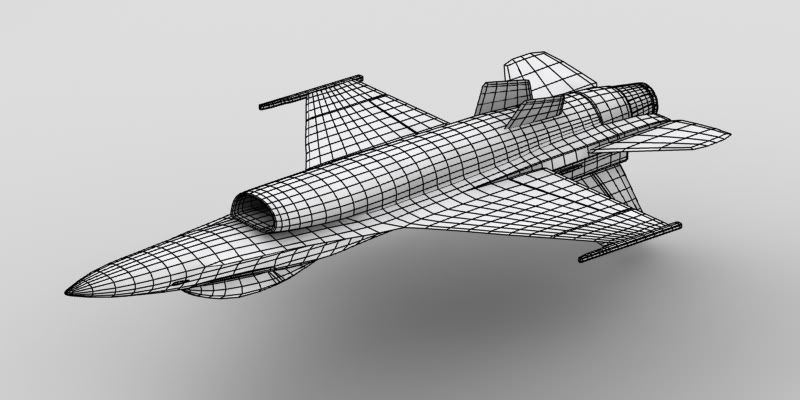
Here's a few wires. This copy of the model is frozen at sub-d level 1.
Do you have any advice or can you point me to a good tute on how to composite a multi-pass render? I thought you'd mentioned this technique in this or another thread in the past. I want this to look as good as it can, and I think that's a pro approach, but I'm not sure how to do it.
Here's a few wires. This copy of the model is frozen at sub-d level 1.


Matt Grunau
Adobe Demigod
Do you have any advice or can you point me to a good tute on how to composite a multi-pass render? I thought you'd mentioned this technique in this or another thread in the past. I want this to look as good as it can, and I think that's a pro approach, but I'm not sure how to do it.
Mulitpass is a very handy and extremely dynamic approach. It allows complete control over everything you see.
What you will do is to render out as a Photoshop .psd. This allows for each pass to be its own layer. You want Raw Color, Diffuse Shading, Specular, Reflection and Shadow. Refraction also may be needed, as may Caustics. You will arrange them like this (for Photoshop, After Effects, Vegas, or any other layer based program with blending modes):
Reflection ----------- Screen, Add, Linear Dodge
Specular--------------Screen, Add, Linear Dodge
Shadow---------------Multiply, Darken, Linear Burn
RawColor-------------Multiply, Color Burn
Diffuse Shading-----(No Blending Modes, Bottom Layer)
Here is a photoshop doc for you to look at:
http://www.paramm.com/multipass.psd
You also want to save your .psd files with an alpha. That way, after you have blended them and used whatever filters, adjustment layers, and opacity settings you want, you precompose the whole thing, and use an instance of the ouput as a track matte. Poof! Yer done!
Last edited:
TowerFan
Senior Member
Thanks for the tips and the example Matt!! Now I get it. I can see how this is a powerful technique. One thing that popped into my head right away was reflection blurring. This adds tons of time to the render in LW, where it could be done instantly, and be adjustable, in PS or AE. Artistically the possibilities are endless. Thanks again!
Matt Grunau
Adobe Demigod
Your welcome Tower. There are also a lot of things you can do with Specular as well. I like not only the creative freedom, but the speed. There are some things not as accurate, but as a whole, it is very dynamic.
I always render as .psd files since they have a transparant background. Sometimes motion blur can get a little strange when on a black or colored background. Keep an eye out for that.
Glad to help with the post aspect of the process.
I always render as .psd files since they have a transparant background. Sometimes motion blur can get a little strange when on a black or colored background. Keep an eye out for that.
Glad to help with the post aspect of the process.