C300: Soft Filters

Danny1280

Well-known member
Well, since my last question was answered so well, I thought I'd try another.

I've never used filters, but have read about various ones (Tiffen Soft/pro-mist, etc).

For an upcoming shoot, I'm trying to capture a soft/glowing/romantic feel.
It's a 2-camera shoot (C100 and a C300) of a scene in a restaurant, and I would love to find something to add a bit of atmosphere with these very clean digital cameras. I'll be using various Canon L glass, most likely.

Anyone have any favorite filters for that kind of feeling?
I'll be renting, BTW.

Thanks again!!

PS: I'm not averse to old tricks like Vaseline on the lens (as long as I don't mess up any lenses).
 
Everyone's opinion is going to be a little different. Best bet is to get your hands on a few and try them out for yourself to find the one you like best.

You know... Shoot a test.
 
Filtration is great but I wouldn't recommend using glass filters for a shoot like this, the results are sort of unpredictable and you have no control in post.

the software "Tiffen Dfx" is basically a digital emulation of all of their filters, you can apply any strength you want and tweak the parameters freely in post. The render time might be longer with the effects but the advantages are that you can comfortably show your clients various kinds of filtration style and pick the best one with appropriate strength, this is something not very practical to do on set. Also there would be no risk to image quality if done digitally because glass filters are prone to glare/reflections and dust.

It's a plugin for After Effects/Photoshop/Lightroom etc. You can purchase a copy and use it for all of your future projects.

Slightly off topic, there's one glass filter that makes an exception though, the Schneider Digicon, it compresses highlight and softens contrast, it behaves like a non-linear ND which allows the camera to capture a slightly wider dynamic range (0.5-1 stop increase), this cannot be done digitally.
 
I, personally, really like glass filtration but, like marvinhello said, it's dangerous. The glass is uncoated so it is easy to end up with ghosts. Also, it's not something that can be reversed in post. That being said, I use it whenever I can get away with it. If you are just looking to soften the image, it can be done in post. If you are looking to create flares and halation around light sources, I'm pretty sure it is actually easier to use glass rather than work in post. I've never used Tiffen Dfx, but I can't imagine how it would naturally mimic the effect of a Mist or Fog on a bright light source since the only information the program has is a clipped highlight. The flare created by a glass filter will vary depending on the strength of the light source and tell the viewer how bright the light source actually is in relation to the rest of the image. A glass filter can also help to create a more pleasing transition into clipped highlights in certain situations.

So, if you are looking to create a little flare or halation, a black frost or mist is an old stand by. If you want just a streak that kind of mimics the effect of anamorphic glass, a streak or two point star filter might be useful. I've recently been testing some Tiffen Black Satin filters and those are really interesting. The halation is very disperse but still localized. It is similar to glimmerglass.
 
I, personally, really like glass filtration but, like marvinhello said, it's dangerous. The glass is uncoated so it is easy to end up with ghosts. Also, it's not something that can be reversed in post. That being said, I use it whenever I can get away with it. If you are just looking to soften the image, it can be done in post. If you are looking to create flares and halation around light sources, I'm pretty sure it is actually easier to use glass rather than work in post. I've never used Tiffen Dfx, but I can't imagine how it would naturally mimic the effect of a Mist or Fog on a bright light source since the only information the program has is a clipped highlight. The flare created by a glass filter will vary depending on the strength of the light source and tell the viewer how bright the light source actually is in relation to the rest of the image. A glass filter can also help to create a more pleasing transition into clipped highlights in certain situations.

So, if you are looking to create a little flare or halation, a black frost or mist is an old stand by. If you want just a streak that kind of mimics the effect of anamorphic glass, a streak or two point star filter might be useful. I've recently been testing some Tiffen Black Satin filters and those are really interesting. The halation is very disperse but still localized. It is similar to glimmerglass.

Schneider filters are all multi-coated, Tiffen's are not.

I use Dfx all the time and I find it gives identical if not better results with glass filters, Shane Hurlbut also said Dfx performs equally well with the glass counterparts.
 
Are you sure that Schneider filters are multi-coated? I had read that they were not. I've been looking online for the source and I can't find it. I know that Tiffen filters are uncoated and had read that cinema filters were generally uncoated due to cleaning issues. I remember reading that one of the manufacturers (I believe Schneider) had even released a multicoated filter but it didn't sell due to the cleaning problems. Schneider states that they apply an anti reflective coating to many of their filters, but I'm not sure which filters they use it on and I would be willing to be that the company would not label it as being multi-coated. Of course, I may be wrong.

How well does the Dfx deal with halation around light sources? My point of reference is bad fake lens flares in which white clothing was creating the same flares as open bulbs and it looked absurd to me.
 
Thanks for the info!

I'm definitely going to stay away from the filters for client work. So not worth experimenting.

Like the Tiffen dfx. Any reason not to save $300 and get the stand-alone, rather than the plugin, besides obvious convenience factors?
 
Thanks for the info!

I'm definitely going to stay away from the filters for client work. So not worth experimenting.

Like the Tiffen dfx. Any reason not to save $300 and get the stand-alone, rather than the plugin, besides obvious convenience factors?

Standalone is for stills only. After Effects Plugin lets you work with videos (regardless of format/framerate/resolution)
 
I tend to prefer using specific filters while shooting. But we also tend to use a number of post FX depending on the finished look we are after.

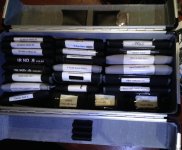
Here is my small filter kit containing what I use the most at the moment.

Filters.jpg
 
I tend to prefer using specific filters while shooting. But we also tend to use a number of post FX depending on the finished look we are after.

Here is my small filter kit containing what I use the most at the moment.

Great pic! some nice selection of Schneider filters.

For ND I recommend True ND as none of the other brands produce truly neutral image.
 
Great pic! some nice selection of Schneider filters.

For ND I recommend True ND as none of the other brands produce truly neutral image.

Have you tried the Skiers?

Something else to think about ... While many can't afford a set of True ND filters at $3100, most can afford a chart to shoot unfiltered and then filtered with the ND providing easy post color correction.
 
Last edited:
Have you tried the Skiers?

Something else to think about ... While many can't afford a set of True ND filters at $3100, most can afford a chart to shoot unfiltered and then filtered with the ND providing easy post color correction.

never heard of Skier before, but the most neutral NDs are True ND and maybe Formatt Firecrest IRND (waiting for empirical tests).

yes they are expensive, a great rental item though.
 
For the folks out there that may experience a color shift using their ND filters, by shooting a chart as an unfiltered reference frame, and then shooting each individual ND filter, you will be able to match your unfiltered shots. You can do this all in advance on a free day, then in your color correction app save each filter correction as a preset favorite, ND.6, ND.9, and so on. Then just drop the correction preset onto the future ND shot for easy baseline matching.
 
Last edited:
My built in ND filters on the C100 are not neutral. I believe that manual even states that built in ND can cause a color shift.
 
Back
Top