

ed_lee83
Well-known member
Searched high and low about any tips to calibrate the monitor for GH2. I don't know whose fault it is, but I was immediately taken aback by how different the colors of the GH2's LCD/EVF and the DP6 were. The fact that the color/gamma shifts when you hit record also complicates things. Also, from my experience and what I've read, the GH2's LCD doesn't give an accurate color anyway.
But, the GH2 is a consumer stills hybrid that just happens to take amazing video, so there are just some things we have to compromise with.
So I thought I'd share my settings to get somewhat accurate colors on the DP6. If any fellow users can try out to see if it also suits them, or share their settings too. There are some variables, though: New vs Old GH2's? Patches? LCD on or off? Type of monitor you use for editing?
I bought mine quite early on and here I'm using the v1.1 patch. I switch off my LCD (huge difference in color when outputting HDMI), and I use a Mac screen for editing.
Now, my main objective like others I would presume, is to get an accurate color representation when filming, and make sure it more or less is what you get when you transfer it to your editing suite.
After fiddling about for ages with no luck, I decided to TRY and calibrate the DP6 in reverse: I took some footage, logged it into FCP, brought up any image on the viewer, returned the SD card into my GH2 and used the DP6 to playback. Then I started to calibrate.
And here's what I got:
Contrast: 40
Brightness: 80
Hue: 48
Saturation: 70
Sharpness: 19
RGB: All gain at 128; Red: 128 Green: 124 Blue: 130
Gamma: 2.2
Of course it's not 100% perfect but it's at least something I'm comfortable with. Unfortunately the whites on the DP6 still look a wee bit yellow, but I'll know where to strike the balance.
OK these pics are actually shite because it was taken with my iPhone.
Before (default):
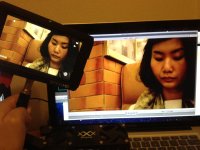
And after:
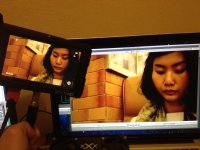
If anyone has any tips or suggestions for what I'm doing wrong I greatly appreciate it. I don't have any more hair to tear out.
But, the GH2 is a consumer stills hybrid that just happens to take amazing video, so there are just some things we have to compromise with.
So I thought I'd share my settings to get somewhat accurate colors on the DP6. If any fellow users can try out to see if it also suits them, or share their settings too. There are some variables, though: New vs Old GH2's? Patches? LCD on or off? Type of monitor you use for editing?
I bought mine quite early on and here I'm using the v1.1 patch. I switch off my LCD (huge difference in color when outputting HDMI), and I use a Mac screen for editing.
Now, my main objective like others I would presume, is to get an accurate color representation when filming, and make sure it more or less is what you get when you transfer it to your editing suite.
After fiddling about for ages with no luck, I decided to TRY and calibrate the DP6 in reverse: I took some footage, logged it into FCP, brought up any image on the viewer, returned the SD card into my GH2 and used the DP6 to playback. Then I started to calibrate.
And here's what I got:
Contrast: 40
Brightness: 80
Hue: 48
Saturation: 70
Sharpness: 19
RGB: All gain at 128; Red: 128 Green: 124 Blue: 130
Gamma: 2.2
Of course it's not 100% perfect but it's at least something I'm comfortable with. Unfortunately the whites on the DP6 still look a wee bit yellow, but I'll know where to strike the balance.
OK these pics are actually shite because it was taken with my iPhone.
Before (default):
And after:
If anyone has any tips or suggestions for what I'm doing wrong I greatly appreciate it. I don't have any more hair to tear out.
Last edited:
