FS7: Slog3 clipping level

Isn't the max exposure of 91% a result of having 1,5 stops of extra headroom in S-log3?

slog3 has some extra headroom but the F5/F55/FS7 doesn't use it.

The only thing lost in this scenario are some data bits allocated to each stop.


[side note]
Set yourself to just about the clipping point in slog3, then switch to slog2 and note where the new clipping point "jumps" too. :)
 
Last edited:
Very interesting. The theories about matching the Cineon curve or leaving room for future cameras with even wider DR are intriguing... (though couldn't they also create an Slog4 if it comes to that?) It makes perfect sense that the we're seeing the maximum input the sensor can take, but it seems odd that they would have the Slog3 gamma map this to 93/94 IRE (you can watch the waveform get leveled right there no matter what you do), instead of 109 or at least 100. Sam, where did you get that chart you posted? Is there any further explanation of that strange vertical blue "clip" line?
 
Pretty sure that image came from CameraManBen on Sony Forums. I know he plotted the various curves once upon a time since he built a gamma converter / calculator software program.

Cheers,
 
The op mentioned there's no LUT applied.

Alexa LogC for example, if you want white to clip at 109%IRE you have to use EI1600 or above, at EI800 or lower white clips well below 109%.

Same applies for Slog

i know what the OP wrote. That was a separate point to the one about your misunderstanding of cineEI. The white clip point does not vary as you adjust EI. You arel 100% wrong regardless of how it works on an alexa.
 
Very interesting. The theories about matching the Cineon curve or leaving room for future cameras with even wider DR are intriguing...
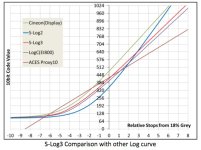
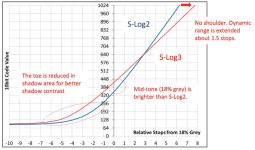
From Sony's Technical Summary, "S-Log3 is based on Cineon Digital Negative revised in 2007. S-Log3 tone curve has no shoulder and is reduced the toe (non-linear curve in shadow area). It is more like a pure log encoding than S-Log2 to provide better log based grading (See chart below). Mid-tone value; 18% grey is brighter than S-Log2. S-Log3 has 1.5 stops wider dynamic rage than S-Log2, covering the full EI range. It is not necessary to change the conversion formula for each EI setting."


Sam, where did you get that chart you posted?

Google images search 'Slog3' or 'Slog3 curve' - due to the typeface I assumed it was from sony but cannot be sure.

Overall I dont really understand it as I would expect the camera pointed at something really over exposed to hit 100 or 109, but there we go!

S
 
Last edited:
In the end, SLog3 on the FS7/F5/F55 doesn't use the whole range.
If Sony did it for future proof cameras with even more DR or if they
had something different in mind - nobody really knows.

SLog3 is abolutely not made for 8bit recording. The 10bit
XAVC is at least needed to get the best out of this profile as you need
enough values to remap the data zo "normal" 709 values up to at least
100 IRE. I think that SLog3 will even be better when you can record in
higher bitdepths (RAW or ProRes 4444), sothat we'll have even more
subtle values for remapping and grading.

Here's what Sony says and how SLog3 compares to SLog2 and other Log-Gammas:


Bildschirmfoto 2015-01-06 um 12.05.50.jpg

Bildschirmfoto 2015-01-06 um 12.05.16.jpg

As we know, the Fs7/F5/55 deliver approx 8 stops below middle gray and 6 stops over middle gray
if you expose as Sony suggests. Remember that 10bit SLog3 still can gives us more than 800 different
values. Enough to remap to 220 8bit values (16-235) anyway. If you're recording for the big screen there
might be better ways to get even more values for post and 10bit delivery. Here's where RAW and ProRes 4444
will shine...

More information to be found here: http://community.sony.com/sony/atta...ry_for_S-Gamut3Cine_S-Gamut3_S-Log3_V1_00.pdf
 
Slog3 may use a little less data bits available than slog2 but here's a chart I made which illustrates the actual distribution of overall data bits between slog2 and slog3 for anyone curious to see it visually:

ScreenShot2014-11-11at95059AM_zps5b93d478.png
 
i know what the OP wrote. That was a separate point to the one about your misunderstanding of cineEI. The white clip point does not vary as you adjust EI. You arel 100% wrong regardless of how it works on an alexa.

Higher EI = more highlight headroom.

At EI2000, DR is approx. +6/-8, at EI4000, it's +7/-7

Same applies for Alexa, EI800 has +7/-7, EI1600 has +8/-6. More headroom requires more bits so higher clipping point on IRE scale.

This is also confirmed by Art Adams:

If you're shooting LogC you won't be able to use the full bit bucket at ISO 400 as the maximum signal caps out at or slightly below 100 IRE, but 800 only goes to 104 IRE. You have to go to ISO 1600 to actually get a highlight up to 109 IRE in Log C. You don't lose much until you get into the lower ISOs... I think 200 puts max LogC signal into the 80s.

http://www.cinematography.net/edited-pages/Optimal ISO for Alexa.html
 
I'm not sure what LogC on Alexa has to do with Slog3 on a Sony FS7 in Cine-EI mode which is recording at EI2000 no matter what setting you have on.

It might be more relevant in RAW, but if shooting Cine-EI internally you just need to know that the clipping point where you lose information in Slog3 is going to be (approximately) 91-94% or whatever. I've not tested this so the figure is just based on other people in this thread's findings. It's not a bug or an error. It's just the dynamic range of the camera shooting non-raw in Cine-EI.

I think :)
 
No matter what EI you select on the camera, the "clipping point" (94% in slog3) still never changes.

The best way to think of CineEI mode and what's actually changing is really where you are biasing your middle grey value with all stops above and below moving with it.

However, obviously before you do that you need to decide based on your scene if you are going to clip any part of the image (low or high tones) in your exposure.

One good thing about rating a camera "lower" for example is that it will cause you to overexpose, which is good for say green screen work where you want more signal-to-noise ratio for improved image quality, but because your scene might have highlights in it then in reality you are potentially losing latitude from your highlight range. It's a trade off.

This image from one of Art's articles shows really what's going on when you adjust your exposure index. Again, if you go too far on your index either way you will exceed the range and start to clip. Essentially this would happen in a very high contrast scene scenario. I wouldn't use EI in that scenario necessarily.

Alexa-Dynamic-Range-Spread.jpg
 
Higher EI = more highlight headroom.

At EI2000, DR is approx. +6/-8, at EI4000, it's +7/-7

Same applies for Alexa, EI800 has +7/-7, EI1600 has +8/-6. More headroom requires more bits so higher clipping point on IRE scale.

This is also confirmed by Art Adams:


http://www.cinematography.net/edited-pages/Optimal ISO for Alexa.html


Too funny...

Let me say again; you are 100% wrong.

We are not talking Alexa here. We are talking the FS7. On the FS7 the underlying Slog3 remains exactly the same when you change EI. All that changes is the mid data point. Everything else remains EXACTLY THE SAME. You are quite clearly confused about how EI relates to the IRE scale. Please read what Dennis and Ben have written and if you still don't get it I'll make you a video with my FS7 which is sitting in front of me.
 
Regarding Alexa, one article that came out afterwards by Adam or Art (don't remember) was that the dynamic range of the camera is actually REDUCED when you engage EI.

Again if you think about shooting a full 14 stop dynamic range scene - something has to go at one end or another when you start over or underexposing.
 
Regarding Alexa, one article that came out afterwards by Adam or Art (don't remember) was that the dynamic range of the camera is actually REDUCED when you engage EI.

Again if you think about shooting a full 14 stop dynamic range scene - something has to go at one end or another when you start over or underexposing.

Too funny...

Let me say again; you are 100% wrong.

We are not talking Alexa here. We are talking the FS7. On the FS7 the underlying Slog3 remains exactly the same when you change EI. All that changes is the mid data point. Everything else remains EXACTLY THE SAME. You are quite clearly confused about how EI relates to the IRE scale. Please read what Dennis and Ben have written and if you still don't get it I'll make you a video with my FS7 which is sitting in front of me.

I think confusion comes from the fact that there are two IRE values people refer to interchangeably (or don't specify which one they are talking about) : IRE of original S-Log and IRE of LUT / MLUT / 3D LUT used for monitoring of video.

It is confusing to me too, I admit, and I may be wrong but this is how I understand it: While changing of an EI does not change clipping point of the underlaying S-Log, nor does it change camera's ISO , it does change the way S-Log is exposed IF you use LUT in the viewfinder with zebras/waveform as an exposure guide. In example, because 500 EI makes the image displayed in the viewfinder appear darker (with LUT applied) of course one will compensate by opening the lens, hence exposing the underlying S-Log brighter (the highlights headroom is reduced but shadows have more underexposure latitude and less noise). When EI is changed from 500 to say 3200, in order to make the image in the viewfinder appear the same, one has to stop down the lens (or change exposure in other way), this time underlaying S-Log will be much darker which means more highlights headroom at expense of less detail in shadows and more noise. The overall dynamic range is 14 stops in both cases and sensor's sensitivity the same 2000 ISO but resulting underlaying S-Log is different. In that sense I would not say that Marvinhello was "100% wrong".
 
Last edited:
Here was my point maybe explained a little more clearly.

1.) Shoot a step chart and expose for the brightest white square at your clipping point. If you used a waveform monitor and slog3 you would see it clip around 94%.

2.) Now think about what will happen when you overexpose this shot by 1 stop as a result of either opening your iris 1 stop, or using the CineIE mode to accomplish overexposure by 1 stop.

3.) The brightest square on the step chart goes past clipping and the 2nd white square now moves up to the clipping point of 94%.

4.) Because your recorded footage is overexposed by one stop, in post you will reduce the overall image to proper exposure levels again. You will not get that 1st white square that clipped back no matter what.

While overexposing causes you to lose range off the highlights technically you get this stop back on the lower end. So as pointed out you go from a stock dynamic range of +6/-8 to an altered dynamic range of +5/-9.

While "technically" these numbers are correct and look great for marketing and discussing in online forums - let me ask any of you working with ANY camera when have you ever come to count and rely on the full range below middle grey straight on down to the bottom where the noise floor exists?
 
Back
Top