
Jack Sewell
Member
Hi all!  rogar-Happy(DBG):
I recently purchased a Shrigg Rigg from the guys at Indi System, and it's all good apart from the quite major fact that I can't access the audio input to get my wonderful Juiced Link audio into the camera.
There is a large hole in the side of the rigg to place cold shoe or alike which (if you take a razor blade to it to make it thinner) you can put the cable through, however as you can see from the picture included - puts the camera off axis. I also don't like the
fact that any pressure to the camera could then break my GH2 audio input.
The Shrigg Rigg is a great product but wow - what a flaw!!! It's just not neat enough to substitute my absolutely gorgeous Juiced Link audio to use it. :undecided
What do we think - has anybody else had this issue?..........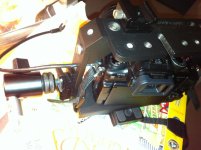
rogar-Happy(DBG):I recently purchased a Shrigg Rigg from the guys at Indi System, and it's all good apart from the quite major fact that I can't access the audio input to get my wonderful Juiced Link audio into the camera.
There is a large hole in the side of the rigg to place cold shoe or alike which (if you take a razor blade to it to make it thinner) you can put the cable through, however as you can see from the picture included - puts the camera off axis. I also don't like the
fact that any pressure to the camera could then break my GH2 audio input.
The Shrigg Rigg is a great product but wow - what a flaw!!! It's just not neat enough to substitute my absolutely gorgeous Juiced Link audio to use it. :undecided
What do we think - has anybody else had this issue?..........


