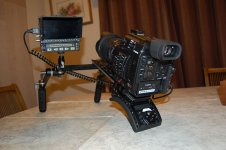
C200: Show us your setup!

The original Ronin is fine, but it’s twice as heavy and I found it to be more jerky.

I also tried the Letus Helix Mg with encoders and it was the worst of the bunch.

I got the M15 on eBay with original Pelican case, stand, 8 batteries, and a ton of other accessories for $1,900. It’s a fantastic gimbal that is very smooth and doesn’t have many quirks (other than dumb batteries and inexplicably not connecting to iOS without an additional $125 adapter).
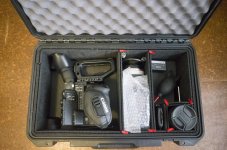
 
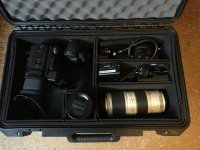
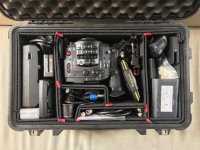
If we are sharing case setups as well, here is my Pelican 1510 setup (with TrekPak dividers):

-C300 Mark II and original side handle
-Smallrig top handle an NATO rail for SmallHD monitor
-CFast Card Case with 3x CFast Cards
-Shotgun Mic with wind cover
-Sennheiser G3 wireless lav transmitter and receiver
-Sanken COS-11D lav mic and Sennheiser ME-2 (backup)
-SmallHD focus display and original C300 Mark II display for backup and when audio is needed
-Leatherman Charge TTI multitool
-Cables for connecting displays, mics, and charging
-Various lav accessories
-2 Canon batteries (A60 and A30)
-2 Anton Bauer L-Series batteries (for SmallHD focus)
-Dual Chargers for Canon and L-Series batteries

IMG_0395.jpg
 
I added an image to my post above, it shows the camera in the case with top handle attached.

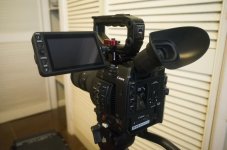
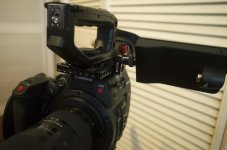
Also, while the screen mount that comes with the camera isn't the best, it's still a good solution that lets you make changes to the monitor with only one hand. Still, I opted to lose the bulk and ease of positioning for a set up that is more rigid. It's still dead easy to make changes, you just need two hands. I added a smallrig top plate, attached a zacuto zicro micro (is that name serious?!) then put a redrock micro spud into the side of the monitor.

basic1.jpg basic2.jpg
 
Last edited:
I added an image to my post above, it shows the camera in the case with top handle attached.

Also, while the screen mount that comes with the camera isn't the best, it's still a good solution that lets you make changes to the monitor with only one hand. Still, I opted to lose the bulk and ease of positioning for a set up that is more rigid. It's still dead easy to make changes, you just need two hands. I added a smallrig top plate, attached a zacuto zicro micro (is that name serious?!) then put a redrock micro spud into the side of the monitor.

But then you can never shoot shoulder mounted, the touchscreen is in your face. I did the opposite and using an Ultralight Control Systems Arm, I moved the touchscreen far enough away from my face to attach a Hoodman H400 and use it as a touchscreen for shoulder mounted outdoor shooting. Since I took this photo, I bought a 1/4" ULCS fitting and it now attaches at the same place the stock touchscreen bracket does on the handle, it's even better than this setup with it attached to the 15mm rod.

Canon C200 Touchscreen Location.jpg
 
Yes I definitely wouldn't attempt to shoot in that configuration on the shoulder, I just like its really small footprint.

Can you make adjustments with your arm or is it either locked or not? How do you think it would compare to the bright tangerine titan arm?

I think I'd opt for a non-shoulder mounted handheld solution, at least in the near future. I'd like to do more commercial work where you have a discussion with clients and having a 5-7 inch monitor in front of both of you makes things easy. I know of one DP who uses the readyrig instead of the easyrig but only uses one set of rods, not two like you see when movi operators use the system.

Down the line, you'd probably want a dedicated shoulder rig too to provide more options to clients and (maybe) people renting a package on the side.

Also, imagine if the touchscreen was wireless!
 
You can kind of nudge the arm around, the ULCS arms have rubber O-rings on every ball joint, so do-able for small adjustments, quickly. I've never used the Titan arm so I wouldn't have any idea.

I have been shooting a lot of documentary run and gun with this setup. My only area of frustration is that I rig the whole thing up for shoulder mounted shooting, then I sometimes have to jump into the front seat of a car or on a boat and grab some shots, not knowing I was even going to do that, then I wish I had a more stripped down setup like in your setup because the full Zacuto shoulder rig with the grip extension and relocater gets in the way. But then we'll arrive to a location and I quickly have to go back to shoulder mounted to shoot long sounds ups and interviews and if I am cradling, I can't get the camera high enough for the interviews (who wants to look up a subjects nose during an interview?) and I fatigue after about ten minutes of cradling the camera with no support, depending on the lens that's mounted and large battery versus small.

Problem is on low budget docs, not a lot of time to plan out everything, you have to just react and go with the flow because we value "real" over the best looking shot. One of the most compelling stories we have so far is the emotional retelling of when one of our subjects was almost killed. I shot it in the front seat of her car as we were driving to a destination, wasn't even planning on rolling, was just holding the C200, no mic on her, just scratch mic on camera and she started telling this amazing story so I rolled. It was in the dark so all I had a was a little camera mounted LED that wasn't really flattering and the camera's scratch mic. But I captured some really moving footage that technically kind of sucks. But we're using it because story trumps all.
 
It’s very easy actually. That’s the beauty of the WC baseplate. The bottom plate is removeable, so on my tripod plate I added the ARRI dovetail on it which slides right onto the bottom of the baseplate. The included bottom plate I mounted to a shoulder pad. So when I want to go to shoulder I just slide the camera off the ARRI dovetail and slide on the shoulder pad and I’m ready to go.

I’ll take some photos of it for you.
 
Last edited:
The baseplate on my studio/sticks setup I have is Arri dovetail based and so is this Tilta shoulder mount so I can quickly slide the rig off sticks and onto the shoulder rig (note that I am using a different baseplate in this shot but the one with rails will slide right on) and there is a NATO rail that I can mount the PIX to:

DSC_1910.JPG
 
gimbal 1.jpg

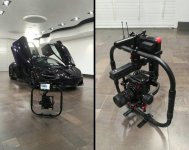
I've been having some issues with my Ronin M since I got the C200 to the point it was super unreliable so I got the Ronin MX and all my problem are gone. My Main issue with the Ronin M was wobble which could of been fixed via Counterweights but I needed the MX anyway for the Matrice 600 so I finally just said screw it and got the MX. Today was a proper first shoot with it and it worked great, Need to tweak the tilt a bit but zero wobble and wow those motors are a lot stronger versus the Ronin M. I wasn't expecting there to be a big difference but it just performs so much better and now I have the confidence to use it on a shoot.
 
View attachment 130188

I've been having some issues with my Ronin M since I got the C200 to the point it was super unreliable so I got the Ronin MX and all my problem are gone. My Main issue with the Ronin M was wobble which could of been fixed via Counterweights but I needed the MX anyway for the Matrice 600 so I finally just said screw it and got the MX. Today was a proper first shoot with it and it worked great, Need to tweak the tilt a bit but zero wobble and wow those motors are a lot stronger versus the Ronin M. I wasn't expecting there to be a big difference but it just performs so much better and now I have the confidence to use it on a shoot.

Can you detail the setup? ring feet? Are you using the inferno? is it daylight viewable?are you going to try to use the grip? Are you using extension rods?is the top battery in the way? Are those wireless mics? Why? And why are you using that top handle instead of the one provided? Please help I'm looking to but this exact setup asap.
 
Can you detail the setup? ring feet? Are you using the inferno? is it daylight viewable?are you going to try to use the grip? Are you using extension rods?is the top battery in the way? Are those wireless mics? Why? And why are you using that top handle instead of the one provided? Please help I'm looking to but this exact setup asap.

Feet are by Small Rig here. That is the Ninja Flame not the Inferno which yes, works great in daylight. The "DJI Grip" aka Ring came bundled with the MX for free, this does not come with a top handle and you cannot swap the orginal handle with the one provided with the grip. The grip's top mount is not removable hence the reason for the handle. I have a better handle with a grip but was too thick to still have the monitor arm attached so this will have to do for now. Mounting the monitor was just a random thought as I was setting it up and love it, prefer it over having it on the left or right like most people do. I am using the Extension rods but it's barely! taking advantage of them. Wireless Lav setup here, use these to mic the cars when doing rollers and work great. Batteries are in lol. The Ronin MX by default limits the tilt in the app so in most cases based off the lens when you tilt up you wont see the battery bay. This has been known as a huge concern on the forum as some say it's a design flaw. I'm only at 18mm so I've yet to experience it in any of my shots today but with a Wider lens it might become an issue, My solution would be to just limit the tilt more and if you need to raise the gimbal more, literally use your arms and raise it lol. There's ways around it so don't be too concerned about the front battery.

Also I thought it used both batteries at the same time but the one in the back just sits there, I was told its used to power camera accesories but have no Idea how. I've yet to find a D-tap port.
 
Last edited:
Feet are by Small Rig here. That is the Ninja Flame not the Inferno which yes, works great in daylight. The "DJI Grip" aka Ring came bundled with the MX for free, this does not come with a top handle and you cannot swap the orginal handle with the one provided with the grip. The grip's top mount is not removable hence the reason for the handle. I have a better handle with a grip but was too thick to still have the monitor arm attached so this will have to do for now. Mounting the monitor was just a random thought as I was setting it up and love it, prefer it over having it on the left or right like most people do. I am using the Extension rods but it's barely! taking advantage of them. Wireless Lav setup here, use these to mic the cars when doing rollers and work great. Batteries are in lol. The Ronin MX by default limits the tilt in the app so in most cases based off the lens when you tilt up you wont see the battery bay. This has been known as a huge concern on the forum as some say it's a design flaw. I'm only at 18mm so I've yet to experience it in any of my shots today but with a Wider lens it might become an issue, My solution would be to just limit the tilt more and if you need to raise the gimbal more, literally use your arms and raise it lol. There's ways around it so don't be too concerned about the front battery.

Also I thought it used both batteries at the same time but the one in the back just sits there, I was told its used to power camera accesories but have no Idea how. I've yet to find a D-tap port.

Where'd you buy the bundle and the top handle? And are you REALLY not scared to put your C200 on a Matrice?!? I'd have a heart attack lol. It's between the Ronin 2 or the MX or the Tilta Gravity. I just can't get over spending the cost of an extra new C200 for a Ronin 2. And Tilta looks like a good happy medium though. Huge payload but the app sucks and the Ronin MX is very affordable. I want to believe that the g2x is the nice interim solution until ronin 2 makes more sense.
 
Back
Top