C100: Shooting to SD card querie

Curnsie

Well-known member
I have been solely using the Ninja 2 for all my professional work which is great for my Mac and FCPx workflow, but I have an event in 2 weeks that I intend to use only SD cards as its run and gun style to produce a bts promo. I have used the SD card 2 times now and this is what I get when I view the card in the Mac finder:
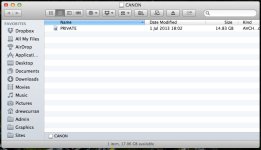
SD private.jpg

To access the contents I have to 'Show Package Contents' and do this for every folder after that until I get to the 'stream' folder:
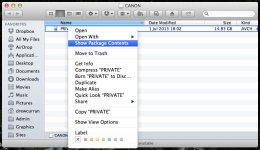
SD show package.jpg

I'm just curious if everyone getting this? On my Windows 8 laptop 'Private' is just a folder what I can double click on and drill down to access the footage as you would expect. Is there any reason why Mountain Lion is locking this file? Can I set something to make this file behave normally?

Thanks.
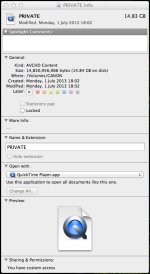
 
I 'Get Info' on the file and this is what I get. I don't seem to be able to change anything:
SD info.jpg
 
yeah I get the same thing. Just open up FCPX and import the footage in via the import window. When you open it, it will automatically see the card as a camera and you will see all your footage on the card.

confused me to start with but works just fine. only thing to make sure of is that you select each clip when its imported and force on "progressive" in the settings menu.

otherwise works like a dream...
 
Thanks Snap, Thats what I found works best. It seems a little odd how finder sees the private folder and seems to think its a video file...
 
I must have been something in the newer versions of Quicktime. I had two machines on 10.6.8 and they both saw the full folder structure. My other machines were on the latest OSX and they do what you show. That makes me think it was an updated Quicktime thing.
 
To access the contents I have to 'Show Package Contents' and do this for every folder after that until I get to the 'stream' folder:

I'm just curious if everyone getting this? On my Windows 8 laptop 'Private' is just a folder what I can double click on and drill down to access the footage as you would expect. Is there any reason why Mountain Lion is locking this file? Can I set something to make this file behave normally?

Yes, as you found out, and Nate shows (and for future readers), you have to right click Show Package Contents repeatedly until you get to the Stream folder where you'll finally see the mts files (which you can then play in VLC if you want).

I must have been something in the newer versions of Quicktime. I had two machines on 10.6.8 and they both saw the full folder structure. My other machines were on the latest OSX and they do what you show. That makes me think it was an updated Quicktime thing.

Nope, it's not a QT thing, it's an OSX 10.8 Mountain Lion thing.
 
Back
Top